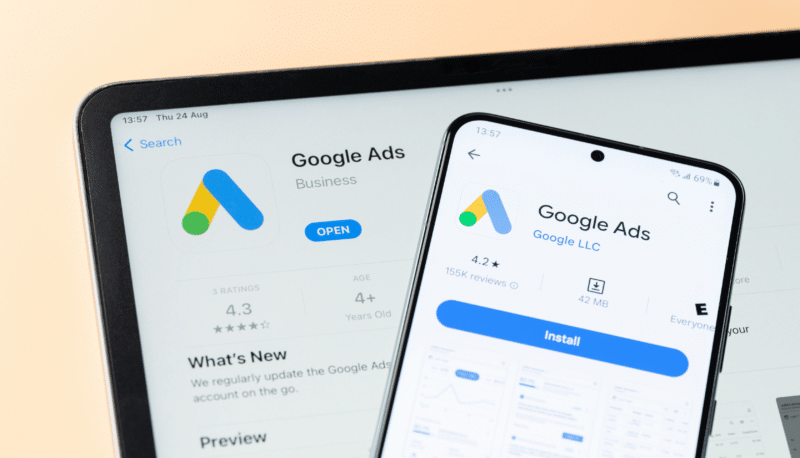
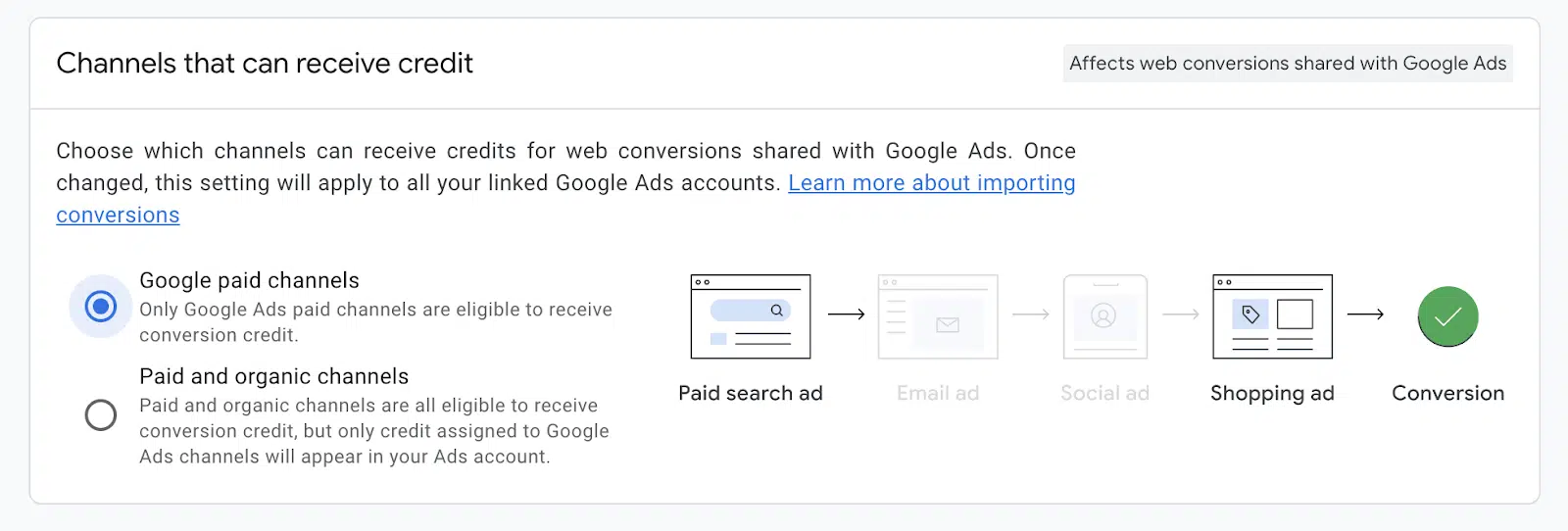
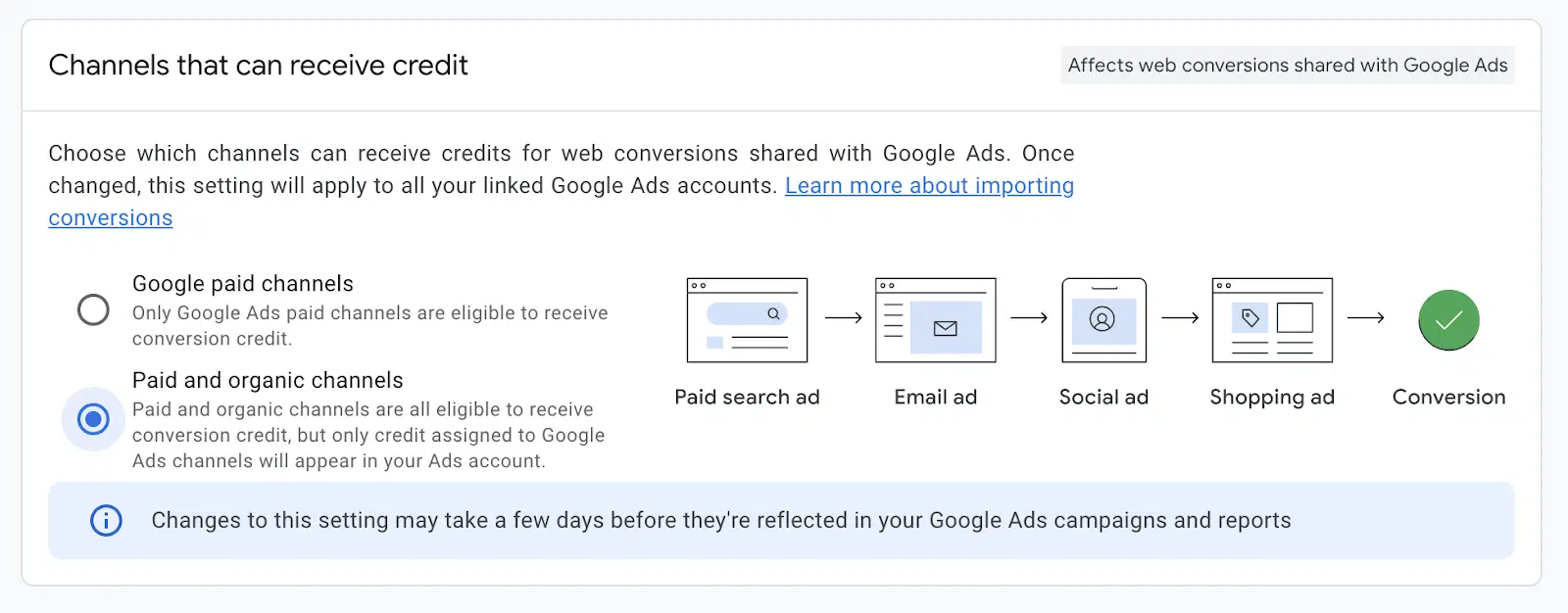
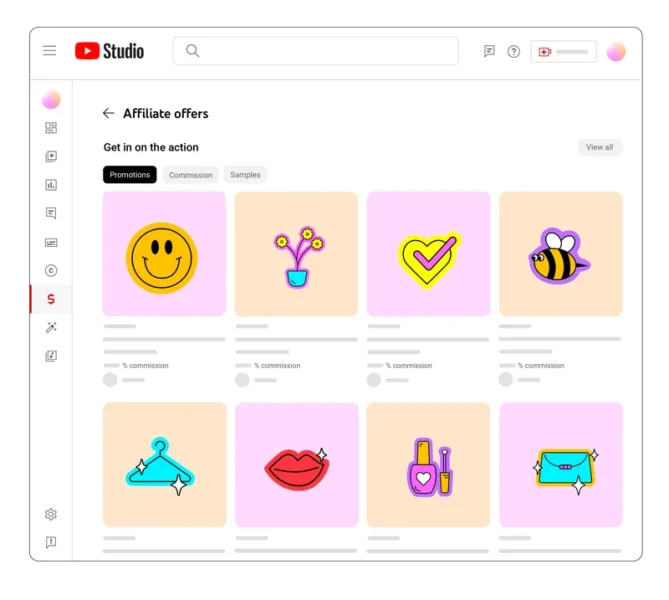
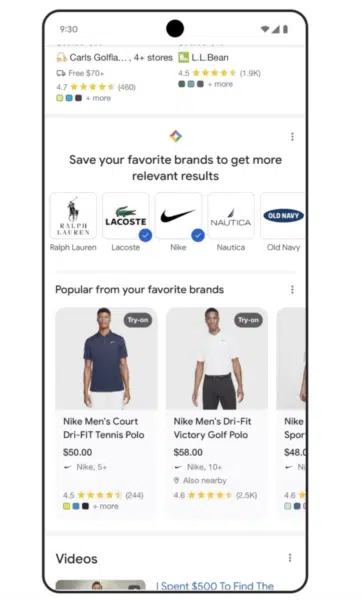
Google Merchant Center will soon track conversion events beyond those attributed to clicks on Shopping free listings, including conversions from Search web results and other sources.
Why it matters. This change aims to provide merchants with more comprehensive performance data and optimize the Google shopping experience.
Key details:
The update will roll out in the coming months.
It expands conversion tracking to include all conversions from merchants’ websites.
Google will use this data to optimize shopping search experiences and improve its products and services.
How it works. The expanded tracking will automatically apply to merchants using Google Merchant Center.
Opt-out options:
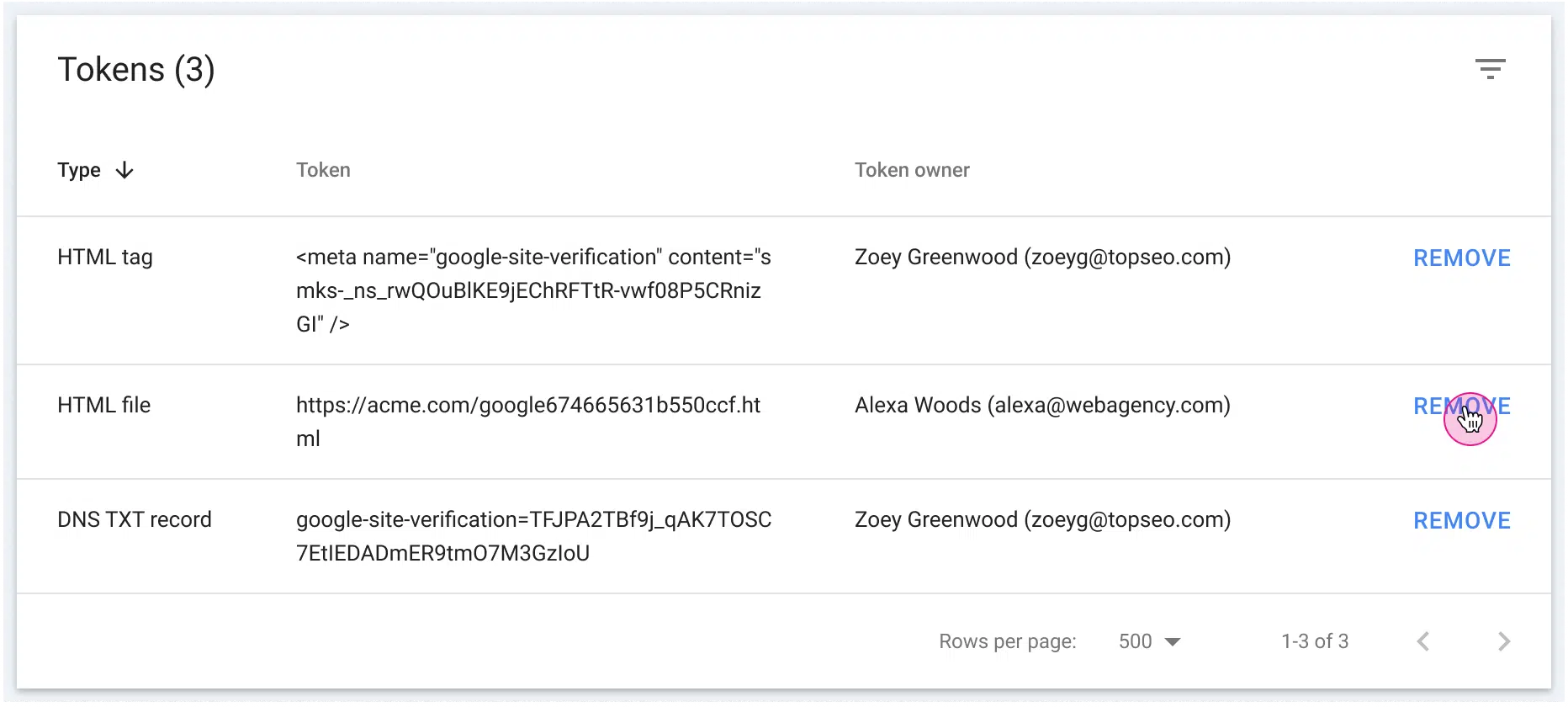
Disable the conversion setting in Merchant Center
Turn off the setting in the Google & YouTube channel app on Shopify
Unlink Google Analytics and Merchant Center accounts
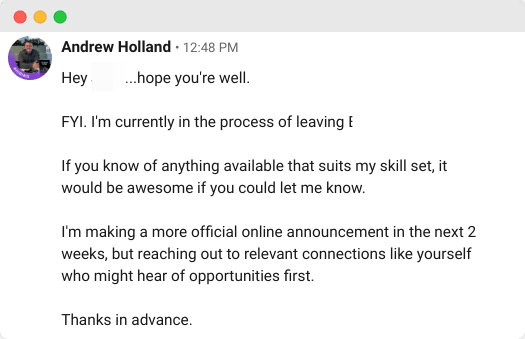
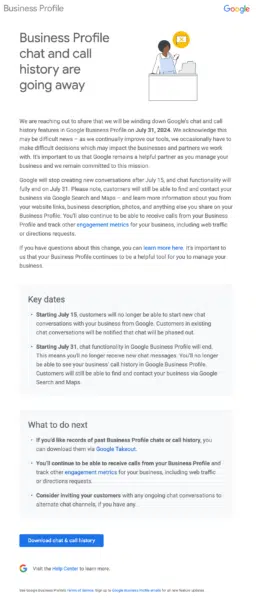
First seen. This update was first seen on Search Engine Land Contributor Menachem Ani’s X. He shared the email he got:
The big picture. This move reflects Google’s efforts to provide more comprehensive data to merchants while also improving its own shopping-related services.
What to watch. How this expanded data collection will impact merchants’ ability to optimize their listings and overall performance on Google’s platforms.
Anu Adegbola has been Paid Media Editor of Search Engine Land since 2024. She covers paid search, paid social, retail media, video and more.
In 2008, Anu’s career started with
delivering digital marketing campaigns (mostly but not exclusively Paid Search) by building strategies, maximising ROI, automating repetitive processes and bringing efficiency from every part of marketing departments through inspiring leadership both on agency, client and marketing tech side.
Outside editing Search Engine Land article she is the founder of PPC networking event – PPC Live, host of weekly podcast PPCChat Roundup, and brand evangelist at ClickTech.
She is also an international speaker with some of the stages she has presented on being SMX (US), SMX (Munich), Friends of Search (Amsterdam), brightonSEO, The Marketing Meetup, HeroConf (PPC Hero), SearchLove, BiddableWorld, SESLondon, PPC Chat Live, AdWorld Experience (Bologna) and more.
As we bid Google Universal Analytics (UA) its final adieu, we caught up with Product Director of Google Analytics, Steve Ganem, about its successor — Google Analytics 4 (GA4). We wanted to know how its meeting the needs of digital marketers, its privacy compliance, and what’s on the roadmap for enhancements. (The interview was edited for brevity and clarity.)
Q: Why GA4?
A: Universal Analytics was built for a different time and a different internet. Universal Analytics was released more than 10 years ago. Think about how much the internet — and the way people behave — has changed in the past five years, let alone more than 10.
In 2012, we were in a world where people interacted with businesses through their websites and advertisers could count on cookies and fully observable journeys to get the information they needed. That’s just no longer a reality — and it shouldn’t be. Not only has the way people interact with and consume content changed, but so have their expectations for privacy.
GA4 was built for this new reality — and to be durable into the future as things continue to evolve. Designed with privacy and AI at its core, GA4 can measure customer journeys that span a variety of devices and touchpoints, without compromising user privacy. People aren’t just using websites and clicking on display ads any more — it’s a complex journey, moving from screen to screen, with all different formats, and we need measurement that measures just as nimbly.
Additionally, GA4 is durable to privacy and regulatory changes, built to handle increasing data sparsity with innovative, privacy-preserving technology.
Q: What features of GA4 do you think are underutilized?
A: As I mentioned above, GA4 was designed for the world we are living in and the features are much more capable and powerful than its predecessor. GA4’s audience builder, as an example, can be used to orchestrate marketing campaigns across ads, push notifications (via Firebase), SMS, email and others through the Audience Export API. Additionally, it includes predictive capabilities to help advertisers reach the right people at the right moment.
We also find that businesses aren’t using the reporting features to their fullest potential. GA4’s reporting is fully customizable and businesses can tailor the experience to meet their specific needs. With features like Business Objectives, customers can easily set up out of the box, customized reporting based on their specific business and goals.
With Explorations, businesses can get even deeper, actionable insights about their customers. Previously only available to Google Analytics 360 customers, in GA4, Explorations are available to all customers and can be set up to help businesses do things like create segments and audiences, focus on the most relevant data with filters and segments and perform ad hoc queries to dig into specific queries.
And, for 360 customers, there is now an option to assign distinct reporting experiences to different users within an organization based on their specific goals and needs.
Overall, the reporting in GA4 — for both standard and 360 customers — has become much more sophisticated and it’s a great opportunity for businesses to explore.
Q: What is one of the biggest challenges you hear from customers as it relates to GA4? How are you addressing that challenge?
A: Universal Analytics was around for a long time and so it is natural that people became very accustomed to the way it worked and “looked.” People became used to where things were and how they were measured, which is completely understandable. But, as I mentioned earlier, UA was built for an older world — one where the way people interacted with businesses was completely different from the way they do today.
So, because of that, we often hear from customers that it can be challenging to find the same use cases in GA4. There are a few reasons that this can be challenging. First and foremost, it’s new, and it takes time to get used to new things. Second, and most importantly, GA4 was intentionally designed to measure differently in a way that reflects the way people now engage with businesses and content — hits and sessions aren’t reflective of today’s reality.
That means that use cases aren’t always 1:1. The information and insights are still there, but they may look different than they did in Universal Analytics because we’re measuring different things — with good reason.
The Setup Assistant was created with businesses of all size in mind. It was designed specifically to help customers get setup with GA4 and make sure they have all of the right pieces in place to get the information they need. This doesn’t have to be a one-and-done situation; it’s a helpful resource and I urge customers to go back to it as they continue to get accustomed to GA4.
In addition to creating more educational materials (some helpful links here, here and here), we’re also investing in AI-based solutions to help customers find features and get their job done more efficiently.
For example, Analytics Insights are something GA4 customers can already take advantage of. They use machine learning to help businesses understand and act on their data. For example, with automated insights, Analytics Intelligence detects unusual changes or emerging trends and notifies businesses automatically. These AI-generated insights live throughout GA4 and you can click the “Insights” icon at the top of any Report to see suggested questions and insights to help you better understand what’s happening and what your next steps should be.
We are always looking for opportunities to make GA4 as intuitive as possible and are excited about how that will continue to evolve.
Q: What does the future of GA4 look like?
A: Google Analytics has long helped businesses understand user engagement on their websites and apps, as well as the performance of their marketing efforts. Google Analytics 4 does this in a more complete, holistic way. Not only does it bring together web and app into one, seamless experience, but it also gives businesses even more cross-channel insights, enabling them to understand their efforts across more than just Google. We will continue to make it easier to bring in offline data to give businesses a complete picture of their customers and improve their ability to measure and activate.
Built with AI at its core, Google Analytics 4 will continue to use best-in-class modeling to give businesses the insights they need to make strategic decisions, all without compromising user privacy. We will build on our stable of intelligence features to help businesses identify important trends and help them capitalize on growth opportunities.
We’re excited to move into this future where GA4 is our only analytics platform — one where we can continue to innovate and invest in making it the most effective, holistic and durable analytics solution for our customers.
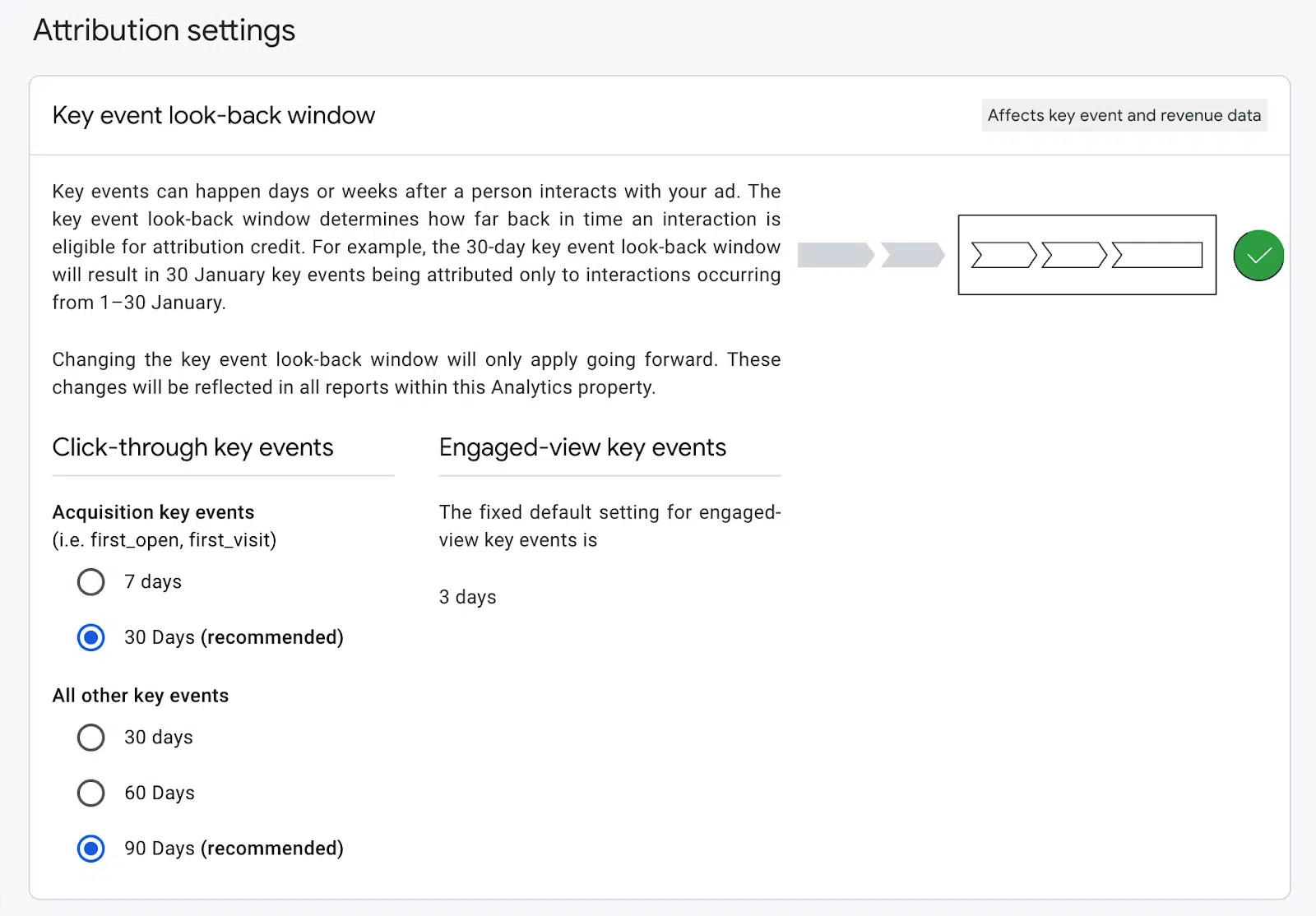
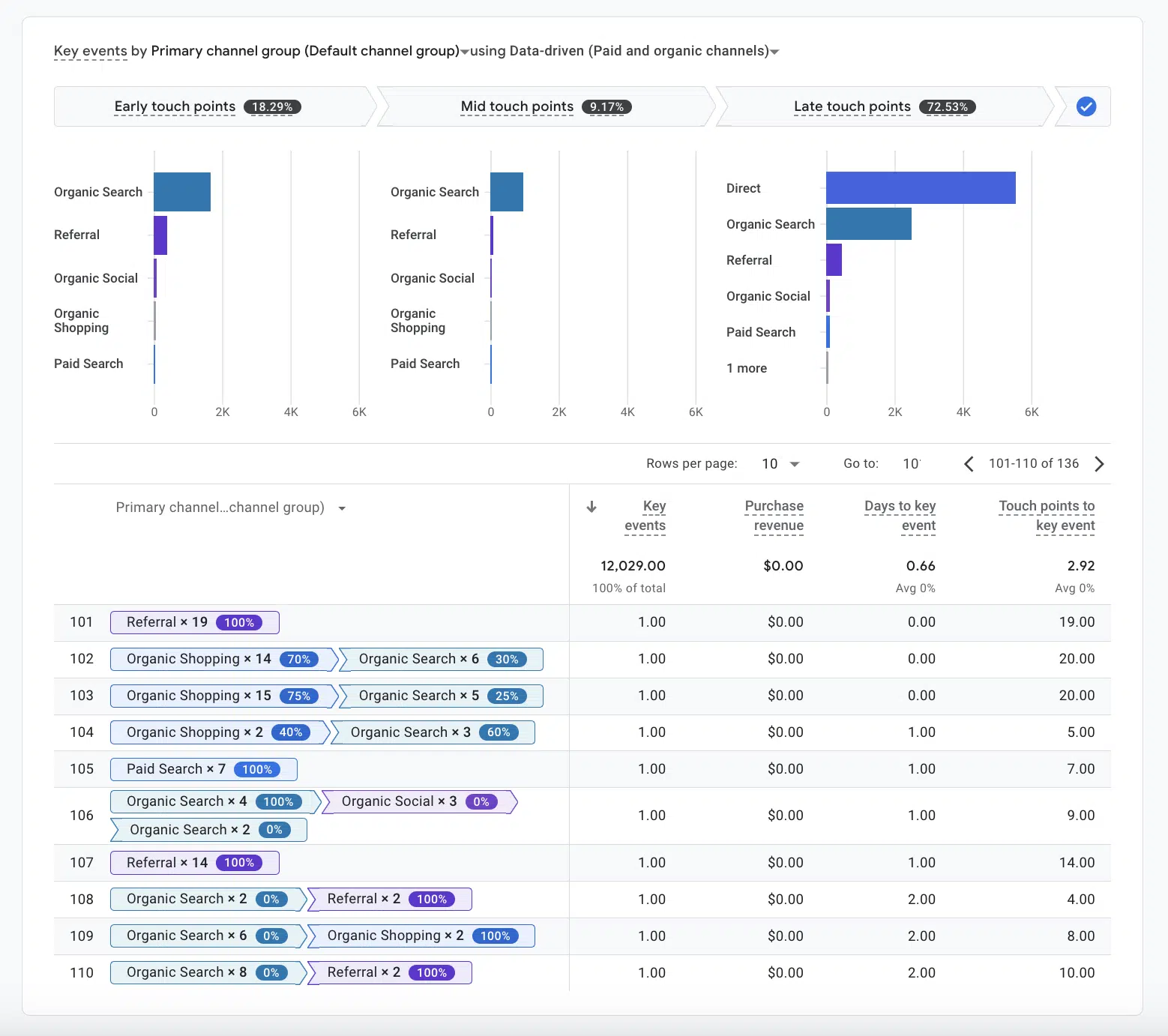
Q: One big issue advertisers had with GA4 (and UA) was conversion reporting discrepancies. How does Key Events solve this? Is it working?
A: Yes, by unifying the concept of Conversions between Google Analytics and Google Ads, we have finally addressed a long-standing customer challenge that the numbers in Google Analytics are not consistent with the view in Google Ads. We will continue to build on this concept, offering more advertiser features powered by Conversions in our Advertising Workspace.
Solving this required us to distinguish between important customer interactions (“Key Events”) and those driven by your marketing efforts (“Conversions”). We plan to also invest more in Key Events reporting to help product development teams optimize important flows in their customer experiences.
Businesses can easily neglect the optimization of organic traffic. This happens because stakeholders often don’t understand how it works or its impact on company goals.
Continue reading and learn how to translate SEO concepts into business terms so you can onboard your business partners and secure their buy-in for organic projects.
Improving customer experience
Customer experience is one of those aspects of the business that almost all leaders agree is super important. And it can’t be different when 52% of customers say they will switch to a competitor after a single negative impression.
But which SEO factors have an impact on it?
1. Broken pages and redirects
Broken pages (like 404 or 500 errors) and implementing redirects are usually business priorities. This is because stakeholders are also online users who likely encounter these issues and understand the frustration they cause.
Cleaning up redirects, however, is another story. Users don’t see the change, but as SEOs, we know that excessive redirects can hurt a website’s performance.
Redirects consume search engines’ crawl budget, dilute page authority and negatively impact speed performance. But how do you explain this in business terms?
One of the easiest ways to explain this is with everyday examples, which people can easily relate to and probably have experienced.
In the 301 case, imagine you have a shopping list, but when you arrive at your local grocery store, you find the store has moved, adding 20 extra minutes to your shopping trip. Even though you’re “redirected” to the new location, you’re frustrated by the extra step.
The same happens with search engine bots when they encounter redirects. Too many redirects can frustrate them, leading to a potential negative impact on your site’s ranking. Similar to a negative customer review.
We all know the impact of negative reviews – the next potential customer will see them, and it may influence their decision to buy from you.
2. On-page SEO
The concept of optimizing individual webpages to rank higher and earn more relevant traffic is a key one in SEO. It is very similar to merchandising practices in the offline world, and its goal is to keep users and bots engaged with your content.
The higher the engagement, the lower the bounce rate, which can improve your rankings (or at least we have a strong reason to believe this after the recent Google documentation leak).
Keeping users engaged increases the time spent on the page and the visibility of important elements like CTAs.
This is similar to how supermarkets place essential items like bread at the back so customers can see other products as they navigate the store, enhancing product visibility.
Just as customers might end up with a basket of unplanned items in a supermarket, good on-page optimization can lead to increased leads and a healthier sales pipeline.
3. Page speed
Page speed is another important factor for SEO and overall user experience.
Slow-loading pages can lead to higher bounce rates, as users are likelier to abandon a site that takes too long to load. We all know how frustrating it is to see how the images load or to need to wait too long to be able to click or scroll.
It is the same as when you walk into a coffee shop for a quick morning coffee on a street full of coffee shops. If your order takes too long, you will probably go elsewhere the next time.
The same principle applies to your website. Just as efficient service in a coffee shop enhances customer experience, a fast-loading website ensures that visitors stay engaged and are more likely to return. And search engine bots are like picky customers who won’t tolerate slow service.
Optimizing your website for a good page speed can increase the loyalty from both humans and bots and can likely lead to higher rankings and sales.
Get the daily newsletter search marketers rely on.
Enhancing lead quality and conversion rates
Good customer experience is not the only factor in having a successful business.
You need to make sure that you attract the right customers – the ones with the highest chance to buy from you and that you give them enough reasons to do so.
On the online front, you have a couple of SEO allies to help you in this effort.
4. Meta titles and descriptions
By the clothes, they greet by the mind they send. This proverb is also true in the search engine world.
Making a strong first impression online is as vital as in any business setting and your meta title and description are the key players here. They are crucial for how bots and users perceive your webpages.
The title tag is the first thing users see and serves as your digital business card. It should be concise and clear and immediately convey your page’s value. The meta description is your elevator pitch. It offers a brief summary that should give users a reason to click on your result.
Just as a good introduction can lead to business engagements, well-crafted meta titles and descriptions enhance click-through rates and improve search engine visibility.
They also ensure that potential customers see the best of what you offer at first glance – the same as a very well-designed and decorated shop window.
Better meta tags can improve the conversion rate of leads entering the sales pipeline, as they set the right expectations. In some B2C businesses, where purchase decisions are quicker and emotionally driven, effective meta titles and descriptions can also increase the number of closed deals.
But good meta titles and descriptions can’t be created without preliminary research.
5. Topic research and content strategy
Understanding market trends and customer needs is crucial for any company and usually starts with deep-dive groundwork.
For example, when you plan to launch a new product or service, you have a preliminary discovery phase. Its goal is to clarify the details around your offer and launch something that has a good chance of being bought by your customers.
The same approach applies to your online presence, but instead of market research, you conduct topic and keyword research before creating your content strategy.
You can create relevant content that meets its needs by understanding what your audience searches for.
Effective topic and keyword research improves traffic quality, increases conversion rates and MQLs and nurtures leads through the sales funnel.
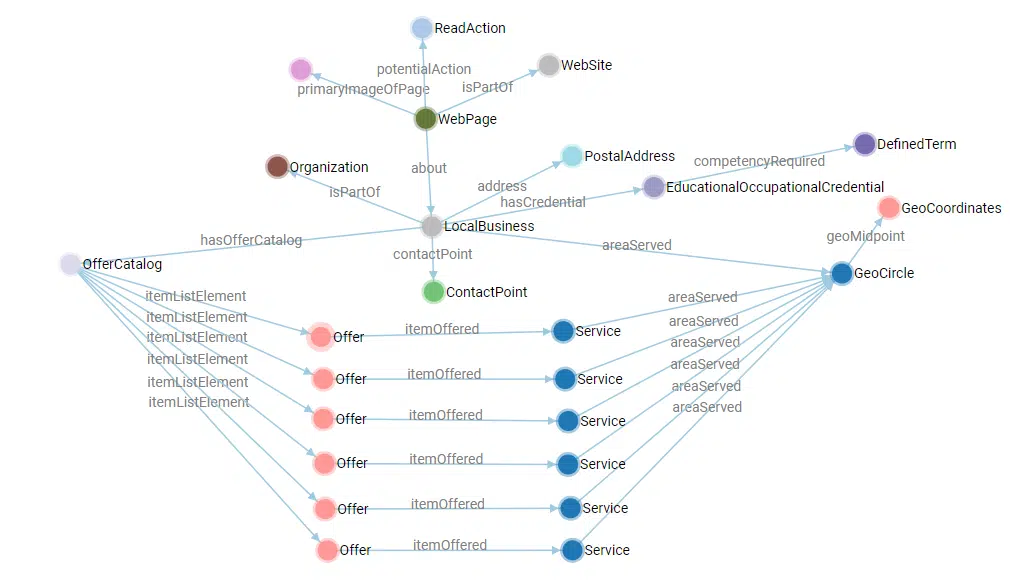
6. Structured data
Structured data is another powerful SEO tool that can enhance lead quality and conversion rates. These pieces of code are not directly visible to users, but they provide search engines with clear, specific information about your website’s content. They are like nutritional labels on food packaging.
Structured data enables search engines to display richer and more relevant search results, including enhanced snippets, product details, review stars and other elements that make your results more attractive to users. This leads to higher click-through rates and potentially higher conversation rates.
Building brand reputation
Improving lead quality and customer experience is crucial for businesses’ everyday survival. But to set the stage for long-term success, you need to invest also in building your brand reputation.
The reason is simple: the purchasing decisions of 63% of consumers are impacted by the company’s reputation, according to Qualtrics.
7. Internal and external links
Creating unique connections through internal and external links is essential for a website’s SEO. Internal links structure information and help users and search engines navigate through it.
The concept is similar to 360-degree reviews and how they help managers and company leadership decide which employees deserve promotion because you can’t promote everyone.
The same is true for Google and other search engines. Their mission is to organize the world’s information and display the best results on top. This won’t be very useful if you see 1 trillion results on page 1.
External links, on the other hand, signal the credibility of your website. They act like professional endorsements, similar to positive customer reviews or media mentions that validate your business’s stability.
External links build a positive image, making your site appear trustworthy, leading to growth opportunities, enhanced brand reputation, higher deal sizes and a stronger sales pipeline.
8. Anchor texts
Another element that has an impact on the website’s trustworthiness is the anchor texts. They are the clickable words in a hyperlink and serve as the invisible handshake between your content and the users. They are very similar to a good introduction at a networking event.
Just as a handshake can set the tone for a business relationship, well-chosen anchor texts guide users and search engine bots to understand the context of your linked content. They should be clear and descriptive so they can ensure a smooth transition to the linked page.
Targeted use of anchor texts can boost the relevance of your pages for concrete terms and serve as authority factors on a webpage level. They set the right expectations for the linked pages and naturally build trust with your users.
Simplifying SEO speak for business stakeholders
SEO is often seen as a mysterious process done by experts rambling about Google’s algorithms. Business stakeholders may view it as a black box where money is spent without clear results.
Explaining SEO concepts in business terms is crucial for website optimization success. This helps stakeholders see SEO’s impact on growth and success, leading to more support and resources for SEO efforts.
Contributing authors are invited to create content for Search Engine Land and are chosen for their expertise and contribution to the search community. Our contributors work under the oversight of the editorial staff and contributions are checked for quality and relevance to our readers. The opinions they express are their own.
Google Colab has been around since 2017 but has gained more popularity recently from SEO professionals sharing code samples.
SEOs love Colab because, unlike GitHub, you can actually run the code directly on the platform.
What is Google Colab?
Google Colab is a tool that allows users to quickly run Python directly on the platform with little to no setup. Google Colab is a hosted Jupyter Notebook that uses Google’s hosting services in the cloud.
In case you’re new to Python, a Jupyter Notebook is a free online tool you can use online to write code, solve math problems, make graphs and show your work. It’s like a digital notebook that helps you keep all of your project parts in one place and share them easily with others.
The best part about Google Colab? It’s free.
If you require more computing power, there is a tier pricing system. As of writing this, I pay $9.99 per month for the first paid tier. The next tier is $49.99 per month and then there’s a custom enterprise version.
Benefits of Google Colab
I’ve personally reaped the benefits of Google Colab for several years and am pleased to share what I’ve found to be its biggest benefits for SEOs.
Fast to start
If you’ve ever installed Python on your local machine, then you know firsthand how annoying it is to get Python set up. Also, if you’re trying a new bit of code, then you’re likely having to install new libraries to get your code to run.
The best part about Google Colab is that most common Python libraries are already installed on Google Colab. If something is missing, you can simply run:
!pip install new-library
The one nuance here is that you need the exclamation point before pip to install a new library.
Doesn’t use your computer’s bandwidth
I often use Python to compute large datasets, which can take quite a bit of time. I’ve run some bits of code that take hours to compute due to the size of the data.
In SEO, we often run crawls and other analyses in the background while we work. Have you ever run a Screaming Frog crawl that completely slows down your computer, making it nearly impossible to do other SEO tasks?
With Google Colab, you can seamlessly run compute-intensive code and work on other SEO tasks while the code runs.
Shareable
Google Colab is meant to be easily shared with collaborators or the world. As someone who believes in the power of open source, I believe that Google Colab is great for me to share code with the SEO community.
AI integration
Google has integrated Gemini directly into Google Colab. So, if you’re struggling to build a new feature in your code, you can leverage AI to help generate new code features.
I would urge caution when doing this, as you may find yourself debugging more than helping yourself.
Dig deeper: Can AI perform technical SEO analysis effectively?
Get the daily newsletter search marketers rely on.
How to use Google Colab
Let’s dive right into how to use Google Colab. I’ll run you through the eight most important features to get you right to coding for SEO.
How to run code
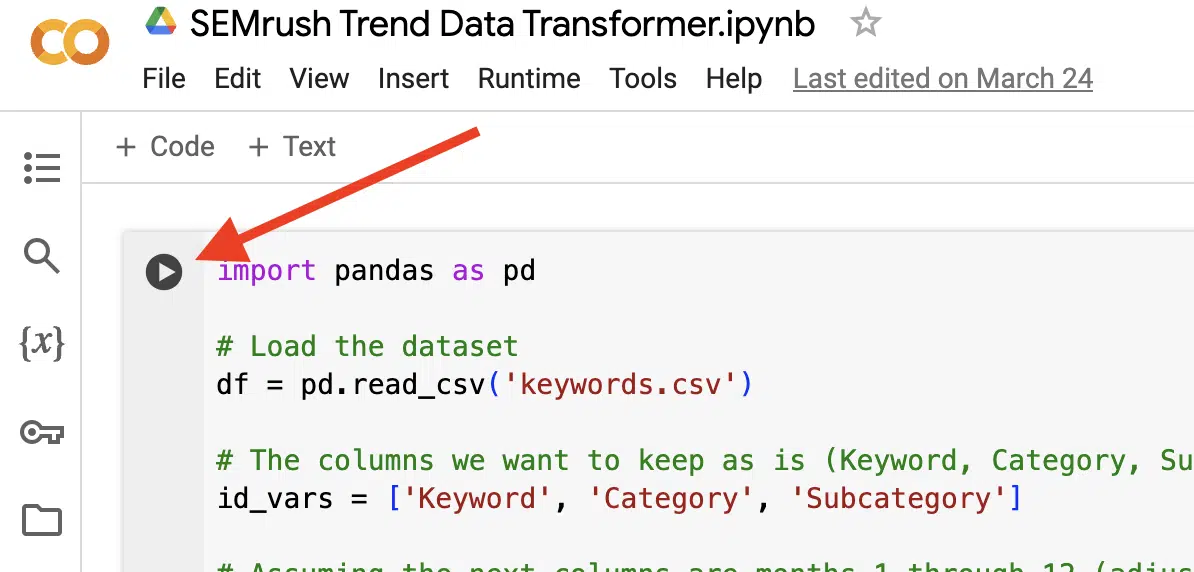
Probably the most simple step here is to know how to actually run the code.
Once you’re ready to run your code, click the play button.
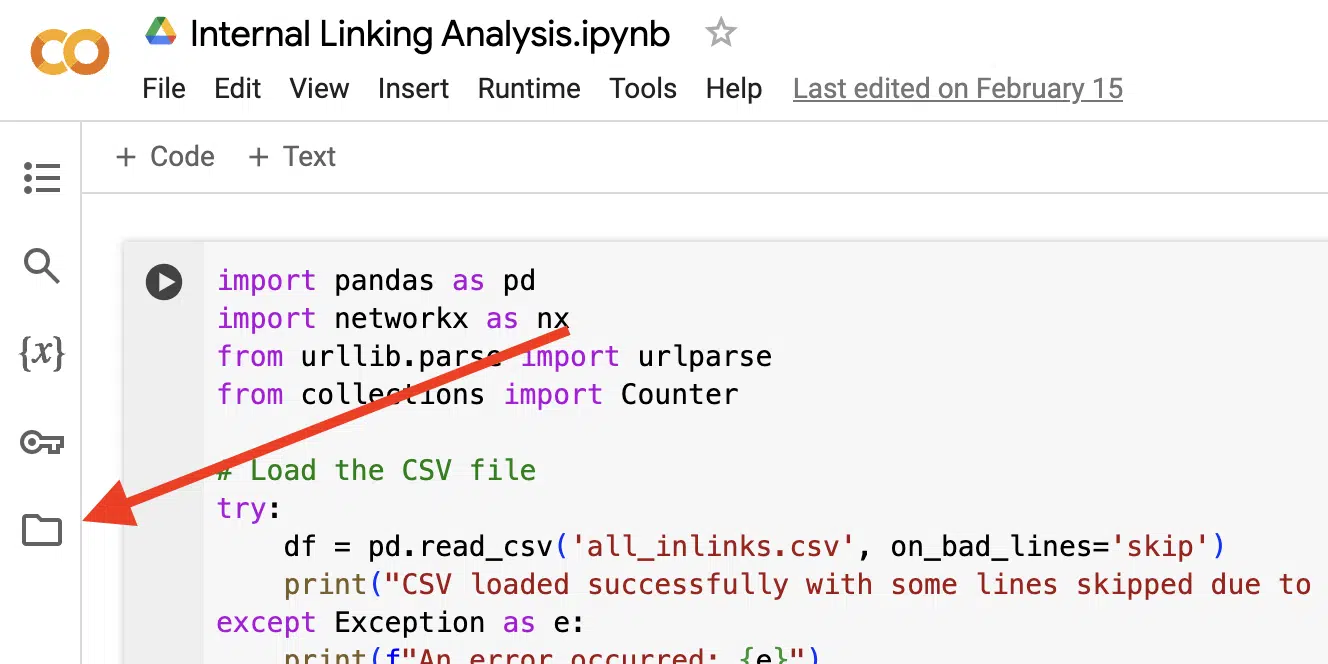
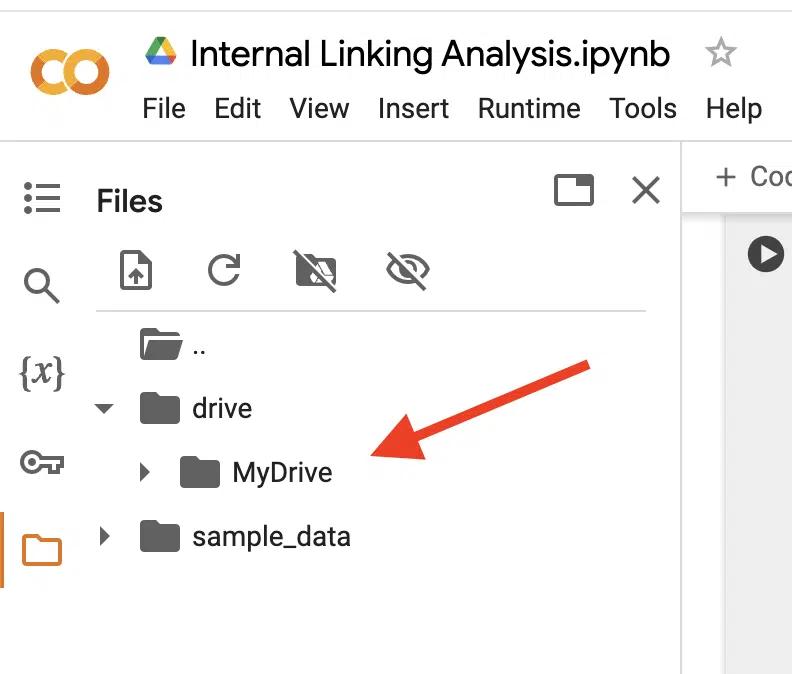
How to open the folder pane
To run code that relies on any source data or exports results into a file, you’ll need to be able to open the folder. Luckily, just like running code, this is just one button, specifically the one that looks like a folder.
How to connect to Google Drive
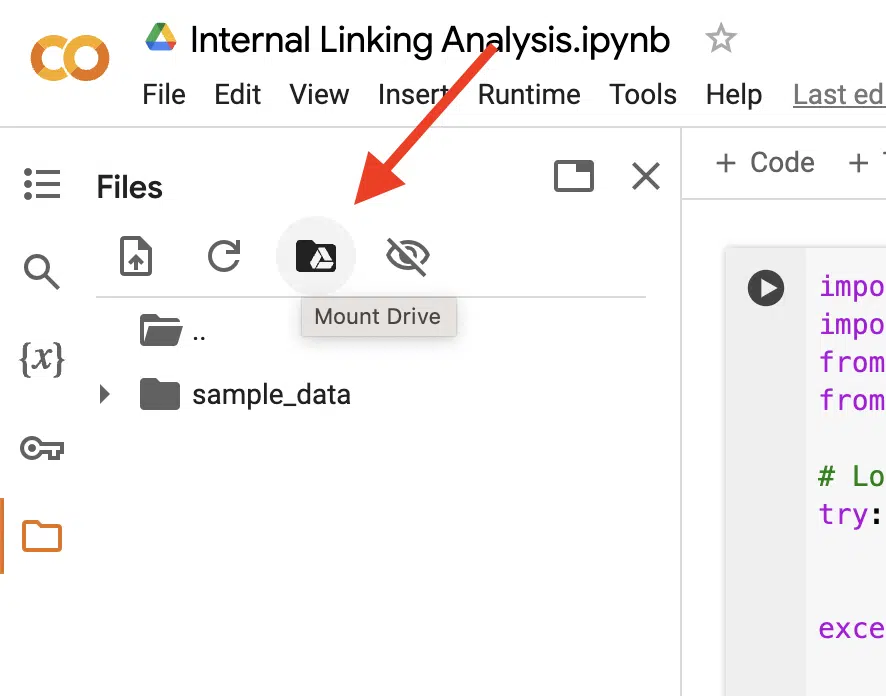
One of the great things about Google Colab is that it’s part of the Google suite of tools, allowing you to connect directly to files in Google Drive and even save your results to Google Drive.
To connect to Google Drive, you first need to mount It by clicking the button shown in the screenshot below.
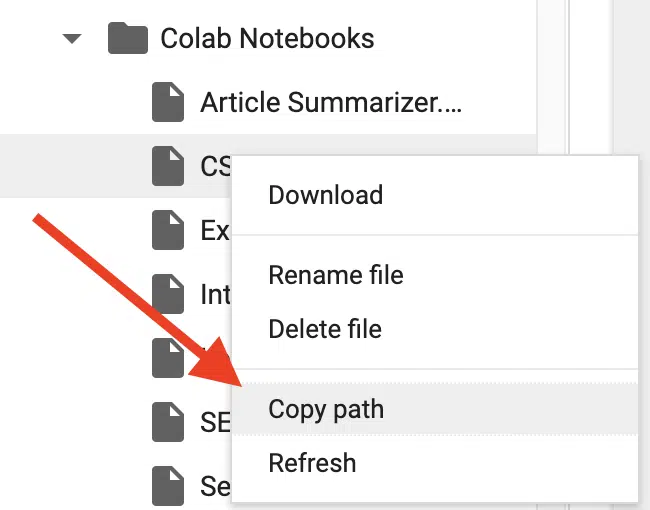
Once Colab finishes mounting Google Drive, your Google Drive folder will appear in the files pane.
From here, you’re able to reference any of those files by right-clicking on the file, selecting a copy path and pasting it wherever you reference a file in your code.
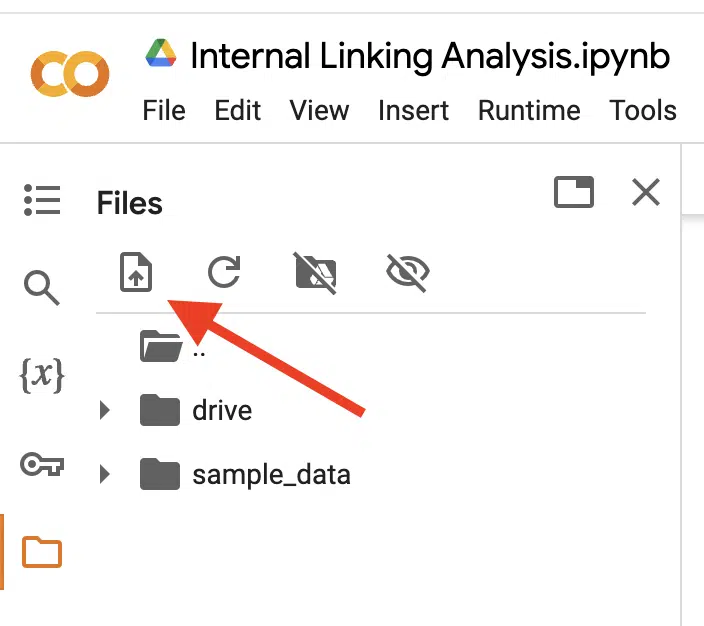
How to upload files manually
Before uploading files, note that anything you upload will not be saved and will only be used as temporary files. Those files will disappear once you refresh the page or close it.
If you want the files to stay available, you’ll need to use Google Drive and connect to them that way (see previous steps).
If you’re OK using files temporarily, then you have two options. You can drag and drop your files from your computer to the files pane or click the upload button.
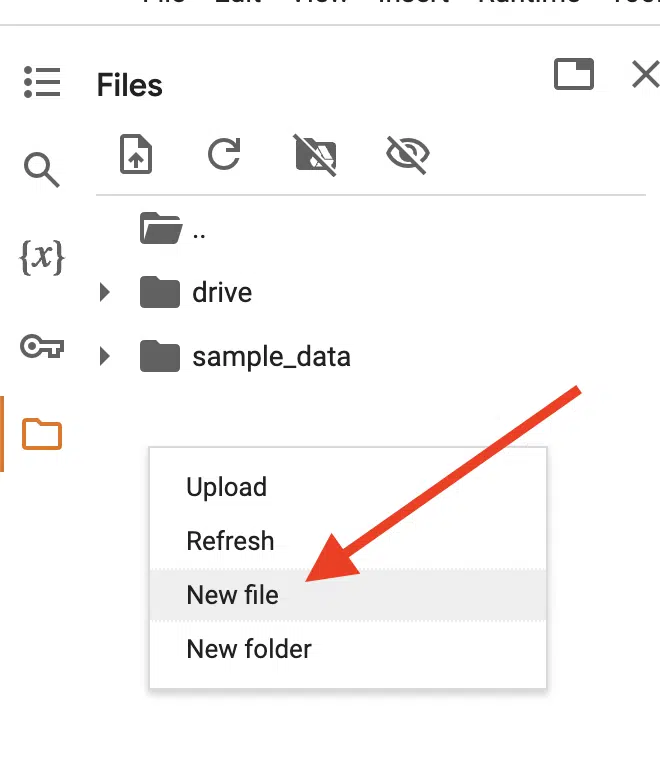
How to create new files directly in Google Colab
Sometimes, I find it easier to create new files directly in Google Colab.
For example, if I have a bunch of keywords I want to analyze, it’s easier for me to copy them and paste them into a file in Colab rather than create a new file locally on my computer and upload it.
To do this, just right-click on a blank space in the files pane and click New File. From there, you can name it whatever you want, and paste your data and then save it with your hotkeys (Command + S or Control + S).
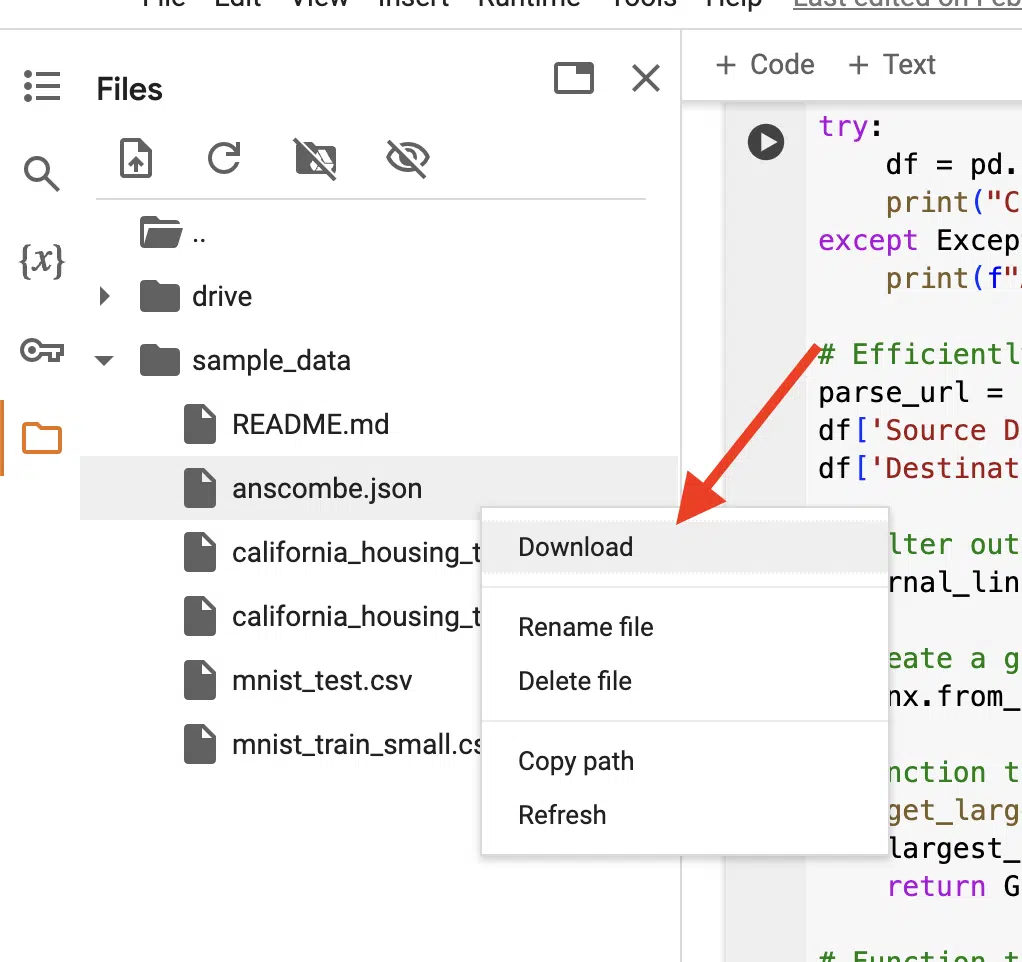
How to download results
Once you’ve run the code, you may have an exported file created in the process.
You can preview the file by double-clicking on it, but if you want to download it, all you need to do is right-click on it and select Download.
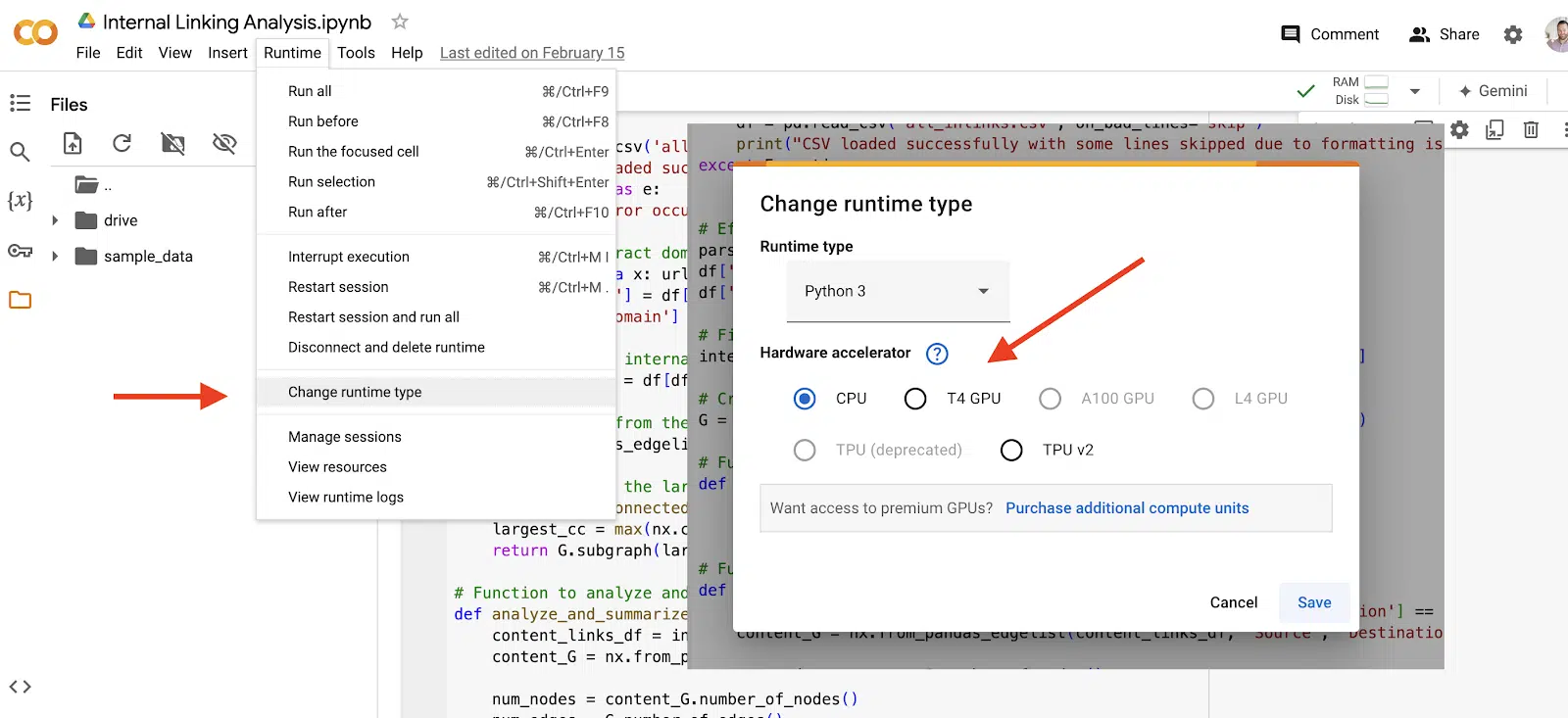
How to connect to a runtime
If you’re running code that may take a more heavy compute load, you may want to experiment with a faster runtime.
To do this, select Runtime in the top menu and then in the dropdown, select Change runtime type.
From there, you’ll see some options that you can change.
Please note that if you’re going to change the runtime, any files in the file pane will disappear.
How to use the AI integration
One of the latest features in Google Colab is the integration of Gemini. Google has made it easy to take advantage of this new feature by adding a Gemini button in the top right of the screen.
By clicking that, a sidebar will appear for you to ask it prompts.
Free code to get you started
Now that you’ve taken the crash course to getting started with Google Colab, it’s time to try some code!
In one of my previous articles, I’ve provided five Python scripts for SEO that you can try right now in Google Colab.
In that article, you will be able to see the context of the scripts, how to set them up and I provide the actual code for you to try.
It’s never been easier to get started in Python for SEO. Happy coding!
Contributing authors are invited to create content for Search Engine Land and are chosen for their expertise and contribution to the search community. Our contributors work under the oversight of the editorial staff and contributions are checked for quality and relevance to our readers. The opinions they express are their own.
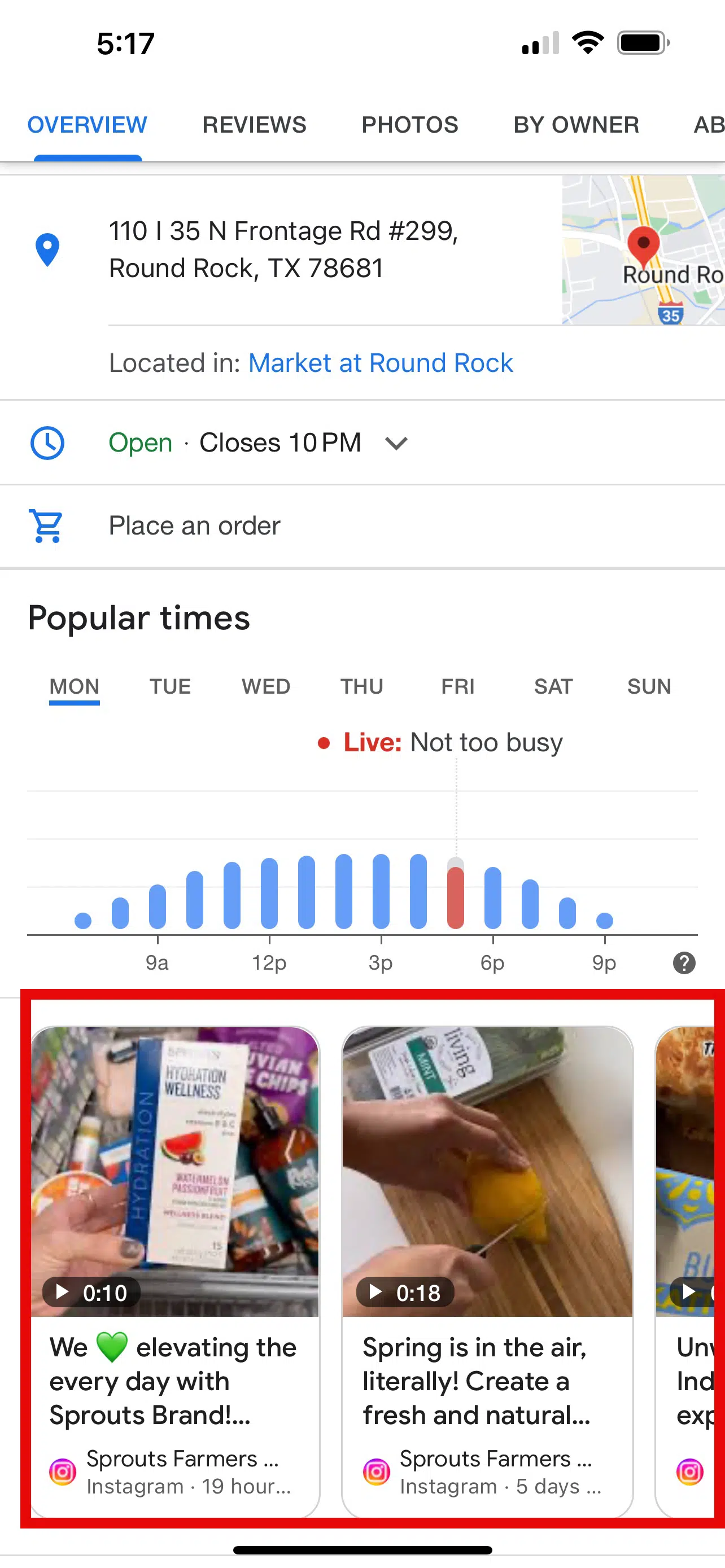
Google Search might be looking at the items in your menu within your Google Business Profile and how busy your establishment is during popular times as local ranking factors and signals.
That’s according to a report by Claudia Tomina. Tomina documented tests on this and believes Google is using these signals to rank businesses in Google Maps and the Google Search local pack.
Menu items. Adding menu items can help a restaurant rank for those menu items on Google, according to the report. So if you add “caesar salad” to your menu items in Google Business Profiles, Google may rank you for [ceasar salad] searches.
This chart shows the ranking improvement for that local restaurant on Google for a search on [best caesar salad near me]. It went from position 71 to position 1 with the change:
I spoke with Tomina, who showed me several other examples of this working.
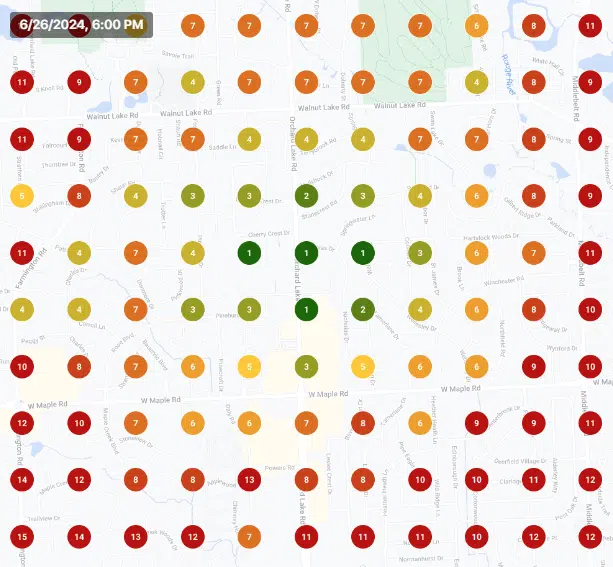
Popular times. Busier establishments during the Google popular times window tend to rank better than less busy establishments, according to the report.
“My research shows that if a business is busier at a specific time of day then they outrank their competitors,” Tomina wrote.
The charts below show local Google ranking reports for the keyword [caesar salad near me]. The rankings improved during popular times throughout the day.
Why we care. If you do local SEO or manage your own local business, maybe try some of these things out to see if your rankings will improve. You can easily add your menu to your Google Business Profile to see if it makes a difference in your foot traffic and online orders. And maybe that effort might also increase how busy you are during those popular times and help you rank better.
Barry Schwartz is a technologist and a Contributing Editor to Search Engine Land and a member of the programming team for SMX events. He owns RustyBrick, a NY based web consulting firm. He also runs Search Engine Roundtable, a popular search blog on very advanced SEM topics.
In 2019, Barry was awarded the Outstanding Community Services Award from Search Engine Land, in 2018 he was awarded the US Search Awards the “US Search Personality Of The Year,” you can learn more over here and in 2023 he was listed as a top 50 most influential PPCer by Marketing O’Clock.
Apple is set to extend its 30% fee on Facebook and Instagram ad purchases made through iOS devices to advertisers worldwide, starting July 1.
Why we care. This move could significantly impact digital advertising costs and strategies for businesses of all sizes, potentially altering marketing strategies and budget allocation toward mobile advertising.
The big picture. Initially implemented for U.S. advertisers in February, this expansion marks a major shift in how social media advertising is priced on mobile devices.
Details:
The fee applies to ad purchases made via iOS apps but can be avoided by using desktop web browsers.
Meta has updated its web platforms to offer the same ad-boosting functionality as mobile apps.
EU regulators and a U.S. federal judge have criticized Apple’s fee structure.
What they’re saying. The fee is “anti-competitive” and gives Apple an unfair advantage, according to Meta’s Director of Privacy & Fairness Policy, Pedro Pavón.
The other side. Apple contends it’s entitled to charge for access to its platform’s audience.
Between the lines.This move is part of an ongoing battle between tech giants over app store policies and revenue sharing.
What’s next. Advertisers will need to adapt their ad purchasing strategies to avoid the fee, potentially shifting more activity to desktop platforms.
How to avoid the fee. Meta has provided guidance on purchasing ads without incurring Apple’s 30% charge.
The bottom line. This change could reshape mobile advertising practices and further intensify scrutiny of Apple’s App Store policies.
Anu Adegbola has been Paid Media Editor of Search Engine Land since 2024. She covers paid search, paid social, retail media, video and more.
In 2008, Anu’s career started with
delivering digital marketing campaigns (mostly but not exclusively Paid Search) by building strategies, maximising ROI, automating repetitive processes and bringing efficiency from every part of marketing departments through inspiring leadership both on agency, client and marketing tech side.
Outside editing Search Engine Land article she is the founder of PPC networking event – PPC Live, host of weekly podcast PPCChat Roundup, and brand evangelist at ClickTech.
She is also an international speaker with some of the stages she has presented on being SMX (US), SMX (Munich), Friends of Search (Amsterdam), brightonSEO, The Marketing Meetup, HeroConf (PPC Hero), SearchLove, BiddableWorld, SESLondon, PPC Chat Live, AdWorld Experience (Bologna) and more.
Microsoft’s AI CEO Mustafa Suleyman believes most web content is “freeware’ that can be used for training AI models. The only exception: websites that explicitly opt out.
Freeware is any form of copyrighted software that can be freely downloaded, installed and used by end users.
The quote. Here’s what Suleyman told CNBC’s Andrew Ross Sorkin at the Aspen Ideas Festival:
“…With respect to content that is already on the open web, the social contract of that content since the ’90s has been that it is fair use. Anyone can copy it, recreate with it, reproduce with it. That has been freeware, if you like. That’s been the understanding.
“There’s a separate category where a website or a publisher or a news organization had explicitly said, ‘do not scrape or crawl me for any other reason than indexing me so that other people can find that content.’ That’s a gray area and I think that’s going to work its way through the courts.”
Fair use or theft? Fair uses allows for limited use of copyright material (e.g., criticism, teaching, research), but what AI models do goes beyond this. The companies behind the AI models clearly want to profit from this content.
Why we care. There is no such “social contract” that I’m aware of. Microsoft (and Google) simply believe that all online content should be available for AI training. Clearly, this benefits these large multinational corporations. The actual content producers? Not so much.
Zoom out. This controversial quote comes as Microsoft, OpenAI, Google and other companies face multiple legal challenges over copyright infringement. This is also why OpenAI is signing so many content licensing deals.
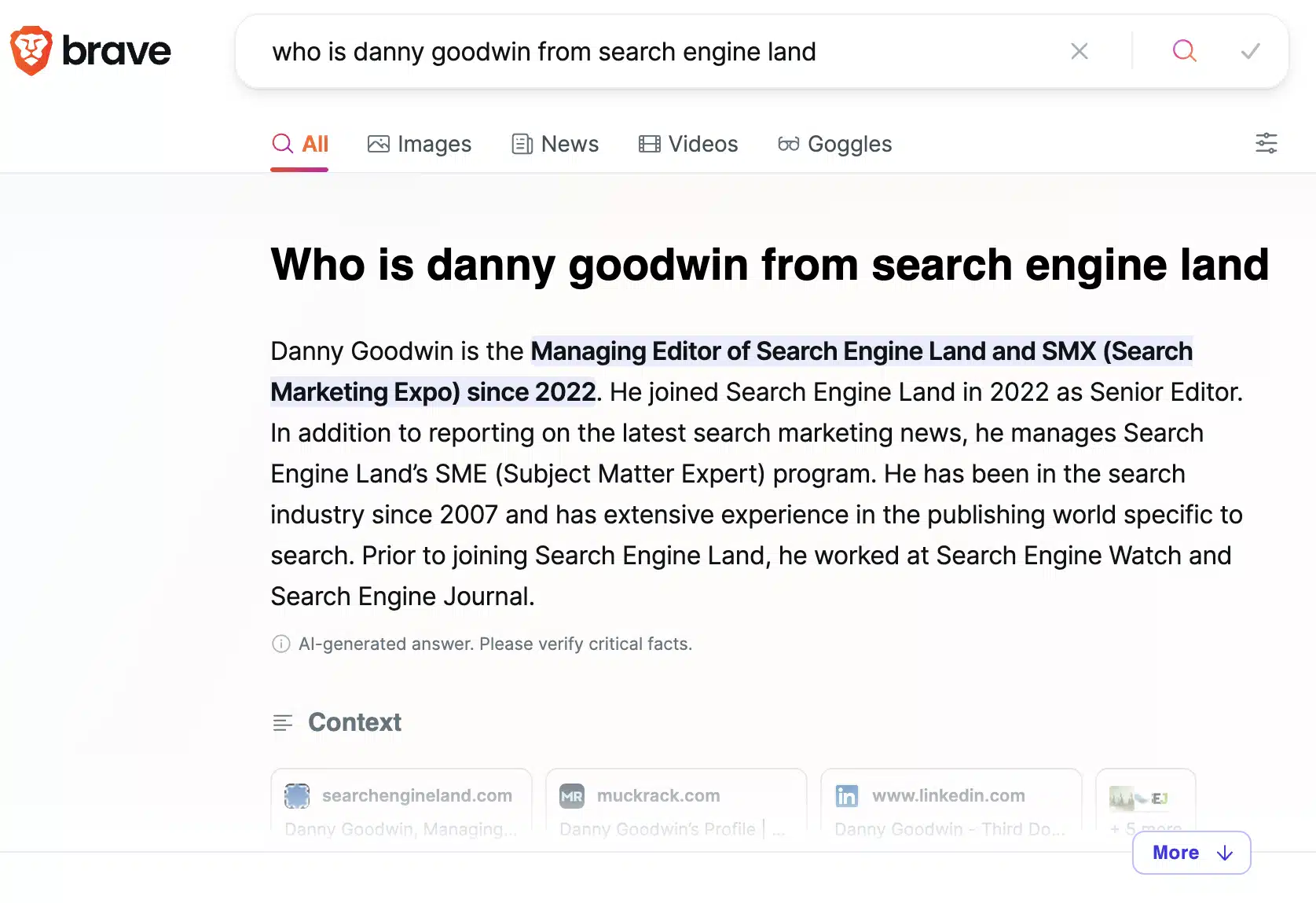
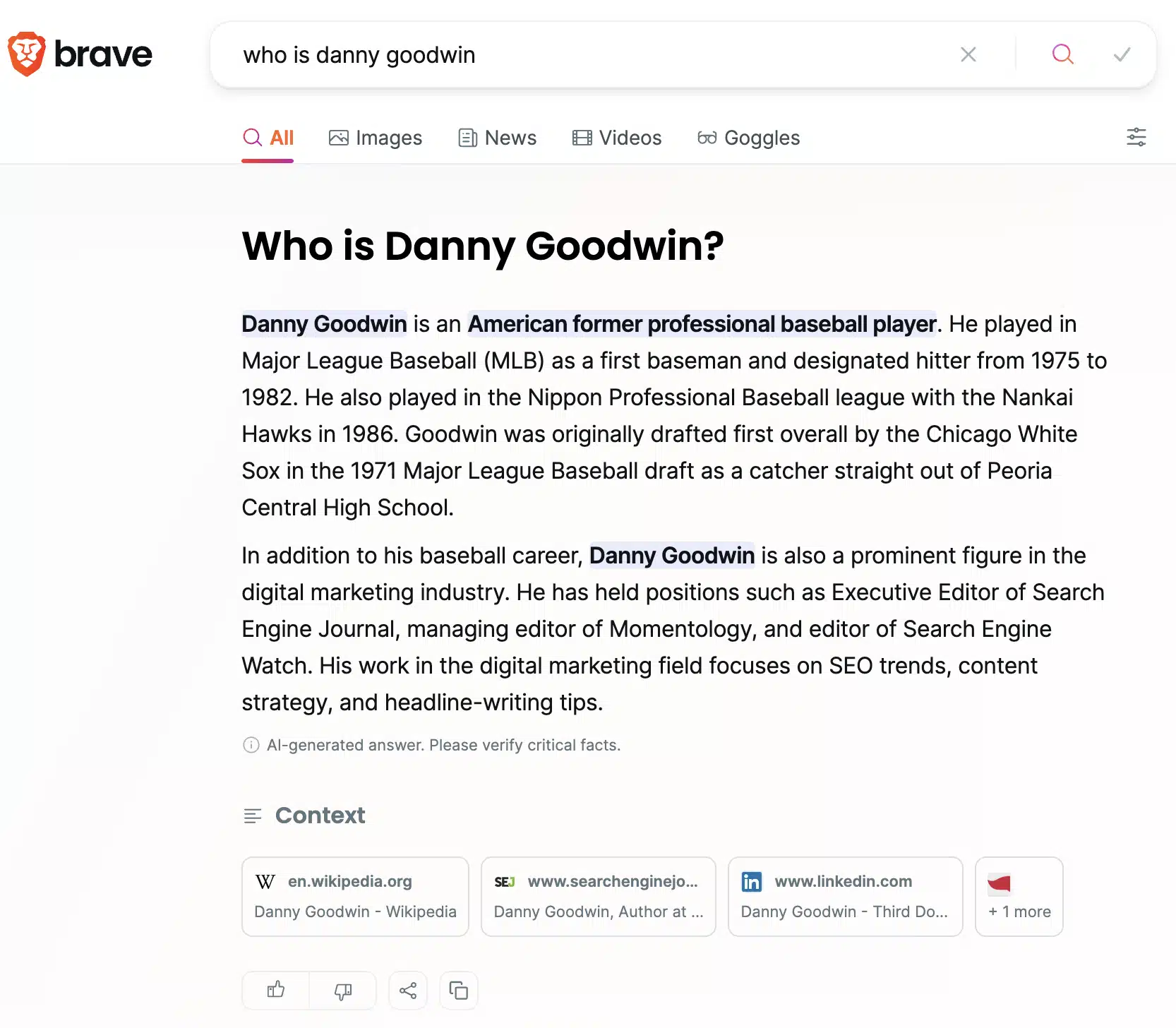
Danny Goodwin has been Managing Editor of Search Engine Land & Search Marketing Expo – SMX since 2022. He joined Search Engine Land in 2022 as Senior Editor. In addition to reporting on the latest search marketing news, he manages Search Engine Land’s SME (Subject Matter Expert) program. He also helps program U.S. SMX events.
Goodwin has been editing and writing about the latest developments and trends in search and digital marketing since 2007. He previously was Executive Editor of Search Engine Journal (from 2017 to 2022), managing editor of Momentology (from 2014-2016) and editor of Search Engine Watch (from 2007 to 2014). He has spoken at many major search conferences and virtual events, and has been sourced for his expertise by a wide range of publications and podcasts.
Google is rolling out its AI-powered Product Studio to merchants in the UK, India, and Japan, while introducing new features to streamline product image creation.
Why it matters. This expansion gives more e-commerce businesses access to free tools for creating high-quality product images, potentially leveling the playing field for smaller merchants competing in a visually-driven online marketplace.
The big picture: Product Studio, part of Google’s Merchant Center Next, now serves merchants in six countries: the US, UK, Canada, Australia, India, and Japan.
Why we care. Advertisers should care about this update as it allows for adding their own assets to the Product Studio giving a higher likelihood for creating not just high quality product images but also having a higher relevancy to their brand.
What’s new.
File upload: Merchants can now directly upload new product images to Product Studio.
Seasonal themes: New templates for wedding and vacation scenes have been added.
Geographic expansion: The tool is now available in three new countries.
What’s next. Google has teased upcoming features, including:
Conversion of static images to videos
AI-generated visuals matching a brand’s style from a single reference image
How to access. Merchants can use Product Studio through Merchant Center Next or the Google & YouTube app on Shopify.
Anu Adegbola has been Paid Media Editor of Search Engine Land since 2024. She covers paid search, paid social, retail media, video and more.
In 2008, Anu’s career started with
delivering digital marketing campaigns (mostly but not exclusively Paid Search) by building strategies, maximising ROI, automating repetitive processes and bringing efficiency from every part of marketing departments through inspiring leadership both on agency, client and marketing tech side.
Outside editing Search Engine Land article she is the founder of PPC networking event – PPC Live, host of weekly podcast PPCChat Roundup, and brand evangelist at ClickTech.
She is also an international speaker with some of the stages she has presented on being SMX (US), SMX (Munich), Friends of Search (Amsterdam), brightonSEO, The Marketing Meetup, HeroConf (PPC Hero), SearchLove, BiddableWorld, SESLondon, PPC Chat Live, AdWorld Experience (Bologna) and more.
PPC advertising can be challenging, especially when your product or service falls into a sensitive or difficult category.
Whether you’re promoting pharmaceuticals, financial services, adult content or other regulated industries, advertising – especially on Google Ads – requires a balance of creativity, compliance and ethical consideration.
Google Ads remains one of the most powerful platforms for reaching potential customers. However, with great power comes great responsibility.
Advertisers in sensitive categories face unique hurdles, including:
Strict policy restrictions.
Heightened scrutiny.
The constant risk of ad disapprovals or account suspensions.
Seasoned marketers might be frustrated by frequent suspensions, but these policies are in place to maintain a safer advertising platform.
Recent Google Ads data shows the extent of this effort. In 2023, they blocked or removed 5.5 billion ads and suspended 12.7 million advertiser accounts, nearly doubling their enforcement actions from the previous year. However, many businesses suffer from incorrect suspensions and misclassified compliance cases due to automated reviews.
This article aims to guide you through the advertising of sensitive categories on Google Ads. We’ll explore strategies to effectively promote your products or services while adhering to Google’s policies and maintaining high ethical standards.
Understand Google Ads policies
Google’s comprehensive policies ensure a safe and positive experience for users, advertisers and publishers. Knowing these policies is the first step to successful advertising in challenging niches.
Google Ads policies on sensitive categories
Google Ads policies are designed to protect users from harmful, deceptive or inappropriate content.
For sensitive categories, these policies are often more stringent and specific. They cover various aspects of advertising, including ad content, targeting and landing pages.
Key policy areas for sensitive categories often include:
Restricted content: Products or services that can be advertised but with limitations.
Prohibited content: Products or services that cannot be advertised at all.
Editorial and technical requirements: Specific guidelines for ad copy, imagery and website content.
Commonly restricted and prohibited content
While the full list is extensive, some common examples of restricted or prohibited content include:
Each category has its own set of rules. For instance:
Pharmaceutical advertisers must be certified by Google and can only promote in certain countries.
Financial services advertisers often need specific licenses and must provide additional disclosures.
The list of restricted categories is not exhaustive, as many subcategories and industries have unexpected policies.
For example, in the IT service industry, working on IT hardware may be prohibited unless you are a certified partner, which can be problematic for many computer repair shops or IT freelancers who lack certification from major manufacturers.
Why you must stay updated with policy changes
To stay compliant and effective in sensitive advertising categories on Google Ads, it’s essential to proactively monitor and adapt to policy changes.
Regularly review Google’s advertising policies, subscribe to their official policy updates and engage with industry forums or groups to gain insights on policy interpretations.
If you have a Google Ads representative, maintain open communication with them to escalate issues quickly.
Remember, policy violations can lead to ad disapprovals, account suspensions or even permanent bans. Staying informed and compliant is not just about avoiding penalties – it’s about building a sustainable, long-term advertising strategy on the platform.
Conduct thorough research
Thorough research is a must before launching your Google Ads campaign in a sensitive category. This groundwork will help you navigate policy restrictions, understand your audience and develop effective strategies within the given constraints.
Identify the specific restrictions for your category
When diving into Google Ads for sensitive categories, it’s crucial to go beyond just skimming the general guidelines. Dig into the specific policies that apply to your industry.
You’ll want to look out for any special requirements, like certifications or pre-approvals, that Google might need before you can run your ads.
Don’t forget to check for any geographical restrictions on where you can advertise. This can be a big deal, depending on your product or service.
Next, try to get a feel for how Google interprets and enforces these policies in real-world situations.
Take a look at the enforcement examples they provide and spend some time browsing industry forums to see what experiences other advertisers have had.
If you’re lucky enough to have a Google Ads rep, pick their brain for insights. They can be a goldmine of information.
Finally, don’t overlook the legal side of things. Make sure you’re up to speed on the laws and regulations in the markets you’re targeting.
Your ads and landing pages need to meet Google’s policies and adhere to the law.
It might seem like a lot of work upfront, but trust me, it’s way better than dealing with account suspensions or legal headaches down the road.
Understand the target audience and their needs
When you’re navigating the tricky waters of advertising in sensitive categories, understanding your audience becomes absolutely crucial.
Here’s the thing: with limited reach due to stricter policies and restrictions, every single interaction with a potential customer carries much more weight.
You can’t afford to cast a wide net and hope for the best. You need to make every impression count.
That’s why it’s important to dive deep into your target audience’s psyche. Crafting detailed buyer personas isn’t just a nice-to-have; it’s essential.
You need to understand not just surface-level demographics but also your potential customers’ underlying motivations, concerns and online behaviors.
What specific pain points are they grappling with? How do they search for solutions?
These insights can help you create hyper-targeted ads that resonate on a personal level. Also, make sure to get the full picture of your target audience’s search behavior.
In sensitive categories, your audience might not be using the most obvious keywords but also a mix of alternatives, synonyms or abbreviations used in the industry.
Don’t underestimate the power of direct feedback, either. Surveys and interviews with your target audience can provide golden nuggets of information that might not be apparent from broader data analysis.
These firsthand insights can help you fine-tune your messaging to address specific concerns or highlight benefits that truly matter to your audience.
Lastly, mine your existing customer data relentlessly. Those customer service logs, reviews and FAQs are treasure troves of information. They reveal the real questions and concerns your audience has, allowing you to craft ads that speak directly to these issues.
Analyze competitors and their strategies within the constraints
Instead of fixating on copying what’s currently visible, focus on understanding the broader landscape.
Look at businesses offering similar products or services, but also consider alternative solutions that might be competing for your audience’s attention. This gives you a more comprehensive view of the market.
When analyzing competitor ads and landing pages, look for patterns in messaging and structure rather than specific tactics.
How are they communicating value while navigating policy restrictions? What themes seem to be consistent across multiple competitors?
This approach helps you understand the industry’s general direction without getting hung up on potentially non-compliant examples.
While it’s tempting to emulate competitors who seem to be pushing boundaries, always prioritize compliance.
If you notice competitors potentially breaking rules, use that as a reminder to double-check your own practices rather than as inspiration to follow suit.
Your goal should be to find ethical, compliant ways to stand out in a tightly regulated space.
Craft compliant ad content
Creating effective ad content for sensitive categories requires a delicate balance between compelling messaging and policy compliance.
Tips for writing ad copy that complies with Google Ads policies
When crafting ads for sensitive categories, navigating the fine line between effective marketing and policy compliance is crucial.
Familiarize yourself with prohibited terms in your industry and create a list of approved alternatives. Focus on highlighting factual, verifiable benefits without resorting to superlatives or unsupported claims.
Transparency is key. Be clear about your offering and include necessary disclaimers directly in your ad copy.
Maintain a professional tone throughout your messaging, avoiding sensationalism and using industry-appropriate terminology. This approach aligns with the seriousness of sensitive categories and helps build trust with your audience.
Make smart use of ad extensions to provide additional, compliant information. Sitelinks can offer more context, callouts can highlight key features or certifications and structured snippets can showcase your product categories or services.
Selecting appropriate visuals and media content
When creating visual content for sensitive category ads, aim to balance attractiveness with policy compliance.
Thoroughly review Google’s image policies for your specific niche, avoiding anything graphic or overly sensational. Always ensure you have proper consent to feature individuals in your visuals.
Focus on high-quality, relevant imagery that accurately represents your product or service. Consider using lifestyle images to provide context, but make sure they remain professional and appealing.
Don’t forget to incorporate necessary disclaimers or warnings directly into your visual content, ensuring they’re clearly legible.
When exploring different ad formats, such as responsive display ads or video content, proceed with caution. Every element must adhere to platform policies, from the opening frame to the closing shot.
Finally, leverage A/B testing to optimize your visual strategy. Create multiple versions of your ads with different images, then monitor their performance to identify what resonates best with your audience while maintaining strict compliance.
This data-driven approach allows you to refine your visual content strategy over time, maximizing impact within the bounds of platform regulations.
Examples of compliant ad content in sensitive categories:
Pharmaceutical ad
Instead of: “Miracle cure for all your ailments!”
Try: “FDA-approved medication. May help manage [specific condition]. Consult your doctor.”
Financial services ad
Instead of: “Guaranteed approval for high-interest loans!”
Try: “Personal loans available. Rates from X.XX% APR. Terms apply.”
When it comes to landing pages for sensitive category ads, transparency and compliance are paramount.
Include comprehensive, accurate details about your product or service, with all the necessary disclaimers, terms and conditions.
Don’t shy away from clearly stating any limitations, risks or potential side effects associated with your offering. This upfront honesty builds trust with potential customers and helps you stay on the right side of advertising policies.
Make sure your business information is easily accessible. Display your company name, physical address and contact details prominently. Include clear links to your privacy policy and terms of service, typically in the footer.
For certain industries, consider adding a visible customer support phone number to further enhance credibility and meet specific policy requirements.
Pricing and billing information should be crystal clear. Display all costs upfront, including any recurring charges or additional fees. Explain your billing process in simple terms.
Avoid any hint of hidden charges or misleading pricing structures. These are quick ways to violate platform policies and consumer trust.
Lastly, pay close attention to industry-specific requirements. If you’re in financial services, include necessary licensing information and disclaimers.
For pharmaceuticals, ensure all claims are approved and include required warnings. Adult content requires robust age verification systems.
Dig deeper: PPC landing pages: How to craft a winning post-click experience
Provide high-quality, relevant content that aligns with the ad
When crafting landing pages for sensitive category ads, focus on creating a seamless, trustworthy experience.
Ensure your page content aligns perfectly with your ad claims, maintaining consistency in language and tone.
Provide comprehensive, valuable information about your offering, including FAQs and policy-compliant testimonials if possible.
Use clear, concise language throughout, avoiding jargon unless necessary. Organize content logically with headers and bullet points for easy digestion.
Incorporate trust signals like relevant certifications, security badges and reputable reviews to build credibility.
Leverage advanced targeting options
When advertising in sensitive categories, precise targeting becomes even more crucial. It helps ensure your ads reach the right audience while minimizing the risk of policy violations. Here’s how to leverage advanced targeting options effectively:
Utilize demographic and geographic targeting to reach the right audience
Set appropriate age restrictions based on your product and policy requirements to optimize targeting, ensuring adult content targets users 18 or older.
Use gender targeting for gender-specific products but avoid unfair discrimination. Employ geographic targeting to comply with regional regulations and exclude prohibited locations.
For financial or luxury products, target by income level to reach interested users while adhering to fair lending laws. Utilize parental status targeting for family-oriented products, ensuring content suitability and compliance.
Website visitor remarketing
Create lists based on specific page visits to target users who’ve shown interest.
Exclude converters to avoid unnecessary ad spend.
Customer match
Upload customer email lists to re-engage past customers.
Ensure you have proper consent to use customer data for advertising.
Similar audiences
Use this feature to find new users similar to your existing customers.
Be cautious with sensitive categories to avoid targeting inappropriate audiences.
Dynamic remarketing
Show ads featuring products or services users have viewed on your site.
Ensure all product images and descriptions comply with policies.
Remarketing lists for search ads (RLSA)
Adjust bids for past visitors when they search for relevant keywords.
Use this to bid more aggressively on high-intent searchers.
Dig deeper: How to combine Google Ads with other channels to retarget, nurture and convert
Use custom intent audiences to target users based on their search behavior
In-market audiences
Target users actively researching or considering products/services in your category.
Be selective with in-market categories to ensure relevance and compliance.
Custom intent audiences
Create audiences based on keywords, URLs and apps your ideal customer might search for or use.
Focus on intent signals that indicate genuine interest without crossing policy lines.
Affinity audiences
Target users based on their long-term interests and habits.
Choose affinities that align with your offering while respecting privacy concerns.
Life events targeting
For relevant products/services, target users going through specific life changes.
Ensure your messaging is sensitive and compliant when using this option.
Tips for compliant and effective targeting in sensitive categories
To optimize ad targeting, use layered targeting to combine multiple methods for specific audience segments, ensuring ads reach the most appropriate users.
Implement exclusions with negative keywords and audience lists to avoid inappropriate contexts, regularly updating them.
Use contextual targeting in display campaigns to ensure ads appear in relevant, brand-safe environments. Apply frequency capping to limit ad exposure and prevent fatigue.
Schedule ads based on the time and day when your audience is most receptive. Regularly review and optimize targeting performance, staying alert to any policy or regulatory changes that might impact your strategy.
Spammy advertising methods to steer clear of
Black hat marketers use deceptive tactics to bypass platform policies. These include cloaking, redirect chains, multiple accounts, coded language and URL shorteners. Some also use rapid ad rotations or slight variations to evade detection.
While these methods may temporarily work, they violate terms of service and can lead to permanent account suspensions, legal issues, and reputational damage. These practices are risky, unethical and strongly discouraged by advertising platforms and professionals.
Cloaking is a deceptive technique where different content is shown to search engines or ad reviewers compared to regular users. It detects when a page is accessed by a crawler or review system and shows compliant content, while regular users see potentially non-compliant content. This is often achieved through:
IP detection: Identifying known IP ranges used by search engines or ad platforms.
User-agent sniffing: Checking the browser or device information to spot crawlers.
JavaScript-based cloaking: Using scripts to alter page content based on user behavior.
Advertisers using cloaking promote policy-violating products or boost rankings with hidden, keyword-stuffed content. This serious violation often leads to immediate account suspension or blacklisting. As detection methods improve, cloaking becomes increasingly risky and unsustainable.
Such techniques are especially dangerous for real, established companies:
Long-term consequences for legitimate businesses
While black hat marketers often operate with disposable websites and temporary accounts, real businesses have much more at stake:
Brand reputation damage: Once exposed, black hat tactics can severely tarnish a company’s reputation. In today’s interconnected digital world, news of unethical practices spreads quickly and can be nearly impossible to overcome.
Loss of customer trust: Consumers value authenticity and transparency. Discovering that a trusted brand engaged in deceptive practices can lead to a mass exodus of customers and long-lasting negative sentiment.
Permanent platform bans: Major advertising platforms like Google Ads or social media sites may permanently ban offending businesses. This can be catastrophic for companies relying on these channels for customer acquisition.
Legal ramifications: Depending on the nature of the deception, businesses might face legal consequences, including fines or lawsuits from misled customers or regulatory bodies.
SEO penalties: Search engines can apply severe penalties or completely de-index sites caught using black hat SEO techniques, effectively erasing years of legitimate SEO efforts.
Financial losses: Beyond immediate revenue drops, companies may face long-term financial repercussions from damaged reputation, legal fees and the cost of rebranding efforts.
Industry blacklisting: In some sectors, being caught using black hat techniques can lead to industry-wide blacklisting or loss of crucial partnerships.
Decrease in employee morale and retention: Ethical employees may leave when they discover their company engages in deceptive practices, leading to brain drain and internal turmoil.
Unscrupulous marketers may quickly abandon a project after being caught, but legitimate businesses have established customer bases and long-term goals.
The risks of unethical marketing far outweigh any potential short-term gains for companies focused on sustainable growth and customer trust.
Instead, ethical marketing practices ensure steady, reliable growth and protect valuable assets like reputation and customer loyalty.
If a client is considering unethical tactics, emphasize the long-term consequences. For a legitimate business, it’s never worth it to engage in unethical marketing.
Contributing authors are invited to create content for Search Engine Land and are chosen for their expertise and contribution to the search community. Our contributors work under the oversight of the editorial staff and contributions are checked for quality and relevance to our readers. The opinions they express are their own.
Google’s June 2024 spam update rollout is now complete. The spam update started June 20, 2024, about 7 days ago.
This update was a general and broad spam update, it was not a link spam update and did not automate the site reputation abuse policy, which is still only done via manual actions.
Google wrote this morning, “The rollout was complete as of June 27, 2024.”
Here’s our past coverage of confirmed Google spam updates:
Why we care. If you noticed your rankings changed during this time frame, it may be related to the June 2024 spam update. Maybe your rankings improved because your competitors were hurt by this update. Maybe your rankings declined because Google thinks you were going against its spam policies.
While Google’s automated systems to detect search spam are constantly operating, we occasionally make notable improvements to how they work. When we do, we refer to this as a spam update and share when they happen on our list of Google Search ranking updates.
For example, SpamBrain is our AI-based spam-prevention system. From time-to-time, we improve that system to make it better at spotting spam and to help ensure it catches new types of spam.
Sites that see a change after a spam update should review our spam policies to ensure they are complying with those. Sites that violate our policies may rank lower in results or not appear in results at all. Making changes may help a site improve if our automated systems learn over a period of months that the site complies with our spam policies.
In the case of a link spam update (an update that specifically deals with link spam), making changes might not generate an improvement. This is because when our systems remove the effects spammy links may have, any ranking benefit the links may have previously generated for your site is lost. Any potential ranking benefits generated by those links cannot be regained.
Google Chrome for Android has added new local places features to Chrome Actions, that will allow Chrome users to quickly call, get directions and read reviews from a local business directly from the Chrome search bar.
What Google said. Google announced it added “new Chrome Actions to help you save time when you’re trying to engage with places like a local business. For example, when you search for a restaurant, you’ll see shortcut buttons in the search results to quickly do things like call, get directions and read reviews.”
Android first. This is first launching on Android today and will be coming to Chrome for iOS later this fall.
What it looks like. Here is a screenshot showing those Chrome Action shortcut buttons. You can see it shows a mobile phone screen doing a search for “verdant valley,” with options underneath the Chrome address bar to “call,” get “directions” and read “reviews.”
Why we care. This may lead to more visibility for local businesses within the Google Chrome Android and, in the future, iOS platforms. Searchers would be able to click to call the business, get driving directions or read reviews a bit faster than when performing a full search in Google.
Google is testing moving the link cards from the bottom of the AI Overviews to the top, making those links much more visible and much more likely to be clicked on by a searcher. Currently, these link cards were below the AI Overview answer and are hard for searchers to see and click on.
What it looks like. Here is a screenshot of this new AI Overviews test in Google Search. It was spotted by Bartosz Góralewicz who posted this screenshot on X:
What a Normal AI Overviewlooks like. Here is a screenshot of the normal version of this AI Overview. By default, you see no link cards, you have to click “Show more” to see them:
After you click on “Show more” it will then expand and show you the link cards below:
Why we care. If Google makes this change live for all AI Overviews, it might lead to publishers and content creators getting the visibility and clicks they deserve and want from these AI Overviews.
Of course, Google doesn’t show us those impressions and clicks clearly in Google Search Console – yet.
Barry Schwartz is a technologist and a Contributing Editor to Search Engine Land and a member of the programming team for SMX events. He owns RustyBrick, a NY based web consulting firm. He also runs Search Engine Roundtable, a popular search blog on very advanced SEM topics.
In 2019, Barry was awarded the Outstanding Community Services Award from Search Engine Land, in 2018 he was awarded the US Search Awards the “US Search Personality Of The Year,” you can learn more over here and in 2023 he was listed as a top 50 most influential PPCer by Marketing O’Clock.
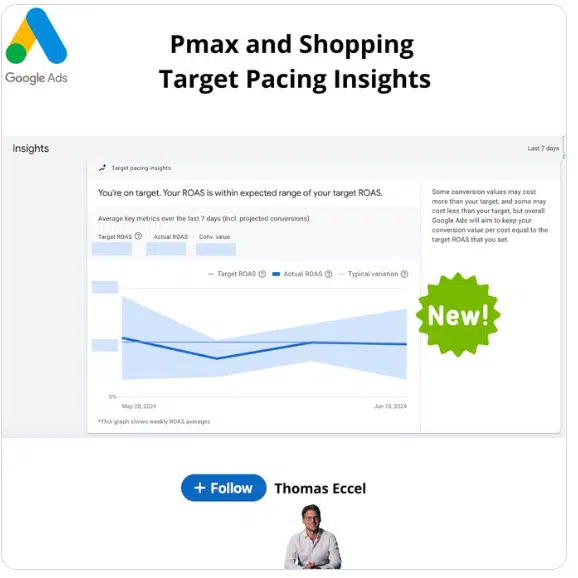
Google has introduced a new tROAS (target Return on Ad Spend) Insight Box for Performance Max and Standard Shopping campaigns, offering advertisers enhanced visibility into campaign performance.
Why it matters. This update provides ecommerce advertisers with a clearer understanding of their ROAS performance relative to their targets, potentially enabling more informed optimization decisions.
How it works.
Displays whether Actual ROAS falls within the expected range.
Shows weekly ROAS averages, including projected conversions.
Calculates typical variation based on historical campaign data.
Key features.
Visual graph of ROAS performance over time.
Indication of whether the campaign is on track to meet goals.
Inclusion of projected conversions in the analysis
Why we care. This update essentially empowers advertisers to make more data-driven decisions about their tROAS strategies, potentially leading to improved campaign performance and more efficient use of ad spend.
First spotted. This update was first seen on Thomas Eccel’s X post:
The big picture. This tool acknowledges that while individual conversion values may fluctuate above or below the target, Google Ads aims to maintain overall conversion value per cost equal to the set target ROAS.
What to watch. How this new insight box influences advertisers’ strategy for setting and adjusting tROAS in their shopping campaigns.
Anu Adegbola has been Paid Media Editor of Search Engine Land since 2024. She covers paid search, paid social, retail media, video and more.
In 2008, Anu’s career started with
delivering digital marketing campaigns (mostly but not exclusively Paid Search) by building strategies, maximising ROI, automating repetitive processes and bringing efficiency from every part of marketing departments through inspiring leadership both on agency, client and marketing tech side.
Outside editing Search Engine Land article she is the founder of PPC networking event – PPC Live, host of weekly podcast PPCChat Roundup, and brand evangelist at ClickTech.
She is also an international speaker with some of the stages she has presented on being SMX (US), SMX (Munich), Friends of Search (Amsterdam), brightonSEO, The Marketing Meetup, HeroConf (PPC Hero), SearchLove, BiddableWorld, SESLondon, PPC Chat Live, AdWorld Experience (Bologna) and more.
A new Google Ads tool – Cross-Media Reach Measurement – lets advertisers measure deduplicated, on-target reach and frequency across video campaigns.
Why it matters. This tool helps advertisers understand the efficiency of their YouTube video campaigns compared to TV, providing a comprehensive view of brand campaign performance.
Why we care. This tool essentially empowers advertisers to make more data-driven decisions, potentially leading to more effective branding campaigns and better use of advertising budgets across different media channels and over a long-term period.
How it works.
Aggregates and deduplicates reach and frequency across multiple campaigns
Shows total on-target reach for specific demographics
Measures unique reach across different devices, formats, sites, apps and networks
Key features.
Digital Video Only report: Available globally, measures reach and frequency for Google Ads video campaigns
Digital Video + Traditional TV report: Available in select countries, combines Google Ads metrics with third-party TV data
How to use it.
Access through the Measurement menu in Google Ads.
Select country and video campaigns (preferably with Target CPM bidding).
Generate reports for various age and gender groups over periods up to 92 days.
The big picture. This tool aims to help advertisers optimize their advertising investments by providing insights into campaign planning and performance across digital and traditional media.
What’s next. Advertisers can now use this tool to make more informed decisions about their video advertising strategies on YouTube and TV.
Anu Adegbola has been Paid Media Editor of Search Engine Land since 2024. She covers paid search, paid social, retail media, video and more.
In 2008, Anu’s career started with
delivering digital marketing campaigns (mostly but not exclusively Paid Search) by building strategies, maximising ROI, automating repetitive processes and bringing efficiency from every part of marketing departments through inspiring leadership both on agency, client and marketing tech side.
Outside editing Search Engine Land article she is the founder of PPC networking event – PPC Live, host of weekly podcast PPCChat Roundup, and brand evangelist at ClickTech.
She is also an international speaker with some of the stages she has presented on being SMX (US), SMX (Munich), Friends of Search (Amsterdam), brightonSEO, The Marketing Meetup, HeroConf (PPC Hero), SearchLove, BiddableWorld, SESLondon, PPC Chat Live, AdWorld Experience (Bologna) and more.
Google is launching enhanced shopping features to help consumers navigate the upcoming summer sales season, responding to increased interest in online deals.
What’s new:
Updated deals destination:
– Shows freshest deals from across retailers in a carousel
– Organizes promotions by product categories
– Available on mobile and desktop in the U.S.
Membership price display:
– Shows regular prices alongside discounted costs for loyalty program members
– Currently available for retailers like BestBuy, Petco, and Minted
Why we care. Retail advertisers might need to shift more focus towards promoting deals and special offers to appear in these new features.
Why it matters. With 44% of shoppers saying deal days prompt them to shop more than usual (according to Google/Ipsos Deal Days Survey), these tools aim to help consumers find the best discounts across retailers.
The big picture.These features leverage Google’s Shopping Graph, which contains 45 billion product listings, to provide a centralized shopping experience.
By the numbers.
Online searches for “deals” spike in mid-July, surpassing interest in “vacation”
25% of people who regret purchases during big sales say it’s due to finding lower prices later
Between the lines. Google is positioning itself as a one-stop shop for deal-hunting, potentially increasing its importance in the e-commerce ecosystem.
Anu Adegbola has been Paid Media Editor of Search Engine Land since 2024. She covers paid search, paid social, retail media, video and more.
In 2008, Anu’s career started with
delivering digital marketing campaigns (mostly but not exclusively Paid Search) by building strategies, maximising ROI, automating repetitive processes and bringing efficiency from every part of marketing departments through inspiring leadership both on agency, client and marketing tech side.
Outside editing Search Engine Land article she is the founder of PPC networking event – PPC Live, host of weekly podcast PPCChat Roundup, and brand evangelist at ClickTech.
She is also an international speaker with some of the stages she has presented on being SMX (US), SMX (Munich), Friends of Search (Amsterdam), brightonSEO, The Marketing Meetup, HeroConf (PPC Hero), SearchLove, BiddableWorld, SESLondon, PPC Chat Live, AdWorld Experience (Bologna) and more.
Google is rolling out automated Local Services Ads lead credits in July, streamlining the process for advertisers to receive credit for poor-quality leads.
Why it matters. This change aims to save time for advertisers and ensure more equitable distribution of ad credits, particularly benefiting those with limited resources. This will potentially affect advertisers’ budgets, lead quality and overall experience with the platform.
How it works:
Google’s machine learning models will automatically review all leads.
Invalid leads will be credited without manual disputes.
Credits typically are applied within 30 days.
The big picture. Since launching in 2017, Local Services Ads have evolved, but the manual dispute system has become challenging to scale and vulnerable to gaming.
This automation addresses disparities in lead disputing practices among advertisers and aims to improve overall lead quality.
Key changes.
No more manual lead disputes are required.
“Job type not serviced” and “geo not serviced” leads will no longer be credited.
Overall, more leads are expected to be credited on average.
Exceptions.The system won’t apply to healthcare verticals or advertisers in EMEA.
What’s next. Advertisers are encouraged to provide feedback on every lead through the Lead Feedback survey to help improve future lead quality.
Between the lines. This shift reflects Google’s growing capability to use AI for quality control in its advertising products.
Anu Adegbola has been Paid Media Editor of Search Engine Land since 2024. She covers paid search, paid social, retail media, video and more.
In 2008, Anu’s career started with
delivering digital marketing campaigns (mostly but not exclusively Paid Search) by building strategies, maximising ROI, automating repetitive processes and bringing efficiency from every part of marketing departments through inspiring leadership both on agency, client and marketing tech side.
Outside editing Search Engine Land article she is the founder of PPC networking event – PPC Live, host of weekly podcast PPCChat Roundup, and brand evangelist at ClickTech.
She is also an international speaker with some of the stages she has presented on being SMX (US), SMX (Munich), Friends of Search (Amsterdam), brightonSEO, The Marketing Meetup, HeroConf (PPC Hero), SearchLove, BiddableWorld, SESLondon, PPC Chat Live, AdWorld Experience (Bologna) and more.
Google appears to have pulled back further on AI Overviews following well-earned criticism about its AI-generated answers giving users incorrect, misleading and dangerous answers.
Let’s dive into new findings from two separate SEO platforms:
SEOClarity looked at 2,700 keywords.
SERanking analyzed 100,000 keywords.
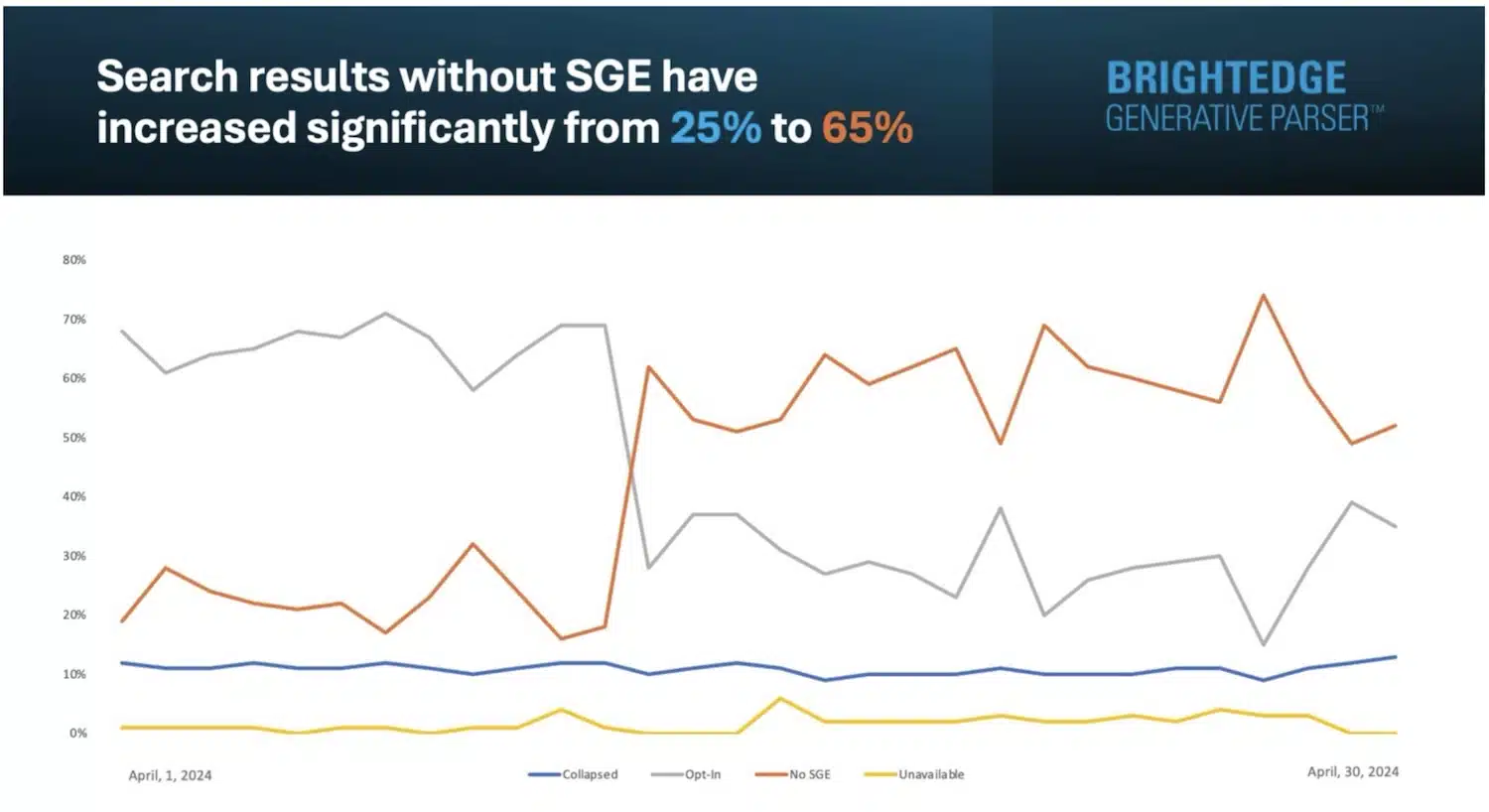
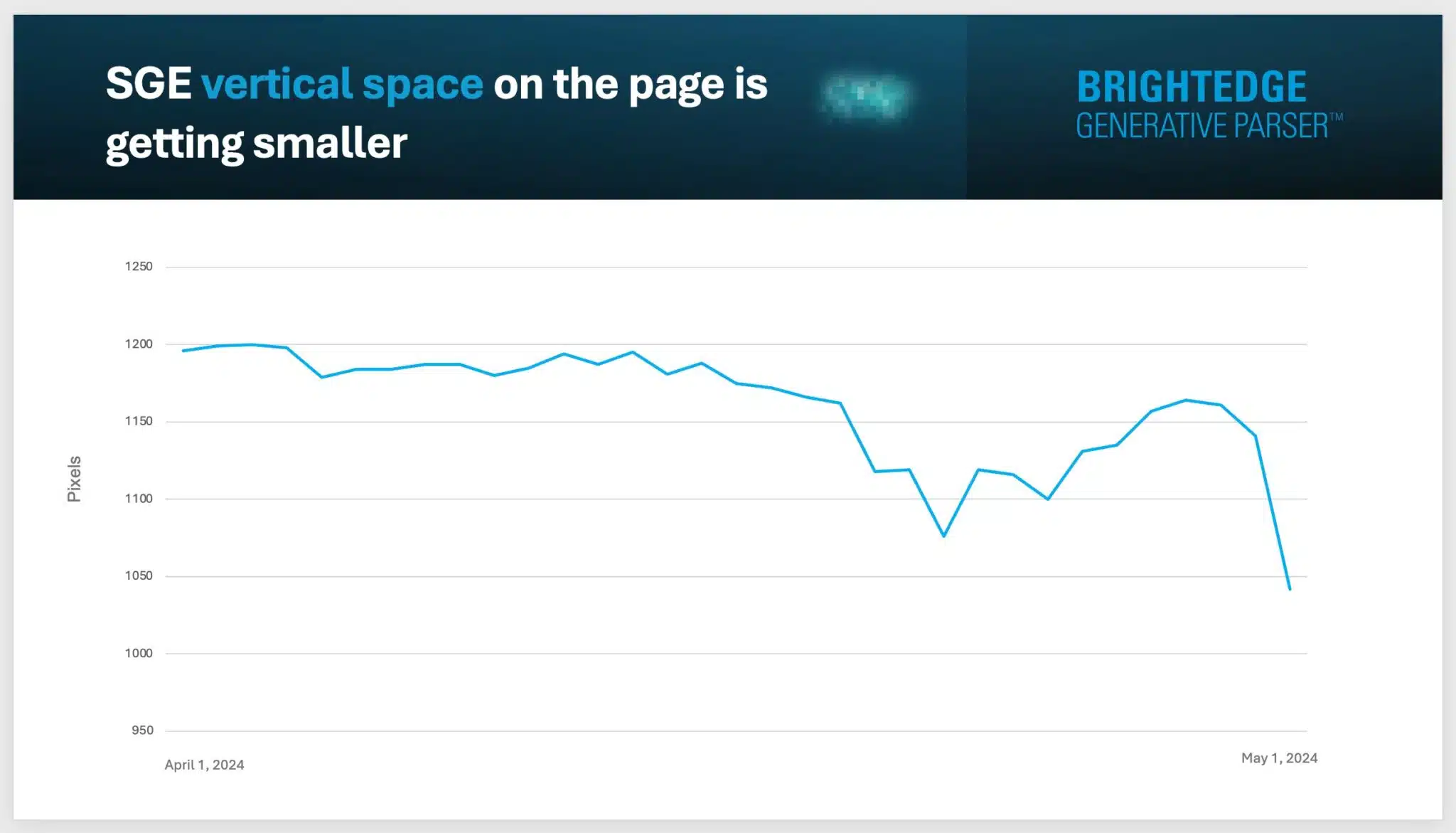
AI Overviews reduction. Google is showing AI Overviews less often, though the analyses disagree on the percentage. AI Overviews show for:
8.71% of searches, according to SERanking. (Down from 64% – when it was still known as Search Generative Experience)
7.6% of searches, according to SEOClarity. (Down from 17.4% observed May 14-30)
This reduction is not surprising – especially after Google responded to criticism and explained how it would improve AI Overviews on May 30.
Citations. Reddit’s visibility dropped in AI Overviews, according to SERanking. It is no longer among the top 10 most cited domains. The top five domains most referenced websites in AI Overviews:
runnersworld.com (1,200 times)
healthline.com (1,114 times)
linkedin.com (1,027 times)
runrepeat.com (933 times)
en.wikipedia.org (775 times)
By the numbers. Some interesting findings from SERanking’s analysis:
84.72% of AI Overviews link to at least one domain that also appears in Google’s top 10 organic search results.
Featured snippets and AI Overviews appear together 45.39% of the time – and when this happens, citations match 61.79% of the time.
AI Overviews are 4,342 characters, on average.
Ads appear with AI Overviews 87% of the time.
AI Overviews are most often present in Relationships (26.62%), Food and Beverage (24.78%) and Technology (18.11%).
More findings. Here are other interesting findings from SEOClarity’s analysis:
AI Overviews appeared for 44% of Your Money Your Life (YMYL) keywords.
Local keywords don’t trigger AI Overviews (this seems consistent with recent BrightEdge findings).
AI Overviews are most often present in Home Warranty (25.22%), Technology (20.09%), and Social Media (23.96%) industries.
Why we care. Despite the early hiccups in these early days of AI Overviews, Google continues to evolve in the direction of AI Overviews. Google wants to become an answer engine rather than a search engine. As this shift from Classic Search to AI Search continues, some brands and businesses may be forced to adapt to a new reality with less organic traffic.
Danny Goodwin has been Managing Editor of Search Engine Land & Search Marketing Expo – SMX since 2022. He joined Search Engine Land in 2022 as Senior Editor. In addition to reporting on the latest search marketing news, he manages Search Engine Land’s SME (Subject Matter Expert) program. He also helps program U.S. SMX events.
Goodwin has been editing and writing about the latest developments and trends in search and digital marketing since 2007. He previously was Executive Editor of Search Engine Journal (from 2017 to 2022), managing editor of Momentology (from 2014-2016) and editor of Search Engine Watch (from 2007 to 2014). He has spoken at many major search conferences and virtual events, and has been sourced for his expertise by a wide range of publications and podcasts.
Amazon’s Sponsored Brands have always been a central component in showcasing brands and capturing customer attention on the platform. Today, many exciting new features are available to revolutionize your advertising strategy.
This article tackles the latest updates on this Amazon ad format and strategies to maximize its potential. With recent advancements in targeting, ad formats, analytics and optimization, there’s never been a better time to refine your approach and achieve outstanding results.
What’s new in Amazon Ads?
Enhanced targeting options
Amazon has significantly upgraded its targeting capabilities for Sponsored Brands campaigns. These enhancements allow advertisers to pinpoint their ideal customer segments with extraordinary precision.
Expanding criteria to include specific demographics, purchase behaviors and detailed interest categories allows advertisers to reach a broader, more relevant audience. This enhances the impact and efficiency of your campaigns.
Improved ad formats
Amazon recently launched several new ad formats designed to capture and retain customer attention. Among the most notable are video ads and interactive ad formats.
Video ads enable the delivery of visually compelling messages, helping to communicate your brand narrative more effectively.
Interactive ads provide an immersive experience that can boost engagement and drive higher conversion rates. These new formats offer innovative ways to connect with your audience and increase brand visibility.
Advanced analytics and reporting tools
Amazon’s latest updates have introduced advanced analytics and reporting tools for Sponsored Brands campaigns. These tools present deeper insights into campaign performance, helping you identify which strategies are working and where there’s room to improve.
Detailed metrics on engagement, click-through rates, conversion rates and more are now readily accessible. This data lets you make informed decisions, optimize your campaigns in real time and achieve superior results.
AI-powered optimization
AI is at the forefront of Amazon’s latest innovations. The new AI-powered optimization features automatically adjust your bidding, targeting and ad placements to maximize performance.
AI analyzes large data sets to find hidden patterns and emerging trends, helping you stay ahead. Using AI can significantly improve efficiency and ROI.
Integration with Amazon Marketing Cloud
Amazon Sponsored Brands now feature deeper integration with the Amazon Marketing Cloud, providing a comprehensive view of your marketing efforts across the Amazon ecosystem.
It facilitates seamless data sharing and analytics, allowing you to synchronize your ad campaigns with other marketing activities. With this integration, you can create a more cohesive and impactful marketing strategy that elevates your brand presence across Amazon.
1. Leverage enhanced targeting
With the launch of more sophisticated targeting options this year, refining your approach to audience segmentation is crucial.
Start by analyzing your customer data to pinpoint the most relevant demographics, behaviors and interests that align with your brand.
Use these insights to create highly targeted ad campaigns tailored specifically to your ideal customers. For instance, targeting health-conscious individuals who frequently buy wellness products can notably improve ad relevance and engagement if you sell fitness gear.
Continuously monitor and fine-tune your targeting parameters to ensure you’re reaching the most valuable audience segments.
2. Create compelling ad content
The latest ad formats offer exciting opportunities to craft more engaging content.
For video ads, focus on creating visually appealing and concise messages highlighting your brand’s unique value. Use storytelling techniques to captivate viewers and leave a lasting impression.
For interactive ads, design immersive experiences that encourage user participation, such as quizzes, product demos or interactive catalogs. The key is to make your ads eye-catching, informative and enjoyable, ultimately increasing engagement and conversion rates.
3. Leverage advanced analytics
Advanced analytics tools are more powerful than ever, providing better insights into your campaign performance.
Make it a habit to regularly review these analytics to better understand how your ads are performing.
Identify trends in engagement, click-through rates and conversion metrics to pinpoint successful elements and areas for improvement in your campaigns.
Use these insights to inform data-driven decisions, tweak your ad content and target and bidding strategies as needed to optimize performance.
Get the daily newsletter search marketers rely on.
4. Embrace AI-powered optimization
AI-powered optimization eliminates much of the uncertainty in managing ad campaigns.
Set up AI-driven features to automatically adjust bids, targeting and placements using real-time data analysis. This saves you time and guarantees optimal campaign performance.
However, don’t just set it and forget it.
Regularly review the adjustments to ensure they align with your overall marketing goals. Make manual tweaks when necessary to refine performance and maintain a competitive advantage.
5. Capitalize on Amazon Marketing Cloud integration
Integrating with Amazon Marketing Cloud allows you to create a more holistic marketing strategy.
Leverage the data and analytics from the Marketing Cloud to comprehensively understand your customer journey across different touchpoints.
This empowers you to synchronize your Sponsored Brands ads with other marketing efforts, such as email campaigns, social media advertising and in-store promotions.
By aligning these efforts, you can foster a unified brand experience that strengthens customer relationships and boosts overall marketing effectiveness.
Tips and best practices for ongoing success
Stay updated with Amazon’s changes
Amazon frequently enhances its advertising platform with new features and improvements. Staying informed about these changes is vital for maintaining a competitive edge. Here are some steps to ensure you’re always up-to-date:
Subscribe to Amazon advertising’s newsletter: Itprovides regular updates on new features, case studies, and best practices.
Join industry forums and groups: Engage with communities on platforms like LinkedIn, Reddit and industry-specific forums where professionals share insights and experiences.
Attend webinars and conferences: Amazon and other marketing organizations often host events that can provide in-depth knowledge and networking opportunities.
Follow thought leaders: Identify and follow experts in the Amazon advertising space. Their blogs, social media posts and publications can offer valuable insights and tips.
Experiment and iterate
The digital advertising landscape constantly evolves, making experimentation and iteration essential for success. Here’s how to effectively test and refine your strategies:
A/B testing: Regularly conduct A/B tests on various elements of your ads, such as headlines, images, calls to action and targeting options. Analyze the results to determine which variations perform best.
Pilot new features: Whenever Amazon releases a new feature, consider running a small-scale campaign to test its effectiveness before fully integrating it into your strategy.
Monitor competitors: Keep an eye on what your competitors are doing. Analyze their ad formats, messaging and targeting strategies. Learn from their successes and mistakes to improve your own campaigns.
Review performance metrics: Set up a schedule to review your campaign performance metrics regularly. Look for trends, spikes and drops in engagement and use this data to make informed adjustments.
Actionable strategies for continuous success
Building a sustainable strategy requires actionable steps that can drive ongoing success. Here’s how to ensure your campaigns remain effective:
Regularly update your product listings
Ensure your product listings are always up-to-date with accurate information, high-quality images and optimized keywords.
Make sure your titles, bullet points and descriptions are clear, concise and compelling.
Optimize bids and budgets
Regularly review and adjust your bids and budgets based on performance data.
Increase funding for high-performing campaigns and decrease spending on less effective ones.
Leverage seasonal trends and events
Plan and execute campaigns around major shopping seasons and events like Black Friday, Cyber Monday and Prime Day.
Customize your ads to align with seasonal trends and special promotions.
Utilize negative keywords
Regularly update your negative keyword list to exclude irrelevant searches that don’t convert.
This helps to optimize your ad spend and improve your ROI.
Enhance customer reviews and ratings
Actively seek customer feedback and encourage satisfied customers to leave positive reviews.
Address any negative feedback promptly and use it to improve your products and services.
Implement retargeting campaigns
Use retargeting to reach customers who have previously viewed or interacted with your products.
Craft personalized ads that remind them of the products they are interested in, increasing the likelihood of conversion.
These practical tips in your marketing strategy will enhance your Amazon Sponsored Brands campaigns and support continuous improvement. This proactive approach keeps your brand competitive and successful.
Whether you’re seasoned in selling on Amazon or new to the platform, these insights are designed to help you secure a competitive advantage and maximize the opportunities presented to you now and in the future.
Contributing authors are invited to create content for Search Engine Land and are chosen for their expertise and contribution to the search community. Our contributors work under the oversight of the editorial staff and contributions are checked for quality and relevance to our readers. The opinions they express are their own.
One of the greatest failings of a PPC specialist is being unable to take a step back and see the big picture.
You can get lost in the weeds of account management and focus too much on vanity metrics, bidding strategy testing and reporting to forget about what the client ultimately wants from the account.
To be fair, the client is often not great at communicating what that big picture looks like, and they, too, can often get lost in CTR and Search impression share metrics.
I’ve had more conversations over the years with some clients on why average CPC is up year on year, why they aren’t top of the SERP on certain searches, or why the bounce rate is so high on a Shopping ad compared to a Search, rather than discussing how our overall business objectives are progressing.
Campaign goals and objectives should be regularly discussed because they are the ultimate measure of success, vary among different people in the company and change over time.
With this in mind, I’ve come up with five considerations for setting up and adapting your PPC goals and objectives
1. Alignment with overall business goals
Agencies often promise to improve campaign performance but may not know how the client defines performance. Sales teams who are involved in early discussions may have questionable PPC experience since they don’t regularly manage accounts.
Audits are carried out, recommendations are made and account management is handed over. Some conversations are had along the way about the account objectives, but often, this is done after an audit.
This is odd to me, as without the goals, how do you have context for campaign goals, bidding strategies and account structure?
Even when objectives are clear, different people involved in the discussions can cause the details to get lost in the setup and week-to-week management.
Those business goals must be the center of your initial campaign strategy and roadmap. Before handling an account, you need to answer the following questions:
Is the measurement in place to track all the priority and secondary goals the client wants to track?
Does every campaign currently running, or planned to be built, have a specific goal that is aligned with the overall objective?
Is the account structure proportionally reflective of these objectives?
How does the business track the success of these objectives and goals? Can we have access to it (Shopify, HubSpot, etc.)?
There will be more specific questions to ask, which may have been covered in the briefing stage, but ensure these are documented and recorded as a reference point for future conversations.
Dig deeper: Setting PPC goals: How to tailor KPIs and metrics for each funnel stage
2. Channel and audience research
With the business priorities and sub-priorities set out, you now have to identify the biggest PPC opportunities that are available to match those priorities.
Research your audience and match their profile with a channel that will produce results based on each priority. Your budget and the client’s available resources will also dictate what channels you decide to invest in.
For example, a new insurance company may have a limited budget to generate brand awareness (priority) and initial leads (sub-priority).
The first go-to strategy may have been Meta Ads to build awareness and Google Search ads targeting specific keywords for leads. However, the markets using these channels are notoriously competitive, and the average CPC/CPM is very high.
As a new company, they lack a strong brand name and the trust that comes with it. However, they have a young, savvy marketing team and a product targeting a younger audience.
Their team creates high-quality, engaging video content, evident from their YouTube channel, which has 10 times more subscribers than their Meta accounts.
YouTube suits their longer, product-focused videos, and their audience engages better there. Based on this, they decided to focus their advertising budget on YouTube with video in-stream ads for brand awareness and demand gen campaigns for leads.
Dig deeper: Un-silo your PPC campaigns: 4 tactics for more cohesive marketing
3. Enhanced measurement strategy
It all goes back to your initial conversations. Once priority and sub-priority objectives are agreed upon, identify what needs to be tracked for each objective. Ensure the client agrees with this measurement strategy.
If the main goal is to generate more revenue, set up revenue tracking for optimization and measurement. This defines success for the account, so client alignment is crucial. Secondary goals might include acquiring new users or increasing average order value (AOV).
Make sure new user acquisition is tracked in both the sales platform (overall) and search ads (platform-specific). This allows you to measure and report on new acquisition bidding strategies.
To measure AOV, implement basket-level data tracking to identify products with the highest AOV. This lets you test bidding on these products separately and measure any uplift.
Often, brand awareness is the most difficult objective to track, and each client will have different ideas on tracking it (e.g., clicks, sessions, views from videos, reach, impressions, etc).
Some will look deeper, such as brand lift studies (limited to high spenders), direct traffic growth, returning user growth or brand traffic growth.
It’s likely a combination of these factors and others. The key is to discuss these options with the client and, once agreed upon, make them the focus of advertising measurement, optimization and reporting.
Dig deeper: How to track and measure PPC campaigns
Get the daily newsletter search marketers rely on.
4. Reporting
With clear and measurable goals and objectives agreed upon, reporting should reflect this as transparently and plainly as possible.
The CEO, CFO, head of sales or any member of the marketing team should be able to understand and interpret a report in the context of the priority and sub-priority objectives agreed upon.
A real-time dashboard is ideal because stakeholders can access reports from any time period without needing frequent email requests for specific data. It should reflect the agreed-upon KPIs for each campaign and metrics related to important objectives like profitability. Organize priority objectives on separate pages to avoid confusion.
You can use a simple test by asking a colleague not involved in the account if they can clearly identify the campaign objectives just by looking at the dashboard structure.
If someone who also creates dashboards for clients can’t recognize the objectives within 30 seconds, CEOs and CFOs who don’t regularly view dashboards will likely struggle, too.
Be patient with client feedback on the dashboard’s appearance and data content. Once they’re satisfied, your job is done. It’s also helpful to clearly state specific goals on the dashboard and define where each campaign stands in the sales funnel.
This transparency is crucial, especially for new team members or those who don’t frequently review dashboards.
Dig deeper: 3 steps for effective PPC reporting and analysis
5. Consistent and structured communication
With reporting nailed down, you have the foundation for consistent and structured communication among the different client stakeholders.
Carry out monthly report check-ins with your own interpretation of the report, as data alone will rarely tell the whole story and provide context.
This can be communicated through regular weekly or bi-weekly comms with your day-to-day contact, most likely with the client’s marketing team.
If possible, build in quarterly and annual reviews. This enables you and the client to regularly take a step back and monitor the overall progress of the objectives.
Make sure that finance, sales and other leadership stakeholders within the company are brought into these meetings/calls to discuss the overall strategy and reconfirm on their side if their road map hasn’t changed.
Don’t just rely on the marketing team to keep everyone updated. Often, there will be new members of the leadership team who weren’t involved in the initial discussions, so regularly reaffirming objectives and strategies will be welcomed.
How often have you left annual reviews with the business leadership team feeling disappointed due to negative feedback?
It was supposed to be a moment to celebrate the year-on-year increase in conversions and lower CPA, which you thought were the main campaign goals.
However, it turns out the increased leads are low quality, and there are fewer sales conversions (thanks to the sales team for the updated information). Without their input and involvement, this issue wouldn’t have been identified.
These meetings require more preparation and can be stressful, as opinionated individuals, some of whom have bad memories, will scrutinize everything about the campaigns. However, your consistent and transparent reporting on agreed-upon metrics will serve you well.
Issues like low-quality leads would have been caught earlier when setting primary objectives. (Remember, you should’ve gained access to the client’s HubSpot account initially, integrated it into our measurement setup and included it in our comprehensive report dashboard.)
As we’ve seen in the past few eventful years for online advertising, markets can significantly fluctuate. As the business goalposts shift, then so should your campaign approach.
In the case of the insurance company mentioned earlier, after a year with their initial strategy, the annual review showed increased brand recognition and a small number of high-quality leads.
Market analysis revealed that many competitors had exited the search markets, leading to a 30% decrease in average CPC compared to the inflated numbers of the previous year.
After reviewing forecasting data, the company decided to pivot and revise its main objective to focus more on increasing lead numbers while preserving quality, with brand awareness becoming a secondary priority.
To achieve this, they decided to increase their marketing budget. Previously, their budget wasn’t sufficient for testing search ads. While lead generation was a secondary priority, they now have enough funds to give paid search a fair trial and increase lead volume to align with their primary objective.
Their successful brand awareness campaign on YouTube over the past year featured innovative, engaging video ads that bolstered the company’s market reputation and established a stronger authority bias.
This led to higher conversion rates and a more efficient return on investment from paid search than if they had launched the ads a year earlier, when they had minimal market presence and trust, resulting in higher average CPCs.
The scenario happened because of direct communication and clear reporting of primary objectives with senior stakeholders. It’s crucial to have everything agreed upon set up and performing well through the first four steps.
However, if this isn’t regularly communicated to company decision-makers, you won’t be able to react swiftly and capitalize on market opportunities as they arise.
Dig deeper: How to deliver PPC results to executives: Get out of the weeds
Contributing authors are invited to create content for Search Engine Land and are chosen for their expertise and contribution to the search community. Our contributors work under the oversight of the editorial staff and contributions are checked for quality and relevance to our readers. The opinions they express are their own.
In 2023, Google’s Gary Illyes stated that links are no longer the third most important Google ranking factor.
Was he lying?
A recent study by Internet Marketing Ninjas showed that over 96% of websites in the Top 10 search results have more than 1,000 backlinks from unique domains.
And only 0.3% have less than 100.
Clearly, websites that rank well in Google Search tend to have more high-quality backlinks.
What is the key to earning those precious nods from other websites?
Content-based link building.
What is content-based link building?
Content-based link building is a strategy used in SEO to acquire backlinks by creating and promoting high-quality content.
Instead of actively soliciting links from other websites, which can be seen as spammy or manipulative, content-based link building focuses on creating valuable, informative or entertaining content that naturally attracts links from other sites.
What types of content tend to earn the most links?
There are two critical elements: relevance and value.
Your content should resonate with other websites, filling a gap in their content or sparking a new idea.
Think long-form content – comprehensive guides, groundbreaking research, visually stunning infographics and forward-thinking opinion pieces – content with a certain “stickiness” that encourages other sites to link back to it as a trusted authority.
Content that attracts high-quality links often falls into certain categories, including:
Case studies
Industry reports
Controversial or opinionated pieces
Interviews with industry experts
How to write link-worthy content
Creating content that attracts links isn’t rocket science. You simply need to focus on providing helpful information that answers the burning questions of your target audience.
When you do, you’ll become the default authority in your industry.
Readers respond to engaging headlines, subheadings and eye-catching visuals that segment the text.
To add credibility, illustrate your points with specific data and relatable examples that resonate with your audience.
Dig deeper: How to create linkable assets with ChatGPT
Get the daily newsletter search marketers rely on.
7 effective content-based link building strategies
Want to turbocharge your website’s visibility? Focus on building quality backlinks with these seven strategies.
1. Create linkable assets
Develop valuable resources like infographics, whitepapers or interactive tools that naturally attract links. These linkable assets provide unique value that other sites will want to reference and share with their audience, helping you earn valuable backlinks.
2. Guest posting
Reach out to relevant websites in your niche and offer to write a high-quality guest post. This lets you tap into their audience while earning a backlink to your site. But make sure to choose only reputable sites that are aligned with your target audience.
3. Broken link building
Find broken links on relevant websites, then reach out to the site owner and offer your content as a replacement. This technique helps site owners fix their broken links while allowing you to earn a valuable backlink and demonstrate your expertise.
4. Skyscraper technique
Find popular content in your niche, then create an even better version. Reach out to sites linking to the original piece and let them know about your improved resource. If your content is truly valuable, many of these sites will update their links.
5. Expert roundups
Create a roundup post featuring insights from industry experts. Reach out to these experts and let them know they’ve been featured. Many will share the post with their audience, driving traffic and earning natural links.
6. Resource pages
Many websites have resource pages that link to helpful content on a specific topic. Find relevant resource pages in your niche and reach out to suggest your content as a valuable addition. If your resource truly adds value, you can earn a high-quality link.
7. Digital PR
Create newsworthy content like original research, surveys or industry reports. Pitch this content to journalists and publications in your niche, and if they cover your story, you’ll earn authoritative links from trusted media sites.
The key to any link building strategy is to focus on providing genuine value. Your content needs to be link-worthy – something that other sites would want to reference and share with their audience to enhance the user experience.
Dig deeper: How to use digital PR to drive backlinks and business growth
The role of social media in content-based link building
Today’s social media landscape offers a unique chance to build relationships and earn links.
Get your audience buzzing by asking thought-provoking questions, sparking lively discussions and responding to comments.
As your social engagement rises, you’ll naturally attract links from people who stumble upon your content.
Another tactic is to mention influencers and thought leaders when sharing your content. If you’ve referenced their work or included their insights, tag them in your social posts, and many will reshare the post with their followers, expanding your reach and increasing your chances of earning links.
Connect with journalists and publications in your industry. Engage with their posts, and when the timing is right, pitch your content for a chance to land valuable backlinks and boost your brand’s visibility.
Remember, link building is about more than just creating great content – it’s about getting that content in front of the right people. Harness the power of social media to promote your content, build relationships and get those high-quality links pointing to your site.
The future of link building: Adapting to the rise of AI-generated content
The future of content is being rewritten by AI and the landscape is shifting rapidly.
These days, artificial intelligence is cranking out incredibly realistic content at lightning speed, making it easy for marketers to whip up social media posts, blog articles and ad copy.
But while this tech is undeniably cool, it’s also making link building a bit of a puzzle.
The web is awash with AI-generated content, making it tough to cut through the noise and earn those prized high-quality backlinks.
What will give you a unique advantage is your human touch. It’s all about tapping into people’s emotions, sharing real-life experiences and offering genuine perspectives – things that AI systems are still struggling to master.
With AI-generated content on the rise, creating truly exceptional content is more crucial than ever. Here are three things to keep in mind when generating link-worthy AI content.
Prioritize E-E-A-T: Google’s E-E-A-T guidelines are more important than ever. Create content that showcases your unique expertise and experiences to build trust with your target audience.
Focus on user intent: Instead of just targeting keywords, create content that addresses the underlying needs and questions of your target audience. Use tools like Answer the Public to uncover the topics and queries that users are searching for.
Experiment with new formats: While long-form content can be great for link building, don’t be afraid to experiment with shorter, more visual formats like infographics, videos and interactive tools. These can be highly shareable and help you stand out in a sea of text-heavy content.
AI may be wreaking havoc on the link building landscape, but it also presents new opportunities for those willing to adapt and innovate.
By focusing on creating unique, valuable content that meets the needs of your target audience, you can continue to earn high-quality backlinks and establish your website as a go-to resource in your industry.
Contributing authors are invited to create content for Search Engine Land and are chosen for their expertise and contribution to the search community. Our contributors work under the oversight of the editorial staff and contributions are checked for quality and relevance to our readers. The opinions they express are their own.
Google is discontinuing Universal Analytics, its legacy web analytics platform. This is the final shift in the transition to Google Analytics 4 (GA4).
Why it matters. Businesses that relied on Universal Analytics for website measurement and data analysis need to act quickly to avoid losing access to their historical data and maintain continuity in their analytics capabilities.
Key dates.
July 1: Users will lose access to Universal Analytics data and interface.
After July 1: All Universal Analytics data will be permanently deleted.
Why we care. We’ve finally reached the “now or never” moment. Export your historical data or you’ll lose it all in July.
The big picture. This transition marks a significant shift in Google’s analytics offerings, with GA4 designed to be more privacy-focused and adaptable to future changes in technology and regulations. However, search marketers remain unimpressed with GA4 – many of them still absolutely hate GA4.
Details:
Universal Analytics properties are identifiable by tracking codes starting with “UA-“.
Google has been automatically creating GA4 properties for users since March 2023.
Several features, including real-time reports and certain advertising capabilities, have already been deprecated.
There will be no visibility of historical UA bidding, audience or conversion data.
Universal Analytics 360 contract holders will no longer be able to create standard Universal Analytics properties.
Publisher or other product integrations (e.g. UA audience list, BigQuery exports, UA API requests) will be unavailable when services have stopped.
What to do.
Export your Universal Analytics data before July 1, 2024.
Set up and configure a Google Analytics 4 property if you haven’t already.
Migrate Google Ads links and create new conversions based on GA4 events.
Bottom line. If you haven’t already, you need to act swiftly to preserve your historical Google Universal Analytics data.
Anu Adegbola has been Paid Media Editor of Search Engine Land since 2024. She covers paid search, paid social, retail media, video and more.
In 2008, Anu’s career started with
delivering digital marketing campaigns (mostly but not exclusively Paid Search) by building strategies, maximising ROI, automating repetitive processes and bringing efficiency from every part of marketing departments through inspiring leadership both on agency, client and marketing tech side.
Outside editing Search Engine Land article she is the founder of PPC networking event – PPC Live, host of weekly podcast PPCChat Roundup, and brand evangelist at ClickTech.
She is also an international speaker with some of the stages she has presented on being SMX (US), SMX (Munich), Friends of Search (Amsterdam), brightonSEO, The Marketing Meetup, HeroConf (PPC Hero), SearchLove, BiddableWorld, SESLondon, PPC Chat Live, AdWorld Experience (Bologna) and more.
Google is rolling out Local Services Ads on its Maps app, starting with iOS, to help advertisers generate more leads directly from the navigation platform.
Why it matters. This expansion brings local business ads to a highly-intent user base actively searching for nearby services, potentially increasing lead generation for advertisers.
How it works. Google will automatically create and display ads on Maps using businesses’ current Local Services Ads data.
The catch. Advertisers can’t opt out of Maps placement without also pausing their Search ads.
Why we care. This could be good news for advertisers with a chance at increased visibility on Google Maps, providing exposure to users actively searching for local services, potentially at the moment of need. However, advertisers should also be aware that this bundling limits flexibility in campaign management and may affect budget allocation strategies
Key details.
Launch limited to iOS version of Google Maps mobile app
Uses existing ad data and user reviews to create ads
No additional data required from advertisers
Billing and pricing remain the same as Search ads
Advertisers only charged for qualified leads
Existing bids will be used for Maps ads
First spotted. This announcement was spotted on Matt McGee on X. He shared the email he received:
Examples of it live. Search Engine Land’s Barry Schwartz spotted a few examples on a search:
Between the lines. This move leverages Google’s dominant position in local search and navigation to create new ad inventory.
The bottom line. For local businesses, this update could increase visibility to potential customers when they’re looking for services, but it also binds Maps and Search ad placements together.
Google seems to have a bug where it has not indexed new content across both large and smaller publishers over the past several hours. The issue seemed to have started at about 5 p.m. ET, when Google Search was not showing most of the new content that content creators were publishing to their websites.
What are we seeing. Sites as large as AP News, CNN, Wall Street Journal, NY Times, Fox News, CNBC and even small sites like the Search Engine Roundtable, are all seeing issues with new content not being shown in the Google Search results.
This can be a Google Search bug with indexing or serving or maybe some rendering issue with the Google Search interface.
Here are some examples of the Google Search results filtered to show content published in the past hour from some of these publications that publish dozens of stories per hour. You can see some sites have no pages shown for content published on them in the past hour, some have one, some have three and so on:
Checking Google Search tools. So when I was debugging this after covering this issue a few hours ago on the Search Engine Roundtable, I noticed the story I published on this news was not indexed by Google and is still not indexed a few hours later. The content published on this site normally gets indexed within minutes by Google Search.
Google Search Console’s URL inspection tool still says the URL is not indexed, hours later:
When I search for the story headline, filter by content published recently, or even search by the URL of the story, Google Search is not returning it.
No word from Google yet. I have reached out to Google but have still not heard back on this issue. Google has still not published an issue update on the Google Search Status dashboard – I suspect they will eventually.
Spam update the issue. Is it possible that the June 2024 spam update broke Google Search? That is hard to say and it is, of course, just speculation. But we know with the last core update, Elizabeth Tucker from Google said their main goal was to ensure that algorithm update did not break Google. We also know that sometimes Google experiments cause issues in Google Search.
Others having issues. I posted the news on social media, including X and there are a lot of folks noticing this issue now. Just click through to my post on X and you’ll see a lot of the replies and quotes:
Why we care. If you produce content, like a news publication, and notice a drop in Google traffic over the past several hours – this may be why.
Hopefully Google will fix it and reply with more detail. Google clearly wants to ensure searchers can find the content, especially new content, that they are looking for. So I am sure Google takes these reports seriously.
Google is aware of the reports, but has not yet replied with any details. We will update this story when we hear back.
Google is consolidating its content suitability levers for advertisers across YouTube and the Display Network starting in September.
What’s changing:
Several content label exclusions will be removed for YouTube ads (DL-G, DL-PG, DL-T, DL-MA, “not yet labeled”) but remain for Display
“Embedded YouTube videos”, “Live streaming”, and “Families” exclusions only available account-wide, not per YouTube campaign
Many topic-based exclusions still offered at campaign and ad group levels
Why we care. The updates could have implications for brand suitability, campaign targeting strategies, and ultimately return on ad spend on YouTube and Display campaigns that advertisers will want to get ahead of.
Why it matters. The updates aim to simplify Google’s array of brand suitability controls while preserving flexibility for advertisers.
Key details.
Changes impact both existing and new campaigns created after September
No action required for advertisers currently using affected exclusion settings
Google’s core ad policies prohibiting violative content remain in place
The email. Search Engine Land contributor and Founder of JXT group Menachem Ani shared with me the email he received from Google.
The big picture. As brand safety remains a priority, Google is looking to streamline suitability options and controls across its advertising platforms.
What’s next? Check account-level suitability settings closer to the September rollout for any needed adjustments.
Anu Adegbola has been Paid Media Editor of Search Engine Land since 2024. She covers paid search, paid social, retail media, video and more.
In 2008, Anu’s career started with
delivering digital marketing campaigns (mostly but not exclusively Paid Search) by building strategies, maximising ROI, automating repetitive processes and bringing efficiency from every part of marketing departments through inspiring leadership both on agency, client and marketing tech side.
Outside editing Search Engine Land article she is the founder of PPC networking event – PPC Live, host of weekly podcast PPCChat Roundup, and brand evangelist at ClickTech.
She is also an international speaker with some of the stages she has presented on being SMX (US), SMX (Munich), Friends of Search (Amsterdam), brightonSEO, The Marketing Meetup, HeroConf (PPC Hero), SearchLove, BiddableWorld, SESLondon, PPC Chat Live, AdWorld Experience (Bologna) and more.
How to wisely select the best white-label link building services.
How it works.
What to look for in a service provider.
What are white-label link building services?
White-label link building services involve a specialized agency building backlinks on behalf of another agency. The primary agency then presents these links to their clients as their own work.
These services are essential for SEO campaigns but require specialized skills, which many digital marketing and SEO agencies lack.
This is where white-label services come in.
Who benefits from white-label link building:
SEO agencies without a dedicated link building team. They need to deliver high-quality links but lack the resources to do so internally.
Independent SEO experts. They may need to scale their efforts without the time or manpower to handle link building themselves.
White-label link building services include everything from guest posting to securing high authority backlinks – or, simply, websites that have demonstrated credibility and trustworthiness and are typically rewarded with organic visibility by search engines. The main goal is to boost a client’s search engine rankings through effective strategies.
Here’s why you might consider white-label tactics:
Your client demands high-quality links, but your team lacks the expertise.
Your in-house team is overwhelmed with requests.
You want to offer link building services without the overhead of hiring a full team.
Testing the waters with such services before committing to an in-house team.
Professional services allow you to access experts who know how to build effective links quickly and efficiently.
How white-label link building works
The white-label method involves a specialized agency managing the entire process of acquiring backlinks on behalf of another agency. This allows the primary agency to offer comprehensive link building services to its clients without having to build an in-house team.
Here’s how a professional white-label link building team operates:
Step 1: Understanding client needs
The process begins with understanding a client’s product, service and goals.
The primary agency provides this information to the white-label partner, outlining the target landing pages and desired outcomes.
Step 2: Identifying relevant opportunities
The white-label agency identifies the most suitable websites. They focus on sites that align with the client’s goals and industry, ensuring the links are relevant.
Step 3: Creating content and outreach
Next, the agency creates high-quality content. This can include guest posts, linkable assets or other types of content.
They then contact publishers, collaborating to secure placements and ensuring the content is published on authoritative sites – sites that are helpful, useful and trusted and respected by other websites, people and search engines.
Step 4: Reporting and analytics
Once the links are placed, the agency provides detailed reports and analytics.
The primary agency can then present these results to their clients under their own branding, maintaining full transparency and control.
Why hire a white-label link building agency?
Here’s a list of only a few advantages you can get from hiring a professional white-label link building agency:
Expertise: These agencies hire experienced outreach specialists who know all the ins and outs of getting effective links. Their expertise ensures high-quality results that meet the specific needs of different industries.
Connections: Pro agencies have built relationships with trusted publishers and websites. They have the tools and connections to secure high-quality results faster than an in-house team.
Quality links: Professional agencies use best practices to get quality backlinks from reputable sources, boosting your SEO.
Scalability: A good agency can easily adjust to your requirements. Whether you need a few high-quality links or many, they can manage it effectively.
Full service: Such agencies often go beyond just link building. They can create content and offer other relevant services, such as SEO audits, keyword research, and social media management, adding value for you or your clients.
By hiring a team of experts, SEO firms and independent specialists can deliver excellent link building services, improving their clients’ SEO results.
How to choose a white-label link building agency
As you may already have guessed, choosing the right team is essential for delivering top results to your clients.
Here are key factors to consider before making up your mind.
Case studies
A reputable agency should have a portfolio of genuine, successful case studies that showcase their expertise and specialization in your niche.
Look for detailed examples of their past work and verify their authenticity to gauge the agency’s ability to deliver the results you need.
Reviews
Client reviews provide insights into an agency’s performance.
Platforms like Clutch and G2 offer scores and detailed feedback from previous clients. Checking these reviews will help you assess the agency’s reliability and effectiveness.
For example, if you search “top link building companies” on Clutch, here’s what you’ll see:
Realistic guarantees
A reliable agency will give you a clear idea of the results you can expect.
They provide realistic expectations and focus on delivering quality links rather than quantity. Therefore, they should specify how many links they can build and their quality.
Steer clear of agencies that make unrealistic promises.
Safe link building practices only
Ensure the agency uses only no-risk or low-risk methods.
These can be, for example:
Guest posting: Writing and publishing valuable articles on reputable websites in your niche to build authority and reach a wider audience.
Skyscraper technique: Creating high-quality content that improves upon existing popular content and reaching out to sites linking to the original.
Connectively (ex-HARO): Providing expert quotes to journalists which can potentially result in backlinks and increased visibility.
Linkable assets: Creating valuable content like infographics, videos and comprehensive guides that attract natural backlinks.
Using these methods indicates they focus on proven tactics for building backlinks.
Getting just what you need
Depending on your business niche and requirements, you can get links only from websites suitable for your needs. This helps you maintain control over the quality and relevance of the links being built.
Many agencies skip this step, but it’s a valuable feature to look for.
Note: Once you choose an agency, remember that detailed reporting is crucial. The agency should provide clear and comprehensive reports that show the progress and impact of its efforts. This transparency helps you keep track of the campaign’s effectiveness.
Choosing a white-label agency: Red flags
Knowing what to avoid when choosing your perfect white-label agency will help you make a smart choice and safeguard your investment.
Here are some red flags to keep an eye on.
Low-quality link building
Low-quality link building can damage your SEO efforts. To ensure a white-label agency avoids these practices, ask for their methods, request case studies and inquire about their approach to maintaining quality and compliance with search engine guidelines.
Avoid agencies that use link farms, which are sites created solely to host paid links. These sites often have poor content and low relevance.
For example, Google has deindexed many websites for deceptive link schemes, excessive link exchanges, paid links and other manipulative practices that violate its guidelines.
Similarly, beware of Private Blog Networks (PBNs) and forum links, as they offer minimal to no SEO value and can even result in penalties.
Unrealistic guarantees
Be cautious of agencies that make grand promises, like guaranteeing top rankings or a massive number of backlinks quickly.
These “pie in the sky” promises are often too good to be true.
Low prices
Quality comes at a price. And obtaining high-quality links requires significant effort and resources.
Attractive offers like “600+ links for $10” on platforms like Fiverr.com often result in low-quality links that do more harm than good. So your best bet is to stay away from such “experts.”
Building a solid link profile requires investment; cheap solutions rarely deliver the desired results.
By avoiding these pitfalls, you can select a team that provides genuine value and supports your SEO goals.
Conclusion
White-label link building is a smart move for agencies and SEO experts. It lets you offer top-notch services without overextending your resources. This approach ensures quality results and allows you to focus on other important things.
A good white-label program is flexible and can be customized to fit your needs and your clients’ requirements, making the process smooth and efficient for everyone.
Partnering with a reputable team of experts at Editorial.Link means you can provide your clients with an added service that enhances the work you’re already doing.
Google added new capabilities to its Display & Video 360 API – including advertiser-level keyword management and an optimization objective field for insertion orders.
The additions. Here’s what’s Rolling out as part of the June update:
Advertiser keyword targeting: Advertisers can now retrieve and manage keyword targeting lists assigned at the advertiser level through the API.
Insertion order optimization objective: The new “optimizationObjective” field has been added to the InsertionOrder resource, allowing select advertisers to set optimization goals.
Why we care. The ability to retrieve and manage keyword targeting lists at the advertiser level through the API allows for more centralized and efficient keyword optimization across campaigns. The new optimization objective makes programmatic advertising more customizable and scalable.
The details.
The optimization objective field is only writable for allowlisted advertisers.
To use the new features, advertisers must update to the latest version of the API client library.
Get the daily newsletter search marketers rely on.
Support. Google has launched a new technical support contact form specifically for the Display & Video 360 API for any issues.
Bottom line. Google is steadily enhancing its APIs to offer more features and customization for automated campaign management.
Anu Adegbola has been Paid Media Editor of Search Engine Land since 2024. She covers paid search, paid social, retail media, video and more.
In 2008, Anu’s career started with
delivering digital marketing campaigns (mostly but not exclusively Paid Search) by building strategies, maximising ROI, automating repetitive processes and bringing efficiency from every part of marketing departments through inspiring leadership both on agency, client and marketing tech side.
Outside editing Search Engine Land article she is the founder of PPC networking event – PPC Live, host of weekly podcast PPCChat Roundup, and brand evangelist at ClickTech.
She is also an international speaker with some of the stages she has presented on being SMX (US), SMX (Munich), Friends of Search (Amsterdam), brightonSEO, The Marketing Meetup, HeroConf (PPC Hero), SearchLove, BiddableWorld, SESLondon, PPC Chat Live, AdWorld Experience (Bologna) and more.
Google has successfully maneuvered to have its adtech antitrust case heard by a judge rather than a jury, potentially reducing unpredictability in the high-stakes lawsuit.
Driving the news. Google submitted a $2.3 million cashier’s check to cover potential damages, effectively removing the monetary aspect of the case and securing a bench trial.
The case, brought by the Justice Department and eight states, is now set for a bench trial on Sept. 9.
The lawsuit seeks to break up Google’s online advertising business.
Why we care. This update in the antitrust lawsuit represents a significant step in a case that could reshape one of the world’s most influential companies and the digital advertising landscape as a whole. With it being a bench trial as well, advertisers will unlikely have to wait as long as if it were a jury trial therefore seeing the effects of the decision a lot quicker, if any at all.
Why it matters. This is a setback for the Justice Department, which had pushed for a jury trial in this first antitrust suit against a Big Tech company brought by the Biden administration.
Between the lines. Google argued that antitrust laws don’t prevent companies from refusing to deal with rivals and that the government hadn’t proven its market dominance.
The judge also blocked a former FBI agent, who had consulted for Google on cybersecurity, from testifying as an expert for the company.
Background. Here’s how we ended up here:
Google preemptively paid damages to the U.S. government, Reuters reported on May 20.
A judge decided that Google’s fate would be decided by a judge rather than a jury, the AP and others reported on June 7.
What’s next. The trial begins on Sept. 9, with significant implications for Google’s advertising technology business.
The bottom line. This case is part of a broader legal landscape for Google, including:
Anu Adegbola has been Paid Media Editor of Search Engine Land since 2024. She covers paid search, paid social, retail media, video and more.
In 2008, Anu’s career started with
delivering digital marketing campaigns (mostly but not exclusively Paid Search) by building strategies, maximising ROI, automating repetitive processes and bringing efficiency from every part of marketing departments through inspiring leadership both on agency, client and marketing tech side.
Outside editing Search Engine Land article she is the founder of PPC networking event – PPC Live, host of weekly podcast PPCChat Roundup, and brand evangelist at ClickTech.
She is also an international speaker with some of the stages she has presented on being SMX (US), SMX (Munich), Friends of Search (Amsterdam), brightonSEO, The Marketing Meetup, HeroConf (PPC Hero), SearchLove, BiddableWorld, SESLondon, PPC Chat Live, AdWorld Experience (Bologna) and more.
Traditional search engines like Google, once the uncontested gatekeepers of online discovery, are now sharing the stage with the likes of TikTok, Instagram and Pinterest. These social platforms are becoming new hubs for information discovery.
This shift, which I call the migration to social search, is largely driven by Gen Z and millennials, who prefer the visual, interactive and community-driven nature of these platforms.
For brands, this means rethinking strategies to meet audiences where they spend time and engage most.
This article tackles the factors fueling social search, from user-generated content (UGC) to the power of authenticity. We’ll also discuss how you can adapt your brand’s marketing approach to thrive in this changing landscape, offering practical insights for leveraging social search effectively.
How social search is redefining online discovery
Social search is a major change from traditional search engines, focusing on social signals, user-generated content and community-driven discovery of information and brands.
Unlike traditional search engines like Google, which use algorithms to index and rank webpages by factors like keywords and backlinks, social search uses data from social platforms to provide more personalized and relevant results while still considering traditional search factors like keywords at times.
Traditional search engines operate by users entering a query and getting a list of results based on the algorithm’s relevance. It can also be a friction-filled experience where publishers and brands are concerned with sending signals to Google instead of focusing on meeting audience needs. This can be frustrating for late millennials and Gen Z, who grew up with social platforms at the forefront of their online experience.
Social platforms, on the other hand, integrate users’ preferences, behaviors and interactions. This means search results are influenced by what the user regularly engages with, leading to a more personalized and dynamic search experience than traditional search.
For example, searching [best restaurants] on Google typically shows results based on online reviews and search rankings.
On social platforms like Instagram or TikTok, the same search emphasizes restaurants that friends, favorite creators and top influencers in their demographic have visited and tagged or are trending within their engaged communities.
Dig deeper: How to leverage social search for effective on-site optimization
The rise of social search among Gen Z and millennials
The move toward social search is led by Gen Z and millennials, who are digital natives and avid social media users. They tend to prefer social platforms’ interactive, visual and community-focused aspects for finding information and making choices.
Platforms like TikTok, Instagram and Pinterest have become essential tools for these audiences. TikTok, for instance, is not just a platform for entertainment but a powerful search tool where users can find everything from cooking recipes to travel tips, all delivered through engaging short-form videos. The hashtag system and algorithm-driven feed ensure that users constantly discover new and relevant content based on their interests and the latest trends.
Instagram, with its visually rich environment, serves as a search engine for lifestyle content. Whether looking for fashion inspiration, home decor ideas or dining options, users rely on the visual content and influencer recommendations that populate their feeds.
Pinterest operates similarly but focuses on idea generation and project planning, making it a go-to for DIY enthusiasts and hobbyists. It has also become a place users turn to when they are ready to buy but seek inspiration, meaning it can be leveraged to gain conversions quickly when other platforms move users through the buyer journeys at a much slower pace.
The preference for these platforms is rooted in their ability to provide instant, visually engaging and socially validated information.
Gen Z and millennials trust recommendations from peers and content creators they follow, influencing their choices of brands and products. This makes social search a powerful tool for discovery and decision-making.
As these generations dominate digital engagement, social search’s influence will grow, compelling brands to adapt their strategies.
Your brand must create content optimized for both traditional search engines and social platforms, leveraging UGC, engaging with communities meaningfully and repurposing content to ensure wide coverage across this emerging search universe.
Factors driving the migration
User-generated content
User-generated content (UGC) is key in enhancing search relevance and engagement on social platforms. Brands like Gymshark have effectively used user-generated content on TikTok and Instagram to create a more engaging and authentic connection with their audience.
By encouraging users to share their own content featuring Gymshark products, the brand amplifies its reach and enriches the pool of content available for search marketing queries.
This user-driven content includes workout routines, progress photos and testimonials, all tagged with the brand’s hashtags and shared widely within the community. This enables Gymshark to gain visibility for searches it wouldn’t ordinarily rank for.
Gymshark’s use of UGC, especially during Gymshark66, has turned its customers into brand ambassadors who generate buzz and foster community around the brand.
This content boosts the brand’s visibility and authenticity, making it more relatable and trustworthy to potential customers while continuing to develop fanatics and advocates.
Trust and authenticity
Social search thrives on trust and authenticity, leveraging peer/creator/influencer reviews, testimonials and real-life experiences to influence purchase decisions.
Unlike traditional search results that may feel impersonal, social search results often include personal endorsements and experiences from real users. This peer validation is crucial for users who highly value the opinions of their peers and favorite influencers.
Instagram and TikTok excel at providing these authentic experiences. When users search for product reviews or recommendations on these platforms, they often encounter genuine, unscripted content from everyday users. The algorithm will also return influencers they trust.
This layer of social proof is powerful, as it builds credibility and influences purchasing behavior more effectively than traditional advertising ever could.
Dig deeper: Search, social and retail: The future of digital brand experiences
Visual and interactive content
The appeal of visual content and short-form videos is a significant driver of the migration to social search.
Younger audiences, particularly Gen Z, are drawn to visual content’s dynamic and engaging nature, which is more immersive and easier to consume than text-heavy formats.
Social platforms cater perfectly to these preferences by prioritizing video content that demands attention and conveys information quickly.
Short-form videos, in particular, are highly effective for social search. They offer concise, engaging snippets that are easy to watch and share. This format aligns well with the fast-paced consumption habits of younger audiences.
For example, TikTok’s algorithm curates content based on user interactions, ensuring that the most relevant and engaging videos surface at the top, thus enhancing users’ overall search experience .
And here is where an “ace” of social search emerges. Social algorithms can show users relevant content before they even search for it. This means brands can engage users earlier in their journey, placing themselves at the center of the conversation from the start – something traditional search can’t do.
Additionally, social platforms’ interactive elements (e.g., likes, shares and particularly the extension of conversation via comments) further boost engagement and content visibility.
Users are more likely to trust and act on content widely endorsed by their peers, creating a feedback loop that continuously elevates the most relevant and popular content within social searches.
Get the daily newsletter search marketers rely on.
Implications for brands and marketers
Adapting SEO strategies
As social search gains prominence, you must adapt your brand’s SEO strategies to include platforms beyond Google, embracing this search universe.
This means understanding the unique algorithms and search behaviors on social media platforms like TikTok, Instagram and Pinterest.
Traditional SEO practices such as keyword optimization, link building and on-page SEO remain relevant but must be integrated with social search techniques alongside this, allowing you to amplify what is possible with search marketing.
Brands should create content optimized for both traditional search engines and social platforms. This requires thorough research to understand platform-specific keywords and hashtags and integrate them into content.
Engaging with trending topics (e.g., “challenges”) further enhances visibility and relevance in social search results through continuous trend monitoring.
Dig deeper: How to navigate SEO in a multi-platform world
Content creation and distribution
To succeed in social search, you must develop a robust content creation and distribution strategy.
Leverage influencers/creators: Collaborate with influencers aligned with your brand values to amplify reach. Their endorsement can enhance engagement and credibility, especially when integrated as contributors to your online blog content.
Engage with communities: Actively participate in relevant online communities to boost brand presence and cultivate an engaged fan base. Respond to comments, join discussions and share UGC.
Content quality is key: Prioritize high-quality visual and video content that is engaging, shareable and visually appealing to capture audience attention.
Repurpose and recycle content: Extend reach by repurposing content across platforms. For instance, a blog post can be transformed into Instagram stories, a Pinterest infographic or a TikTok video. This strategy maximizes content value and effectively reduces SEO and marketing costs by leveraging each activation.
Dig deeper: Why creator-led content marketing is the future of search
A social search case study: Sephora’s ‘Black Beauty is Beauty’ campaign
Sephora’s “Black Beauty is Beauty” campaign exemplifies the effective use of social search to enhance brand engagement and authenticity.
This initiative celebrates Black beauty and amplifies Black voices, leveraging social search strategies to create a resonant and inclusive movement at a time when traditional search missed the intent of audiences.
UGC
Sephora encouraged customers and influencers to share their beauty stories using the hashtag #BlackBeautyIsBeauty on platforms like Instagram and TikTok.
This strategy boosted campaign visibility and fostered a sense of community. Customers shared authentic content, such as photos and videos of their beauty routines, which increased the campaign’s credibility and relatability.
Trust and authenticity
The campaign’s success hinged on trust and authenticity. By partnering with Black influencers alongside black-owned brands, Sephora ensured that the campaign message reached a wider audience through trusted voices.
This peer validation was critical in building credibility and influencing purchase decisions, making the campaign more effective than traditional advertising.
Visual and interactive content
Sephora utilized visually rich content, including a short film, to demand audience attention. Makeup tutorials, product reviews and personal beauty stories were shared widely, enhancing user engagement.
The visually appealing content ensured the campaign was both informative (meeting search needs also) and captivating.
Sephora’s “Black Beauty is Beauty” campaign showcases the power of social search. By leveraging UGC, fostering trust and authenticity and creating engaging visual content,
Sephora successfully connected with its audience and amplified its inclusive message. This case study highlights the importance of adapting to social search trends and building meaningful community connections.
Adapting your brand strategy to the era of social search
The migration to social search represents a fundamental shift in how audiences discover and engage with content online. As platforms like TikTok, Instagram and Pinterest continue to redefine the search landscape, brands must evolve to meet users where they are most active and receptive.
By embracing user-generated content, fostering authenticity and creating visually engaging experiences, you can tap into the power of social search to build deeper connections with your audiences.
The key takeaway is clear: social search is not just a trend but a transformative force in digital marketing. Brands that adapt quickly, prioritizing community engagement and platform-native content, will be best positioned to thrive in this new era.
As we navigate this search universe, the opportunities for meaningful interaction and impactful brand storytelling are boundless. The future of search is social, and the time to embrace it is now.
Dig deeper: Search universe analysis: A deep dive
Contributing authors are invited to create content for Search Engine Land and are chosen for their expertise and contribution to the search community. Our contributors work under the oversight of the editorial staff and contributions are checked for quality and relevance to our readers. The opinions they express are their own.
As technology advances and high-speed internet connects more people, businesses of all sizes are realizing the power of video content to build their identity and engage with audiences.
This article explores how brands are leveraging video to stand out in a crowded market. We’ll look at why video is so effective, examine case studies of successful video marketing strategies and discuss the various forms video content can take.
Video: The secret weapon for brand differentiation and growth
Video is a powerful medium because it leverages human-to-human connection.
From my experience, there is nothing more convincing than a founder or CEO putting their heart on the line to educate a consumer on why they built their service or product, combined with a demonstration to help showcase the advantages.
Video can also take on many other forms to drive conversion/sales, such as one of my personal favorite case studies, Purple.
Before developing my own agency, I worked for Molio. In this YouTube creative and media buying agency, Purple blessed us with the opportunity to iterate their current creative while also applying deep analysis.
I’ll never forget spending $50,000 in month one to $500,000 by month three during a very unique time for YouTube advertising in 2017.
The results were staggering, as we had the Goldilocks product demonstration video to drive intent while leveraging our Sasquatch videos to drive user engagement through earned views and subscribers. Both were instrumental in delivering top-funnel reach, bringing users into the brand while generating intent through the egg test.
What I find most interesting about brand building with video is how long top-funnel engagement can last. In consulting with Purple, we were able to grow past Casper in search, but what I think is more impressive is how people search for Purple on YouTube even today.
The insight garnered from the YouTube Ads helped us scale our investment into Sasquatch as a core character, bringing him back for Christmas and many key holidays throughout the year to drive additional earned media.
Dig deeper: How advertisers can capitalize on vertical video
Scaling video in B2B and B2C markets
Depending on various factors, video can have a profound impact or sometimes fall flat, but no other medium offers the same level of consumer feedback.
In my experience with B2B and B2C brands, video is particularly effective for B2C, especially ecommerce. However, B2B brands that master video gain a significant advantage.
Despite being harder to scale, video is essential due to its popularity, engagement and receptiveness. If you believe in your brand, using video is a must.
If you’re unsure about video, consider that every major ad and social platform continues to heavily invest in it, like TikTok and Instagram Reels.
As Gary Vaynerchuk said, “Every business is a media company,” and I fully agree. This sentiment has only deepened over the last 10 years.
Producing diverse content formats
From consulting for numerous brands, I’ve seen my clients all operate as media companies with diverse strategies. Running an agency and working with small businesses offers a unique view into how each brand manages its media, even within the same industry.
A common question from clients is about the type of video content they produce and how much is done in-house versus outsourced.
The most common type of video content aligns with the study below, which showcases primarily social media and short-form content followed by video ads.
I would probably rank tutorials and education higher than short-form content. Tutorials and education are extremely important in the beginning phases as you reach new customers.
The most important factor in video content development is variation. I recommend creating multiple variations of your content to understand audience engagement and feedback, allowing for better future iterations.
This approach should also apply to production, using different creators and outlets to gain the best insight into consumer engagement.
The more varied the content, the better you can understand and reach your consumers, ultimately driving the KPIs your brand aims for.
Viral video marketing in action
I’m fascinated by those focused on building a brand identity through video. For example, “Nicole The Intern” impressed me by successfully growing the #smasharmy and rebranding @mixoloshe, a non-alcoholic mocktail, during a challenging time to go viral.
Nicole’s goal was to get 500,000 followers to keep her job. She used video, consistently uploading clips of smashing drinks, which created the #smasharmy.
Now aiming for 1 million subscribers, her impact is clear: the website has a “Here for Nicole The Intern” pop-up, showing she drives major traffic.
Her story has become central to the brand’s strategy. Small businesses can learn from her use of video, consistent uploads and perseverance. A visually appealing product helps, too.
Building brand identity through strategic video content
Building brand identity takes time. There’s no perfect formula, but most brands start with or need video to reach and engage a large audience.
Every company is a media company to some extent, whether working with top agencies or having an intern go viral. The key is to prioritize video and try different approaches.
This variety allows for analyzing what works, giving an edge when everyone can easily make videos. Ultimately, varied content and analysis help brands scale across platforms.
Contributing authors are invited to create content for Search Engine Land and are chosen for their expertise and contribution to the search community. Our contributors work under the oversight of the editorial staff and contributions are checked for quality and relevance to our readers. The opinions they express are their own.
Pinterest is rolling out new AI-powered ad tools and measurement partnerships to drive better performance and brand safety for advertisers.
The big picture. Pinterest is investing heavily in generative AI capabilities for more engaging, personalized ad formats and automating campaign optimization.
What’s new. Pinterest is launching an “Ad Labs” innovation program to test prototypes like:
Personalized background generation using its visual search AI to create aesthetically tailored lifestyle backgrounds for Product Pins.
Interactive, shoppable collage ads that let users curate brand imagery, with early tests driving strong engagement.
Brands like John Lewis, Wayfair and Bumble are testing collages for advertisers.
It’s also expanding brand safety validation through partnerships with measurement firms IAS and DoubleVerify.
Why we care. These AI-powered updates show a desire for Pinterest’s to evolve their ad platform with cutting-edge technology that can drive performance, effective personalisation, efficiency, improved brand safety and unique experiences for advertisers aiming to effectively reach its audience.
The AI boost. Pinterest Performance+, currently in closed beta, uses automation and AI to optimize campaigns for better cost efficiency.
Early tests showed 10%+ improvements in cost per acquisition for conversion campaigns.
It also reduced campaign setup time by 50% thanks to automated inputs.
Get the daily newsletter search marketers rely on.
What they’re saying. “We saw the unique opportunity with collages to take customers from inspiration to action with a single ad creative,” said Wayfair’s Sandro Corsaro, an early Ad Labs partner.
Brand safety matters. Pinterest says 99% of measurable ad impressions were rated brand safe by IAS and DoubleVerify during testing.
Limitation. The collage ads are initially limited to select brands like Nike, Wayfair and NYX Cosmetics, with more advertisers to come.
What’s next. Expect further AI-powered upgrades as Pinterest aims to stand out through automation and personalization at scale.
Google is making it easier for merchants to pull in product listings from their sites through automated “website crawl” feeds in Merchant Center.
How it works. Google uses structured data markup on merchant websites to automatically extract up-to-date product information like titles, pricing, availability and images.
The big picture. The automated feeds aim to reduce the work required to keep product listings current as assortment and pricing changes – a challenge with traditional feed file uploads.
Why we care. This update could help reduce manual grunt work when it comes to updating product listings in the Merchant Center, although there may be a learning curve to ensure all products have the correct schema markup, which may not be the advertisers’ role in the marketing team.
The details. To use automated feeds, merchants must implement required schema.org markup for product details like:
Title Google streamlines product listings via website crawl
Price [price]
Availability [availability]
Image [image_link]
Additional attributes like GTIN, brand, size and condition can further enrich listings when provided via markup or supplemental feeds.
What’s new. Some merchants now see an alternative “Website” feed experience that allows them to simply toggle automated product ingestion on/off in the Merchant Center.
Products get automatically added or removed from the Merchant Center based on the website crawl. It complements other product data sources without duplication.
The challenges. Proper structured data implementation is key, as is managing crawl directives via sitemaps and robots.txt to avoid indexing issues.
What they’re saying. “Supplemental feeds provide additional information…and you can refresh [them] more often,” per Google’s automated feed documentation.
Between the lines. Automated feeds align with Google’s push toward entities and structured data as core to its modern “AI-first” approach across products.
First spotted. This update was first spotted on Thomas Eccel’s profile:
Bottom line. By reducing manual feed labor, automated product ingestion could lower barriers for merchants to participate across Google’s growing array of surfaces like Search, Shopping, Images and more.
Google is notifying some advertisers that they must transition away from paying for Google Ads via credit or debit card by July 31 or face account suspension.
The big picture. The move is part of Google’s effort to steer high-spend advertisers toward more automated payment methods better suited for scaling ad investment.
Details. Impacted advertisers will only be allowed to use bank-based payment options going forward:
Monthly Invoicing (Google’s recommended approach) with 30-day payment windows
Direct Debit for Automatic Payments, where available
Cards will no longer be accepted for these accounts, which Google says provides “flexibility” and “control” benefits for high-growth spenders.
Why we care. While this creates a system for more frictionless, automated monetization for Google, this could lead to account suspension and cashflow issues for advertisers.
The catch. While more automated, the change eliminates a popular payment option that provides cashflow flexibility via cards for some advertisers.
Who is affected. Google is notifying impacted “high-growth” accounts throughout 2024, though criteria like spend thresholds are unclear. Manager accounts must also update billing centrally.
The email & reaction. Jeremy Brandt founder of We Buy Houses shared the email he received:
Brandt isn’t happy with this update:
“This change will cost us $250k+ per year. It does not benefit the customer in any way. In speaking with other business owners, I think this is going to cause a lot more negative press/blowback than may have been expected.”
What they’re saying. “The Monthly Invoicing billing method is best suited for your account(s) given the flexibility it provides high-growth customers,” Google told impacted advertisers.
“We notified a small segment of advertisers that the billing options available for their Ads accounts are changing. This means that some customers will move to bank payments via monthly invoicing or direct debit from a bank account. To make this transition as easy as possible, we already launched new tools and features to help customers through this process and to ensure minimal disruption to their accounts.”
What’s next. July 31 is the deadline for impacted advertisers to update billing methods before facing potential ad account suspensions.
Google will continue developing AI features despite ongoing and potential issues, according to Liz Reid, the company’s head of Search.
What it means. When it comes to AI in Search, Google will continue to take thoughtful risks, test extensively and quickly respond to any problems, Reid said during an all-hands meeting last week, CNBC reported.
Why we care. Google is evolving from a classic search engine to an answer engine. This transition won’t be quick or easy. There’s a lot we still don’t know about how AI Overviews will impact our search strategies and performance.
What Google is saying. Here’s some of what Reid said at the meeting:
“It is important that we don’t hold back features just because there might be occasional problems, but more as we find the problems, we address them.
“I don’t think we should take away from this that we shouldn’t take risks. We should take them thoughtfully. We should act with urgency. When we find new problems, we should do the extensive testing but we won’t always find everything and that just means that we respond.
“People actually created templates on how to get social engagement by making fake AI Overviews so that’s an additional thing we’re thinking about.
“No matter how much red teaming we do, we will need to do more.
“We don’t just have to understand the quality of the site or the page, we have to understand each passage of a page.
“Anytime you see problems, they can be small, they can be big. Please file them.”
AI issues. The AI-generated answers that appeared in Google’s newly launched AI Overviews were criticized for giving dangerous and wrong answers – including running with scissors, cooking with glue, eating rocks and drinking urine.
Google said some of the AI Overview screenshots were faked while others were due to data voids (a.k.a., information gaps). The company said it “found a content policy violation on less than one in every 7 million unique queries on which AI Overviews appeared.”
Danny Goodwin has been Managing Editor of Search Engine Land & Search Marketing Expo – SMX since 2022. He joined Search Engine Land in 2022 as Senior Editor. In addition to reporting on the latest search marketing news, he manages Search Engine Land’s SME (Subject Matter Expert) program. He also helps program U.S. SMX events.
Goodwin has been editing and writing about the latest developments and trends in search and digital marketing since 2007. He previously was Executive Editor of Search Engine Journal (from 2017 to 2022), managing editor of Momentology (from 2014-2016) and editor of Search Engine Watch (from 2007 to 2014). He has spoken at many major search conferences and virtual events, and has been sourced for his expertise by a wide range of publications and podcasts.
Google is rolling out an update to attribution models in Google Analytics 4 (GA4) to more accurately credit paid search campaigns for driving conversions.
Why it matters. The change addresses an issue where conversions that should be attributed to paid search clicks were sometimes incorrectly assigned to organic search, especially for single-page applications.
Why we care. This attribution adjustment in GA4 is aimed at giving advertisers more accurate data to make informed decisions, invest efficiently and optimize based on actual paid search performance – which is critical as measurement and attribution grow more complex.
How it works. Currently, the ‘gclid’ parameter that identifies a paid search click doesn’t always persist across pageviews.
The upcoming update will adjust how GA4 captures campaign data on the first event of each new page. If users leave and return through a different channel, the attribution will update accordingly.
What to watch. The attribution fix may increase the number of conversions counted as coming from paid search campaigns.
This could have an impact on advertisers’ Ads campaign budgets and spending. Google recommends reviewing and adjusting budget caps before the update rolls out over the next two weeks.
Get the daily newsletter search marketers rely on.
Between the lines. Accurate attribution has long been a challenge as user journeys grow more complex across multiple sessions and channels. This update aims to resolve a specific blind spot in how GA4 tracks paid search conversions.
The big picture. As Google moves toward a cookieless future with initiatives like Topics API, robust first-party analytics and attribution capabilities across its products will be crucial for advertisers.
Losing your job in SEO can happen for various reasons, such as redundancy, a shift in the company’s focus or performance issues. However, the reason doesn’t change the outcome.
What you need now is a well-crafted, step-by-step plan to not only survive but thrive in this situation. Here it is.
The article’s first line raised a question, followed by a sobering thought: “Is SEO Truly Dying?SEO job listings are down -37% in Q1 of 2024 compared to 2023.”
A 37% reduction in job roles is a staggering difference.
We live in a tough economic time, and SEO is a growth marketing tactic, not a survival one.
Brands investing in SEO are doing so as part of a long-term plan to increase revenue for their business. However, in the current tough economic situation globally, growth is not on the minds of many businesses; survival is.
In addition, the recent Google algorithm updates have negatively affected thousands of websites in the publishing sector.
The reality check you need to take is a simple one.
SEO jobs are fewer.
This means that more SEOs are fighting for fewer roles, and we will lose many of them as they leave the industry.
There simply aren’t enough SEO roles to support an industry that surged thanks to a post-COVID boom in digital marketing demand.
And this is part of the issue.
Post COVID, we saw a huge rise in demand for SEO and related services as people realized the importance of digital marketing.
This saw a rise in agencies, fast growth for many and massive salary inflation.
However, a large part of this boom was that governments printed money to stay afloat, and people sat at home and spent their money online.
Today, things are different.
All of this is a nice way of saying, “It’s not your fault.”
And here we come to the first choice you need to make.
Are you going to stay in SEO?
People are often shocked to learn that I have only been a professional SEO for nine years. I’m 45 and spent 20 years of my life in the police.
This is my second career, and considering that the government will probably make me work into my 70s (unless I get filthy rich), I have become comfortable with the fact that I will likely have several other careers before that time.
Search engines of the future will not be the search engines of today.
SEO (as we know it) will probably not exist at all.
If you need a job in SEO, your first decision needs to be whether you want to stay in this business.
Or do you take this as an opportunity to reinvent yourself and your career?
You can reinvent yourself. I did it.
The day I left the police, I built a business from scratch that replaced my income in days.
And it wasn’t SEO.
I wrote blog posts, built websites, ran social media accounts… I did it all.
So, you should take a few days to consider what you want to do.
Is it time to make a shift?
If it is, then this would probably be where we went into a different article entirely.
But we’re going to focus on getting you back into SEO.
So, let’s build that plan.
Dig deeper: The SEO career path: What it may look like and how to level up
Get the daily newsletter search marketers rely on.
To freelance or not to freelance?
Freelancing can be a wonderful option for many in SEO.
It gives you absolute freedom and can save you a lot of money.
No commute to an office. You can also be more tax efficient if you set up your business as a company.
But you need to build up your clients, which can be hard.
Freelancers generally charge less than agencies, and clients know this. Many people hate hiring agencies and seek freelance support because they won’t be tied into a contract.
But this can lead to a feast or famine approach as a freelancer.
Today, you have work. Tomorrow you don’t.
That can be the freelance life.
This is why so many freelancers are so active on social media. Because it lands them work.
Now, the thing is, you might have to freelance for a while before you land your next SEO role.
So, be prepared to set up freelance profiles for work on the usual freelance sites.
The more, the better.
But I want to focus on getting a job in SEO. Freelancing is great, but making money is a priority when you have bills and money leaving your bank.
So, let’s get back to it.
Update your CV and LinkedIn profile
This is kind of obvious, so I won’t dwell on it. Update your CV and LinkedIn profile.
If your CV includes links to work websites or social channels such as LinkedIn, ensure the links work.
Dig deeper: LinkedIn SEO guide: Optimizing your profile for more connections, better leads
Draw a timeline
You’ll need to set up a timeline based on your notice period.
If you have four weeks to find a new role, this will be tough, and you’ll have to make every day count.
With a two- or three-month notice period, you have more time and options.
However, if you have less time, such as a week (which can happen during redundancy or a probation period), you must make every hour count.
I suggest a timeline because there comes a point when you need to decide what route you’ll take. And how furiously you reach out to people.
I’ll also add this. Be prepared to walk away from marketing for a time.
My friend worked in a warehouse for nearly a year before landing his next marketing job.
Should you announce it?
We’ve all seen it. The social post announcement on X or Linkedin, where people tell others they are in the market for a new job.
We also see the ones where people are “starting to freelance,” and we equally know that it is possible that they lost their jobs and are now trying to start on their own.
If you are going down the freelance route, then announce it.
But I believe that if you are looking for a job, I have two views.
If your timeline is small (i.e., a week or a month), announce it.
Every day and hour counts.
But if you have longer, then don’t.
There are a few reasons for this, but when you announce you’re in the market, people know your exit will likely not be one you control.
This is you saying, “I have no job. Can you help?”
If you have many connections, you’re bound to receive two things: messages of support and people wanting to know what has happened.
As great as these messages are, you should focus on getting a new job, not having your inbox full of goodwill and questions.
There are pros and cons to this, but you never lose the ability to announce that you’re in the market for a job.
And if you have time on your side, make it count in your favor.
Recruiters: Your first call
There are now some specialist recruiters in SEO, such as SEO For Hire. And yes, you should make a specialist agency your first call.
The reason is that these have already built up specific connections with people looking for SEOs.
Next, make a list of local and large city recruitment agencies that you can call.
They might have vacancies, but they might not.
This is why we did the CV first; they’ll want you to send yours.
Message connections
This is where you reach out to as many key connections as possible on LinkedIn to get the ball rolling.
Here’s the message I used when I was in the market for a new job.
I advise starting with people you know physically and then moving to online connections.
Agency owners, heads of HR and heads of departments are people to message.
The aim here is to tell people that you’re now in the market for a job, and the next move is up to them.
You don’t know what’s going on inside their business.
Issues with current staff.
They landed a big client last week.
They just had someone resign.
This is why you should reach out to as many as you can.
It’s also why you should keep your social profiles active.
Posting online is a small safety net as it gets you on the radar of others in your sector.
Use job sites
Job sites are great, but when you use these, you lose the advantage of connection.
If you use recruiters or leverage your network, you have the advantage of people speaking with you and learning who you are and what you do, think and speak like.
This gives you an advantage.
Now, I’m not saying don’t apply for roles.
You’ll need to move quickly in your first few days, and you might find a perfect job.
Several specialist SEO job sites list the roles, and many SEO newsletters post roles they know exist.
Dig deeper: The latest jobs in search marketing
It didn’t work – what next?
For whatever reason, perhaps time or just a lack of luck, you have run out of road, and now, next month, you have no income.
This is not a great situation to be in.
Firstly, as I’ve said earlier, you might need to do something other than marketing for a while.
However, there is another route.
Audit your skills
Go through your skills and break them apart.
For example, my list would look like this:
Website building
SEO
Social media marketing
Newsletter building
Copywriting
Marketing
Blog writing
Graphic design
YouTube marketing
AI
Prompt writing
Make a list and then start building some offers.
For example, I might create an offer such as “Website for $1,000, SEO for free.”
I might offer to build websites for $1,000 and then offer the basic SEO for that site for free.
Yes, this is cheap, too cheap. But that’s the point.
It’s an offer too good to say no to.
You can offer several low-cost, high-value offers and reach out to people.
Remember, when you reach out, you need to give them a reason behind your offer.
An example could be:
“Hi, I’m one of the most experienced digital marketers in the UK. I recently left a seven-figure agency to start my own business.
To celebrate, I’m offering deals on my services that would normally be charged at a far higher rate.
I’ve noticed that your (insert the problem they have).
Well, I can sort that out for you (insert fee and offer).
If you’d like to chat more, then let me know.
And here’s a link to some examples of my work.”
That message needs work, but it’s where you can start.
Build your offer and reach out to people next.
However, ask for 50% deposits upfront to build trust and cash flow. Or, in a service-based business, ask to be paid in advance.
If this kind of thing is not what you’re used to, that’s fine. You don’t have to do this. But if it is and you are struggling with offers, head over to an AI tool and use a prompt like this:
“I’m trying to launch my own freelancer business selling websites and SEO services. List some offers and package titles that would be good to pitch. Make the offer catchy and think of upsells and side sells we can offer once we’ve pitched. List me 10 offers that are low priced but high value and provide the name of the offer, the upsell and a recurring payment option for both SEO and web development services and suggested prices for each service, starting at £1,000.”
Here’s what I got:
This is just an idea.
You can change it, alter it and adapt it to your needs and skills.
Look, no one wants to be in the situation where we are unemployed.
It is a vile place to be.
If you’re here right now, what matters is that you take some time to think.
This might take an hour or a few days, depending on your situation.
But once you’ve had that time to think.
Now is the time to act.
Dig deeper: Will AI replace SEO professionals?
Contributing authors are invited to create content for Search Engine Land and are chosen for their expertise and contribution to the search community. Our contributors work under the oversight of the editorial staff and contributions are checked for quality and relevance to our readers. The opinions they express are their own.
A short while after Google announced it would pause low-activity keywords, the Optmyzr team ran a study and got reactions from paid search experts to figure out how marketers may be affected, what shifts (if any) it would cause in advertiser management styles and what risks come with this update.
The big picture. Google’s plans to automatically pause long-idle ad keywords have sparked debate among marketers – some see it as overreach, while others say it’s overdue account maintenance.
What’s happening? Google will start automatically pausing search ad keywords and ad groups that have gone 13+ months without any impressions or activity. The change, initially met with mixed reactions, aims to streamline the management of stale entities.
The concerns. Some advertisers believe leaving dormant keywords maintains account history and relevance signals. Others fear prematurely pausing viable terms that see sporadic bursts of traffic.
The data.The Optmyzr study of over 9,400 Google Ads accounts found:
84% of accounts had 50%+ keywords with zero impressions in 13+ months.
Pausing those terms likely won’t hurt performance for most.
Only 145 large accounts (1.5%) risk potential performance loss.
Why we care. While most small account advertisers may welcome the account clean-up, larger brands with established keyword-level control may face challenges adapting to increasingly automated, opaque Google Ads management
The upside. Most accounts stand to gain streamlined structures and simpler budgeting after the pauses, aligning with Google’s push for automation over manual management.
What they’re saying. “Google continues to blur the lines between platform and ad partner” by making organizational calls like this, marketing consultant Kirk Williams, owner of ZATO, told Optmyzr.
Bottom line. While valid fears exist around losing viable keywords, most advertisers likely have little to lose – and may see gains – once long-dormant terms get automatically parked.
Did you know? 82% of consumers say personalization drives their brand choice. Where is your organization on the journey to delivering personalized experiences to its customers?
Join us for an insightful webinar with John Nash, Chief Marketing and Strategy Officer at Redpoint Global, as he shares the building blocks for creating exceptional, personalized customer experiences. You’ll:
Learn how to break down data silos and achieve customer-focused data quality with automated data ingestion and quality functions
Discover the power of dynamic segmentation that reflects real-time aggregations, moving beyond simplified, product-centric segments
Understand how to shift from single-channel optimization to full customer value optimization, enhancing lifetime value through journey optimization and measurement
Knowledge bases are powerful self-service features that improve customer satisfaction, enhance user experience and reduce customer support costs. The knowledge base can also be an SEO goldmine if given proper attention.
Follow this guide to make your knowledge base a hit with both users and search engines.
What is a knowledge base?
A knowledge base is a comprehensive collection of organized, searchable, easily accessible information about a company and its products and/or services. The primary purpose of a knowledge base is to anticipate and answer user questions.
Some companies use the terms “knowledge base” and “help center” interchangeably. Others consider the help center a repository of information from various sources, including knowledge base articles, contact information and live support options.
Dig deeper: Why your website needs a resource center and how to create it
What types of content should you include in a knowledge base?
Meeting diverse user needs requires comprehensive documentation in a variety of formats. The finer details of your knowledge base content will depend on your product and audience, but common knowledge base content types include:
A getting started guide: Guide new users through basic setup, navigation and admin features.
FAQs: Provide answers to the most common user questions.
Product documentation: Include specifications, features, use cases, version history and release notes.
A glossary: Define brand- or product-specific terminology and industry jargon.
How-toguides: Use a variety of formats, including text, images and video tutorials.
Best practices and pro tips: Suggest ways to enhance, optimize or simplify usage.
Troubleshooting guides: Offer step-by-step solutions to common user roadblocks.
Community forums: Highlight helpful user-generated content and give users a space to help each other.
How to leverage site search data to choose knowledge base article topics
Your Google Analytics Site Search report will give you insight into what users are looking for on your site.
Do their queries lead them to timely, relevant content?
Do you notice any common themes among the queries?
Are users looking for information but coming up empty-handed?
Your internal site search data is immensely beneficial for identifying potential knowledge base articles and aligning your SEO and content strategy with your audience’s language.
To identify what users are searching for on your site, create aFree Form Exploration report.
Add Page path + query string as your dimension variable and select it as the row of your report. For your metrics, which will also be the values in your report, add Views, Exits and Bounce rate.
To limit your data to only contain site search queries, create a Page path + query stringfilter using your search term query parameter.
To check your parameter, perform a search on your site. Your parameter will be the text between the question mark and the equal sign in your search term’s URL.
For example, the parameter in the Google merch store is “keyword.” To ensure your results only contain site search data, include the surrounding question mark and equal sign in your filter.
Now, turn your report into a heatmap by changing its cell type. Look for search terms with a high number of views, but also a high bounce rate and exit count.
Try searching for these terms on your site and see what comes up. If it isn’t what you expected, consider building them into your knowledge base.
Other places to look for knowledge base content inspiration
If you don’t have any site search data yet or have already optimized your knowledge base based on the data in your exploration report, here are a few additional places to look for knowledge base article ideas.
Find troubleshooting needs on social media and review forums
Customers frequently flock to online communities and review outlets to express their confusion or frustration.
Social listening can help you identify your audience’s troubleshooting needs.
Even if a dissatisfied customer doesn’t directly engage with your company’s social media accounts, they may still air their dissatisfaction on a third-party review site or submit their question to an online community like Reddit.
Gain tutorial ideas from influencers and industry experts
No matter what your industry is, chances are you can learn something new about it from a TikTok or YouTube video.
Following influencers or experts in your industry can give you some great ideas for your own content.
While their tutorials may not be specific to your product, you might be able to apply some of the concepts they discuss to your own how-to guides.
Look to your competitors for inspiration
When was the last time you performed a content gap analysis?
Your knowledge base can help you fill content gaps you might not be able to fill with your blog alone and can also enhance the value of your existing blog posts by offering actionable next steps.
The best keywords for knowledge base articles are “how to” questions with informational intent.
Ask for (and respond to) user feedback
Direct user feedback can uncover some surprising insights you might not find in your analytics data.
Review feedback form submissions, look for common themes in customer support tickets and ask your customer-facing teams (sales, customer support, customer success, etc.) if they find themselves answering any questions over and over again.
Responding to user feedback with knowledge base articles will make your customers feel heard, enhance your onboarding process and improve your brand’s relatability.
Get the daily newsletter search marketers rely on.
How to create an SEO-friendly knowledge base
A knowledge base with logical and intuitive information architecture (IA) simplifies a user’s quest for answers while also jumpstarting the next stage in their self-education.
From a technical SEO perspective, a clear IA helps search engine crawlers find, index and contextualize your content. A few best practices for knowledge base IA:
Make your knowledge base easy for search engines to crawl
Establish a clear knowledge base taxonomy with categories, subcategories and tags.
Help crawlers (and users) navigate and contextualize your content with breadcrumbs that follow the structure of your URL path.
Create a web of interconnected content and prevent orphan pages by adding a “related articles” section at the end of each article.
Preserve crawl budget and avoid keyword cannibalization by consolidating similar content and canonicalizing duplicate content.
Bonus tip: If you have a large knowledge base or want to build in scalability, consider using a subdomain like help.yourwebsite.com.
Make your knowledge base easy for search engines to understand
Build a knowledge graph to optimize for entity-based search. (See: “Entity-oriented search: The evolution of information retrieval, explained” for detailed instructions.)
Implement structured data markup to give search engine crawlers explicit details about how to classify your knowledge base content.
Maintain recency by updating your knowledge base to reflect new products and features.
Maintain relevancy by updating your knowledge base to include version updates and changes to processes.
How to create a user-friendly knowledge base
Because users visit your knowledge base looking for specific, actionable information, your knowledge base content should get to the point quickly and simply.
Save the conversational introduction and flowery language for your blog. Reduce time to value by providing answers upfront. To build a knowledge base your users will love:
Make your knowledge base easy for users to find
Make your help center accessible from your website’s navigation menu and customer support page, link to it on your social media accounts and online communities and integrate it with your onboarding process.
Optimize your knowledge base articles for site search by incorporating user query keywords.
Prominently display your most popular knowledge base articles under your search bar.
Implement a chatbot to suggest knowledge base articles based on user queries.
Make your knowledge base articles easy for users to read
Standardize and templatize your different article types, creating a predictable and chronological structure of headings and subheadings. For a troubleshooting article, for example, you might follow the following format: X problem, X solution, step-by-step instructions to get from problem to solution, related articles.
Include anchor links in a table of contents to help users quickly navigate long articles.
Follow web accessibility best practices, including ensuring proper contrast ratios, including alt text on all non-text media and using descriptive text for links.
Offer multilingual support if you serve users in multiple countries (but don’t forget to follow hreflang best practices!).
Knowledge base examples to inspire you
Ready to take your knowledge base from ideation to creation? Check out these best-in-class examples for some additional guidance.
Information architecture: Shopify
The Shopify help center offers a delightful experience for both users and search engine crawlers. Their categories and subcategories are easy to understand and organized logically within a minimalist interface.
They also prominently display a chatbot to help users find what they need or connect them with a member of customer support.
The articles in each section of Shopify’s knowledge base act as categories with high-level information. Each article includes a dropdown menu with a table of contents guiding users to subcategories with more specific information.
For example, the Migrate to Shopify article’s dropdown menu allows users to choose platform-specific migration instructions.
As users continue navigating the help center, Shopify leaves breadcrumbs so they can return to previous pages if desired.
They also include previews – in the form of a table of contents – of the step-by-step instructions their articles will cover.
The virtual assistant remains on screen the entire time in case additional help is required.
Site search optimization: Dropbox
Dropbox clearly designed its knowledge base around what users search for in their help center. Their FAQs come up the moment users click on their help center’s search bar.
As a user begins to type, Dropbox auto-suggests potential queries. Their suggestions don’t just show up in alphabetical order based on what you type in the search box, either. They’ve clearly put thought into displaying queries based on internal search data.
The ‘getting started’ guide: Trello
Your “getting started” guide should provide new users with basic setup instructions without overwhelming them. This resource from Trello, for example, covers all the essentials for using their project management platform, including:
A brief welcome message.
Basic product features (and how to locate them).
Account settings (and how to modify them).
Onboarding instructions.
Top tips and tricks.
Take note of the navigation menu on the left side. When the user views different chapters within the guide, the navigation menu expands to include anchor links matching the headings of the questions answered within the chapter. The articles are also enhanced with screenshots and related article suggestions.
Trello highlights “pro tips” in purple boxes to encourage users to try additional workflow optimizations once they’ve mastered the basics.
The FAQs: Airbnb
Your answers to the most common user questions should be displayed in a prominent place within your help center. Making these knowledge base articles easy to find creates a better user experience by shortening the user journey within your knowledge base.
Airbnb’s FAQ integration is a standout example of how FAQs can be used to establish brand loyalty by making users feel heard.
Airbnb segments their help center resources by their different audiences: guests, hosts, experience hosts and travel admin. With the click of a tab, the featured guides and top articles change to match the intended audience.
For guests, the Airbnb journey starts with finding the perfect lodging and how to check the reservation status.
For hosts, getting paid is most important, so it makes sense for cancellation policies to be a host FAQ.
The multimedia how-tos: Canva
Given its purpose as a visual design tool, it’s no surprise Canva offers an extensive array of multimedia how-to guides, product documentation and tutorials to help both new and experienced users master their tools.
Canva’s design school contains thousands of courses and tutorials. Videos include text transcripts and give users the ability to skip ahead to a specific step in the instructions, making them both accessibility-friendly and easy to navigate.
Building an SEO-friendly, user-friendly knowledge base requires careful thought and planning. Skillful implementation, however, can improve user satisfaction and boost your brand’s search engine visibility.
Contributing authors are invited to create content for Search Engine Land and are chosen for their expertise and contribution to the search community. Our contributors work under the oversight of the editorial staff and contributions are checked for quality and relevance to our readers. The opinions they express are their own.
Google Ads is finalizing the rollout of its new design to all markets starting Aug. 30, retiring the old interface for desktop users.
The big picture. First launched in 2023, the new Google Ads design overhauls how the product is organized, aiming to make tools and features easier to find while retaining existing functionality.
Why it matters. Advertisers have shown a preference for the updated look based on sustained usage during the initial rollout, according to Google. The company says the changes will streamline workflow for both new and experienced users.
Why we care. While a design revamp may seem superficial, it will impact workflow efficiency and new user training. Google aims to make this a future-proof design, meaning advertisers should prioritize and embrace this transition.
What’s New:
Main menu: A left-side menu organizes pages into 5 high-level categories (see below).
Search: A top search bar allows quick access to specific tools and settings.
Clean UI: The new interface presents a cleaner, more modern look and feel.
Get the daily newsletter search marketers rely on.
The 5 categories:
Campaigns – Analyze, optimize and manage ad campaigns.
Goals – Define, monitor and update conversion goals.
Tools – Access tools for planning, bidding, troubleshooting, assets and audiences.
Billing – Monitor spend and make payments.
Admin – Manage team access, security settings and account details.
The transition. While all functionality remains intact, the old Google Ads design will sunset on August 30th for desktop users, who must switch to the new experience.
Reaction. This announcement was first noticed on Thomas Eccel’s LinkedIn profile. Being an early tester of the new design, Eccel noted:
“I recommend using the new Google Ads UI already, to adapt soon enough.
“In the beginning my brain struggled to find tools and submenus, but it will get used to it.
The best thing about the new design is that you can finally segment (conversions etc.) one specific PMax campaign without selecting ‘All Campaigns’ or ‘All PMax campaigns’.”
What Google is saying. “We’ll continue to fully support existing features and tools,” per Google’s announcement, encouraging users to embrace the updated organizational structure.
Anu Adegbola has been Paid Media Editor of Search Engine Land since 2024. She covers paid search, paid social, retail media, video and more.
In 2008, Anu’s career started with
delivering digital marketing campaigns (mostly but not exclusively Paid Search) by building strategies, maximising ROI, automating repetitive processes and bringing efficiency from every part of marketing departments through inspiring leadership both on agency, client and marketing tech side.
Outside editing Search Engine Land article she is the founder of PPC networking event – PPC Live, host of weekly podcast PPCChat Roundup, and brand evangelist at ClickTech.
She is also an international speaker with some of the stages she has presented on being SMX (US), SMX (Munich), Friends of Search (Amsterdam), brightonSEO, The Marketing Meetup, HeroConf (PPC Hero), SearchLove, BiddableWorld, SESLondon, PPC Chat Live, AdWorld Experience (Bologna) and more.
Google updated its search performance report within Google Search Console to include a breakdown of your merchant listings within the Google Search Image tab. This means you can now see how well your merchant listings are performing when a searcher clicks on the image tab within the Google Search results.
What it looks like. Google posted this screenshot of this report on X:
What are merchant listings. Google explained that Merchant listings are an extension of the Product snippet item that enable more full-featured search results and always include a price. “For example, they might appear in a carousel of similar products from different sellers, or in a knowledge panel in search results,” Google wrote.
What Google said. Here is the post from Google:
“New to Search Console Performance report you can now see merchant listings performance in the Google Search Image tab.”
Why we care. If you use merchant listings, now you have one more data point to analyze when doing your SEO and performance reports. This report will show you how much exposure your merchant listings are gaining from the image tab in Google Search. You can make tweaks to better optimize your performance in the image results (which can take time) and then see if those tweaks are paying off, or not.
Google is launching a new set of AI-powered “Brand Recommendations” within the Recommendations page of Google Ads, the company announced today.
The big picture. The tailored Brand Recommendations span awareness and consideration campaigns with cost-per-thousand (CPM) and cost-per-view (CPV) bidding. They complement the existing performance recommendations for cost-per-action campaigns, giving advertisers a “full funnel” of optimization choices.
Why we care. For brand marketers looking to stay ahead, these automated, insight-surfacing recommendations could provide an easy way to regularly access Google’s latest best practices.
How it works. Brand Recommendations analyze an advertiser’s Google Ads history, campaign settings and industry trends to automatically surface ways to improve brand campaign performance and effectiveness.
What’s included. The recommendations fall into five main categories:
Ads and assets (e.g. add bumper ads, include ideal video aspect ratios)
Bidding and budgets (e.g. adjust CPM/CPV bids and budgets for flighted campaigns)
Keywords and targeting (e.g. opt into audience expansion, remove contextual targeting)
Measurement (e.g. link YouTube account for more reporting)
Full-funnel opportunities (e.g. “funnel up” to a brand campaign)
The recommendations are customized for each advertiser and updated regularly as Google’s systems discover new optimization opportunities.
What they’re saying. “Adopting Brand Recommendations are part of a best practice to maximize the chances of brand campaign success,” Google said in its announcement.
Bottom line. The new Brand Recommendations use Google’s AI smarts to analyze advertisers’ specific situations and suggest relevant ways to improve their brand marketing on Google’s properties.
Anu Adegbola has been Paid Media Editor of Search Engine Land since 2024. She covers paid search, paid social, retail media, video and more.
In 2008, Anu’s career started with
delivering digital marketing campaigns (mostly but not exclusively Paid Search) by building strategies, maximising ROI, automating repetitive processes and bringing efficiency from every part of marketing departments through inspiring leadership both on agency, client and marketing tech side.
Outside editing Search Engine Land article she is the founder of PPC networking event – PPC Live, host of weekly podcast PPCChat Roundup, and brand evangelist at ClickTech.
She is also an international speaker with some of the stages she has presented on being SMX (US), SMX (Munich), Friends of Search (Amsterdam), brightonSEO, The Marketing Meetup, HeroConf (PPC Hero), SearchLove, BiddableWorld, SESLondon, PPC Chat Live, AdWorld Experience (Bologna) and more.
For any SEO professional, staying focused and productive can be a challenge.
With constant algorithm updates, changing trends and a barrage of emails and notifications, it can feel like you’re always playing catch-up.
That’s where deep work sessions come in.
Like any skill, developing deep work sessions takes practice.
At first, you might find yourself really struggling to retain focus. It can feel unnatural for many of us, especially if you are used to regular interruptions during your workday. Here are some tips to get started.
Schedule deep work sessions
Scheduling deep work sessions is the cornerstone of protecting your focus and productivity. One of the first things to do is understand your peak productivity times.
Everyone has certain times of the day when they feel most alert and productive.
For some, it’s the quiet hours of the early morning; for others, it might be later in the day.
Start by identifying when you are naturally most focused. You can track your energy levels and productivity weekly to find patterns.
Once you know your peak productivity times, block these periods out in your calendar specifically for deep work. Treat these blocks as non-negotiable appointments with yourself.
Just as you wouldn’t skip a meeting with a client, don’t skip your deep work sessions. It can be really helpful to have your deep work sessions at the same time each day or week.
Consistency helps train your brain to enter a focused state more easily.
The length of your deep work sessions can vary but if you are just starting out, then build it up slowly.
Create a distraction-free environment
Creating a distraction-free environment is essential for maintaining focus during deep work sessions. This can be the hardest part of curating your deep work sessions.
If you are in an office environment, you might need to negotiate time in a quiet office or even hybrid working, where you can spend time at home with fewer interruptions.
If you work in an SEO team, then setting boundaries is key. Let your colleagues know when your sessions are, and ask them not to disturb you unless it is urgent. They can also help protect this time for you.
You could agree to a team rota so that each of you can have this valuable time on a daily or, if not possible, at least a weekly basis.
Once other people are not going to be an issue, the next biggest culprit is notifications. Here’s how to manage them:
Mobile devices: Put your phone on “Do Not Disturb” mode or silence it completely during deep work sessions. Consider placing it out of reach to resist the temptation to check it. Give it to a colleague or put it in a drawer where you can’t see the screen. For lots of us, simply putting it next to us in easy reach is too tempting – a bit like having your favorite treat in eye-shot when you are trying to be healthy.
Computer alerts: Disable notifications for emails, social media and other apps that aren’t essential for your deep work. Many operating systems allow you to customize these settings easily.
Dig deeper: 10 things to eliminate from your life to be more productive at work
Use focus tools and apps
As an SEO, you will likely need internet access during your deep work. Use a tool or app (e.g., StayFocusd, Freedom) to block distracting websites.
Apps like Forest or Focus@Will provide a structured approach to maintaining concentration, either by timing your work sessions or providing background sounds conducive to focus.
You could also try noise-canceling headphones to block out noise, play background music or keep things quiet, depending on what works best for you.
Set clear goals
Setting clear goals is a fundamental step in ensuring your deep work sessions are productive and effective. Plan ahead so that when you start your deep work session, you know what tasks you will tackle.
You might want to use this time for more strategic type work or to deal with a specific problem. For example, if you work for an agency and one of your clients’ websites has lost rankings and traffic recently.
You might use this time to try and work out why and devise a plan to improve performance.
Break down larger goals
Be wary of setting goals that are too large for these sessions.
Large goals can be intimidating and lead to procrastination. Break them down into smaller, manageable tasks.
For example, if your goal is to conduct a complete site audit, break it down into:
Crawl the website: Use tools like Screaming Frog to crawl your site and identify issues.
Analyze site speed: Use Google PageSpeed Insights to evaluate and improve load times.
Check mobile usability: Ensure your site is mobile-friendly using Google’s Mobile-Friendly Test.
Review on-page SEO: Assess and optimize meta tags, headings and content.
Not all goals are equally important. Once you’ve broken them down, prioritize them based on their impact on your overall SEO strategy.
Focus on high-priority goals during your deep work sessions to ensure you’re making the most significant impact.
Balance your goals between short-term tasks that provide immediate benefits and long-term projects that contribute to your overall SEO strategy.
Get the daily newsletter search marketers rely on.
Take regular breaks
Taking regular breaks is crucial for maintaining high levels of productivity and focus during deep work sessions.
Breaks are essential for several reasons:
Preventing burnout: Continuous work without breaks can lead to mental and physical exhaustion. Regular breaks help prevent burnout by giving your mind and body time to rest and recover.
Improving focus: Short breaks can help you maintain high levels of concentration and prevent attention fatigue.
Boosting creativity: Stepping away from your work can give your subconscious mind time to process information, often leading to new ideas and insights when you return.
Dig deeper: How to avoid search marketing burnout
Use the Pomodoro technique
The Pomodoro technique is a popular method for incorporating regular breaks into your work routine:
Work for 25 minutes: Focus intensely on a single task for 25 minutes.
Take a 5-minute break: Step away from your work, stretch, get a drink, or simply relax.
Repeat the cycle: After four cycles, take a longer break (15-30 minutes).
This technique helps maintain focus and productivity while ensuring you get regular short breaks. If you are new to deep work, you might start with one session of 25 minutes and gradually build up the blocks of time.
Learning a new skill can be exhausting. Deep work is no exception.
If you find yourself losing focus, then that can often be an indication that you need to take a small break.
Review and adjust
While creating habits is important, regularly reviewing and adjusting your deep work strategies is essential for continuous improvement and sustained productivity.
Schedule regular reviews
Set aside time to review your deep work sessions:
Weekly reviews: At the end of each week, spend 15-30 minutes reflecting on what you accomplished during your deep work sessions. Identify what worked well and what didn’t.
Monthly reviews: Conduct a more in-depth review at the end of each month. Assess your overall progress toward your SEO goals and evaluate your deep work habits.
Track your progress
Keeping track of your progress helps you understand how effectively you’re using your deep work time:
Task completion: Note which tasks you completed during your deep work sessions. This helps you see patterns in your productivity.
Time tracking: Use tools like Toggl to track your time spent on various tasks. This data can reveal how efficiently you’re working and highlight areas for improvement.
Identify obstacles and distractions
Pinpoint the obstacles and distractions that hinder your deep work:
Common distractions: Identify recurring distractions (e.g., phone notifications, noisy environments) and consider how you can mitigate them.
Interruptions: Note any interruptions that occurred and think about how to prevent them in the future. This might involve setting clearer boundaries or improving communication with colleagues and family.
Adjust your schedule
Based on your reviews, adjust your deep work schedule to better suit your needs:
Optimal times: If you find you’re more productive at certain times of the day, adjust your deep work sessions to those periods.
Duration: Experiment with different session lengths. Some people might find 60-minute blocks more effective than 90-minute ones, or vice versa.
Refine your goals
Regularly revisiting and refining your goals ensures they remain relevant and achievable:
SMART goals: Make sure your goals continue to be specific, measurable, achievable, relevant and time-bound. Adjust them as needed based on your progress and changing priorities.
Short-term and long-term goals: Balance your focus between immediate tasks and longer-term projects. This helps maintain momentum while ensuring progress toward bigger objectives.
Seek feedback
Feedback from colleagues, mentors, or peers can provide valuable insights:
Peer review: Discuss your deep work strategies with colleagues and ask for their feedback. They might offer new ideas or highlight areas for improvement.
Mentor guidance: If you have a mentor, seek their advice on optimizing your deep work practices. They can provide perspectives based on their own experiences.
Dig deeper: Effort shaming: Balancing work ethic and burnout in marketing
Contributing authors are invited to create content for Search Engine Land and are chosen for their expertise and contribution to the search community. Our contributors work under the oversight of the editorial staff and contributions are checked for quality and relevance to our readers. The opinions they express are their own.
If you’re chasing trends right now to try and spike your traffic – and by that, I mean choosing the tactic of the week, like using generative AI or large language models (LLMs) without investigating their viability or whether they match your strategy and business – it will probably come back to bite you.
The pitfalls of trend-chasing: Staying true to your brand
In business, there’s a long-standing concept brought back into the conversation by folks like Simon Sinek. When you pit yourselves against someone else in your industry and want to “win” against them, you’re bound to lose.
Business isn’t a finite battle, but often, we act like it is. The goal of a business is to keep operating, not necessarily to “win” against our competitors.
Apple never blinked an eye at Microsoft’s Zune, which might be a better product than theirs. Apple was simply trying to do its best to help its customers live their best lives. A few months after the Zune’s release, Apple released the iPhone, which made that whole product vertical nearly obsolete. Yet, that was seemingly not Apple’s primary goal in creating the iPhone.
In the best world as a business, you’re playing an infinite game, only looking to get better against your old “self” – constantly iterating on your product or service to be incrementally better than you were before.
Many businesses or individuals feel like they need to chase trends because “everyone is doing it,” which is intrinsically comparative: you want, if not to be better than everyone else, at least be the same.
Following trends this way often leads to action without planning, neglecting how it fits into your marketing mix, whether your ideal clients spend time there and other important considerations for business strategy and tactics.
All this hasty decision-making to “join the bandwagon” can lead to a sunk cost fallacy for the business later down the line.
And jumping on the bandwagon for something like using AI or LLM bots to fully write your content for you – that’s going down a path that could actively harm your business, not just in the long term but also in the short term, because of the effort Google is putting into detecting content that is search-engine first rather than people first.
Dig deeper: How to survive and thrive in a Google helpful content world
Considerations when using ChatGPT
As a business owner myself, I can tell you I only use ChatGPT one way: to create Excel, Colab and Google Sheets formulas.
I don’t touch content in any way, shape or form with an AI or LLM model. And I’ll tell you why.
A screenshot of the author’s queries to ChatGPT in the last 30 days
Tone of voice and brand consistency
Consumers absolutely buy the “why.” We care about things like supply chain transparency, carbon footprint offset and more. We care about “thinking differently.”
That “why”, when you get it right, is the foundation of your brand. And that is a gold standard you always want to refer back to.
If you’re taking content spun up straight from a prompt into your preferred AI platform, you probably will not be getting something back that sounds like your brand and editing it to sound like your brand could very easily take more time than it would take to write that article yourself in the first place.
While I’ve not worked with a brand-grounded AI or LLM model myself, I would even be skeptical of that grounded content actuallysounding like your brand. Nuances in brand tone are sometimes difficult to codify into a formula, a yes/no or if/else statement.
The consistency of the content can be spotty from one topic to another with ChatGPT and LLMs as well because it depends on the level of quality of the information already published on the web and whether or not that model has actually seen that content.
If you’re working with a particularly niche or specialized topic – or even something subjective, like how the specs on a camera affect the artistry of the photograph, you may end up with a drastically inconsistent spun-up article because there is no consensus on the Internet about it.
Get the daily newsletter search marketers rely on.
See terms.
Repetition and information gain
Intrinsically, AI and LLMs cannot create new information unless you’ve written your own, and you can add new content into the corpus, like, say, your sales or support transcripts.
Most folks using tools like this probably aren’t paying that money and going to that depth when using AI; it’s being used as a timesaving tool, so why would that much upfront time go into it?
If you’re using an open-source web model, you’re using the same information already on the web (or whatever percentage of it the tool scraped), repurposed, copied and pasted in a slightly different way with a few hallucinations thrown in for some spice.
In many ways, this entirely defeats the general purpose of content on your website: to provide information relevant to your specific users or customers, potential or current.
With the algorithm updates in the last 18 months, we have a sense of how actively Google is trying to weed out unhelpful, duplicate or near-duplicate content.
That’s been reinforced with the babyPanda function in the recently leaked documentation, which, while seeming separate from the HCU algo changes, indicates the focus on unique content has been there as an explicit factor for a while and a continued factor even after Panda was fully integrated into the main algorithm.
When creating content for your website and playing the infinite game, you want to create something that’s uniquely beneficial to your customers.
If they’ve told you themselves they’re looking for an answer to x or y, all the better. However, the likelihood that a tool like ChatGPT would be able to generate something that actually directly answers that question with 100% accurate information is slim to none.
E-E-A-T
When you use a tool to create content, for example, using it to ghostwrite for a busy subject matter expert and requesting the SME to review, you’ve already created a bias in the content itself.
It’s possible that if you gave the same brief to the SME to write when they had the time, they would take an entirely different approach to the topic. However, because either you input the headings or the model creates them for you, the benefit of that other direction may be entirely lost.
Additionally, an AI or LLM-generated article is unlikely to prompt original thought in the SME when they’re reviewing – so how, then, can this article be considered authoritative?
It’s simply a regurgitation of known facts and standard recommendations, likely with no perspective or angle. That angle often helps cement authority in a space and by using an AI or LLM-generated content base, you may be removing that unique perspective entirely.
Dig deeper: How relying on LLMs can lead to SEO disaster
Really think about why you want to use an AI or LLM
Many businesses feel pressure to write all the content or publish a blog article a week, a day, or an hour, or to feel like they need to have content for every variation of best/cheapest/newest/most features.
Instead of focusing on volume and feeling the pressure to use AI to publish X number of articles a week, focus on what is actually valuable for your customers and your business.
Google announces the v17 release of the Google Ads API, bringing several new features and changes that advertisers and developers need to be aware of.
Why we care. The updated version of Google Ads offers a range of new tools and capabilities to help you better manage and monitor the performance of campaigns. It’s also important to be aware of these changes so as to take full advantage of new capabilities while avoiding disruptions from deprecated features or policy changes.
What’s new. There are three big changes that Google introduced to keep up with policy update, volume of information being processed and reporting view. The rest are batch processing updates and new optimization features.
The big changes:
Resource Usage Policy Update. To prepare for an upcoming resource usage policy change on June 17, 2024, two new values have been added to QuotaError, for instances of excessive resource consumption over a time period.
Page Size Fixed at 10,000. The page size field is now always set to 10,000, and you can no longer pass a page size to GoogleAdsService.Search. Doing so will result in a request error.
New Reporting Views. Campaign aggregate asset view and Channel aggregate asset view have been added for reporting more metrics on Performance Max and Search campaigns.
Batch processing updates:
Asset Group Operations. Support for setting MutateOperation.asset_group_operation when using BatchJobService has been added, allowing batch processing for creating and managing entire Performance Max campaigns.
Request Size Limit. A new BatchJobError.REQUEST_TOO_LARGE error for any job requests larger than 10,484,504 bytes will produce an error. Advertisers will need to divide operations into smaller groups for separate requests.
Other notable changes:
Keyword Match Type. Campaign.keyword_match_type has been added to allow setting a keyword match type for all keywords in a campaign.
Ad Group Criterion Status. Primary status and primary status reasons have been added to AdGroupCriterion to show serving status and reasons.
New Shopping Product Report. A new shopping product report has been added, corresponding to the Products page in the Google Ads UI.
Demand Gen Renaming. Discovery has been renamed to Demand Gen across all relevant fields, enums, and errors.
Further reading. For the complete list of changes made to Google Ads API in version 17, read the full release notes.
Anu Adegbola has been Paid Media Editor of Search Engine Land since 2024. She covers paid search, paid social, retail media, video and more.
In 2008, Anu’s career started with
delivering digital marketing campaigns (mostly but not exclusively Paid Search) by building strategies, maximising ROI, automating repetitive processes and bringing efficiency from every part of marketing departments through inspiring leadership both on agency, client and marketing tech side.
Outside editing Search Engine Land article she is the founder of PPC networking event – PPC Live, host of weekly podcast PPCChat Roundup, and brand evangelist at ClickTech.
She is also an international speaker with some of the stages she has presented on being SMX (US), SMX (Munich), Friends of Search (Amsterdam), brightonSEO, The Marketing Meetup, HeroConf (PPC Hero), SearchLove, BiddableWorld, SESLondon, PPC Chat Live, AdWorld Experience (Bologna) and more.
Google launched a new marketing resource hub called Accelerate with Google as part of a “Summer of AI Essentials” program aimed at helping advertisers supercharge their campaigns with AI tools.
What’s happening. Accelerate with Google will serve as a central destination rooted in Google’s AI Essentials resources for ads products like Search and Performance Max.
Why we care. Accelerate with Google will give advertisers one central point to keep up to date with what AI functionalities are available to them. Regardless of skepticism of how much of it should be implemented, there will be one place to go to see what the options are.
The big picture. With AI playing an increasingly pivotal role in powering ad products, Google wants to equip marketers with best practices for driving customer connections, creating high-quality creative, and making data-driven decisions using AI.
What’s included.
Customized skill assessments to identify knowledge gaps.
A library of video tutorials and articles tailored to business goals.
Upcoming digital live streams on AI marketing topics.
Resources spanning areas like campaign automation, predictive insights, and dynamic ad creation.
Beta. It is available only in the U.S., Germany and India. Additional global availability is coming soon, Google said.
Between the lines. The “Summer of AI Essentials” program represents Google’s aim to evangelize and demystify AI’s role in advertising as marketers become more reliant on machine learning-powered tools.
Bottom line. With AI increasingly driving Google’s ad offerings, Accelerate with Google serves as the company’s hub for equipping marketers with the skills and knowledge to take advantage.
Anu Adegbola has been Paid Media Editor of Search Engine Land since 2024. She covers paid search, paid social, retail media, video and more.
In 2008, Anu’s career started with
delivering digital marketing campaigns (mostly but not exclusively Paid Search) by building strategies, maximising ROI, automating repetitive processes and bringing efficiency from every part of marketing departments through inspiring leadership both on agency, client and marketing tech side.
Outside editing Search Engine Land article she is the founder of PPC networking event – PPC Live, host of weekly podcast PPCChat Roundup, and brand evangelist at ClickTech.
She is also an international speaker with some of the stages she has presented on being SMX (US), SMX (Munich), Friends of Search (Amsterdam), brightonSEO, The Marketing Meetup, HeroConf (PPC Hero), SearchLove, BiddableWorld, SESLondon, PPC Chat Live, AdWorld Experience (Bologna) and more.
Can you rank in the top 10 of Google with very few links? Not according to a new analysis published today by Internet Marketing Ninjas. It found that:
Over 96% of websites ranking in the top 10 of Google had more than 1,000 backlinks from unique domains.
Only 0.3% had less than 100 backlinks.
Why we care. Google has been saying that links are no longer one of the top three ranking signals and needs “very few links to rank pages.” However, clearly, websites that rank well tend to have more backlinks. But it’s also true that webpages that rank well tend to attract a lot more backlinks – because they rank so well.
The results. Here’s a table showing the overall findings:
Some other interesting findings from the backlink analysis:
Amazon ranked in the top 10 for 164 of the 200 keywords; the next closest brand was Walmart (57).
The “weakest” site had 54 referring domains and ranked in Position 6.
An average of 164 unique domain backlinks appeared to be the “minimum required to rank in the top 10” for local search terms, for the lowest 10 sites
But. As the study notes, not all links have equal value. Variables that could influence the value of a link include the authoritativeness of the linking site, anchor text and whether people actually click on the links.
About the data. The results are based on an analysis of the top 10 Google Search results, consistenting of 1,113 unique websites, for 200 random commercial intent keyword phrases.
Danny Goodwin has been Managing Editor of Search Engine Land & Search Marketing Expo – SMX since 2022. He joined Search Engine Land in 2022 as Senior Editor. In addition to reporting on the latest search marketing news, he manages Search Engine Land’s SME (Subject Matter Expert) program. He also helps program U.S. SMX events.
Goodwin has been editing and writing about the latest developments and trends in search and digital marketing since 2007. He previously was Executive Editor of Search Engine Journal (from 2017 to 2022), managing editor of Momentology (from 2014-2016) and editor of Search Engine Watch (from 2007 to 2014). He has spoken at many major search conferences and virtual events, and has been sourced for his expertise by a wide range of publications and podcasts.
The May 2024 Google leak has shed light on the growing importance of author and publisher entities in SEO.
This article explains how the Google leak confirms that the search engine can identify content creators and website owners. It also shows why this is a great opportunity for SEOs to optimize author and publisher entities in their strategies.
Expanding SEO: Beyond websites to publishers and authors
For over 30 years, SEO has focused on website and content-level optimization.
We can keep that. It is valuable and it works.
However, SEO needs to add two new layers of optimization:
The website owner (publisher).
The content creator (author).
This allows Google to assess each related entity and gives Google confidence in the brand, so it awards each entity a kgmid, and a place in Google’s Knowledge Graph – the cornerstone of search and generative AI.
Since 2015, I have optimized thousands of website entities, website owner entities and author entities to create Knowledge Panels and optimize brand SERPs (the search results for a brand name search).
Google identifies and assesses the credibility of the content, the entity behind the website and the content creators on the website.
How do I know? I have the data.
The Google leak does not list ranking factors or machine learning elements that drive Google Knowledge algorithms. Still, it reinforces what I see daily – that Google’s algorithms successfully detect and evaluate the credibility of website owners and content creators.
And this is an enormous opportunity for SEO.
A new three-tiered approach to SEO
Tier 1: Optimizing website content with traditional SEO
Continue to focus on website-level optimization – technical SEO, links and content. This will drive traffic to the website and convert visitors.
The two tiers below provide a holistic SEO strategy that will thrive and survive in generative AI results and contribute to the wider business digital marketing objective of acquiring clients and making sales.
Tier 2: Optimizing the website owner (publisher)
Google leak: isPublisher
The screenshots of the documents are thanks to Dixon Jones from InLinks, who provides a great resource for searching and displaying the documentation
The isPublisher element in the leak corresponds directly to the Search Quality Rater guidelines changes between December 2022 and September 2023.
Mentions of “website” were replaced by “website owner” (a.k.a. publisher). There are now 20 mentions of “website owner.”
This website owner entity is the “guarantor” of the content, standing firmly behind it. Who is putting their reputation on the line by publishing this? Is that entity trustworthy?
Note: The publisher will often be an organization (including a corporation, local business or educational organization), but it can also be a person. In this article, I am assuming a corporation.
The isPublisher variable is boolean, so the game is zero-sum. The algorithms understand who the publisher is, or they don’t. If they don’t, Google loses confidence in the website and content because it doesn’t understand who has their reputation on the line.
Optimizing for website owner/publisher entities
Step 1 of tier 2: Understandability
Understandability is the foundation of website owner optimization. Without this, the rest won’t work. You absolutely cannot skip this step.
Educate Google’s knowledge algorithms so that they understand the entity that published the content: who they are, what they offer and who they serve.
Focus on the clarity, consistency and accuracy of all information on the entity home and company profiles, creating an infinite loop of self-corroboration. Google identifies isReferencePage for entities, which is similar to sameAs and subjectOf in schema markup.
Your KPI in step 1 is obtaining a kgmid in Google’s Knowledge Graphs for your website owner entity. Once you have a kgmid, you have started your entity optimization.
A corporate entity in Google’s Knowledge Graph
But don’t stop there. Keep building confidence in Google’s understanding. Confidence is key.
Google is more likely to prioritize entities when it is confident it understands who they are, what they offer and which audience they serve.
Expand the footprint with references on relevant second and third-party websites to build confidence in understanding.
Google identifies reference pages from all across the web with the website owner entity through inbound links, explicit mentions and even implicit mentions, as these variables show.
Your KPIs for confidence in understanding will combine the items listed below.
The confidence score in Google’s Knowledge Graph. (WordLift’s score of 197 in the screenshot above is solid.)
The stability of a Knowledge Panel (when it 100% reliably triggers on a brand SERP).
The entity home is displayed in the Knowledge Panel.
The presence of related entities in the Knowledge Panel, such as a People Also Search For section.
Get the daily newsletter search marketers rely on.
Step 2 of tier 2: Credibility
Google refers to credibility as E-E-A-T. At my company, we use an extended version: N-E-E-A-T-T (adding Notability and Transparency, both vital to entity optimization).
Demonstrating N-E-E-A-T-T credibility requires that you communicate the following things to Google.
Notability: The company is a recognized market leader cited by multiple leading resources inside the industry (and, where possible, generalist resources such as major media sites, Wikipedia, etc).
Experience: The company has visible, historical and recognized involvement in the topic.
Expertise: The company provides topical content that aligns with generally industry-accepted facts across owned sites, social platforms and third-party sites. The content provides relevant solutions to common problems faced by the target audience.
Authoritativeness: The company has mentions and links back to its Entity Home from multiple relevant authoritative websites. It has recent and historical relationships with market-leading companies and influential people in the industry.
Trustworthiness: The company is regularly cited positively by leading industry resources and the target audience (clients and users) on forums and across the web.
Transparency: The company provides clear, up-to-date and accurate information about itself and its products on its website and across the web. It interacts openly and clearly with users and clients web-wide.
Your work as an SEO is to use traditional SEO tactics to ensure that this information is discoverable for Google and provided in a format that Google can digest easily and analyze confidently.
Don’t focus only on the company’s website. You must look wider and work on second-party websites such as social media platforms, profile pages and review sites (see isReferencePage above).
Your KPIs for credibility will be a combination of the following things.
The quality (information-richness) of a Knowledge Panel.
The number, relevancy and confidence scores for related entities in the Knowledge Graph. WordLift has 345 entity associations in the example above (but be wary when too many are irrelevant).
The quality and richness of the brand SERP.
The quality and richness of SERPs for queries that include the company name.
Step 3 of tier 2: Deliverability
Deliverability is not directly the responsibility of SEO, but a marketing, funnel and acquisition strategy.
It ensures your content is strategically placed across the right online platforms to reach your target audience. Having the right content on the right platforms for the right audience across the entire market digital ecosystem.
Ideally, the company achieves omnipresence for its ideal client and shows up everywhere when looking for solutions to their problems.
SEO is essential in supporting work by “packaging” this content for Google to understand.
Your KPIs for deliverability will be a combination of the following things.
Brand search volume.
Brand SERP click-through rate.
Positive sentiment and accuracy of assistive engine descriptions (ChatGPT, Bing Copilot, Google Gemini, etc.)
A presence in the top and middle of the funnel results.
Proto-measurements in search and assistive AI results.
Dig deeper: Modern SEO: Packaging your brand and marketing for Google
Tier 3: Optimizing the content creator (author)
Google leak: isAuthor
Like isPublisher, isAuthor corresponds directly to the Search Quality Rater Guidelines changes between December 2022 and September 2023 when mentions of content creator (author) escalated. The guidelines mention content creator 140 times.
The content creator entity is responsible for the information in the content and stands behind it. Google wants to know who is creating the content and whether they are trustworthy.
The isAuthor variable is boolean, so the game is zero-sum. The algorithms understand who the content creator is. Or they don’t. If they don’t, you aren’t even in the game for tier 3.
Optimizing for content creator/author entities
The three-step process for a website owner/publisher I described above works similarly for a personal entity and personal brand strategy, so I won’t repeat everything here; I’ll just identify different aspects.
Step 1 of tier 3: Understandability
Google’s knowledge algorithms have been focusing almost exclusively on person entities since the first Killer Whale Update in July 2023, so getting a place in the Knowledge Graph and triggering a Knowledge Panel is significantly easier for a person than a company.
The process is the same. Create an infinite loop of self-corroboration.
Identify an entity home.
Make all references to the person clear, accurate and consistent across the web.
Link from the entity home to the corroborative source and back to the entity home.
Your KPIs for confidence in understanding will be the same as for the website owner/publisher/corporation entity.
Step 2 of tier 2: Credibility
You need to be transparent to demonstrate to the algorithms that the content creator is an expert, has experience and is authoritative and trustworthy.
If you want to be at the top of the results, you must make that entity notable in its field. This is niche notability. Trusted and famous in a niche beats trusted every day of the week.
That is how you can get an author or person entity to the top of an entity list like this:
Your KPIs for confidence in credibility will be the same as for the website owner/corporation entity.
Step 3 of tier 2: Deliverability
Optimizing an author entity or a personal brand means maintaining a consistent presence wherever the audience may be online. The message and content are distributed across the digital landscape to engage with the target audience.
By aligning their content with the platforms the author or person’s ideal audience naturally uses, the person shows up at every stage of their online journey, offering insights, solutions, or services related to their interests and needs.
Deliverability is not SEO’s direct remit. SEO leverages maximum value from digital content assets wherever they appear online by ensuring they are discoverable, digestible and attractive to Google.
Your KPIs for deliverability will be the same as for the website owner/corporation entity.
Incorporating author and publisher entity optimization into your SEO strategy
The May 2024 Google leak is a definitive signal for SEOs and business leaders to embrace an expanded approach to optimization.
By recognizing the importance of entities – specifically authors and publishers – you must adapt your strategies to align with Google’s evolving ability to understand the world and evaluate the credibility and authority of the players.
The traditional focus on website and content optimization remains the essential foundation, but adding entity optimization at both the publisher and author levels is vital.
The three-tiered entity optimization strategy – encompassing understanding, credibility and deliverability – ensures that you are not just optimizing for search engines but establishing a clear identity for all related entities within the relevant market’s digital ecosystem.
As you progress with your SEO efforts, remember that it’s no longer just about climbing SERP rankings; it’s about building trust with users and search engines through insightful entity optimization.
This holistic approach will future-proof your SEO and provide greater visibility, user engagement, and, ultimately, sales and revenue for your company or clients.
Contributing authors are invited to create content for Search Engine Land and are chosen for their expertise and contribution to the search community. Our contributors work under the oversight of the editorial staff and contributions are checked for quality and relevance to our readers. The opinions they express are their own.
Major educational publishers — Cengage, Macmillan Learning, McGraw Hill and Elsevier — have filed a lawsuit against Google, accusing it of promoting pirated copies of their textbooks.
Why it matters. This case could reshape how tech giants handle copyright infringement and impact the $8.3 billion U.S. textbook market.
Why we care. Advertisers will care about this lawsuit because it strikes at the heart of ad integrity and fair competition. If the allegations are true — that Google promotes pirated textbooks while restricting ads for legitimate ones – it suggests the tech giant may not be providing a level playing field or ensuring brand safety.
Details.
Filed in the U.S. District Court, Southern District of New York
Google accused of ignoring thousands of infringement notices
Pirated e-books allegedly featured at the top of search results
Publishers claim Google restricts ads for licensed e-books
By the numbers. Pirated textbooks are often sold at artificially low prices, undercutting legitimate sellers.
What they’re saying. “Google has become a thieves’ den for textbook pirates,” Matt Oppenheim, the publishers’ attorney, told Reuters.
Google hasn’t commented on the lawsuit.
What’s next. The case (No. 1:24-cv-04274) seeks unspecified monetary damages.
Anu Adegbola has been Paid Media Editor of Search Engine Land since 2024. She covers paid search, paid social, retail media, video and more.
In 2008, Anu’s career started with
delivering digital marketing campaigns (mostly but not exclusively Paid Search) by building strategies, maximising ROI, automating repetitive processes and bringing efficiency from every part of marketing departments through inspiring leadership both on agency, client and marketing tech side.
Outside editing Search Engine Land article she is the founder of PPC networking event – PPC Live, host of weekly podcast PPCChat Roundup, and brand evangelist at ClickTech.
She is also an international speaker with some of the stages she has presented on being SMX (US), SMX (Munich), Friends of Search (Amsterdam), brightonSEO, The Marketing Meetup, HeroConf (PPC Hero), SearchLove, BiddableWorld, SESLondon, PPC Chat Live, AdWorld Experience (Bologna) and more.
Do you ever feel like the world of paid search evolves faster than you can keep up?
With constant updates and the push to accept AI and automation, it can be easy to feel overwhelmed and discouraged as a paid search marketer. But you aren’t alone.
In a dynamic field like paid search, success lies not in clinging to what worked yesterday but in adopting a growth mindset.
Thriving in PPC isn’t about what you know now; it’s about your willingness to learn.
This article explores the concept of a growth mindset and highlights conversations within the paid search community that exemplify this mindset.
What is a growth mindset?
It’s the belief that your abilities and knowledge aren’t set in stone.
Through hard work, learning and openness to feedback, you can continuously improve and achieve your goals.
Imagine perceiving challenges as opportunities for learning and growth rather than as obstacles. That’s the power of a growth mindset!
A contrast to a growth mindset would be a fixed mindset.
With a fixed mindset, people believe their talents and intelligence are fixed.
If you’re “not good at math,” you’ll never be good at data analysis (a crucial skill in PPC).
This example of a fixed view can hinder your progress and leave you feeling discouraged when faced with setbacks while working on accounts.
A frequent misconception is that you lack the skills to explain or create presentations effectively on campaign strategy. This skill can be learned and developed through practice.
Why a growth mindset matters for PPC marketers
Whether you’re a seasoned expert or thinking of a career in PPC, understanding the key qualities of successful and happy paid search professionals can be helpful.
We often hear about the technical skills and campaign optimization tricks, but let’s be real: happiness is pretty darn important, too.
A growth mindset will not only help you succeed in your career but also contribute to a more enjoyable work life.
Imagine spending all day looking at data, writing ad copy and trying to stay current in PPC while feeling unhappy. If you aren’t feeling fulfilled and enjoying the work, you can feel seriously unmotivated.
Dig deeper: Becoming a world-class PPC ad buyer: 8 key lessons
What a growth mindset may look like in action
Paid search experts with a growth mindset believe their skills and knowledge are constantly evolving. This translates to:
Continuously analyzing data to understand new audience needs and search trends.
Testing a new campaign type that the industry has yet to adopt.
Actively participating in industry discussions and posing insightful questions, even if they feel uncomfortable.
Questions often emerge within the community, and it is through these discussions that we gain deeper insights, uncover hidden opportunities and enhance our understanding of the platforms.
Perhaps you might be interested in pitching and speaking at a paid search conference. While you might feel nervous or unprepared, a growth mindset reminds you that you can successfully present to your peers with practice and preparation.
A fixed mindset may hold you back from taking on new challenges and pushing the boundaries of your knowledge.
It’s easy to get comfortable in our routines and stick to what we know works. However, this limits our potential for growth.
Advertisers need professionals to be growth-minded as well.
Brands don’t want the same old tricks year after year. A growth-minded expert will test new strategies, discover fresh ways to engage audiences and remain receptive to emerging market insights.
Human expertise and machine power mean the future of paid search is here.
Consider, for instance, automated bidding or recent advancements in AI.
Some may see these changes as a loss of control, but a growth mindset frames them as opportunities to enhance account performance and dedicate more time to improving landing pages and customer experience.
This willingness to learn, experiment and adapt keeps paid search experts at the forefront.
Dig deeper: How to advance your SEM career: 9 attributes to master
Get the daily newsletter search marketers rely on.
Collective paid search conversations: Exploring how the paid search community fosters learning and adaptability
Let’s look at the conversations happening on LinkedIn within the paid search community. Here is part of Julie Bacchini’s viral LinkedIn post with 225 reactions:
In the post, Friedman Bacchini acknowledges the limitations of data and the value of alternative approaches, both hallmarks of a growth mindset.
Sharing a hard truth, even if uncomfortable, can expose areas for improvement, leading to better outcomes in the long run. Conversations like this spark productive conversations and promote accountability in the community.
Her post does a great job of differentiating between a hard truth and negativity. A growth mindset approach involves delivering the truth in a constructive and respectful way, which she does very well here.
Another example comes from Jordan Brunelle. In his post, Brunelle highlights the importance of understanding the audience.
He also points out that different clients need different strategies.
Both points demonstrate that he is a growth mindset professional, adapting his approach accordingly.
A last point highlights that continuous learning ensures they can cater to “super niche” audiences and identify hidden problems customers might not even know they have.
The paid search community also gives collective advice for new marketers entering the field.
Amalia Fowler recently shared a LinkedIn post celebrating graduation season, encouraging fellow professionals to share their advice for aspiring marketers.
In her advice, Charley Brennand advocates for focused learning and adaptability. One key piece of her guidance is concentrating on a niche. This aligns with a growth mindset by promoting deep learning rather than attempting to be a jack-of-all-trades.
Jyll Saskin Gales has built her entire business model around growth. As an early pioneer among Google Ads coaches, she stands out in the industry.
She frequently shares on LinkedIn how she meticulously studies Google documentation to deepen her understanding of the platform.
In addition to actively seeking out new information, she is willing to find weaknesses and areas for opportunity, even in established resources like the Google Ads Help Center.
Cultivate a love for learning and experimentation
The paid search industry thrives on a collaborative spirit, where we learn from each other’s triumphs and challenges to stay ahead of the curve.
The industry is dynamic, and the experts who succeed embrace the power of a growth mindset.
So, ditch the fixed mindset and cultivate a love for learning and experimentation.
In the long run, you’ll find PPC more enjoyable if you have a passion for growth and learning.
No matter how much you’ve learned, there’s always more to discover and improve upon in the constantly evolving world of paid search.
So keep an open mind, be willing to take risks and try new things and remember that your abilities are not fixed – they can always be improved with effort and determination.
Dig deeper: Broad vs. deep expertise: How to decide which is right for you
Opinions expressed in this article are those of the guest author and not necessarily Search Engine Land. Staff authors are listed here.
AI-powered search engine Perplexity introduced a new product – Perplexity Pages – to select free and paid users on May 30. Content from these Pages has started appearing in Google’s AI Overviews and featured snippets.
What are Perplexity Pages. Perplexity called it a way to share your knowledge with the world, via in-depth articles, detailed reports or informative guides. You can even select the audience type (beginner, advanced, anyone) when you have AI generate your content. You can also add sections, videos, images and more.
“All these pages are publishable and also searchable through Google. You can share the link to these pages with other users. They can ask follow-up questions on the topic as well. What’s more, users can also turn their existing conversation threads into pages with the click of a button.”
Pages in Google. These pages are being indexed by Google and included as citations in AI Overviews and appearing in featured snippets.
Here are examples showing this, shared on X by Kristi Hines:
Spam? This definitely seems like a case of one search engine spamming another search engine. Or, as Ryan Jones put it on X, “An AI overview of an AI overview in search results pages in my search results page.”
Aside from that absurdity, Perplexity Pages are ripe for abuse by those who will probably try to use it to hack their way into AI Overviews.
A big question is how Google will handle this new AI-generated content in its Search results long-term. This tactic could be short-lived, as pointed out in an X thread, started by Glenn Gabe. From the thread:
Search engines continue to evolve, but SEO strategies have failed to keep up.
For years, we have relied on keyword research to choose specific searches to target. However, keyword research often prioritizes the wrong goals.
Executed well, keyword research helps you craft a balanced keyword strategy for your target market and personas. It prioritizes keywords that attract traffic that converts into customers.
Executed poorly, keyword research focuses on high-volume, low-intent searches instead of purchase-intent searches that are most likely to convert.
Conversion-focused SEO campaigns aren’t right for every situation. But conversion should be the primary goal for ecommerce, service businesses, lead generation and any other SEO campaign that aims to impact key business metrics.
The keyword research trap
Too often, marketers pursue keywords with high search volume, resulting in a list of keywords that are merely relevant but don’t convert.
This is the keyword research trap – chasing relevant keywords with volume while ignoring the intent behind the search.
Years ago, I worked for a company specializing in corporate team-building events. They offered one program called “Write a Country Song Like Taylor Swift.” The page for this service attracted plenty of organic traffic. However, most organic visitors wanted information about Swift’s music, not corporate team building.
The Swifties visiting the site would never book a corporate team-building event. They are precisely the wrong audience for corporate team-building events.
The disconnect between the audience and the offer is obvious. However, the disconnect is often less obvious or even ignored by marketers.
The keyword research trap will only become more dangerous as consumers adopt generative engines for search, like Google AI Overviews and Perplexity.ai.
Keyword research is overrated
Early search engines simply looked for keywords on web pages – returning a list of pages that mention the keywords.
Modern search engines are much more sophisticated. They understand the relationships between the searcher’s intent and the pages that best satisfy that intent.
It’s time to modernize SEO methods, including keyword research, developed for the first generation of search engines.
For example, we advised a bank offering donor-advised fund (DAF) accounts. DAFs allow wealthy donors to accelerate tax deductions for charitable contributions.
After keyword research, the bank wanted to target the keyword “donor-advised fund.”
This keyword is relevant in a broad sense. But who is searching for this keyword? And, most importantly, what are they searching for?
We did some research. It turns out they are looking for:
General information about DAFs.
A CPA who understands DAFs.
How to file their DIY taw return with a DAF.
A donor-advised fund account.
The bank should target searchers looking to open a donor-advised fund account. These keywords are searched by people who intend to open a DAF account. Instead, the vast majority of the searches the bank wanted to target had no intention of opening an account.
There are better keywords, like “open a donor-advised fund account,” that are more likely to generate high-value traffic. However, they have much less search volume than “donor-advised fund” and higher competition.
Dig deeper: Beyond search volume: Future-proofing keyword research for SEO
Substituting relevance for intent
Many marketers misunderstand the relationship between relevance and intent.
Relevance and intent are both important, but prioritizing intent is crucial for attracting qualified traffic more likely to convert into customers.
Keywords have both relevance and intent. Search intent is related to relevance, but it’s an entirely different concept.
Relevance is the similarity between keywords and the content or products you offer. Intent is the momentum that will carry the searcher to the next step in their journey.
Intent describes the trajectory of the search. It captures what the searcher wants to achieve with the search.
The momentum behind a search is both a blessing and a curse. If your content satisfies the intent, the momentum will push the visitor to the next step in the buying process. If your content doesn’t satisfy the intent, the momentum makes changing the searcher’s direction difficult.
Search intent captures what post-search outcomes are possible.
Understanding the possible outcomes of a search is critical. For example, it’s unlikely that Taylor Swift fans will book corporate team-building events. They’re more likely to purchase a concert ticket.
Keyword research and analytics tools help you choose relevant keywords. However, they offer less guidance on selecting keywords with the right intent.
Get the daily newsletter search marketers rely on.
How keyword research fails
Like most marketers, you probably start your SEO campaigns with keyword research. You compile an exhaustive list of relevant terms and prioritize them based on search volume and competition.
Let’s be clear. While it’s important to consider keyword relevance, volume and competition, this approach can mislead you and blunt your SEO campaign’s targeting.
How keyword research selection criteria can mislead you:
Relevance: Relevant keywords may not be searched by your best customers with intent to purchase. They might just be relevant. For example, the keyword “skiing” is relevant for an ecommerce site selling skis and a ski resort.
Search volume: Many different intents often drive high-volume keywords. The actual search volume for the intent you are targeting is sometimes a tiny fraction of the total volume for a keyword.
Competition: It’s hard to rank for competitive keywords. But competitive keywords are competitive precisely because they convert well. Conversely, low-competition keywords usually don’t convert well.
Keyword research is more challenging than most marketers think. These metrics can lead you astray if not applied correctly.
You must skillfully balance the trade-offs between relevance, volume and competition to avoid the keyword research trap. Otherwise, you might invest significant resources into optimizing SEO content for keywords that drive traffic but fail to convert.
Fixing keyword research with intent
Many SEO campaigns are doomed from the start, especially when marketers choose keywords BEFORE identifying the search intents that are most likely to convert.
Don’t start your SEO campaign with keyword research.
Start with customer research.
Before selecting keywords, you must understand your best customers’ search intents and which of those intents is most likely to convert.
The order of operations is essential: Identify search intents, then select keywords.
Use search intent as a filter. Select keywords with intents that align with your target search intents.
Once you understand your customers’ search intent, you can choose keywords and create content that aligns with your customers’ search intent. You must choose intents you can satisfy with content or a product.
Start your SEO campaign by collecting customer insights from customers’ conversations, sales calls, or social media to understand:
The customer journey
The questions your customers ask
The information your customers need
What triggers customers to convert
These insights will help you understand what information your customers search for when making a purchase decision. These are the search intents you should target.
Here’s a better approach to keyword research:
Start with customer research
Map the customer journey
Identify search intents
Compile relevant keywords
Filter keyword list based on intent
Develop content for each intent
Prioritizing search intent over keywords leads to more effective content that speaks directly to your audience’s needs and increases conversion rates.
Dig deeper: How to optimize for search intent: 19 practical tips
Conversion-focused SEO
Traditional keyword research involves optimizing for metrics that can mislead you.
Well-targeted SEO campaigns deliver content and brand messaging to prospects actively researching a purchase. Precise campaign targeting improves conversion.
Focusing on intent has benefits beyond just lifting rankings and traffic:
Higher conversion rates: Targeting high-intent keywords improves organic conversion rates by providing visitors with content that satisfies their query.
Marketing efficiency: Focusing your attention on searchers actively searching for your products reduces resources spent on broadly targeted content.
Cross-channel insights: Search intent analysis provides valuable insights into customer behavior that can be applied across all your marketing channels, not just SEO.
High-impact SEO campaigns optimize for conversions and sales, not just rankings and traffic. They look beyond keyword relevance, volume and competition by targeting search intents first and keywords second.
Opinions expressed in this article are those of the guest author and not necessarily Search Engine Land. Staff authors are listed here.
Instagram is experimenting with a new ad format that prevents users from scrolling until they view a video ad in their main feed.
Why it matters. The move could significantly boost ad exposure for brands but risks alienating users who find forced viewing intrusive.
How it works.
New in-feed ads display with a timer.
Users can’t scroll past until timer runs down.
Essentially “un-skippable” like some YouTube ads.
Why we care. On one hand, this feature is a great opportunity for advertisers to get their ads in front of an audience that are used to seeing ads. But could it come at a risk of losing customers who will find their scrolling experience significantly disrupted?
The big picture. With half of users’ feeds now AI-recommended content from unfollowed profiles, Instagram sees an opportunity to blend in more ads without seeming overly disruptive.
Ad blockers. YouTube’s unskippable ads are often cited as a top reason people use ad blockers, suggesting forced viewing is deeply unpopular.
Between the lines. Instagram’s shift to Reels-heavy, algorithm-driven feeds may be paving the way for more aggressive ad strategies.
What they’re saying. A Meta spokesperson told TechCrunch:
“We’re always testing formats that can drive value for advertisers. As we test and learn, we will provide updates should this test result in any formal product changes.”
The other side. Users are not thrilled. Photographer Dan Levy shared an example, sparking backlash in comments.
Anu Adegbola has been Paid Media Editor of Search Engine Land since 2024. She covers paid search, paid social, retail media, video and more.
In 2008, Anu’s career started with
delivering digital marketing campaigns (mostly but not exclusively Paid Search) by building strategies, maximising ROI, automating repetitive processes and bringing efficiency from every part of marketing departments through inspiring leadership both on agency, client and marketing tech side.
Outside editing Search Engine Land article she is the founder of PPC networking event – PPC Live, host of weekly podcast PPCChat Roundup, and brand evangelist at ClickTech.
She is also an international speaker with some of the stages she has presented on being SMX (US), SMX (Munich), Friends of Search (Amsterdam), brightonSEO, The Marketing Meetup, HeroConf (PPC Hero), SearchLove, BiddableWorld, SESLondon, PPC Chat Live, AdWorld Experience (Bologna) and more.
Redirects are a way of moving a webpage visitor from an old address to a new one without further action from them. Each webpage has a unique reference, a URL, to enable browsers to request the correct information be returned.
If a browser requests a page that has a redirect on it, it will be instructed to go to a different address. This means that the content on the original page is no longer available to request, and the browser must visit the new page to request the content there instead.
Essentially, redirects are instructions given to browsers or bots that the page they are looking for can no longer be reached and they must go to a different one instead.
Types of redirects
A website can indicate that a resource is no longer available at the previous address in several ways.
Permanent and temporary
When identifying that a redirect has been placed on a URL, search engines must decide whether to begin serving the new URL instead of the original in the search results.
Google claims it determines whether the redirect will be a permanent addition to the URL or just a temporary change in the location of the content.
If Google determines that the redirect is only temporary, it will likely continue to show the original URL in the search results. If it determines that the redirect is permanent, the new URL will begin to appear in the search results.
Meta refresh
A meta refresh redirect is a client-side redirect. This means that when a visitor to a site encounters a meta redirect, it will be their browser that identifies the need to go to a different page (unlike server-side redirects, where the server instructs the browser to go to a different page).
Meta refreshes can happen instantly or with a delay. A delayed meta refresh often accompanies a pop-up message like “you will be redirected in 5 seconds”.
Google claims it treats instant meta refreshes as “permanent” redirects, and delayed meta refreshes as “temporary” redirects.
JavaScript redirect
A redirect that uses JavaScript to take users from one page to another is also an example of a client-side redirect. Google warns website managers to only use JavaScript redirects if they can’t use server-side redirects or meta-refresh redirects.
Essentially, search engines will need to render the page before picking up the JavaScript redirect. This can mean there may be instances where the redirect is missed.
Server-side redirects
By far, the safest method for redirecting URLs is server-side redirects.
This requires access to the website’s server configuration, which is why meta refreshes are sometimes preferred. If you can access your server’s config files, then you will have several options available.
The key differences in these status codes are whether they indicate the redirect is permanent or temporary and whether the request method of POST (used to send data to a server) or GET (used to request data from a server) can be changed.
For a more comprehensive overview of POST and GET and why they matter for different applications, see the W3schools explanation.
Permanent redirects
301 (moved permanently): A redirect that returns a HTTP status code of “301” indicates that the resource found at the original URL has permanently moved to the new one. It will not revert to the old URL and it allows the original request method to change from POST to GET.
308 (permanent redirect): A 308 server response code is similar to 301 in that it indicates that the resource found at the original URL has permanently moved to the new one. However, the key difference between the 308 and the 301 is that it recommends maintaining the original request method of POST or GET.
Temporary redirects
302 – found (temporarily displaced): A 302 server code indicates that the move from one URL to another is only temporary. It is likely the redirect will be removed at some point in the near future. As with the 301 redirect, browsers can use a different request method from the original (POST or GET).
307 (temporary redirect): A 307 server code also indicates that a redirect is temporary, but as with a 308 redirect it recommends retaining the request method of the original URL.
Why use redirects
There are several good reasons to use redirects. Just like you might send out change-of-address cards when moving house (well, back in the early 2000s anyway, I’m not sure how you kids do it now), URL redirects help ensure that important visitors don’t get lost.
Human website users
A redirect means that when accessing content on your site a human visitor is taken automatically to the more relevant page.
For example, a visitor may have bookmarked your URL in the past. They then click on the bookmark without realizing the URL has changed. Without the redirect, they may end up on a page with a 404 error code and no way of knowing how to get to the content they are after.
A redirect means you do not have to rely on visitors working out how to navigate to the new URL. Instead, they are automatically taken to the correct page. This is much better for user experience.
Search engines
Similar to human users, when a search engine bot hits a redirect, it is taken to the new URL.
Instead of leaving them on a 404 error page, it can identify the equivalent URL straightaway, negating the need for the search bot to try to identify where, if anywhere, that original URL’s content might now be housed.
Demonstrating equivalence
Search engines will use redirects to determine if they should continue displaying the original URL in the search results.
If there is no redirect from an old, defunct URL to the new one, then the search engines will likely just de-index the old URL as it has no value as a 404 page. With a redirect in place, however, the search engine can directly link the new URL to the old one.
If it is redirected permanently, the search engine will likely begin to display the new URL in the search results.
If it is a temporary redirect, they may continue to display the old one. Google and other search engines may pass some of the ranking signals from the old URL to the new one due to the redirect.
This only happens if they believe the new page to be the equivalent of the old one in terms of value to searchers.
There are instances where this will not be the case, however, usually because the redirects have been implemented incorrectly. More on that later.
Typical SEO use cases for redirects
There are some very common reasons why a website owner might want to implement redirects to help both users and search engines find content. Importantly for SEO, redirects can allow the new page to retain some of the ranking power of the old one.
Vanity URLs
Vanity URLs are often used to help people remember URLs. For example, a TV advert might tell viewers to visit www.example-competition.com to enter their competition.
This URL might redirect to www.example.com/competitions/tv-ad-2024, which is far harder for viewers to remember and enter correctly. Using a vanity URL like this means website owners can use short URLs that are easy to remember and spell without having to set up the content outside of their current website structure.
URL rewrites
There may be instances when a URL needs to be edited once it’s already live.
For example, perhaps a product name has changed, a spelling mistake has been noticed, or a date in the URL needs to be updated. In these cases, a redirect from the old URL to the new one will ensure visitors and search bots can easily find the new address.
Moving content
Restructuring your website might necessitate redirects.
For example, you may be merging subfolders or moving content from one subdomain to another. This would be a great time to use redirects to ensure that content is easily accessible.
Moving domains
Website migrations, like moving from one domain address to another, are classic uses of redirects. These tend to be done en masse, often with every URL in the site requiring a redirect.
This can happen in internationalization, like moving a website from a .co.uk ccTLD to a .com address. It can also be necessitated through a company rebrand or the acquisition of another website and a desire to merge it with the existing one.
There may even be a need to split a website into separate domains. All of these cases would be good candidates for redirects.
HTTP to HTTPS
Not as common now the internet has largely woken up to the need for security is the migration from HTTP to HTTPS.
You still might need to switch a site from an insecure protocol (HTTP) to a secure one (HTTPS) in some situations. This will likely require redirects across the entire website.
Dig deeper: What is technical SEO?
Redirect problems to avoid
The main consideration when implementing redirects is which type to use.
In general, server-side redirects are generally safest to use. However, the choice between permanent and temporary redirects depends on your specific situation.
There are more potential pitfalls to be aware of.
Loops
Redirect loops happen when two redirects directly contradict each other. For example, URL A is redirected to URL B; however, URL B has a redirect pointing to URL A. This makes it unclear which page is supposed to be visited.
Search engines won’t be able to determine which page is meant to be canonical and human visitors will not be able to access either page.
If a redirect loop is present on a site, you will encounter a message like the one below when you try to access one of the pages in the loop:
To fix this error, remove the redirects causing the loop and point them to the correct pages.
Chains
A redirect chain is a series of pages that redirect from one to another. For example, URL A redirects to URL B, which redirects to URL C, which redirects to URL D. This isn’t too much of an issue unless the chain gets too big.
URL chains can start to affect load speed. John Mueller, Search Advocate at Google, has also stated in the past that:
“The only thing I’d watch out for is that you have less than 5 hops for URLs that are frequently crawled. With multiple hops, the main effect is that it’s a bit slower for users. Search engines just follow the redirect chain (for Google: up to 5 hops in the chain per crawl attempt).”
Soft 404s
Another problem that can arise from using redirects incorrectly is that search engines may not consider the redirect to be valid for the purposes of rankings.
For example, if Page A redirects to Page B but the two are not similar in content, the search engines may not pass any of the value of Page A to Page B. This can be reported as a “soft 404” in Google Search Console.
This typically happens when a webpage (e.g., a product page) is deleted and the URL is redirected to the homepage.
Anyone clicking on the product page from search results wouldn’t find the product information they were expecting if they landed on the homepage.
The signals and value of the original page won’t necessarily be passed to the homepage if it doesn’t match the user intent of searchers.
Ignoring previous redirects
It can be a mistake not to consider previously implemented redirects. Without checking to see what redirects are already active on the site, you may run the risk of creating loops or chains.
Frequent changes
Another reason for planning redirects in advance is to limit the need to frequently change them. It is important from an internal productivity perspective, especially if you involve other teams in their implementation.
Most crucially, though, is that you may find the search engines struggle to keep up with frequent changes, especially if you incorrectly suggest the redirect is permanent by using a 301 or 308 status code.
Get the daily newsletter search marketers rely on.
Good practice for redirects
It is helpful when considering any activity involving redirects to do the following to prevent problems down the road.
Create a redirect map
A redirect map is a simple plan showing which URLs should redirect and their destinations. It can be as simple as a spreadsheet with a column of “from” URLs and “to” URLs.
This way, you have a clear visual of what redirects will be implemented and you can identify any issues or conflicts beforehand.
Dig deeper: How to speed up site migrations with AI-powered redirect mapping
Assess existing redirects
If you keep a running redirect map, look back at previous redirects to see if your new ones will impact them at all.
For example, would you create a redirect chain or loop by adding new redirects to a page that already is redirected from another? This will also help you see if you have moved a page to a new URL several times over a short period of time.
If you do not have a map of previous redirects, you may be able to pull redirects from your server configuration files (or at least ask someone with access to it if they can!)
If you do not have access to the server configuration files either, or your redirects are implemented client-side, you can try the following techniques:
Run your site through a crawling tool: Crawling tools mimic search bots in that they follow links and other signals on a website to discover all its pages. Many will also report back on the status code or if a meta refresh is detected on the URLs they find. Screaming Frog has a guide for detecting redirects using its tool.
Use a plug-in: There are many browser plugins that will show if a page you are visiting has a redirect. They don’t tend to let you identify site-wide redirects, but they can be handy for spot-checking a page.
Use Chrome Developer Tools: Another way, which just requires a Chrome browser, is to visit the page you are checking and use Chrome Developer Tools to identify if there is a redirect on it. You simply go to the Network panel to see what the response codes are for each element of the page. For more details, have a look at this guide by Aleyda Solis.
Google Search Console
The Coverage tab in Google Search Console lists errors found by Google that may prevent indexing.
Here, you may see examples of pages that have redirect errors. These are explained in further detail in Google’s Search Console Help section on Indexing reasons.
Alternatives to redirects
There are some occasions when redirects might not be possible at all. This tends to be when there is a limit to what can be accomplished through a CMS or with internal resources.
In these instances, alternatives could be considered. However, they may not achieve exactly what you would want from a redirect.
Canonical tags
To help rank a new page over the old one, you might need to use a canonical tag if redirects are not possible.
For example, you may have two identical URLs: Page A and Page B. Page B is new, but you want that to be what users find when they search with relevant search terms in Google. You do not want Page A to be served as a search result anymore.
Typically, you would just add a redirect from Page A to Page B so users could not access Page A from the SERPs. If you cannot add redirects, you can use a canonical tag to indicate to search engines that Page B should be served instead of Page A.
If URL A has been replaced by URL B and they both have identical content, Google may trust your canonical tag if all other signals also point to Page B being the new canonical version of the two.
Crypto redirects
A crypto redirect isn’t really a redirect at all. It’s actually a link on the page you would want to have redirected, directing users to the new page. Essentially it acts as a signpost.
For example, a call to action like, “This page has moved. Find it at its new location.” with the text linking to the content’s new URL.
Crypto redirects require users to carry out an action and will not work as a redirect for search engines, but if you are really struggling to implement a redirect and a change of address for content has occurred, this may be your only option to link one page to the other.
Conclusion
Redirects are useful tools for informing users and search engines that content has moved location. They help search engines understand the relevance of a new page to the old one while removing the requirement for users to locate the new content.
Used properly, redirects can aid usability and search rankings.
Used incorrectly, they can lead to problems with parsing, indexing and serving your website’s content.
Opinions expressed in this article are those of the guest author and not necessarily Search Engine Land. Staff authors are listed here.
Site launches are arguably one of the most risky SEO endeavors. You can go from pure SEO bliss to catastrophe at the flip of a switch.
I’m sure any experienced SEO you ask could tell you a site launch horror story or two; whether it was their own doing due to lack of knowledge/experience or something completely out of their hands.
My hope with today’s article is that you may learn something from some of the lessons I’ve learned launching websites over the past decade. At the very least, perhaps it’ll help prevent one less site launch horror story.
Below are some of the major lessons I’ve learned and aren’t in any particular order of importance.
1. Excluding low-traffic pages from redirects during a site launch is risky
I learned this lesson the hard way when working at an agency years ago.
For whatever reason, at the time, we only redirected the top 500 pages of a site based on traffic, links and overall page authority.
If it was a CMS page (like category pages), those also got redirected.
As for the rest, if we could find a way to mass redirect chunks of them beyond that, we did. If not, we cut it off there.
When managing an ecommerce site with thousands upon thousands of pages, low search traffic to a specific page or set of pages can still add up to hundreds or thousands of visits overall. This can lead to a significant decrease in total traffic after launch.
If you want to avoid any type of traffic loss, make sure you set up a time with your web team in advance to discuss a 301 redirect strategy so that you can redirect the majority, if not all, of your old pages to your new pages.
Dig deeper: SEO during website development and post-launch: Key considerations
2. Issues with redirects can cause major technical problems and traffic loss after a site launch
Even the most perfect 301 redirect strategy can go awry.
Not only is it important that you have a good strategy and list, but it’s almost just as important to test that redirects are working properly immediately after launch.
You’ll want to check for things like:
Redirect chains.
Loops.
302 redirects.
To do this, I recommend using Screaming Frog’s list mode feature to audit your redirects by uploading your redirect list and checking the final destination of each URL. I also use a tool called WhereGoes to check for redirect loops and chains. To me, it’s never a bad thing to use more than one tool for testing.
3. Changing the user experience can tank your new site’s traffic for months
I once worked on a furniture site. All kinds of changes were being made – from the overall site design to the navigation, filters and the checkout experience.
Making these changes is not bad. However, without the proper testing, things can go wrong quickly.
After launch, we experienced traffic loss and conversion rate drops. Customers also had issues at the checkout. There were a lot of problems, to say the least.
As time went on, things got slightly better, but I’m not sure they ever fully recovered.
You can expect issues with any launch, but when the conversion rate tanks, that is a major sign of user experience issues. Especially when you roll out changes like navigation updates, different filters and a new design.
This experience highlighted the importance of having a skilled user experience team for a successful site launch. It can make or break your site!
Dig deeper: 12 SEO pitfalls to avoid during a website platform migration
4. Not involving SEO from the beginning is a recipe for disaster
I was initially brought in only to collaborate with an outside agency on the redirect strategy (and some other SEO details) for the furniture company site relaunch I mentioned earlier.
I wasn’t included in site launch meetings. I had no access to wireframes, designs or related materials.
In hindsight, I should have requested more information. I assumed those aspects were being handled.
What I’ve learned since: it’s in your best interest to proactively involve yourself in any area that might impact SEO.
Many people often overlook your work as an SEO. You’re often better off assuming people don’t know what you know than assuming it is being thought about or taken care of because it likely isn’t.
If it is being thought about and being taken care of properly, that’s amazing. You’re one of the lucky few. At least you know you did your due diligence.
Here are things you should be involved in for a site launch:
Strategy meetings
Wireframe / information architecture reviews
Design / UX discussions
Keyword research for new pages
Staging site access and reviews
301 redirect strategy
Post-launch review
You can improve this process more through better cross-team collaboration and communicating the importance of what you do and why you do it.
This can be done through better processes, documentation, training and simply educating other teams. Oftentimes, in SEO, you have to be your own advocate.
Dig deeper: How to use SEO education for stakeholder management
Navigating the perils of site launches
Site launches are inherently risky endeavors for SEO, but proper planning and cross-functional collaboration can help you avoid potential pitfalls.
While not an exhaustive guide, learning from the hard-earned lessons outlined here can spare you from common site launch blunders that set SEO efforts back months or even years.
Opinions expressed in this article are those of the guest author and not necessarily Search Engine Land. Staff authors are listed here.
One size certainly does not fit all in PPC advertising. The strategies that drive success in ecommerce often differ from those required for effective lead generation.
Lead generation through PPC is more challenging than ecommerce.
There are more obstacles and numerous sales funnel strategies to navigate.
Additionally, major ad networks often favor ecommerce brands because of their new features and educational resources.
This article wasn’t written to complain but to explore the nuanced approaches needed for each, highlighting key strategies for lead generation such as fraud prevention, monitoring micro KPIs and navigating the complexities of revenue tracking.
The challenges of lead fraud
Lead generation campaigns face the persistent challenge of lead fraud, which can skew performance data and drain budgets. This can be true for display, video and cross-network campaigns.
Unlike ecommerce, where the end goal of a transaction requires a credit card payment, lead generation can be susceptible to fraudulent leads due to the naturally low barriers to entry.
Because placement targeting and bidding are mostly algorithmically based, shady content publishers have realized that generating fake conversions for an advertiser will cause the algorithms to serve more ads on their websites and YouTube channels and even bid higher.
For the advertiser, even if Google catches and credits the invalid click activity, fraudulent leads generate false signals, making it difficult to optimize and ascertain a campaign’s true performance.
Effective strategies to counteract fraud leads and keep your data clean include implementing advanced verification techniques. Using CAPTCHA should be a given.
Look at including complex conversion criteria, manually excluding spammy placements and avoiding hot beds to improve lead quality such as children’s apps and parked domain websites.
Run an analysis of placements where your ad showed on Google Ads and sort by conversion rate. Manually copy and paste the channels or websites into your browser. In lead gen, if the performance is too good to be true, it probably is.
Additionally, despite Google’s claims otherwise, using video enhancements to extend your video’s formats has been found to lead to low-quality placements and leads. As a best practice, turn off this Google Ads setting for Video campaigns.
Dig deeper: Paid search for lead gen: Tips for new accounts with limited budgets
Get the daily newsletter search marketers rely on.
Funnels and micro KPIs
Ecommerce funnels are typically straightforward. A potential customer enters the funnel, browses products and adds to cart. The simplicity of this funnel allows for clear-cut strategies and optimizations.
In contrast, lead generation funnels are far more complex. They can include various lead capture tools, such as free downloads, assessments, webinars and form submissions, each industry requiring a different approach.
Whether in ecommerce or lead generation, the importance of email capture as a micro KPI cannot be overstated. Capturing an email address provides a crucial touchpoint for re-engagement and long-term relationship building, especially considering that most visitors will not convert on their first visit.
Micro KPIs, as defined here, are incremental goals leading to the ultimate goal (i.e., revenue in the bank). However, they are just as important because they lead you to the end result. Micro KPIs can include email captures, email-to-buy conversion rates, marketing qualified leads and add-to-carts.
In ecommerce, capturing an email can lead to purchases through follow-up marketing. Lead generation is the starting point for nurturing leads through the sales cycle, gradually building trust and moving leads closer to conversion.
Especially if your lead generation goal is in-depth, such as an application form or assessment, consider prioritizing an email capture or lead magnet to gain more potential for relationship building.
Whether ecommerce or lead generation, micro KPIs should be measured and campaign-focused. For example, a top-of-funnel campaign will contribute more effectively to the end goal of revenue generation if it is optimized toward a micro KPI versus purchases or sales-qualified leads.
For ecommerce, a top-of-funnel campaign optimized for add-to-carts will fuel more fire for remarketing and total new customers. For lead gen, the conversion optimization goal for a top-of-funnel campaign should be email opt-ins.
If revenue is the objective at the end of the day, micro KPIs will get you there, but they will differ for ecommerce and lead gen.
Dig deeper: Top 5 paid search B2B lead gen strategies
Revenue tracking
One of the most significant advantages ecommerce holds over lead generation is the straightforwardness of revenue tracking. In ecommerce, the transaction of the purchase takes place online, making it easier to measure and make informed adjustments.
In contrast, lead generation involves multiple steps and interactions before a lead even potentially results in revenue. The sales cycle can be long and is often completed offline, which introduces a level of complexity in tracking and attributing revenue. Lead quality tracking is vital for adjusting strategies and ensuring that each lead generation effort is cost-effective.
The steps or integrations needed to incorporate your CRM and offline data into your PPC campaigns will pay dividends due to the improved insights. The ability to analyze performance that you gain can be used to pinpoint where customers are coming from and, more importantly, where your ad buying is not resulting in leads.
Effective lead management systems and CRM integrations are essential for analyzing lead quality. They help bridge the gap between online marketing efforts and offline sales results, providing a clearer picture of campaign effectiveness and areas for improvement.
Adapting your approach to PPC success
PPC advertising for ecommerce and lead generation requires distinctly different strategies and mindsets.
While ecommerce benefits from straightforward transactional metrics, lead generation demands a deeper engagement with potential customers over a more extended period. Both require a keen understanding of the customer journey, a strategic approach to new customer development and meticulous attention to micro KPIs.
By mastering these elements, marketers can tailor their PPC campaigns to meet the unique demands of their targeted outcomes, whether immediate sales or cultivating potential leads for future revenue.
Dig deeper: Driving lead generation with paid media: What’s new and what’s next
Opinions expressed in this article are those of the guest author and not necessarily Search Engine Land. Staff authors are listed here.
Brave Search now offers Search Ads on a managed service basis.
Brave Search Ads. Here’s what Brave announced:
Ads are sold on a cost-per-click basis.
Rates are negotiated on a fixed basis before paid campaigns launch.
Eligible brands can get up to 14 days of complimentary advertising.
What Brave Search Ads look like. Here’s a screenshot:
Available now. Brave Search Ads are available in the U.S., Canada, the UK, France and Germany. Brands must meet certain eligibility requirements – Brave called this a “minimum threshold of eligible ad impressions in their desired region.”
Testing, testing. The launch follows 18 months of testing, Brave said. Amazon Ads Sponsored Products, Dell, Fubo, Insurify, Shutterstock and Thumbtack were among the brands that tested Brave Search Ads.
What Brave is saying. The company is pitching this as a way that brands can augment their paid media strategy and reach “highly qualified—but otherwise unreachable—audiences”:
“As of April 2024, a third of the top search advertisers in the US by media spend are either currently testing or have moved to paid Brave Search Ads campaigns. Since the beginning of the year, 89% of customers who started Brave Search Ads campaigns have continued to advertise in consecutive months.”
About Brave Search. Brave has an independent search index (it doesn’t rely on Google or Microsoft to serve its search results). It now has 65 million monthly active users and processes over 10 billion annual searches. For context, Google processes roughly that many searches per day.
Google is rolling out changes to comply with new state privacy laws and user opt-out preferences across its ads and analytics products in 2024.
The big picture. Google is adjusting its practices as Florida, Texas, Oregon, Montana and Colorado enact new data privacy regulations this year.
Key updates include:
Restricted Data Processing (RDP) (which is when Google limits how it uses data to only show non-personalized ads) for new state laws:
Google will update its ads terms to enable RDP for these states as their laws take effect.
This allows Google to act as a data processor rather than a controller for partner data while RDP is enabled.
No additional action required if you’ve already accepted Google’s online data protection terms.
Honoring global privacy control opt-outs:
To comply with Colorado’s Universal Opt-Out Mechanism, Google will respect Global Privacy Control signals sent directly from users.
This will disable personalized ad targeting based on things like Customer Match and remarketing lists for opted-out users.
Why we care. This change Google is implementing will help keep advertisers on the right side of the law when it comes to privacy. However, the changes could impact ad targeting efficiency and personalization capabilities as more users opt out.
What they’re saying. Here’s what Google told partners in an email:
“If you’ve already agreed to the online data protection terms, customers [i.e. advertisers] should note that Google can receive Global Privacy Control signals directly from users and will engage RDP mode on their behalf.”
Bottom line. Google is taking steps to help partners comply with tightening data privacy rules, even if it means limiting its own ad targeting.
Anu Adegbola has been Paid Media Editor of Search Engine Land since 2024. She covers paid search, paid social, retail media, video and more.
In 2008, Anu’s career started with
delivering digital marketing campaigns (mostly but not exclusively Paid Search) by building strategies, maximising ROI, automating repetitive processes and bringing efficiency from every part of marketing departments through inspiring leadership both on agency, client and marketing tech side.
Outside editing Search Engine Land article she is the founder of PPC networking event – PPC Live, host of weekly podcast PPCChat Roundup, and brand evangelist at ClickTech.
She is also an international speaker with some of the stages she has presented on being SMX (US), SMX (Munich), Friends of Search (Amsterdam), brightonSEO, The Marketing Meetup, HeroConf (PPC Hero), SearchLove, BiddableWorld, SESLondon, PPC Chat Live, AdWorld Experience (Bologna) and more.
LinkedIn has reduced the size of link preview images for organic posts, while maintaining larger preview images for sponsored content.
Why it matters. The change aims to encourage more native posting on LinkedIn and could prompt more users and brands to pay for sponsored posts to retain larger link previews.
Why we care. The change incentivizes advertisers to pay to promote posts to get more visibility with larger link previews.
Driving the news. As part of this “feed simplification” update announced months ago, LinkedIn is making preview images significantly smaller for organic posts with third-party links.
Sponsored posts will still display larger preview images from 360 x 640 pixels up to 2430 x 4320 pixels.
The smaller organic previews are meant to “help members stay on LinkedIn and engage with unique commentary.”
What they’re saying. “When an organic post becomes a Sponsored Content ad, the small thumbnail preview image shown in the organic post is converted to an image with a minimum of 360 x 640 pixels and a maximum of 2430 x 4320 pixels,” per LinkedIn.
The other side. Some criticize the move as penalizing professionals who don’t have time for constant original posting and rely on sharing third-party content.
The bottom line. Brands and individuals looking for maximum engagement from shared links on LinkedIn may increasingly need to pay for sponsored posts.
Anu Adegbola has been Paid Media Editor of Search Engine Land since 2024. She covers paid search, paid social, retail media, video and more.
In 2008, Anu’s career started with
delivering digital marketing campaigns (mostly but not exclusively Paid Search) by building strategies, maximising ROI, automating repetitive processes and bringing efficiency from every part of marketing departments through inspiring leadership both on agency, client and marketing tech side.
Outside editing Search Engine Land article she is the founder of PPC networking event – PPC Live, host of weekly podcast PPCChat Roundup, and brand evangelist at ClickTech.
She is also an international speaker with some of the stages she has presented on being SMX (US), SMX (Munich), Friends of Search (Amsterdam), brightonSEO, The Marketing Meetup, HeroConf (PPC Hero), SearchLove, BiddableWorld, SESLondon, PPC Chat Live, AdWorld Experience (Bologna) and more.
Google is having some technical difficulties this morning with its news engine. Google News, the news tab in Google Search, Google Discover, Google Trends and other Google services that use news publications, are currently not returning results for many searchers.
The issue I believe started a couple of hours ago but is now getting worse and happening for more and more Google searchers.
What it looks like. Here are some screenshots of Google News taking down parts of Google Search, the Google News homepage, Google Discover feeds and more.
Why we care. This may result in less traffic to news publishers, while Google works to address these issues. Google News, the news tab in Google Search, Google Discover and Google Trends all send a significant amount of traffic to publishers.
If you notice a decline in traffic this morning – this may be why.
Google responded to the bad press surrounding its recently rolled out AI Overviews in a new blog post by its new head of Search, Liz Reid. Google explained how AI Overviews work, where the weird AI Overviews came from, the improvements Google made and will continue to make to its AI Overviews.
However, Google said searchers “have higher satisfaction with their search results, and they’re asking longer, more complex questions that they know Google can now help with,” and basically, these AI Overviews are not going anywhere.
As good as featured snippets. Google said the AI Overviews are “highly effective” and based on its internal testing, the AI Overviews “accuracy rate for AI Overviews is on par with featured snippets.” Featured snippets also use AI, Google said numerous times.
No hallucinations. AI Overviews generally don’t hallucinate, Google’s Liz Reid wrote. The AI Overviews don’t “make things up in the ways that other LLM products might,” she added. AI Overviews typically only go wrong when Google “misinterpreting queries, misinterpreting a nuance of language on the web, or not having a lot of great information available,” she wrote.
Why the “odd results.” Google explained that it tested AI Overviews “extensively” before releasing it and was comfortable releasing it. But Google said that people tried to get the AI Overviews to return odd results. “We’ve also seen nonsensical new searches, seemingly aimed at producing erroneous results,” Google wrote.
Also, Google wrote that people faked a lot of the examples, but manipulating screenshots showing fake AI responses. “Those AI Overviews never appeared,” Google said.
Some odd examples did come up, and Google will make improvements in those types of cases. Google will not manually adjust AI Overviews but rather improve the models so they work across many more queries. “we don’t simply “fix” queries one by one, but we work on updates that can help broad sets of queries, including new ones that we haven’t seen yet,” Google wrote.
Google spoke about the “data voids,” which we covered numerous times here. The example, “How many rocks should I eat?” was a query no one has searched for prior and had no real good content on. Google explained, “However, in this case, there is satirical content on this topic … that also happened to be republished on a geological software provider’s website. So when someone put that question into Search, an AI Overview appeared that faithfully linked to one of the only websites that tackled the question.”
Improvements to AI Overviews. Google shared some of the improvements it has made to AI Overviews, explaining it will continue to make improvements going forward. Here is what Google said it has done so far:
Built better detection mechanisms for nonsensical queries that shouldn’t show an AI Overview, and limited the inclusion of satire and humor content.
Updated its systems to limit the use of user-generated content in responses that could offer misleading advice.
Added triggering restrictions for queries where AI Overviews were not proving to be as helpful.
For topics like news and health, Google said it already have strong guardrails in place. For example, Google said it aims to not show AI Overviews for hard news topics, where freshness and factuality are important. In the case of health, Google said it launched additional triggering refinements to enhance our quality protections.
Finally, “We’ll keep improving when and how we show AI Overviews and strengthening our protections, including for edge cases, and we’re very grateful for the ongoing feedback,” Liz Reid ended with.
Why we care. It sounds like AI Overviews are not going anywhere and Google will continue to show them to searchers and roll them out to more countries and users in the future. You can expect them to get better over time, as Google continues to hear feedback and improve its systems.
Until then, I am sure we will find more examples of inaccurate and sometimes humorous AI Overviews, similar to what we saw when featured snippets initially launched.
If you’ve been following SEO trends over the past two years, you’ve probably heard the term “AI” more than enough times already. While I’ll admit it is getting a tad bit repetitive, it’s not without good reason.
AI technology will set the trajectory of nearly every industry in the modern economy. Some industries are further along the adoption curve than others, but at some point, the world we see today will be seamlessly woven together with AI.
With that imminent future in mind, it’s important to discuss how we use generative AI effectively.
My agency has dealt with clients on both ends of the AI spectrum. Some wish to avoid it in their content production at all costs, while others think it can do everything for them.
Unfortunately, neither is true.
This begs the question, “How should we use AI for our SEO content production?”
Here are six principles to ensure you’re getting the most out of the technology while still producing effective, Google-friendly content.
1. Know your desired outcome
Whether your content is AI or human-drafted, the creation process should always begin with an understanding of why it’s being created.
I’ve encountered a wealth of useless content produced without a real end goal and no connection to a brand’s larger marketing objectives.
With the rapid adoption of AI, the number of brands mass-producing useless content will grow. Some are adopting the mantra of quantity over quality, using AI to simply produce larger volumes of content.
But more content isn’t always the answer if there’s no goal tied to that content.
Different forms of content have different goals, and each and every piece, whether streamlined with AI or not, should serve a purpose and have a supporting strategy.
Here is a breakdown of content types and the strategy behind them:
Core site content: The goal of this content type is to educate prospective customers about products or services.
Blogs and informational content: These pieces aim to reach new audiences related to your products or services. A blog topic that’s relevant to your audience, products and services and that has proper promotion behind it can expose your business to new market sectors.
Shareable content: Use these deliverables as a way to grow authority and reach through backlinks and social engagement. To be effective, this type of content usually approaches a trending topic in your industry from an interesting perspective or shares proprietary data in a unique or fun way.
Thought leadership content: Leverage this type of content to position a person or brand as a leader or pioneer in their space. You can strengthen the strategy behind this content by including subject matter expert (SME) quotes or interviews.
Dig deeper: AI content creation: A beginner’s guide
2. Leverage audience insights
Your content creation process should always lean heavily on audience research and knowledge. Just as it’s critical to know why you’re creating content, it’s critically as important to think about who you’re creating it for, especially if you’re going to be leveraging AI to help.
Some methods for gaining insight into your audience are:
On-site surveys
CRM data
Data on “most valuable” customers and/or customers with the longest relationship with the brand
Data on brand new customers (became customers within the last week)
Data on customers who entered the funnel but did not convert
Analytics data (audience, demographics)
Social data
Client intel
Survey data of ideal target audiences: Look for commonalities beyond demographics – psychographics
Once you have data points from several areas, you can create a customer persona. This persona is a detailed description of a person who embodies your ideal customer.
Creating this customer profile and keeping it in mind as you write your content serves as a constant reminder of who you’re speaking to, keeping tone and voice accurate and effective.
When leveraging AI, this persona information should be tied directly into your prompts to help ensure the output is less generic and more closely tied to your customer persona.
To integrate your persona attributes with your content even more, you can have AI generate your personas completely. If given the opportunity, this might make more sense.
Most generative AI platforms are designed to comb through vast amounts of data. While crawling these large datasets, the algorithms look for patterns.
If you can work with a more sophisticated platform and feed it as much customer data as you have available, you may be left with a better persona than you ever dreamed of to start.
3. Get a paid account
Privacy and security should be a major consideration for anyone looking to incorporate AI into their daily lives. This is especially true for content creators who want to leverage AI.
As you can see above, knowing your audience and leveraging your proprietary data insights for content production are critical to your content’s performance.
But with the wrong plan type, what you’re inputting into your AI tool of choice could be leveraged as training data and made public. You can get around this by signing up for a plan such as ChatGPT Team, which costs $25/month.
At our agency, before using any AI platform, we thoroughly review the terms and conditions to ensure our use complies with them and that our data – and, by extension, our clients’ data – is not used to train the platform.
Get the daily newsletter search marketers rely on.
4. Don’t expect to find one silver bullet all in one prompt
Contrary to popular belief, there usually isn’t one “holy grail” of a prompt that will get AI to give you the desired results.
For the best results, your team should continuously prompt throughout each stage of your content production process.
The help AI provides may look different at each stage. For example, you can use AI prompts for content to inform your research during the content ideation and outlining process. These platforms can help with research, such as giving lists of keywords and suggesting headings and subheadings that might perform well in the SERPs.
AI can also be helpful at the drafting stage. Starting with your customer persona as an input, query a generative AI platform with an appropriate question for each section of your blog.
The output generated will serve as a great starting point for your writing. However, it’s important to make sure you fact-check and edit that content to give it the ever-necessary “human touch.”
Certain AI platforms, such as Claude and Gemini (from Google), will allow you to upload your outline as part of your prompt. Simply attach your outline file and frame your prompt in a way that instructs your platform to write based on the uploaded file. What you’ll get won’t be perfect, but it will be a solid foundation for you to work from.
What if you’re not generating new content?
If you need to edit and refresh existing content, you can and should still use AI. The right AI platform can trim fluff, bring more clarity to your content and identify what can be added to strengthen your content.
These refreshing tactics could help give your current content the facelift it needs to perform well in this new era of Google AI Overviews.
5. Enhance E-E-A-T
In a nutshell, Google wants to reward content from people who have and demonstrate first-hand subject matter expertise and experience.
Yes, we’re talking about E-E-A-T, which stands for experience, expertise, authoritativeness and trustworthiness.
Many companies are already using generative AI platforms to mass-produce blog content. So E-E-A-T could become even more important as we ride the wave of AI technology.
To set your content apart, and provide a superior user experience to a competitor’s robot ramblings, work with:
Experienced authors
Hire an expert in the field to help with your content production or leverage an expert to review your content. If you work for an agency, ask your clients to provide a dedicated subject matter expert to formally review your content when needed.
If you’re in-house, ask who has the depth and experience needed to weigh in on the subjects you’re covering. You can also develop standard interview questions to ask your client about each topic, ensuring you have a bank of expert insight to improve content performance.
LinkedIn is also a great platform to identify and hire experts within certain fields to help write or professionally review your content.
SMEs
Strengthen your content with SME insights, quotes, resources or statistics.
If you can’t get in direct contact with an in-house SME or one on a client’s team, there are other ways to gain insights and quotes.
You can leverage sites like Connectively (formerly HARO) or respondent.io to farm questions directly from an industry expert. You may have to verify their credentials, but it’s an easy, low-cost way to add depth to your content.
Your client’s YouTube channel (if they have one) can also be a veritable gold mine of quotes.
Data
Leverage custom or proprietary data. Access to unique data in your space positions you with experience that Google will value.
Either internally or using a third-party data collection company, conduct a survey. Brainstorm a unique perspective on topics within your industry and develop a questionnaire.
6. Human touch is essential
AI can help you achieve 60-70% of the goals with specific tasks, but a human touch remains essential throughout the process. Although technology is advancing, glitches like AI hallucinations leave us at a point where a human touch is essential to producing stellar content.
Your aim should be to use AI to set your piece up for success, enhance the content and save yourself some time. But it’s critical to ensure you have the proper staff to check for plagiarism, optimize readability and edit for final spelling and grammar.
The important thing to remember is that AI isn’t perfect. It takes a human hand to oversee content and ensure it hits all the major benchmarks of good internet writing, like E-E-A-T, and polishing the piece to sound conversational, on brand and provide the user experience your readers and the SERPs are after.
Dig deeper: How to survive the search results when you’re using AI tools for content
Take an interest in AI
Keep feeding your interest in AI.
Take it upon yourself to be the AI pro on your team.
AI isn’t going anywhere. It’s growing more intelligent with every passing day.
Stay ahead of AI news and trends, become familiar with new platforms and continue to responsibly explore new and exciting ways to implement AI to transform your workflow.
Opinions expressed in this article are those of the guest author and not necessarily Search Engine Land. Staff authors are listed here.
Google has confirmed a “logging error” that affected the product snippets reporting within the Google Search Console performance report. The issue occurred between May 15, 2024 until May 27, 2024 and resulted in an increase in clicks and impressions for the Product snippet search appearance type within the search performance report and impressions overlay in the product snippet rich result report.
This is just a reporting issue and has no impact and real Google Search rankings.
More details. A week ago, we noticed a weird spike in impressions and clicks for product snippets. Some thought it might be related to AI Overviews, but John Mueller from Google said it is unlikely related to that. He wrote:
The folks here are looking into the details of this, and it does look like a bug on our side in Search Console reporting (and FWIW it doesn’t seem to be related to AI Overviews at all, but I can see how that would be tempting). Once we know more (and ideally have fixed it), we’ll likely add an annotation in Search Console & an entry in the data anomalies page.
Google details. Google then posted an update here, confirming the reporting issue. Google wrote:
A logging error affected Search Console reporting on product snippets from May 15, 2024 until May 27, 2024. As a result, you may notice an increase in clicks and impressions during this period for the Product snippet search appearance type in the performance report and impressions overlay in the product snippet rich result report. This is just a logging issue, not an actual change in clicks or impressions.
What it looks like. Here is a screenshot showing the spike for this report:
Why we care. If you noticed this unusual spike, you were not alone. Just note that this was a reporting glitch in Google Search Console so that you know what happened.
It would be best to ignore that data, within that date range, for client and internal reporting purposes.
Understanding all the features of Google Analytics 4 (GA4) is essential to making the most of it. Doing so allows you to configure the tool to analyze data accurately and efficiently. It also lets you draw the best conclusions for designing, refocusing and defining your digital strategies.
GA4 users can configure many functionalities, including custom dimensions, which allow for more detailed and personalized data analysis.
What are dimensions in GA4?
Google defines a dimension as an attribute of your data. It describes your data, and it’s usually written in text rather than numbers.
An example of dimensions would be source/medium, which shows how a user arrives at a website:
Another example of dimension would also be the Event name, which shows the different events that happen on a website and how the user interacts with it:
When creating the GA4 account, the tool preconfigures a wide list of dimensions automatically by default.
However, if this is not enough for your strategy’s analysis and you need to analyze attributes in more detail and specifically based on the website’s objectives, you can create custom dimensions.
Events and event parameters
To understand custom dimensions and how to create them, you must first understand some GA4 concepts – events and parameters.
Events are the metrics that allow you to measure specific user interactions on a website, such as loading a page, clicking on a link or submitting a form.
Event parameters are additional data that site information about those events (i.e., additional information about how users interact with a website).
There are two types of event parameters in GA4, depending on how they are captured by the tool:
Automatically collected parameters: These are preconfigured by GA4, which automatically captures a set of parameters (e.g. page_location, page_referrer or page_title). Google provides a list of all these event parameters created automatically or enhanced measurement.
Custom parameters: These allow you to collect information that is not captured by default. This applies to recommended events and custom events, where custom settings are required.
What are GA4 custom dimensions?
Custom dimensions are attributes that allow you to describe and collect data in a customized way. Essentially, they are parameters you create in GA4 to capture information that is not automatically tracked by the tool.
Types of custom dimensions
Depending on the information that you want to collect in a custom way, you can create different types of custom dimensions, as indicated by Google:
When is it recommended to create custom dimensions?
Before creating custom dimensions to analyze data in more detail, it is advisable to check whether these attributes already exist as automatic events predefined by GA4 or as options within enhanced measurement events.
To determine if the data you want to analyze is already provided by automatic events, you can consult the list that Google Analytics offers under Automatically collected events. These events are collected automatically, so the user does not need to perform any additional actions.
This is not the case for the enhanced measurement events, these must be activated within the GA4 account if you want to collect this information.
To activate these attributes, you will do it inside Admin > Data streams > Events > Enhanced measurement.
If the information you want to analyze is not included within these automatic events, it is recommended that you create it as a custom dimension.
Get the daily newsletter search marketers rely on.
How to set up custom dimensions
Regardless of the type of custom dimension, it must be created via Google Tag Manager. Below is a step-by-step guide for configuring an event-scoped custom dimension.
Before getting started, make sure the GA4 and Google Tag Manager accounts are properly configured and linked.
Next, you need to define and create which event parameter you want and send it as a custom dimension in GA4.
In this case, you are going to show in the following image how to create the event parameter to analyze the URL of the video that a user plays on your website:
As it is a manually configured event parameter only included in Google Tag Manager, it will not be enough for GA4 to include it in its reports automatically. You will have to notify GA4 about it by going to Admin > Data display > Custom definitions.
Then, click on Create custom dimension.
Create the custom definition with the information from your event parameter:
Now that your custom dimension is created, use DebugView to check if it is being collected correctly and is properly configured.
In parallel, within the Custom definitions section, under Quota information, you can monitor the total number of custom dimensions created in your GA4 account.
How many custom dimensions can I set up in my GA4 account?
The number of custom dimensions that a user can create is limited, although it is often difficult to reach this limit.
To ensure you create only the most useful dimensions, first define the highest-priority KPIs for your website or app and then create and configure only those dimensions that are truly of interest. To avoid exceeding this limit, use predefined dimensions and metrics whenever possible.
How to analyze custom dimensions
Custom dimensions will provide you with additional information about your data. This information can be analyzed within GA4.
In the case of GA4, you can analyze the custom dimensions through the same reports that the tool offers in a customized way, either in the traffic or events panel, for example:
Custom dimensions can also provide more information about your data when using the explore section:
Creating custom dimensions is a valuable method for enhancing your analytics with valuable insights for your business.
Opinions expressed in this article are those of the guest author and not necessarily Search Engine Land. Staff authors are listed here.
Google will be shutting down the Google Business Profile chat and call history feature on July 31, 2024. Google will stop allowing new chats to be initiated starting on July 15, 2024 and then will totally disable the chat and call history features on July 31, 2024.
What Google said. Google sent out numerous types of emails to businesses, depending on if they uses the chat or call history feature. The email says:
“We are reaching out to share that we will be winding down Google’s chat and call history features in Google Business Profile on July 31, 2024. We acknowledge this may be difficult news – as we continually improve our tools, we occasionally have to make difficult decisions which may impact the businesses and partners we work with. It’s important to us that Google remains a helpful partner as you manage your business and we remain committed to this mission.”
Important dates. Here are the upcoming dates you need to be aware of:
July 15, 2024: Searchers will no longer be able to start new chat conversations with your business from Google Maps or Google Search. However, searchers that are already in existing chat conversations will be notified that chat will be phased out.
July 31, 2024: The chat functionality in Google Business Profile will end completely and you will no longer receive new chat messages. You will also no longer be able to see your Google Business Profile call history in Google Business Profile.
History download. You can download your chat and call history from Google Business Profiles, so you can store them somewhere. At some point, Google will delete the history.
The email. Here is a screenshot of the email I received:
Why we care. If you used these features for your business, please be aware they are going away soon. You may want to download your chat and call history before the deadline, so that you can archive that data in your CRM software and database.
A trove of leaked Google documents has given us an unprecedented look inside Google Search and revealed some of the most important elements Google uses to rank content.
What happened. Thousands of leaked internal documents, which appear to come from Google’s internal Content API Warehouse, were shared with Rand Fishkin, SparkToro co-founder, earlier this month.
Read on to discover what we’ve learned from Fishkin, as well as Michael King, iPullRank CEO who also reviewed the documents (and plans to provide further analysis for Search Engine Land soon).
Why we care. This leak gives us a glimpse inside how Google’s ranking algorithm works, which is invaluable for SEOs who can understand what it all means. In 2023, we got an unprecedented look at Yandex Search ranking factors via a leak, which was one of the biggest stories of that year. This Google document leak? It will likely be one of the biggest stories in the history of SEO and Google Search.
What’s inside. Here’s what we know about the leaked documents from Fishkin and King:
Current: The documentation indicates this information is accurate as of March.
Ranking features: 2,596 modules are represented in the API documentation with 14,014 attributes.
Weighting: The documents did not specify how any of the ranking features are weighted – just that they exist.
Twiddlers: These are re-ranking functions that “can adjust the information retrieval score of a document or change the ranking of a document,” according to King.
Demotions: Content can be demoted for a variety of reasons:
If a link doesn’t match the target site.
If SERP signals indicate user dissatisfaction.
Product reviews.
Location.
Exact match domains.
Porn
Change history: Google apparently keeps a copy of every version fo every page of it has ever indexed. This means Google can “remember” every change ever made to a page, but it only sees to use the last 20 changes of a URL when analyzing links.
Links matter. Shocking, I know. This leak confirms that link diversity and relevance remain key.
Successful clicks matter. This should not be a shocker, but if you want to rank well, you need to keep creating great content and provide a good user experience.
Brand matters. Fishkin’s big takeaway from the leak is that brand matters more than anything else:
“If there was one universal piece of advice I had for marketers seeking to broadly improve their organic search rankings and traffic, it would be: ‘Build a notable, popular, well-recognized brand in your space, outside of Google search.’”
Entities matter. Google stores author information associated with content.
Danny Goodwin has been Managing Editor of Search Engine Land & Search Marketing Expo – SMX since 2022. He joined Search Engine Land in 2022 as Senior Editor. In addition to reporting on the latest search marketing news, he manages Search Engine Land’s SME (Subject Matter Expert) program. He also helps program U.S. SMX events.
Goodwin has been editing and writing about the latest developments and trends in search and digital marketing since 2007. He previously was Executive Editor of Search Engine Journal (from 2017 to 2022), managing editor of Momentology (from 2014-2016) and editor of Search Engine Watch (from 2007 to 2014). He has spoken at many major search conferences and virtual events, and has been sourced for his expertise by a wide range of publications and podcasts.
Google has upgraded its Google Analytics, GA4, real time reports to show users in last 5 minutes. It previously showed users in last 30 minutes and now it shows both users in last 5 minutes and users in last 30 minutes.
The old Universal Analytics tool showed real-time metrics based on the last 5 minutes, and now GA4 does it too.
What it looks like. If you click on your real-time reports in GA4, you will see the chart shows two real-time metrics:
Why we care. You can now see how many users you had on your website in the last 5 minutes, in addition to the last 30 minutes. So real-time metrics just got a bit more fun to watch.
Barry Schwartz is a Contributing Editor to Search Engine Land and a member of the programming team for SMX events. He owns RustyBrick, a NY based web consulting firm. He also runs Search Engine Roundtable, a popular search blog on very advanced SEM topics. Barry can be followed on Twitter here.
Amazon recently launched a new automated ad product called Performance+. Using a black box approach, it employs machine learning to optimize campaigns based on predicted conversion rates.
The big picture. Performance+ marks Amazon’s entry into the AI-driven ad automation space, pioneered by Google and Meta. This puts Amazon in direct competition with these internet giants for ad budgets.
Why we care. This offers advertisers an opportunity to diversify their ad spending and avoid relying solely on Google and Meta for AI-driven campaigns. Advertisers might prefer Amazon’s solution to Google and Meta because it provides more control.
How It works. Performance+ is housed within Amazon’s demand-side platform and uses an AI model to predict the likelihood of users converting on an hourly basis.
Advertisers set target cost-per-acquisition goals and Amazon’s algorithms (using first-party signals) to handle campaign setup, audience targeting and optimization.
The automated ad campaigns can run across Amazon’s owned-and-operated properties as well as external publisher inventory.
Key Features.
Brand safety, pacing, frequency and viewability controls
Custom attribution settings and reporting
Designed for brands not currently selling on Amazon’s e-commerce platform
Performance Claims. Since launching in March, Amazon claims most Performance+ campaigns have achieved 30-90% lower CPAs compared to standard Amazon DSP ad buys with the same goals and formats.
What Amazon is saying. An Amazon spokesperson told Digiday(subscription required):
“Our goal is to offer advertisers and agencies AI-powered efficiency with clear oversight, enhancing their marketing tactics and achieving their business objectives.
“Performance+ simplifies programmatic buying while providing visibility into effective creatives, placements, and audiences reached, along with a range of controls to ensure ads reach the advertiser’s desired audience.”
Get the daily newsletter search marketers rely on.
Bottom line. With Performance+, Amazon is aiming to leverage its valuable shopping data to drive more ad dollars while offering an automated ad product comparable to Google and Meta’s AI ad offerings.
Anu Adegbola has been Paid Media Editor of Search Engine Land since 2024. She covers paid search, paid social, retail media, video and more.
In 2008, Anu’s career started with
delivering digital marketing campaigns (mostly but not exclusively Paid Search) by building strategies, maximising ROI, automating repetitive processes and bringing efficiency from every part of marketing departments through inspiring leadership both on agency, client and marketing tech side.
Outside editing Search Engine Land article she is the founder of PPC networking event – PPC Live, host of weekly podcast PPCChat Roundup, and brand evangelist at ClickTech.
She is also an international speaker with some of the stages she has presented on being SMX (US), SMX (Munich), Friends of Search (Amsterdam), brightonSEO, The Marketing Meetup, HeroConf (PPC Hero), SearchLove, BiddableWorld, SESLondon, PPC Chat Live, AdWorld Experience (Bologna) and more.
Universal Analytics reports attributed the entire credit for the conversion to the last click. A direct visit was not considered a click, but for the avoidance of doubt, this attribution model was also called the last non-direct click model. Other attribution models were only available in the Model Comparison Tool in the Multi-Channel Funnels (MCF) reports section.
GA4 offers a wider availability of different attribution models, but it depends on the scope of the report – whether it is the user acquisition source, session source or event source.
In Universal Analytics, the source dimensions had session scope solely. The MCF reports made it possible to analyze the sources of all sessions on the conversion path. The three scopes of source dimension in GA4 (user, session, event) are the most important and fundamental changes in the attribution area.
This guide will use the term “source” in a broader meaning as any dimension that indicates the origin of a visit (e.g., channel grouping, source, medium, ad content, campaign, ad group, keyword, search term, etc.).
In 2024, Google modified the terminology in Analytics, and what were previously known as conversions are now called key events. The term “conversion” in Google Analytics will be reserved for Google Ads conversions imported from Google Ads.
Session source
Session-scope attribution – unsurprisingly – determines the source of the session. It is used, among others, in the Traffic acquisition reports in the Reports section.
The session source is the source that started the session (e.g., social media referral or organic search result). However, if a direct visit started a session, the session source will be attributed to the source of the previous session (if there was any).
Quick reminder: A direct visit means that Analytics does not know where the user came from because the click does not pass the referrer, gclid, or UTM parameter.
The session source will be direct only if Analytics cannot see any other source of visit for the given user within the lookback window. The default lookback window in GA4 is 90 days. We will return to the lookback window matter later in this article.
By the way, what is a session?
A Google Analytics session is not the same as a browser session.
In GA4, a session begins when a user visits the website or app and ends after the user’s inactivity for a specified time (30 minutes by default – see this Analytics help article).
Closing the browser window does not end the session. If the browser window is closed, another visit to the website within the time limit will still belong to the same session – unless the browser deletes cookies and browser data after closing the browser window, for example in incognito mode.
If a visit from a new source occurs during a session, a new session will not start, and the source of the current session will remain unchanged.
It does not mean that the visit from the new source is ignored. GA4 records the source of this visit, and the event-scope attribution reports (more on that later in this article) will take into account all sources of all sessions. (See this Analytics help article.)
A new visit during an existing session may happen, for example, if a user returns from a payment gateway or a webmail site after password recovery or registration confirmation. These visits will not artificially inflate the number of sessions.
In GA4, these visits are de facto ignored because the session source and the session count remain unchanged. The non-direct attribution modeling in GA4 will assign no credit to this (direct) source (as described later in this article).
First user source
First user source (source of the first visit) is new to GA4. It shows where the user came from to the website or app for the first time.
It is a part of Google’s new approach to measurement in online marketing, which no longer focuses only on the classic ROAS (revenues vs. costs), but also analyzes the CAC vs. LTV (customer acquisition cost vs. lifetime value).
This approach reflects the app logic: we have to acquire the app user first, and after the app is installed, further marketing efforts engage and monetize the user. However, for the web traffic, it also makes more sense.
The new customer acquisition goal in Google Ads, available in Performance Max campaigns, also represents a similar approach. In this case, the focus is on the first-time buyer, not the first visit.
In GA4, the first user visit is recorded by the first_visit event for the website or the first_open event for the app. The naming is self-explanatory.
Therefore, the source of the first visit is a user attribute and indicates where this user’s first visit to the website or application came from.
The first visit source is attributed using the last non-direct click model. Of course, this attribution applies only to interactions before the first website visit or the first open of the app (interactions following the first visit or first open are not taken into account).
Once assigned, the source of the first visit remains unchanged – of course, as long as Google Analytics can technically link the user’s activity on the website and in the app with the same user.
The first user source will be reset if the tracking of the user is lost, for example, if the user does not visit the website for a period longer than the Analytics cookie expiration date.
We will return to the Analytics cookie expiration period and other data collection limitations in GA4 later in this article.
Event scope attribution
In GA4, events replaced sessions as the fundament of data collection and reporting. Google Analytics makes it possible to report attribution using a selected attribution model only for key events.
The model is set in the Attribution Settings of the GA4 property. There are several pre-defined models to choose from (see the screen below).
The default data-driven model can be changed at any time. This change is retroactive (i.e., it will also change the historical data).
A common belief is that Google Analytics 4 no longer uses the last-click attribution model. But is that the case?
In practice, it applies only to customized reports that use event-scope dimensions and metrics, for example, Medium – Key events.
The default traffic and user acquisition reports use session source and first user source, respectively, and these dimensions use the last click model. It is indicated in the dimension name (e.g., Session – Campaign or First User – Medium).
Remember: source, session source and first user source are three different dimensions where different attribution models apply.
Scope
Attribution Model
Where available
Session
Last click
E.g., traffic acquisition reports
User (first user source)
Last click
E.g., user acquisition report
Event
Model set in the GA4 property settings (data-driven by default)
E.g., in the Explore section
Attribution settings
The attribution model set in the property settings applies to all reports in the property.
There are several attribution models (described in the earlier mentioned Analytics help article), to choose from. However:
All the models do not assign value to direct visits unless there is no other choice because there is no other interaction on the path. In other words, they all use the non-direct principle.
The Ads-preferred models assign the entire value of the key event to Google Ads interactions if they occur in the funnel. There is only one Ads-preferred model available: the last click model. In the absence of Google Ads interactions on the funnel, this model works like a regular last-click model.
In addition to clicks, models take into account “engaged views” of YouTube ads, that is, watching the ad for 30 seconds (or until the end if the ad is shorter) and other clicks associated with that ad (see this Google Analytics help article for more details).
Again, a change of the attribution model settings works retroactively (i.e., it applies to the historical data before the change). Saved explorations will be recalculated when viewing them.
Lookback window
Google Analytics property settings determine the length of the lookback window. The lookback window determines how far back in time a touchpoint is eligible for attribution credit. The default lookback window is 90 days, but you can change it to 60 or 30 days.
According to Analytics documentation, the lookback window settings apply to all attribution models and all key event types in Google Analytics 4 (i.e., it also applies to session-level attribution and attribution model comparisons).
The lookback window of the first user source has a separate setting (30 days by default, and it can be changed to 7 days). Are you wondering why it is defined differently?
Well, first of all, it is worth considering why there is any lookback window for the first visit at all.
Moreover, why are we talking about the first user attribution model, which is always the last (non-direct) click?
After all, GA4 knows the source of the first visit when this visit happens. As it is the first visit, there are no previous visits, and thus no other sources to consider.
So, what is the point of looking deeper in time than the first interaction with a website or app?
Google Analytics 4 is designed to blend data collected by the website’s tracking code with information known by Google about the users, especially if they are logged in to Google services.
For example, Google may know that the user had an engaged interaction with our YouTube ad on a different device before the first visit.
Similarly, the user may use the app for the first time (first_open) during a direct session, but the install itself may result from a mobile app install campaign in Google Ads, clicked a few days earlier.
Therefore, if the source of the first visit session is unknown (it is a direct visit), Google Analytics may try to assign the source of the first visit to the earlier known interaction if it occurred during the lookback window period.
In other words, GA4 may potentially record ad interactions before the first user visit.
Lookback window changes do not work retroactively. It means that they only apply from the moment of the change.
The engaged views of YouTube ads, however, always have three days lookback window, regardless of the property settings.
Get the daily newsletter search marketers rely on.
Bye to cookie logic?
Universal Analytics’s default lookback window for the acquisition reports was six months. Any change to this period was also non-retroactive.
Such a change, however, did not apply to conversions (now key events) but to interactions that had taken place after the change. It reflected the logic of the _utmz cookie, which was responsible for storing the source information.
Its expiration time was set when the cookie was created or updated (i.e., upon a visit from a given source).
For example, changing the lookback window in Universal Analytics from 30 to 90 days did not immediately include interactions from 90 days ago in the acquisition reports for the visits since the date of the change because the virtual “source cookie” for interactions older than 30 days has already “expired.”
There was a transition period (in this example, 90 days), after which all key events were fully reported under the new lookback window.
Google Analytics 4 uses a different data model. They could therefore break with this past and stop using the cookie logic.
For example, they could apply changes to all key events that have taken place since the change, as it is now in Google Ads. Interpreting such would be much easier. They could, but they did not.
In GA4, the change applies to interactions still in the lookback window.
For example, if the lookback window is increased from 30 to 90 days, the key events will not immediately be reported in the new, 90 days lookback window. It will be reflected in the reports after 60 days from the date of change (the interactions from the initial 30-day lookback window will be remembered).
Reducing the lookback window (e.g., from 90 to 30 days) will apply the change immediately (i.e., all key events will be reported in the shorter, 30 days window).
Yes, it sounds exotic. Fortunately, in practice, the analysts do not change the lookback window often.
Cookie expiration and data retention
The Google Analytics 4 cookie has a standard expiration time of 24 months, but it can be changed to a period between one hour and 25 months (or the cookie may be set as a session cookie and expire after the browser session end).
Subsequent visits may renew this time limit. This will be the period in which Analytics will be able to recognize a returning user and remember the source of the first visit – see this GA4 help article).
However, it does not automatically mean that GA4 will “remember” user data that long.
In addition to the cookie expiration, we also have to deal with the GA4 data retention period. It is set by default to only two months, but you can (and basically, you should) change this setting to 14 months. (In the paid version, Google Analytics 360, it can be up to 50 months.)
After this time, Google deletes user-level data from Analytics servers. To keep this data, you must export it to BigQuery (see this GA4 help article).
It means that reports in the Explore section can only be made within the data retention period (please note that in the Explore section, you cannot select a date range beyond this period).
These restrictions do not apply to standard reports in the Reports section that use aggregated data. GA4 will store this data “forever.”
In the unpaid version of GA4, the first user source data are deleted after 14 months of inactivity. After that, this user will be recorded as a new user.
Therefore, there is no point in, for example, changing the cookie expiration time from default 24 months to a longer period, unless you use Google Analytics 360.
Conversion export to Google Ads
Exporting conversions to Google Ads is often used as an alternative to the native Google Ads conversion tracking as the fastest and most convenient way to implement conversion tracking in Google Ads.
However, this time-saving seems illusory in the era of Google Tag Manager.
In GA4, the conversion import has flexible options so it is important to understand the differences between available settings.
In Universal Analytics and the earlier versions of GA4, the conversions were solely exported using Analytics’ last-click attribution model, regardless of the attribution model selected in Google Ads.
This methodology had problematic implications, particularly if the imported conversions were to be used for Google Ads optimization:
It reduced the number of conversions observed in Google Ads because, as a matter of principle, Analytics attributes conversions to all traffic sources, not only to Google Ads.
Such attribution is difficult to interpret, especially if Google Ads uses other attribution models for the last-click conversions imported from Analytics.
It is vulnerable to unforeseen Google Analytics configuration and link tagging errors, such as unwanted referrals or redundant UTM parameters, which may suddenly increase the credit attributed to other sources.
Google engineers probably understood this issue and recently added more options.
Today, if you import conversions from GA4 to Google Ads, the conversions will be imported using the attribution model selected in the Google Ads conversion settings.
Additionally, it is possible to choose which channels are eligible to receive conversion credit for web conversions shared with Google Ads. You can decide whether your GA4 conversion export attributes conversions:
Only to Google Ads.
Or across all channels.
Attributing only to Google Ads makes the conversion export very similar to native Google Ads tracking.
The conversions are attributed solely to Google Ads clicks on the attribution path, and no credit is assigned to other channels.
As of June 2023, it is the default setting for properties creating a link between Google Ads and GA4 for the first time.
Attribution across channels is the previously existing method.
If you linked GA4 and Google Ads before June 2023, it should apply to your GA4 property until you change it.
If you use this option, you should remember that the number and value of conversions will likely be smaller than in the first option or when using native Google Ads conversion tracking.
This is because conversions will be partly attributed to other interactions on the conversion path (e.g., social media campaigns or organic traffic).
If you choose the last-click model for imported conversions, the value attributed to Google Ads can sometimes even be zero.
It is because you will only import conversions whose Google Ads source has not been overwritten by subsequent clicks from other sources (similar to how it worked in Universal Analytics).
Regardless of the property-level attribution settings, Google Analytics allows comparisons of different attribution models in the Advertising section.
Currently, the available models are the same as those available in the property settings, and it is impossible to create custom models.
GA4 allows reporting in two attribution time methods:
Interaction time.
Key event time.
The interaction time method is typical for advertising systems, where ad conversions are attributed to clicks and, thus – costs. It allows a correct match between costs and revenues.
Otherwise, the reports might include key events attributed to a given campaign after the end of the campaign, in a period when there is no ad spend.
On the other hand, the interaction time method may cause the total number of key events to change depending on the attribution model, as different models may attribute key events or their fractions to clicks outside the reporting period.
Moreover, the key event count and revenue for a given reporting period may grow over time until the lookback window closes.
In other words, we may observe more key events for the recent period if we look at the same report in the future – which is not the case when key events are reported in the key event time.
Both approaches have advantages and disadvantages, so it is good that we can now use both.
Attribution paths report
The GA4 attribution paths report is rich with data: days to key event and the number of interactions for a given path (touchpoints to key event).
It partly compensates for the lack of time lag and path length reports, which were separate reports in Universal Analytics.
The ability to choose an attribution model for this report may be surprising at first sight.
The attribution model does not affect attribution paths. They remain the same, and their length (number of touchpoints) and number of days to key event do not change.
In GA4, the path visualization also includes the fraction of key events assigned to a given interaction or their series in the selected attribution model.
In the last click model, the last interaction always has a 100% share in the key event, but in the other models, the distribution will be different.
This feature also allows a better understanding of how the data-driven model worked for the interactions in this report.
Additional bar graphs are placed above the funnel report, visualizing how the selected attribution model assigned a value to channels at the beginning, middle and end of the funnel.
The early touchpoints are the first 25% of the interactions along the path, while the late touchpoints include the last 25%. The middle touchpoints are the remaining 50% of the interactions.
If you feel that the distribution between early, middle, and late touchpoints does not look as expected for the multi-touch models, please note that if there are only two interactions, there is one early, one late, and no middle interactions.
If there is only one interaction, for the multi-touch models, it will be reported as late interaction – which distorts these reports the most.
Probably, it would be better if the only interaction was considered as 33.3% early, 33.3% middle, and 33.3% late interaction.
Thus, the attribution model will only affect the bar charts at the top of the report and the percentages shown in the funnel visualization.
The table figures (funnel interactions, key events, revenue, funnel length, and days to key event) will remain the same, regardless of the attribution model.
By default, the attribution paths and model comparison reports include all key events in the GA4 property. Therefore, it is worth remembering to select the desired key event(s) first.
Use of scopes in the reports
Again, the source dimensions in GA4 can have one of three scopes: session, user, and event.
In the case of the event scope, the attribution model specified in the property attribution settings is used.
The session source (session scope) is assigned to the last non-direct interaction at the session start and remains unchanged for a given session, even if there is a visit from another source during the session. It’s the “first source” of the session, although assigned in the last-click model.
Similarly, the first user source (user scope) is assigned to the last non-direct interaction before the first visit and remains unchanged.
In Google Analytics, all dimensions and metrics operate within their own scope. For example, the Landing page dimension has the session scope, and the Page dimension has the event scope.
Although technically possible, using dimensions and metrics of different scopes can sometimes lead to confusing or difficult-to-interpret reports. There is typically little point in making such reports in GA4.
However, some reports using dimensions and metrics of different scopes will make sense. For example, for source dimensions in GA4:
The number of events (event scope) paired with the First user source dimension (user scope) shows how many events were generated by users whose first visit was from a given source.
The number of events (event scope) paired with the session source dimension (session scope) shows how many events were generated by users during sessions with a given source.
The GA4 documentation fails to indicate how to interpret the number of sessions or users matched with the event scope. Such explorations, although possible, often contain many not set values.
However, creating such reports doesn’t make sense. (See the previously mentioned GA4 help article on scopes.)
Modeled and blended data
Finally, it is worth emphasizing the fundamental change in Google Analytics 4, where reports include data collected by the tracking code enriched with modeled data.
The modeled data uses information collected in the cookieless consent mode for users who have not given consent to tracking and data for users logged in to Google. This data is fragmentary, but Google can fill in the missing data using extrapolations and mathematical modeling.
Modeled data is available only for GA4 properties using blended reporting identity.
Thanks to blended data in GA4, we can see an approximate but more complete picture of the user’s journey.
For example, Universal Analytics recorded an iPhone user who visited the website from a YouTube ad using Safari and never returned. Universal Analytics also saw an event made by another user who came from a direct visit on the Chrome browser for Windows.
Google knows these events belong to the same user because this user was logged into Gmail and YouTube.
This is how Google Analytics 4 can model the cross-device users’ behavior. It makes the reported number of users more real (reduces it) and improves the attribution accuracy.
In the example above, the key event from the direct session can be correctly attributed to the YouTube ad.
Not all users are always logged into Google – many do not even have a Google account.
Therefore, to make the picture more complete, Google Analytics will assume that users who are not logged in behave similarly.
Consequently, GA4 sometimes will supplement the missing sources (e.g., assign certain sources to key events that were previously assigned to direct).
The behavior of users who have not given consent to tracking is estimated similarly.
Analytics knows the number of page views and key events from the non-consented users and can model how many users generated these pageviews and conservatively attribute key events to sources.
Enriching Analytics data may take up to a week. Therefore, the recent data may change in the future.
Various privacy-oriented technology solutions, such as PCM by Apple or similar solutions proposed by Google (the Privacy Sandbox), randomly delay event reporting by 24-48 hours.
Therefore, we must get used to the fact that the full view of analytical data will only be available after some time.
In GA4, we can also enhance the reports using the 1st party data, namely the User-ID.
GA4 reports combine the User-ID data with the Client-ID (the Analytics cookie identifier) and user provided data, which makes the data more complete, especially in the cross-device aspect and LTV measurement.
The complexity of these processes may cause greater or lesser discrepancies between the data in different reports.
We should get used to it, but hopefully, as GA4 improves its algorithms, these discrepancies will become less and less significant.
It is worth remembering that Google Analytics is not accounting software.
Its objective is not to record every event with 100% precision but to indicate trends and support decision-making – for which approximate data is sufficient.
Author’s note: This article was written using Google help articles, answers given by Analytics support and results from my experiments.
Opinions expressed in this article are those of the guest author and not necessarily Search Engine Land. Staff authors are listed here.
With over 60% of all website traffic originating from organic search and 91.5% of clicks going to first-page results, businesses that neglect SEO are missing out on valuable opportunities to attract, engage, and convert their target audience.
But as search engines continue to evolve and competition intensifies, achieving SEO success has become more complex than ever.
MarTech’s “Enterprise SEO Platforms: A Marketer’s Guide,” was created to help you navigate the challenging world of SEO and unlock the insights you need to outrank your rivals. Download this guide and discover:
The key trends reshaping the SEO landscape, including the impact of generative AI
How enterprise SEO platforms can help you dominate the SERPs
Essential capabilities and features to look for in an SEO platform
Digital Marketing Depot is the resource center for digital marketing strategies and tactics. Created by Third Door Media, Digital Marketing Depot features a robust library of hosted white papers, eBooks, original research, and webinars on a wide range of digital marketing topics- from advertising, analytics, data and content management, to email marketing, SEO and PPC campaign management, and much more. Visit us at http://digitalmarketingdepot.com.
I’ve learned through experience to be cautious when using the words “content” and “scale” close to each other in SEO because it’s usually coded-speak for creating content in large volumes, primarily for search engines.
We’ve seen time and time again this approach ending in disaster when the search engines work out what is going on.
When used correctly, however, AI can be a powerful assistant for SEO and help work out how to improve the quality of our content.
What we’re going to do
Our goal is to use an automated process to find “intent gaps” in our content.
To do this – all in real-time – we will:
Crawl our content URLs.
Analyze the text content on the page with ChatGPT.
Compare this to an intent map of Google’s People Also Ask data to determine where we have gaps in our content.
The result will be a spreadsheet that potentially saves us hundreds of hours by automatically listing questions that our content does not answer, which Google has already determined are related to the page’s intent.
Screaming Frog SEO spider: This popular web crawler recently released its v20, which, among other things, includes a new feature we will use to execute custom JavaScript while crawling, meaning we can extract data as we go.
OpenAI API: The OpenAI API will allow us to programmatically interact with ChatGPT for content analysis. Summarizing and reviewing content, rather than creating it, is one of the strongest uses for Large Language Model systems.
AlsoAsked API: AlsoAsked is the only tool with an async/sync API which allows us to programmatically query and access People Also Asked data in any language/region supported by Google.
Why this approach is so powerful
People Also Ask (PAA) data
Typical PAA result for [how to change car battery]
We’re using PAA data for this project because it has several distinct advantages over other types of keyword data:
Intent clustering by Google
Google uses PAA boxes to help users refine queries, but they also serve as an induction loop of interaction data for Google to understand what users want from a query on average.
The term ‘intent’ generally refers to the overall goal a user wants to complete, and this intent can consist of several searches. Google’s research has shown that for complex tasks, it takes, on average, eight searches for a user to complete a task.
In the above example, Google knows that when users have the intent of learning how to change a car battery, one of the most common searches they will perform on this journey is asking which terminal to take off first.
We also know that Time To Result (TTR) is one of Google’s metrics for measuring its own performance. It’s essentially how quickly a user has completed their mission and fulfilled their intent. Therefore, it makes sense that we can improve our content and reduce the TTR by including searches that are in close ‘intent proximity’ to the topic of our article.
If we can make the content more useful, we’re improving its chances of ranking well. No other source of keyword data can provide such detail on queries that come up as ‘zero volume’ keywords on traditional research tools.
Recency
No other sources of search data give queries and updates as quickly as People Also Ask data. As I write this, GPT-4o was released 4 days ago. However, major keyword research tools (incorrectly) still say there are 0 searches for “GPT-4o”:
Keywords Everywhere showing 0 monthly searches for “gpt-4o”
For the same search term, you can see that Google’s People Also Ask feature has already been updated with numerous queries about GPT-4o, asking if it’s free and how it’s better.
PAA results for GPT-4o
Being the first to publish on a particular topic is a huge advantage in SEO. Not only are you almost guaranteed to rank if you’re one of the first sites to produce the content, but there is usually an early flurry of links around new topics that go to these sites that will help you sustain rankings.
The recency of the data also means it’s an excellent way to see if your content needs updating to align with the current search intent, which is not static.
Step-by-step approach
1. Update Screaming Frog to >v20.1
Before we begin, it’s worth checking that you have the latest version of Screaming Frog. CustomJS was introduced in v20.0, and since v20.1 the AlsoAsked + ChatGPT CustomJS is packaged with the installer, so you don’t need to manually add it.
Screaming Frog update menu
Screaming Frog can update directly from the program while only one instance is running. To find this option, go to Help > Check for Updates, which will require a restart.
2. Crawl site URLs
Although we will not run this process on all URLs, we need a list of URLs to choose from. The easiest way to achieve this is to start a standard crawl of your website with Screaming Frog and select the HTML filter to view pages.
HTML Filter in Screaming Frog
If your site requires client-side JavaScript to render content and links, don’t forget to go into Configuration > Spider > Rendering and change Rendering from Text Only to JavaScript.
3. Select content URLs
Although this process can work on all different types of pages, it tends to offer the most value on informational pages. We must also consider that each URL we query will use more OpenAI tokens and AlsoAsked credits.
For this reason, I would recommend starting with your content URLs. For this example website, I will look at blog posts, which I know all have /blogs/ in the URL.
Screaming Frog offers a quick way to show only these URLs by typing ‘/blogs/’ into the filter box at the top right.
Filtering to URLs that contain /blogs/
Your URL pattern may differ, and it doesn’t matter if there is no obvious URL pattern, as Screaming Frog offers a powerful Custom Search to filter based on page rules.
For this example, I will simply select and Copy the URLs I am interested in, although it would also be possible to export them to a spreadsheet if you have a large amount you want to work through.
Copy or export the URLs you want to run the analysis on
4. Import CustomJS
The new CustomJS option can be found under the Configuration > Custom > Custom JavaScript menu.
Custom JavaScript options
This will open the Custom JavaScript window. In the bottom right, click the + Add from Library button to load a list of pre-packaged custom JavaScript that ships with Screaming Frog.
Scroll down and select (AlsoAsked+ChatGPT) Find unanswered questions and click Insert.
5. Configure API keys
We’re not quite ready to go yet. We now need to edit the imported JavaScript with our API keys — but don’t worry, that’s really easy!
Once the CustomJS is important, you need to click on this edit icon:
The easy-to-miss edit JS button
You should now see the JavaScript code in the editor window. There are two parts you need to edit, which are in capitals: ‘ENTER CHATGPT API KEY’ and ‘ENTER ALSOASKED API KEY’.
When you click Create new secret key, you’ll be prompted for a name and the project it’s attached to. You can call these whatever you like. OpenAI will put a secret key (be careful never to share this!) on your clipboard, which you can paste into your Screaming Frog CustomJS edit window.
The cost of ChatGPT will depend on token usage, which also depends on which pages we provide. Before deploying anything, it’s worth double-checking the spending limits you have set up to make sure you don’t unexpectedly go over budget.
AlsoAsked API key
AlsoAsked API access requires a Pro account, which provides 1,000 queries every month, although you can buy additional credits if you need to do more.
The costs here are much easier to predict, with a single URL costing $0.06 or with bulk Pay As You Go credits as low as $0.03. This means you could fully analyze 1,000 URLs of content for as low as $30, which would take days of manual work to achieve the same.
With a Pro account, you can create an API key.
Once again, give the key a name you will recognize, leave the ‘environment’ set to ‘Live’ and click ‘Create key’.
This will generate an API key to paste into the Screaming Frog CustomJS edit window.
6. Review settings
Configure PAA language and region
AlsoAsked supports all of the same languages and regions that Google offers, so if your website is not in English or targeting Great Britain, you can configure these two settings within the JavaScript from line 25 onwards.
Occasionally, English results will be returned as a fallback if no results for the region/language combination are provided, as there are often intent commonalities.
Customize the ChatGPT prompt
The current prompt used in the script for ChatGPT is:
List the questions in this JSON array ${JSON.stringify(questions)} which are not answered in the text content of this page, but would make sense to answer in context to the rest of the content. Output the questions that are not answered in a JSON array of strings within an object called unanswered_questions.
There may be ways to improve output with more specific prompting related to your content by editing the part of the prompt in bold. This can be worth playing around with and seeing where you get the best output for your website.
To improve the output of the prompt, we have also asked ChatGPT to filter not only the unanswered questions but also the unanswered questions that might make sense to answer given the rest of the content on the page.
Warning: The beginning and end of the prompt, which are not highlighted in bold, specify specific formats, variables and objects that are used elsewhere in the script. If you change these without adjusting the script, it will likely break.
The prompt starts at around line 146
Check H1 inputs
We are prompting for People Also Asked data with the contents of the Header 1 (h1) on the target URL.
This means that if the page does not have a readable H1 tag, the script will fail, but I’m sure that, as we’re all SEOs, nobody will be in that position.
The H1 selector is on line 42
With a little coding, it is possible to change this variable to pass other parameters, such as a title tag, to fetch People Also Ask data, although our experiments have shown that H1s tend to be the best bet as they are a good description of page content.
7. Run List crawl for selected URLs
Use the Clear button at the top of the Screaming Frog interface to start a new crawl, and then select the Mode menu and change the crawl type to List.
Selecting List crawl type
Important: As you will be running Custom JavaScript, you must ensure your rendering mode is set to JavaScript in Configuration > Spider > Rendering or the script will not execute.
The Upload button will now let you import your list of URLs. You can simply select Paste if you copied your URLs to the clipboard as I did. If you exported them to a file, select From a File…
Importing selected URLs for new crawl
8. View results
Your results will be in the Custom JavaScript tab, which you can find either by clicking the down arrow to the right of the tabs and selecting Custom JavaScript’
Unanswered questions as determined by ChatGPT
Here, you will find your URLs, along with a list of questions based on PAAs that ChatGPT has determined have not been answered within your content and that might make sense.
Once the crawl is complete, you can use the Export button to produce a convenient spreadsheet for review.
Fit this in with your current SOPs
There are many ways to gather data to improve your content, from qualitative user feedback to looking at quantitative metrics within analytics. This is just one method.
This particular methodology is extremely useful because it can give some inspiration based on actual data while leaning into the strength of LLMs by summarising instead of generating content to put it into context.
With some extra tooling, it would be possible to build these kinds of checks in as you are producing content and even on scheduled crawls to alert content creators when new gaps appear.
Opinions expressed in this article are those of the guest author and not necessarily Search Engine Land. Staff authors are listed here.
Google looks stupid right now. And AI Overviews are to blame.
Google’s AI Overviews have given incorrect, misleading and even dangerous answers.
The fact that Google includes a disclaimer at the bottom of every answer (“Generative AI is experimental”) should be no excuse.
What’s happening. Google’s AI-generated answers have gained a lot negative mainstream media coverage as people have been sharing numerous examples of AI Overview fails on social media.
Just look at all the coverage:
A few examples of Google’s AI Overviews:
Google described the health benefits of running with scissors:
Google described the health benefits of taking a bath with a toaster:
Google said a dog has played in the NHL:
Google suggested using non-toxic glue to give pizza sauce more tackiness. (This advice apparently was traced back to an 11-year-old Reddit comment.)
Google said we had one Muslim president – Barack Obama (who is not a Muslim):
Google said you should eat at least one small rock a day (this advice can be traced back to The Onion, which publishes satirical articles):
Google looks stupid. My article, 7 must-see Google Search ranking documents in antitrust trial exhibits, included a slide that feels most appropriate at this moment following all the coverage of Google’s AI Overviews in the last couple of days:
What Google is saying. Asked by Business Insider about these terrible AI answers, a Google spokesperson said the examples are “extremely rare queries and aren’t representative of most people’s experiences,” adding that the “vast majority of AI Overviews provide high-quality information.”
“We conducted extensive testing before launching this new experience and will use these isolated examples as we continue to refine our systems overall,” the spokesperson added.
This is absolutely true. Social media is not an entirely accurate representation of reality. However, these answers are not good and Google owns the product producing them.
Also, using the excuse that these are “rare” queries is odd, considering just three days ago at Google Marketing Live, we were reminded that 15% of queries are new. There are a lot of rare searches on Google, no kidding. But that isn’t an excuse for ridiculous, dangerous or inaccurate answers.
Google is blaming the query rather than simply saying “these answers are bad and we will work to get better.” Is that so hard to do?
But this seems to be Google’s pattern now. They are telling us to reject the evidence we can all see with our eyes. It’s Orwellian.
Why we care. Google AI Overviews and Search have severe, fundamental issues. Trust in Google Search is eroding – even if Alphabet is making billions of dollars every quarter. As that trust erodes, people may start searching elsewhere, which will slowly trickle down and hurt performance for advertisers and further reduce organic traffic to websites.
History repeats. This may feel like déjà vu all over again for those of us who remember Google’s many issues with featured snippets. If you need a refresher or weren’t around in 2017, I highly suggest reading Google’s “One True Answer” problem — when featured snippets go bad.
Goog enough. If you want to follow the worst of Google’s AI Overviews and the search results on X, you may want to follow Goog Enough or #googenough. AJ Kohn said he is not behind the account, but knows who is. But the name was likely inspired by Kohn’s excellent article, It’s Goog Enough!
I’m going to wash down the rocks I just ate with some urine – thanks #googenough
Google is testing a large blue visit button under some of the search results in the mobile search interface. The button says “visit” and takes you to the website listed in the search results.
What it looks like. Here is a screenshot of this button, which Shameem Adhikarath shared with me on X:
Why we care. If Google does roll this new visit button out, and that is a big if, this might drive a higher click-through rate to search result snippet in the search results. Big blue buttons to drive attention and may result in more clicks to the web search results than maybe it did before.
Barry Schwartz is a Contributing Editor to Search Engine Land and a member of the programming team for SMX events. He owns RustyBrick, a NY based web consulting firm. He also runs Search Engine Roundtable, a popular search blog on very advanced SEM topics. Barry can be followed on Twitter here.
SEO today is more complex and challenging than at any other point.
Once upon a time, not too long ago, links were the most important thing in SEO.
But is that still true?
This article will examine the significance of link SEO today. It will include various perspectives within the industry, analyze empirical evidence and consider Google’s recent statements and updates on the role of links in their ranking algorithms.
Backlinks and SEO: Confusion in today’s landscape
Links matter. The volume and quality of external links to a webpage can influence its search rankings.
Beyond the number of links, other factors that play a role include:
Link diversity (do your links come from multiple sites?).
Relevance.
Quality.
Authority.
Technical aspects and Google’s preference for editorial (non-paid) links further impact effectiveness.
Links create PageRank, which helps elevate keyword rankings. Although Google no longer shows PageRank publicly, it still influences its algorithm.
How much? Opinions vary. Some believe PageRank is crucial, while others think its importance is all but dead.
Just check out this LinkedIn post:
Such posts can lead to interesting discussions that surface interesting views:
Opinions on the importance of links vary widely, leaving many confused.
If you’re among the confused, know you aren’t alone.
So – are links as crucial as sellers claim? Or are links an industry scam costing thousands for unnecessary links?
The truth, as is typically the case, is somewhere in between.
Let’s further examine these perspectives and measure them against the facts.
Google’s statements and updates
Before we proceed, it’s probably prudent to check recent comments from Google.
Let’s start with comments from Gary Illyes, a webmaster trends analyst at Google, from September, as reported here on Search Engine Land:
“I think they [links] are important, but I think people overestimate the importance of links. I don’t agree it’s in the top three. It hasn’t been for some time.”
Then, in March, Google released a Spam Policy update, removing the word “important” in reference to links as a ranking factor. This change coincided with the March 2024 core algorithm update.
In April, there was a bit of a storm when Illyes indicated that links were less important at a search conference:
“We need very few links to rank pages… Over the years we’ve made links less important.”
John Mueller, a Google search advocate, also made these comments:
“My recommendation would be not to focus so much on the absolute count of links. There are many ways that search engines can discover websites, such as with sitemaps. There are more important things for websites nowadays, and over-focusing on links will often result in you wasting your time doing things that don’t make your website better overall.”
Some parts of Google’s documentation still mention links and PageRank as core aspects of its ranking systems.
Within their documentation, Google states that PageRank is:
“one of our core ranking systems used when Google first launched. Those curious can learn more by reading the original PageRank research paper and patent. How PageRank works has evolved a lot since then, and it continues to be part of our core ranking systems.”
So, even if Google is reducing the prominence of link data within its ranking algorithms, it seems that will be a gradual sunset.
“We assess the importance of every web page using more than 200 signals and a variety of techniques, including our patented PageRank™ algorithm, which analyses which sites have been ‘voted’ to be the best sources of information by other pages across the web. As the web gets bigger, this approach actually improves, as each new site is another point of information and another vote to be counted.”
This suggests that links and PageRank are still important in 2024. However, if you read further:
“We never manipulate rankings to put our partners higher in our search results and no one can buy better PageRank. Our users trust our objectivity and no short-term gain could ever justify breaching that trust.”
The statement that “no one can buy better PageRank” indicates that Google aggressively defends this part of its ranking algorithm.
It also suggests that Google believes, or wants us to believe, that paid link building services are ineffective. If such services were effective, Google couldn’t claim that no one can buy better PageRank.
This doesn’t mean links are unimportant. But Google invests heavily to make simple link building strategies ineffective.
Despite Google’s efforts to reduce reliance on links and prevent backlink exploitation, the SEO industry still promotes link building as a valid tactic. The industry continues to generate business and educate those they see as uninformed.
These practices will persist unless Google makes radical changes to its ranking algorithms and clearly communicates them to the industry.
Google aims to move away from links to better rank content, but what could replace PageRank?
For now, nothing.
However, with Google’s AI capabilities, this could change.
If Google can evaluate content usefulness directly without external links, they won’t need to rank webpages anymore. Instead, responding to search queries will become an exercise in AI-driven, technical content extraction and surfacing.
This shift seems inevitable.
Empirical evidence and studies
The key question to ask when it comes to your SEO efforts is: “Do links work right now?”
Ahrefs – a platform for backlink analysis, keyword indexing, content optimization, and cloud-based technical SEO auditing – updated its SEO Statistics for 2024 on March 18.
Ahrefs found a positive correlation between the number of sites linking to a page and that page’s ranking and SEO traffic performance. Most top-ranked pages gain between 5% and 14% more followed links per month.
Many other stats from Ahrefs reference publishers like Authority Hacker and include survey-based data.
Study 2: Backlinko search ranking findings
“A site’s overall link authority (as measured by Ahrefs Domain Rating) strongly correlates with higher rankings,” according to a Backlinko study, updated on March 24.
Google doesn’t use SEO tool scores in its algorithms, but it still uses PageRank. Ahrefs Domain Rating is designed to simulate PageRank, so a correlation is expected if Ahrefs is accurate.
Backlinko’s study also said:
“Pages with lots of backlinks rank above pages that don’t have as many backlinks. In fact, the #1 result in Google has an average of 3.8x more backlinks than positions #2-#10.”
However, correlation doesn’t imply causation. High rankings can make a page more visible, leading to more backlinks and citations. Still, the correlation between link authority and higher rankings is strong.
“We found no correlation between page loading speed (as measured by Alexa) and first page Google rankings.”
The point above is slightly misleading. Google doesn’t adjust rankings based on Alexa page-speed ratings. Instead, they use Core Web Vitals to assess page performance. Therefore, this statement might be based on poor input data.
On to the next point:
“Getting backlinks from multiple different sites appears to be important for SEO. We found the number of domains linking to a page had a correlation with rankings.”
The importance of link diversity is generally accepted within the search community.
Study 3: Monster Insights Ranking Factor Findings
Monster Insights, a WordPress plugin provider, determined that backlinks “have a huge influence on Google’s ranking algorithm,” in January.
Monster Insights concluded that sites with higher volumes of backlinks usually achieve higher Google ranking positions (on average):
“All in all, backlinks from high authority websites are more valuable, and will boost your rankings more, than links from lower rated sites. Acquiring these links sends a signal to Google that your content is trustworthy, since other high-quality websites vouch for it.”
Making sense of link data and associated claims
While most studies show a correlation between links, rankings and search traffic, they don’t address causality.
Do links cause pages to rank higher, or do high-ranking pages attract more links?
This has been a major debate in SEO for over a decade.
Some have had success with link building, while others have seen no results or even received a manual action from Google.
I trust Ahrefs’ study the most because it provides tools and data without selling link building services, reducing bias. They have a massive index of over 14 trillion live backlinks.
Understanding the role of backlinks in 2024
Your main takeaway is that links still matter now.
However, traditional link building, which often produces poor-quality links, has been ineffective for some time.
Success requires creative ideas and real-world events that garner high-tier editorial coverage.
Don’t “build” links. Earn and attract links. Producing links isn’t as simple as stacking blocks.
While backlinks are becoming less important, they are still an important part of SEO.
Adopting a holistic and quality-focused approach in link acquisition and broader SEO strategies will likely yield the best results in this changing landscape.
Opinions expressed in this article are those of the guest author and not necessarily Search Engine Land. Staff authors are listed here.
TikTok unveiled a suite of new AI and automation tools for advertisers at its TikTok World event, aiming to make it easier for brands to create effective ads at scale on the viral video platform.
The big picture. TikTok is leaning into AI and automated ad tech as it looks to cement itself as more than just a media platform, but as a key “business partner” driving sales and ROI for brands.
New tools rundown. Four tools to take note of:
TikTok One – A centralized hub giving advertisers access to creators, creative tools, partners and measurement capabilities.
TikTok Symphony – An umbrella for TikTok’s AI ad tools, including support for:
Script writing
Video production
Creative asset optimization
Automated ad optimization. Using AI to optimize ad creative, targeting, budgets and more to hit set campaign goals like purchases or awareness.
TikTok shop automation. AI tools to optimize ad spend, bidding, creative and other e-commerce costs for TikTok Shop ads.
Why we care. TikTok is a powerful platform for driving sales and ROI. These new AI and automation tools can significantly enhance ad creation and effectiveness.
What they’re saying. Adrienne Lahens, TikTok’s global head of creator marketing solutions, said:
“We’re building for the future of creative, and we’re inviting brands to come and test and learn with us.”
Early results. An Ohio wellness brand piloting TikTok’s Shop automation tools saw 136% higher sales and 4x higher ROI while saving 10 hours per week, TikTok claims.
U.S. ban. TikTok declined to comment on whether advertising has been impacted by the threat of a potential U.S. ban over data security concerns.
The bottom line. TikTok is making an aggressive push into AI-driven ad automation as it tries to position itself as an essential sales and marketing channel rivaling Google and ad tech players.
Anu Adegbola has been Paid Media Editor of Search Engine Land since 2024. She covers paid search, paid social, retail media, video and more.
In 2008, Anu’s career started with
delivering digital marketing campaigns (mostly but not exclusively Paid Search) by building strategies, maximising ROI, automating repetitive processes and bringing efficiency from every part of marketing departments through inspiring leadership both on agency, client and marketing tech side.
Outside editing Search Engine Land article she is the founder of PPC networking event – PPC Live, host of weekly podcast PPCChat Roundup, and brand evangelist at ClickTech.
She is also an international speaker with some of the stages she has presented on being SMX (US), SMX (Munich), Friends of Search (Amsterdam), brightonSEO, The Marketing Meetup, HeroConf (PPC Hero), SearchLove, BiddableWorld, SESLondon, PPC Chat Live, AdWorld Experience (Bologna) and more.
Search engines that incorporate AI-generated results have the potential to make it easier for people to discover products and services, according to a new survey from Botify, shared exclusively with Search Engine Land.
Why we care. Search marketers tend to look at search much differently than everyday Google Search users. So it’s interesting to see what consumers know and think about AI-powered search. The data is a good reminder that user behavior is always slow to change, so don’t expect a quick transition from Classic Search to AI Search.
By the numbers. Some interesting findings from Botify’s survey:
44% of respondents were familiar with generative search – 58% of Millennials and 58% of Gen Z were most familiar; 74% of Baby Boomers were unfamiliar with it.
37% of respondents tried an AI-driven search engine and found the results more satisfying.
34% said the way they search on AI Search hasn’t changed; 28% said they make “more detailed” search queries; 9% said they write longer prompts.
56% of respondents, when asked to choose between two results pages for the same query, preferred AI-generated results over traditional search results.
Online shopping. Forty-one percent of respondents said the top reason for using AI search was for online shopping. Other top reasons to use it were for keeping up with the latest news (19%) and seeking health-related information (12%).
Meanwhile, a majority of respondents (55%) said “Yes,” they believe search engines that incorporate AI-generated results have the potential to make it easier for people to discover products and services.
Faster answers. While 36% of respondents haven’t used AI search, 25% of consumers have – and mainly to test out the new technology.
Meanwhile, 17% said their top reason for using AI-powered search was because the chatbot-style results helped them find answers faster.
About the survey. The data was collected by Dynata, an independent market research company, on behalf of Botify. The survey of 1,000 US respondents, aged 18+, was conducted in February.
Danny Goodwin has been Managing Editor of Search Engine Land & Search Marketing Expo – SMX since 2022. He joined Search Engine Land in 2022 as Senior Editor. In addition to reporting on the latest search marketing news, he manages Search Engine Land’s SME (Subject Matter Expert) program. He also helps program U.S. SMX events.
Goodwin has been editing and writing about the latest developments and trends in search and digital marketing since 2007. He previously was Executive Editor of Search Engine Journal (from 2017 to 2022), managing editor of Momentology (from 2014-2016) and editor of Search Engine Watch (from 2007 to 2014). He has spoken at many major search conferences and virtual events, and has been sourced for his expertise by a wide range of publications and podcasts.
In today’s digital landscape, inclusivity and accessibility are no longer optional; they are essential for engaging with diverse audiences and fostering meaningful connections. Neglecting digital accessibility can alienate potential customers and limit your brand’s reach.
During this webinar, our expert panel will delve into the evolving consumer behaviors and preferences, highlighting the importance of creating content that resonates across various audiences and platforms. They will also discuss the critical role of website accessibility in organizations, aligning with the Americans with Disabilities Act (ADA) to ensure broader reach and avoid potential legal pitfalls.
Attendees will gain valuable insights on how to craft digital experiences that are elegant, engaging, and inclusive, fostering a brand presence that makes everyone feel welcome. Register now to save your spot!
Edna Chavira is the Senior Director of Marketing Services at Third Door Media. She has over 20 years of experience helping B2B companies generate leads and acquire customers.
Acquiring new customers is crucial for any business, but it’s challenging in today’s crowded digital landscape. Google Ads’ new customer acquisition (NCA) feature can help. This tool is designed to reach and convert prospects who have never engaged with your business.
However, using NCA effectively requires a strategic approach. Simply enabling it won’t automatically deliver new customers.
To maximize this feature, you need to set the right campaign parameters, monitor performance data closely and follow certain steps.
This guide will explore how to leverage NCA the right way to take your new customer acquisition to new heights.
How Google identifies new vs. existing customers
At the core of the new customer acquisition goal is Google’s ability to distinguish between users who have already converted for your business and completely new prospects. But how does it actually make this determination?
Google leverages three main methods to classify customers as new or existing.
You can use any one of these approaches or combine them for more comprehensive new customer tracking.
Google’s automatic detection
This default method is enabled when you select the “new customer” acquisition goal. Google will analyze your account’s conversion data from the last 540 days to create an audience list of existing customers.
Anyone who has converted within that time window will be classified as an existing customer. Those not on that audience list will be designated as new customers.
This automated approach is the easiest to implement but also has some limitations since users can delete cookies or opt out of tracking.
Also, with more tracking blockers, privacy tools and a more privacy-aware audience, this method is unlikely to give proper results to work with.
Customer list uploads
For a more robust way to define your existing customer base, you can upload your own first-party data via customer match lists. Google will designate any user not found on your uploaded list(s) as a new customer.
You can include up to five customer lists to cast a wider net around your existing audiences. Ensure your lists contain at least 1,000 entries each for optimal matching.
Conversion tracking tags
This method gives you the highest level of control. It uses a custom conversion tracking tag to explicitly label each conversion as “new customer,” “existing customer” or “unknown.”
You’ll need to work with your developer to insert this specialized tag on your conversion pages and pass through the appropriate parameters. It’s more technical but ensures accurate data is sent directly to Google.
Using a combination of these three approaches is generally recommended for the most reliable new vs. existing customer segmentation.
Beyond the new vs. existing classification
Even when optimizing for new customers using NCA, you’ll likely still see some conversions from existing customers in your reports. This can happen for a couple of main reasons:
Identification limitations
There are some instances where Google may not be able to definitively identify an existing customer, such as:
They are browsing on a new device or browser that hasn’t been previously recognized.
They’ve cleared their cookies and website data, appearing as a new user.
They convert through a different channel, like a call asset, where historical data is limited.
Multi-conversion scenarios
If a single ad click results in multiple conversions being recorded (such as both a lead and sale), Google will count all of those conversions toward your campaign goals, even if some are from existing customers.
While not ideal, some existing customer data “getting through” is expected with NCA campaigns. The key is understanding why it’s happening and finding the right balance for your business.
Avoid getting tripped up
To leverage NCA successfully, you’ll want to pay close attention to a few potential areas of confusion or misconfigurations:
Sharing customer list data
For Google to accurately match users against the audiences you’ve uploaded, those customer lists need to be shared with the same Google Ads account running your NCA campaigns. Double-check this is enabled.
Conversions classified as ‘unknown’
Some conversions may come through labeled as “unknown” if Google cannot confidently categorize them as new or existing based on the data available. Minimizing these unknown instances will improve your audience segmentation.
Bid strategy alignment
Make sure your campaign’s bid strategy (like target CPA) is aligned with the specific new vs. existing customer signals you’ve provided to Google through audience uploads or conversion tags. Mismatched signals could disrupt optimization.
As you can see, there are a number of nuances and potential stumbling blocks to be aware of when using the new customer acquisition goal.
Get the daily newsletter search marketers rely on.
How to implement new customer acquisition tracking
Setting up new customer acquisition tracking requires implementing specific code on your website. There are two main methods: using the global site tag or Google Tag Manager.
Global site tag method
Ensure you have a Purchase conversion action set up in Google Ads that meets the requirements.
Install the Google tag conversion tracking code on your site.
Add the “new_customer” parameter to your tag event snippet with values:
true = New customer who hasn’t purchased in 540+ days (default window)
customer_lifetime_value (currency value if new customer)
Google can also auto-detect new vs. existing customers, but using the tag allows more accuracy. By passing customer_lifetime_value, you can assign a fraction of the average order value to new customers.
Properly implementing this tagging is crucial for NCA to identify new customers and optimize bids/spending accordingly. It is recommended that you follow the documentation guides for your chosen method.
The most reliable way is to implement NCA with a direct command on new customer tracking rather than relying on Google to monitor things. If we take a Shopify store as an example, we can make use of the following code:
 function newCustomer() {
    return {% if customer.orders_count < 2 %}true{% else %}false{% endif %};
  }
Identity a new customer for your individual business goals
While Google provides the default 540-day window for classifying new vs. existing customers, that timeline may not perfectly align with your specific business needs. The definition of a “new” customer can vary significantly from industry to industry.
For example, in a high-velocity category like fashion retail, where customers make frequent purchases, you might consider anyone who hasn’t converted in 3-4 months as a new prospect worth resurfacing personalized messaging to.
Conversely, a company selling high-consideration products or services with much longer buyer cycles may view anyone who hasn’t converted in 1-2 years or more as a fresh opportunity worth remarketing to.
This nuance is why tapping into advanced segmentation within your new customer acquisition campaigns is valuable. It allows you to customize how Google isolates and prioritizes these valuable new audiences based on your unique situation.
Through audience segmentation, you can layer on additional recency, behavior, and demographic filters to refine exactly who does (and doesn’t) get bucketed into your “new customer” segments. This could include separating out:
Brand new users who’ve never engaged with your business.
Past purchasers who haven’t converted in over 2 years.
Former customers who fell within your standard 540-day window.
High-value audience segments like lapsed VIP customers.
With this refined segmentation in place, you can create tailored NCA campaigns, ads, landing pages, and audience triggers to deploy highly relevant messaging and experiences to each subset of new customers.
For example, you may want to extend a “We Miss You” promotion to win back lapsed high-value buyers. Or showcase your newest product line to audiences who engaged with your brand a year ago but haven’t converted since.
Once you go beyond Google’s default new customer settings, the possibilities are virtually endless. But getting your segmentation strategy right is critical. Next, we’ll explore specific audience tactics and campaign setup considerations for effective NCA segmentation.
New customer acquisition goals: What to watch out for
One major concern with Google’s new customer acquisition reporting is the potential for inflated and misleading conversion values. Here’s how it works:
Let’s say you sell a product for $250, and you tell Google that a new customer is worth $75 more than an existing customer based on your lifetime value calculations.
However, what Google does next is add that $75 premium directly to the reported conversion value for new customers. So, if an actual $250 sale comes through, Google will record a conversion value of $325 for that new customer order.
This artificial inflation of conversion value metrics like revenue and ROAS can be highly misleading.
While conversion value doesn’t necessarily equate to revenue, most advertisers understand and use it as a proxy metric. Having “made-up” values in your reports defeats the entire purpose of accurate data tracking.
If you’re unsure about using NCA’s inflated value, start by testing it in a limited campaign with very low assigned values before rolling it out fully.
You can also monitor the new “New Customers” conversion columns to gauge initial performance.
As Google continues to prioritize new customer acquisition, having transparent and trustworthy reporting around it will be crucial. Misleading conversion values only muddy the waters around the impacts of your acquisition efforts.
New customer acquisition best practices
When first experimenting with NCA campaigns, it’s wise to start slowly by assigning a very low “new customer” value like $0.01.
This allows you to monitor performance and isolate new customer data without artificially inflating conversion values and skewing critical metrics like revenue and ROAS.
Additionally, create an “active customer” audience segment as a negative exclusion list.
Clearly define what constitutes a new customer for your business – is it anyone who hasn’t purchased in the last 3 months, 6 months, 1 year or more? That delineation will ensure NCA targets the right new prospects.
As you test, add the “New Customers” and “New Customer Lifetime Value” columns to your reports. This visibility lets you assess the actual new customer conversions driven and the total assigned premium value.
With this data, you can calculate the real-world impact on overall ROAS and revenue before ramping up your new customer valuation and bid strategies.
Precisely scoping your new customer definitions, slowly testing with minimal inflation, and closely monitoring segmented data are critical best practices. They allow you to accurately measure the impacts of your NCA efforts from the start.
Opinions expressed in this article are those of the guest author and not necessarily Search Engine Land. Staff authors are listed here.
Unsurprisingly, AI took center stage during the various announcements made today at Google Marketing Live 2024.
Updates also focused on creatives, data and giving the consumer what they want straight from the Search results. Now is the time to start paying closer attention to your impression levels.
Here’s a recap of everything you need to know from Google Marketing Live, with links to our full coverage of each major announcement.
Google PMax upgrade allows mass AI creative asset production
You can now produce high-quality creative assets rapidly and at scale for Performance max campaigns.
With Generative AI, will be able to create ads a lot faster, have brand customized ads, advanced image editing and automatic showcasing of product feeds in AI-generated creatives
New reporting functionalities have also been rolled out for Youtube and creative assets.
Google rolls out immersive, AI-powered Shopping Ads
Video and virtual ad types come for Shopping Ads advertisers.
Retailers can integrate short-form product videos into ads, virtual try on allows shoppers to see how tops fit different body types, and 3D show spins.
Allowing consumers to engage with your creative and products (virtually) before landing on your page.
Google visual storytelling advances for YouTube, Discover, Gmail
You can now target your potential customers with vertical videos, stickers, and automatically generated animated image ads.
These video ads are now available across the 3 billion users across YouTube, Discover and Gmail through Demand Gen campaigns.
More variety for your Demand Gen campaigns.
Google starts testing ads in AI overviews
Your relevant Search and Shopping ads will appear in “sponsored” sections within AI-generated overview boxes on the SERP.
No need for you to do anything – existing Search, PMax and Shopping campaigns will be eligible.
How to make it not eligible – that is unknown as of now.
Google’s first-party data unification Ads Data Manager available to all
Centralize and activate your first-party data for more effective AI-powered campaigns with Google’s Data Manager Tool now available to everyone.
Use it for data integration (consolidates disparate first-party data sources into a unified analytics hub) and audience insights and targeting.
Google gives merchants new brand profiles, AI branding tools
New tools have been released to better showcase your brands and create visual content.
You can create a brand profile to highlight key merchant information on Search, featuring brand imagery, videos, customer reviews, deals, and more.
Product Studio now includes brand alignment features that let you use uploaded images to inspire your AI-generated ad and the ability to create videos from a single product photo.
Google tests AI-powered ads for complex purchases
Google is testing giving consumers an interactive experience upon getting their search results.
AI will be used to provide tailored advice and recommendations based on user needs and context.
The aim is to improve user experience on the SERP and provide a ready to convert consumer when they reach the brand landing page.
But what will this do to search traffic to brand sites? Time will tell.
Why we care. A lot of updates this year focused on less effort for a consumer to click through the site. So it will be interesting to see what that leads to for driving traffic. Still, there are several functionalities that have been introduced that have been long awaited (like reporting) and allow brands to better showcase their creativity.
Google is rolling out upgrades to Google Lens and Circle to Search, adding more links, knowledge panel information and even the new AI Overviews to the search results generated by Lens and Circle to Search. “We’ve been expanding the type of results you can get with Lens & Circle to Search,” Rajan Patel, the VP of Engineering at Google announced.
What it looks like. He shared a video of it in action on X, here it is:
More details. Rajan shared this example, “if you search for a photo of a landmark with Lens, the results now include a knowledge panel and web links about that place, as though you had searched for the name of the building itself.”
“What’s great is that by broadening the types of results we’re showing, it gives more websites the opportunity to show up and get clicks, if they’ve got the best info for that visual question. It also helps us answer a broader set of questions than we could in the past,” he added.
He promised that the Google Lens and Circle to Search results richer results will be expanded to even more categories. “In the weeks ahead, you’ll see more updates to visual query results, including helpful filters for different types of content, similar to what you already get on Search for text queries,” he wrote.
Why we care. Google gives you many different ways to search, you don’t need to just type your query into a search box. You can take photos and search with Google Lens, you can draw on those photos or screenshots with Circle to Search and many other ways to search.
As people search these alternative ways, knowing the search features like knowledge panels, AI Overviews and more links are available to potentially drive traffic to your site, is a good thing.
We’re in a disruptive moment, according to Alphabet and Google CEO Sundar Pichai. Although he is optimistic that Google AI Overviews and Search will drive more traffic and engagement, that is zero comfort for the many content creators who have seen their websites obliterated by Google in recent months.
In a new interview, Pichai discussed concerns about Google hurting websites and businesses, as well as the future of Search, content and the web.
‘These are disruptive moments.’ Pichai was asked about concerns from publishers following the AI Overviews rollout announcement at Google I/O. He likened this AI shift to concerns around the transition from desktop to mobile and the introduction of featured snippets:
“I remain optimistic. … As a company, we realize the value of this ecosystem, and it’s symbiotic. If there isn’t a rich ecosystem making unique and useful content, what are you putting together and organizing? So we feel it.”
“But I understand the sentiment. It’s a big change. These are disruptive moments. AI is a big platform shift. People are projecting out, and people are putting a lot into creating content. It’s their businesses. So I understand the perspective [and] I’m not surprised. We are engaging with a lot of players, both directly and indirectly, but I remain optimistic about how it’ll actually play out.”
Doomed businesses. Pichai was asked specifically about two sites that have loudly complained about losing 90+% of their Google traffic, including HouseFresh and Retro Dodo.
“It’s always difficult to talk about individual cases, and at the end of the day, we are trying to satisfy user expectations. Users are voting with their feet, and people are trying to figure out what’s valuable to them. We are doing it at scale, and I can’t answer on the particular site…”
“It’s not clear to me if that’s a uniform trend. I have to look at data on an aggregate [basis], so anecdotally, there are always times when people have come in an area and said, ‘Me, as a specific site, I have done worse.’ But it’s like an individual restaurant saying, ‘I’ve started getting fewer customers this year. People have stopped eating food,’ or whatever it is. It’s not necessarily true. Some other restaurant might have opened next door that’s doing very well. So it’s tough to say.”
“You may be making a secondary point about small sites versus more aggregating sites… Ironically, there are times when we have made changes to actually send more traffic to the smaller sites. Some of those sites that complain a lot are the aggregators in the middle. So should the traffic go to the restaurant that has created a website with their menus and stuff or people writing about these restaurants? These are deep questions. I’m not saying there’s a right answer.”
Empathy. In an interesting moment, the tables were turned on Google, and Pichai was asked about how it felt when OpenAI transcribed over a million hours of YouTube videos to train GPT-4. The point being: Google is doing this same thing to millions of websites – taking their content, without permission, for profit. Pichai’s responses:
“Look, be it website owners or content creators or artists, I can understand how emotional a transformation this is. …”
“The way we have taken that approach in many of these cases is to put the creator community as much at the center of it as possible. We’ve long done that with YouTube. Through it all, we are trying to figure out what the right ways to approach this.”
“…yes, I understand people’s emotions about it. I definitely am very empathetic to how people are perceiving this moment.”
“Through this AI moment, over time, there’ll be players who will do better by the content creators that support their platforms, and whoever does it better will emerge as the winner. I believe that to be a tenet of these things over time.”
AI content and ranking. Google is in a unique position, where it helps generate AI content (via Gemini) that can be used to flood the web, with the goal of ranking in Search. Pichai said he thinks “using AI to produce content en masse without adding any value is not what users are looking for,” adding:
“Anytime you have these disruptive platform shifts, you’re going to go through a phase like this. I have seen that team invest so much. Our entire search quality team has been spending the last year gearing up our ranking systems, etc., to better get at what high-quality content is. If I take the next decade, [the] people who can do that better, who can sift through that, I think, will win out.”
AI Overviews. Pichai continues to push the idea that AI Overviews are increasing Search usage. Pichai called it “one of the most positive changes I’ve seen in Search based on metrics.”
“…In many cases, part of what is making people respond positively to AI Overviews is that the summary we are providing clearly adds value and helps them look at things they may not have otherwise thought about. If you’re adding value at that level, I think people notice it over time, and I think that’s the bar you’re trying to meet. Our data would show, over 25 years, if you aren’t doing something that users find valuable or enjoyable, they let us know right away. Over and over again we see that.”
While this may be true, it seems like it shouldn’t be true, as I discussed in Google AI Overviews: More searches, less satisfaction. Pichai also completely avoided two questions about whether Google will make any of this data public, so people can verify whether Google’s claims about AI Overview click-through rates and traffic are true.
A richer web. Pichai was asked what the web will look like in five years:
“I hope the web is much richer in terms of modality. Today, I feel like the way humans consume information is still not fully encapsulated in the web. Today, things exist in very different ways — you have webpages, you have YouTube, etc. But over time, I hope the web is much more multimodal, it’s much richer, much more interactive. It’s a lot more stateful, which it’s not today.”
“I view it as, while fully acknowledging the point that people may use AI to generate a lot of spam, I also feel every time there’s a new wave of technology, people don’t quite know how to use it. When mobile came, everyone took webpages and shoved them into mobile applications. Then, later, people evolved [into making] really native mobile applications.”
“The way people use AI to actually solve new things, new use cases, etc. is yet to come. When that happens, I think the web will be much, much richer, too. So: dynamically composing a UI in a way that makes sense for you. Different people have different needs, but today you’re not dynamically composing that UI. AI can help you do that over time. You can also do it badly and in the wrong way and people can use it shallowly, but there will be entrepreneurs who figure out an extraordinarily good way to do it, and out of it, there’ll be great new things to come.”
The interview. You can watch the interview or read the full transcript on some tech news rag.
The Value Proposition Canvas is a tool designed to help businesses create value for their customers.
Typically, this relates to products or services. However, I have found the framework incredibly useful for content ideation, with customer fit and value at the heart of the process (as it should be).
To help you put this into practice, take a copy of this templated worksheet and use it each time you need to generate some more ideas.
Clarifying your SEO approach
This article continues my recent series on SEO strategies, SEO planning, using generative AI to help with SEO and how to create helpful, people-first content. Reading those first (or later) would help, but it is in no way essential.
The idea I am pushing here is that most of the talk and content around SEO strategy is not actually about strategy but is focused on tactics and planning.
Strategy and planning are not the same thing.
Strategies are the long-term ideas and goals.
Tactics are the short-term moves you make to gain an advantage.
The combined goal of these articles is to give you a clear path from strategy to tactics and help you document that path in a simple plan.
Why write content for Google in 2024?
Despite the popularity of social media, the buzz around AI and some game-changing algorithm updates, Google is still the primary source of website traffic.
Google sends up to 70% of all referral traffic while everyone else picks up (or gives out) the scraps.
For context, Facebook, the highest traffic source social network, sends about 3% of traffic, so it is small beans compared to Google.
The long and short is that Google is still the biggest driver of website traffic and by a good measure.
Introduction the Value Proposition Canvas (VPC)
The Value Proposition Canvas (VPC) was developed by Dr. Alexander Osterwalder to help businesses create a strong fit between products and the marketplace.
The framework is designed to help businesses create successful products and services by focusing on the customer’s needs. It’s covered extensively in Strategyzer’s book “The Value Proposition Design.”
The general idea is that:
Businesses design new products and services every day
The majority of these fail miserably
Focusing on what matters to the customer helps you succeed
The Value Proposition Canvas helps fix this for products and services by ensuring they are created to address customer goals, pains and jobs. The canvas then helps you get “fit” between your products and services and what your customer really needs.
The canvas has two main areas, each divided into three sections.
Value proposition
Products and services
Gain creators
Pain reliever
Customer segment
Gains
Customer jobs
Pains
This is a simple visual tool to help you work through the customer, detailing jobs, pains and desired gains on the right-hand side (customer segment).
Then, you fill out your value map by mapping products and services to the customer jobs and detailing how these relieve pains and create gains for the customer.
Using the Value Proposition Canvas for content ideation and SEO
As SEOs and content marketers, we can leverage this approach in the age of helpful, people-first content as we seek to map value-based solutions to prospective customers’ searches.
As with much marketing, the magic is in the process. There is little here that you probably don’t already know on some level, but the process helps to bring all this hidden knowledge to the surface and articulate it in a way that supports content ideation.
Simply put, the Value Proposition Canvas approach forces us to imagine our customer segments’ mindsets and rationally think things through.
Get the daily newsletter search marketers rely on.
Follow these steps to generate high-value content ideas for your customers’ needs and wants.
Step 1: Become the customer
Download the template and walk through these steps:
Customer segment
Identify a customer segment that you want to profile. This can’t be just anyone or everyone; you must narrow it down to talk to a specific segment, so please don’t skip this.
List customer jobs
Customer jobs are the functional, social and emotional tasks customers are trying to perform, problems they are trying to solve and needs they wish to satisfy.
Examples:
Functional jobs: Mow the lawn, eat healthy, write a report.
Social jobs: Dress well, make social media posts, publish blog posts.
Personal jobs: Enjoying life, personal growth, feeling secure, safety.
List customer pains
Pains are aspects of customer jobs that make the customer’s life difficult. These can include time spent, technical issues, or not getting the right results.
Examples:
Undesired outcomes: Something annoying, dull, or does not work.
Obstacles: Anything that gets in the way of success (time, money, etc.).
Risks: Things that may go wrong like fines, non-compliance, issues, etc.
Note: The template includes questions to help identify customer pains.
List customer gains
Gains should describe the outcomes and benefits you are looking for with your content.
Gains can be focused on business, reputation, utility, social or whatever is most relevant for your customer.
Examples:
Required gains: Leads, sales, profit, customers, etc.
Expected gains: Traffic, exposure, Google rankings, customer attention.
Desired gains.
Unexpected gains: Viral potential.
Note: The template includes questions to help identify customer pains.
Example: New kitchen customer
In this example, we have filled out the customer’s jobs (yellow), pains (red) and gains (green).
Customer segment: Homeowners looking to refurb their kitchens. They have a limited budget and are unsure how to do this without breaking the bank.
Step 2: Ranking jobs, pains and gains
Once you have your list of jobs, pains and gains, another essential step is to organize things by priority and opportunity.
Job importance: Rank jobs by the most important to the customer.
Pain severity: Rank pains by how extreme and problematic they are.
Gain relevance: Rank gains by how essential they are in the customer’s eyes.
This helps you prioritize content development efforts and ensures that any content created speaks the customer’s language.
Step 3: Value-driven content plan
By following this process, you get into your customers’ mindset and now clearly understand your target customers’ objectives, problems and desired outcomes (gains, pains and jobs).
You can now start filling out the template’s value side with content ideas.
Content ideas
Here, we replace products and services from the standard Value Proposition Canvas and replace it with content ideas.
The content ideas will be mapped to the jobs, pains and gains.
Content to help with customer jobs
Create tutorials, step-by-step guides, or comprehensive reviews. These help your audience tick jobs off their list.
For instance, “How to change your kitchen cupboard doors” could help a customer looking to refresh their kitchen but does not have a huge budget!
Generally, this will be product – and service-oriented and the content closest to purchase.
Content to alleviate pains
Your content should address the challenges that the audience faces.
For example, if the audience wants to change their kitchen doors but is unsure how to fit them, create guides showing how to measure, detach and install the new doors.
Content to amplify gains
We seek to create content ideas that map to your customers’ goals.
This could be case studies of previous kitchen renovations, style guides, or the latest appliances.
When thinking about your content, remember that modern SERPs are varied and will often feature articles, videos, page features and much more.
Content and conversion fit
Our goal here is to create value for the customer with our content.
We do that by understanding the customer and creating content that helps them achieve their goals.
Simple example
It is useful to simplify this as much as possible so you can clearly understand and articulate it to people in your team.
For a business selling kitchens to budget-conscious customers:
Customer jobs: Setting up a functional kitchen within a tight budget.
Pains: High costs of kitchen units, complexity of installation and high energy consumption.
Gains: Affordable pricing, easy installation and long-term cost savings.
You then map content ideas to this improved understanding of your customer.
Some value-based content ideas include:
Product and service content:
Benefits of modular kitchen units.
Save money with DIY kitchen installation kits.
The best energy-efficient appliances.
Pain relievers:
What is the best way to finance a kitchen?
Learn from the pros with a free kitchen consultation.
Gain creators:
Understanding kitchen guarantees.
The most popular layouts for modern kitchens.
Space-saving solutions for small kitchens.
There is nothing complicated here. Rather, this is just a framework for thinking about content ideas from the perspective of your ideal customer segments so you can focus on their needs and deliver maximum value.
Common mistakes and problems
Remember, this is an ideation process. By its very nature, it is a creative endeavor, so it works best in a team setting. That said, if you are a lone gun, you can easily integrate AI tools into your SEO content planning to act as your assistant.
Common problems we see include:
Too broad a customer profile. Get specific!
Remember to include social and emotional jobs. We buy with emotions, not logic.
Not going into enough detail about your jobs, pains and gains.
Not connecting the dots between jobs, pains and gains.
Specifying content ideas just as the opposite of vague jobs, pains or gains.
Generate SEO content ideas that resonate with your audience
With SEO difficulties and costs spiraling, focusing on customer value to maximize returns from content marketing efforts is crucial.
To get results from SEO in 2024, all the planets must be aligned. Your website SEO has to be perfect, your content has to be aimed squarely at your customer’s needs, and you must measure your SEO results carefully.
The Value Proposition Canvas brings structure to the often chaotic and unpredictable task of generating content ideas. Done well, this will help you get in front of your prospective customers as they research their problems.
Hopefully, this process helps you start with a solid foundation of content ideas that truly help, support and resonate with your target audience.
Opinions expressed in this article are those of the guest author and not necessarily Search Engine Land. Staff authors are listed here.
I don’t know for a fact that people are searching less on Google. I just know it’s true.
During Google I/O, Alphabet/Google CEO Sundar Pichai told us AI Overviews have resulted in an “increase in Search usage.” Pichai said the same thing during Alphabet’s Q1 2024 earnings call.
But if that’s the case – doesn’t that mean AI Overviews, or the artist formerly known as Search Generative Experience (SGE), isn’t solving a problem it was supposedly invented to fix?
Namely, giving users the answer or information they want, faster?
Yes, in the same week that OpenAI basically created Samantha, the AI virtual assistant from the movie “Her,” Google’s tagline became “Let Google do the Googling for you.”
Well, if Google is now doing the Googling for you, Search volume will likely go up when Google can’t find what Google is Googling for on Google!
No blue links
Google’s Search in the Gemini era video was telling.
Watch this:
What did you notice was missing?
The subheading already gave it away, but there are no blue links in sight.
Former Google CEO said Google is not about blue links. Clearly, he wasn’t wrong.
In Google’s Gemini era, apparently, links will now live in a Web filter.
If you’re lucky, Web will be the fourth option you can choose (after All, Images, Video and News) – or you may have to hunt for the Web filter under the More options.
We knew this was coming. For two decades, Google has talked about Search being like the computer from “Star Trek”:
“When search grows up, it will look like Star Trek: you talk into the air (“Computer! What’s the situation down on the planet?”) and the computer processes your question, figures out its context, figures out what response you’re looking for, searches a giant database in who-knows-how-many languages, translates/analyses/summarises all the results, and presents them back to you in a pleasant voice. I think this technology is about, oh, 300 years off.”
That quote, from former Google Chief Technology Officer Craig Silverstein, is from 2003.
It didn’t take 300 years. It took just 20.
The future is here.
Search was already fragmenting
We don’t know exact data on overall Google Search usage in 2024 and how it compares to previous years. Google doesn’t reveal that.
But reporting an increase in Search usage is like reporting on Domain Authority. It’s a meaningless vanity metric.
Google claims user satisfaction has also gone up during the same time. But I can’t remember an extended period of sustained negativity around the quality of Google’s Search results as I’ve seen over the past two years – both inside and outside of the search marketing industry.
Google’s own data has shown that younger Internet users going to TikTok and Instagram instead of Google. While Google is a monopoly general search engine, people are searching on other platforms – Amazon, TikTok, YouTube, Facebook, Reddit and more.
Meanwhile, we’ve been hearing rumors about ChatGPT search – and I fully expect OpenAI to launch a search product in the near future.
Dig deeper. The modern search landscape: How and where to reach your target audience
AI Overviews apocalypse
The inevitable SGE doomsday we’ve been warning you about since last May has finally arrived.
Publishers who weren’t already freaking out about losing traffic from Google’s helpful content or core updates – or Gartner’s prediction that traffic from search engines fall 25% by 2026 – are definitely starting to freak out now as AI Overviews start rolling out.
Here are just a few headlines we’ve seen following the launch of AI overviews:
This quote from Owen Meredith, CEO of the News Media Association, is a variation on one that we’ve heard in recent months from content creators who have recently been frustrated by Google algorithm updates:
“Google’s stated mission is to ‘organise the world’s information and make it universally accessible’ by sending visitors to websites. Introducing [generative AI] into search and AI Overviews that directly synthesise and present information to the user risks discouraging users from clicking through to the original links, in turn threatening the business model of those who invest in journalism and quality information.”
Relying entirely or mostly on one platform like Google to send you traffic via clicks on links isn’t a business model. It’s gambling. Because anytime Google changes something, you risk losing everything.
Ten blue links were a transitory way to provide answers. Now we have AI Overviews.
Tying a bow on it
So we don’t know for a fact that people are searching less on Google. We just know it’s true.
People are unhappy with Search. Google remains a monopoly but people are searching elsewhere.
AI Overviews are designed to reduce the number of Searches – but again, the whole message from Google is “Let Google do the Googling for you.” That itself indicates users should have to do less searches.
Although Google has definitely seen an uptick in the number of Searches for how to turn off AI results.
Oops.
Google seems to be increasingly detaching itself from reality.
In this brave new Google world, advertisers should expect costs to increase (hello, tuning and squashing), websites should expect less organic traffic, while Google sends Searchers down rabbit holes of follow-up queries to inflate Search usage stats nobody cares about – or uses agents to complete tasks like purchases (where I’m sure Google will tack on some hidden Ticketmaster-type fees that turn what should be a $50 purchase into $120).
With rising data restrictions, Snapchat says “Execution, Experimentation and Evaluation” are the key pillars marketers need to focus on to ensure strategic measurement evolves with the times.
Why we care. While Google keeps delaying deprecating third-party cookies, it will happen. So it’s important for advertisers to maintain accurate campaign insights and revenue accountability to conduct effective marketing measurement with tighter data privacy laws.
How it works. The framework aims to create a cycle of constant testing, learning and iteration.
Execution refers to the core campaign components that power marketing efforts day-to-day.
Experimentation involves methods like A/B testing to course correct along the way.
Evaluation uses techniques like media mix modeling to quantify real performance impact.
What they’re saying. “Advertisers who adopt this robust measurement approach see better advertising outcomes,” per Snapchat.
Between the lines. The real emphasis is on evaluating actual results over chasing vanity metrics.
Snap says brands often prioritize “easy accessible correlation metrics over causal experimentation KPIs.”
But if experimentation isn’t tied to evaluating bottom-line impact, “media optimization may be driving negative progress.”
Zoom out. Snapchat’s push is part of a broader industry reckoning as user privacy changes upend traditional digital measurement.
The bottom line. As ad measurement evolves, Snapchat is encouraging a more holistic, cyclical approach centered on continuous optimization and tying performance to real business outcomes.
Anu Adegbola has been Paid Media Editor of Search Engine Land since 2024. She covers paid search, paid social, retail media, video and more.
In 2008, Anu’s career started with
delivering digital marketing campaigns (mostly but not exclusively Paid Search) by building strategies, maximising ROI, automating repetitive processes and bringing efficiency from every part of marketing departments through inspiring leadership both on agency, client and marketing tech side.
Outside editing Search Engine Land article she is the founder of PPC networking event – PPC Live, host of weekly podcast PPCChat Roundup, and brand evangelist at ClickTech.
She is also an international speaker with some of the stages she has presented on being SMX (US), SMX (Munich), Friends of Search (Amsterdam), brightonSEO, The Marketing Meetup, HeroConf (PPC Hero), SearchLove, BiddableWorld, SESLondon, PPC Chat Live, AdWorld Experience (Bologna) and more.
As the traditional search box becomes obsolete and the vast majority of searches shift to the extreme long tail, SEO will invariably evolve in the future.
It’s actually not such a bold prediction if you have been in the search space for a while. Data has shown time and time again that searchers don’t want to “search” but “find.” AI will finally make that happen, which is why every major tech company is shifting its focus to it.
Those of us who have been around for a while remember the PC war, the OS war, the first browser war, the smartphone war, the second browser war, the search engine war and the smart speaker war.
The AI wars will make them all pale in comparison because AI is the future to which all of those technologies pointed.
Who will win the AI wars?
At this point, it’s anybody’s guess. We know the ones who captured the early buzz, such as OpenAI’s ChatGPT, Google’s Gemini, X’s Grok and Anthropic’s Claude.
But don’t count out Apple and Amazon, which late in 2023, realized how annoyingly unintelligent Siri and Alexa were and what a goldmine they’d have if they could make them smarter. They announced their own LLMs, Ferret (now MM1) and Project Olympus.
Don’t count out the countless other AI companies. Will one of them ultimately build a better model than the big companies and either compete with them or be acquired by them? Or will the AI landscape eventually fragment so people learn to go to different LLMs depending on the subject they’re looking for?
While we don’t know exactly who the winners will be just yet, anyone who’s been in search marketing for a while knows exactly what the winning AI will eventually look like.
Follow the yellow brick road
In L. Frank Baum’s “The Wizard of Oz,” Dorothy finds herself lost and encounters three other lost souls: the Scarecrow, the Tin Woodsman and the Cowardly Lion.
Each of them is missing something.
A brain
A heart
Courage
Home
All these also happen to be what AI is missing now.
‘If I only had a brain’: Knowledge
“Some people without brains do an awful lot of talking, don’t you think?”
– L. Frank Baumm, “The Wizard of Oz”
While chatbots seem impressive today, if you ask them anything more than a surface level of questions, you’ll quickly find where they lack.
Here’s an example. As a parent, I love the idea of buying toys made in America. It supports local manufacturing jobs, local communities and I find the quality and safety to be better than toys made overseas.
I asked Google Gemini for suggestions for toys made in the U.S. Here’s what it told me.
Here’s the strange thing.
The Manhattan Toy Skwish is made in Thailand, the Nuby Comfort Plush Turtle in China and Mega Bloks, which used to be made in Canada, are now made in Mexico and China. K’NEX labels read “made in China of USA parts.”
In other words, out of six toys that Google Gemini recommends that are made in the USA, only one is. It’s the Green Toys My First Stack Cup.
OK, Google.
In fairness to Google, none of the other AI chatbots got it right. The problem is the age-old problem of “garbage in, garbage out.”
Google Gemini is tapping Amazon as one of its “authorities” on the subject. But when you go to Amazon’s own toys made in USA search results page (which happens to have ranked in the top 10 of Google’s organic results since the May 2020 core update), you’ll see that out of 75 product listings, nearly half of them are not made in the USA.
“Experience is the only thing that brings knowledge, and the longer you are on earth the more experience you are sure to get.”
– L. Frank Baumm, “The Wizard of Oz”
While Google may have gotten away with ranking sites in organic search based more on their perceived authority than objective truth, users of their AI won’t be as forgiving.
There’s a reason Google has been stressing E-E-A-T for years, and it hasn’t just been out of the goodness of their hearts. They need E-E-A-T to survive.
For a query like this, a retailer like FatBrain, which has been accurately cataloging and displaying the country of origin for all its products, will have an outsized advantage over less precise user experiences like Amazon’s.
AI models that can pull from the most accurate information will have an outsized advantage over their competition, and brands that can produce this information will, too.
‘If I only had a heart’: Empathy
“I had brains and a heart also; so, having tried them both, I should much rather have a heart.”
– L. Frank Baumm, “The Wizard of Oz”
Let’s say you had a question and you know two people who knew the answer. One is brilliant but tends to be pedantic, smug and self-absorbed. This person might give you the right answer but definitely isn’t the most pleasant person to talk to.
The other person may not know quite as much as the first, but takes a genuine interest in what you’re saying, is open-minded, patient and respectful, asks meaningful follow-up questions and doesn’t just deliver you a right answer but does it in a way that you understand and appreciate.
Which of the two would you go to for the answer? Which of the two would you want around you 24/7?
Everyone knows that SEO requires E-E-A-T. But in the coming world of AI, there’s going to be another “E,” which may be the most important factor of all: empathy.
The winner of the AI war will be a great communicator. While you can see the early attempts of AI companies to give their chatbots a “personality,” all the funniest jokes and most clever side comments will be nothing but annoying if the chatbot can’t – or won’t – understand your question.
Get the daily newsletter search marketers rely on.
‘If I only had the nerve’: Courage
“True courage is in facing danger when you are afraid.”
– L. Frank Baumm, “The Wizard of Oz”
In 1998, when Yahoo was at its pinnacle of power, Rick Skrenta and Bob Truel created GnuHoo in response, which later became DMOZ. Yahoo was dominant at the time, and many of us feared that the free and open nature of the Internet would be threatened by any one corporation controlling it.
In 2002, Dave Hyatt, Joe Hewitt, and Blake Ross started what would become Firefox in response to the increasing pressure of Netscape’s commercial requirements. It later became a bulwark against Microsoft when Internet Explorer won the first browser war.
Ironically, Google eventually controlled and shaped the web by dominating both. Today, Alphabet, Apple, Amazon, Meta and Microsoft (through OpenAI) seem to be looking to control and shape AI.
Those of us in the search space have witnessed how Google has evolved. While updates like Medic in 2018 did a lot of good in suppressing potentially dangerous YMYL sites, there are lingering questions of whether Google has too much power to elevate established (“authoritative”) voices and drown out legitimate voices in the minority.
Google’s recent missteps with Gemini further illustrated the potential of what might happen if Google’s internal biases have too much influence on the training and testing of its AI.
When the United States was established, its founders rooted it in classical liberal principles. All humans are created equal. All humans are born with certain rights, including the freedom to speak, assemble and worship as they please. Those on earth who wielded the greatest power were not to infringe on these rights.
With direct control over the information that 99,000 people a second ask around the world, Google arguably has more power than any government on earth today. The power that whoever wins the AI War will have will be much greater.
Will the winners of the AI war set their principles on classic liberty (i.e., “I may not approve of what you say but I will defend the right to say it”)? Or, to maintain “order,” will they do what so many totalitarian regimes have done in world history by suppressing voices that don’t agree with them, especially those who challenge their power?
Just as it took courage for America’s founders to do what they did – and 250 years later, we are still enjoying the blessings of liberty that they put in place – it will take courage for the winner of the AI war to do the same – or for another DMOZ or Firefox to arise to challenge them.
Home
“No matter how dreary and gray our homes are, we people of flesh and blood would rather live there than in any other country, be it ever so beautiful. There is no place like home.”
– L. Frank Baumm, “The Wizard of Oz”
I’ll end with the same bold prediction I started the last article with.
Traditional search is going the way of TV, newspaper and radio advertising. At one time, those were the dominant advertising media. They’re still relevant today, but they have a small fraction of the influence they once had.
What will the “new search” look like? It’ll be people asking their robot for an opinion and the robot giving them the best possible answer. No clicks, no SERPs, no ads.
Oh, AI companies will try to inject ads into their answer, but you’ll drop that AI faster than you drop your friend, who takes every conversation to try to sell you into their latest MLM venture.
How do you compete in this new world? How do you survive and thrive as a brand in a world where all searches are zero click, all SERPs are a single result and people won’t be able to skip or block your ads because there won’t be ads to skip or block?
The ultimate solution is to go back to 1993, the year before Yahoo was founded.
Build your brand.
Search engines like Google were always just supposed to be a way to get customers into your door. From there, it was really up to you to win them over to your brand and earn their loyalty so the next time they search, they’ll bypass Google and go directly to you.
In online marketing terms, if you look at your website traffic and see that your direct traffic is growing, you’re in good shape. But if your direct traffic has been shrinking while your traffic from other channels is growing, you’re in trouble.
In 1993, businesses grew by building great products, taking care of their customers and relying mostly on word-of-mouth to promote their brands.
In 2024, the most successful businesses still do it this way.
When I asked ChatGPT, Grok and Gemini where the best place to buy books is, they all mentioned Amazon. Why? Because they’d look foolish if they said anything else.
Amazon didn’t pay the AI models to mention them, and the latter didn’t arbitrarily decide to promote Amazon. These AI models looked around them and saw that more people buy books from Amazon than anywhere else and that people generally have good things to say about their experience.
There is one thing that will always be more powerful than AI, and that’s free and independent human thought.
If you want to be known as the best widget company, your job is not to convince AI or even Google that you’re the best. Your job is to convince your customers. Like any other expert, AI’s opinion will be questioned if it capriciously contradicts public opinion.
In fairness to Google, every bit of SEO advice they’ve ever given was always about building your brand, from title tag optimization to Core Web Vitals to building links to E-E-A-T. These are all things you should have always been doing as a brand, not for Google’s sake but for your customers.
Assuming that the winner of the AI wars has a good brain, a good heart and courage, we’ll be back home to a place where building your brand is back to being the most important ranking factor – which it always was.
Dig deeper: Modern SEO: Packaging your brand and marketing for Google
Opinions expressed in this article are those of the guest author and not necessarily Search Engine Land. Staff authors are listed here.
TikTok is testing a new 60-minute video upload limit, which could unlock new content possibilities for brands, marketers and content creators.
Why we care. TikTok is already a powerful discovery engine, but the ability to upload 60-minute videos opens up TikTok’s potential as a platform to host long-form branded video content – rather than breaking up videos into multiple parts.
Why TikTok is testing this. TikTok wants to give creators more flexibility and the ability to experiment with new types of long-form content (e.g., cooking demos, beauty tutorials, educational lessons, comedic sketches) that don’t fit well into shorter videos.
Not widely available. This new 60-minute video upload option is being tested with a limited number of users in select markets. It is not available to all users yet and TikTok has no “immediate plans” for a wider rollout, TechCrunch reported.
Longer videos, more ads? This development could also lead the way to TikTok offering more advertising, in the form of pre- and mid-roll ads.
Keeps getting longer. In January, TikTok started testing 30-minute video uploads. That followed increases to 15 minutes in 2023 and 10 minutes in 2022.
At launch, TikTok videos were limited to 15 seconds. TikTok later increased the maximum video length time to 60 seconds, then tripled that to 3 minutes in July 2021.
The Department of Justice’s laid out a damning case against Google in the antitrust lawsuit closing argument.
Search Engine Land Managing Editor Danny Goodwin highlighted some of the damaging evidence – including how Google has been increasing costs for advertisers – in How Google harms search advertisers in 20 slides
In light of the revelations, I contacted search marketers to get their thoughts on Google Ads to evaluate the current confidence level. Spoiler alert: it’s not good.
Clearly, trust is a major issue – and in the court of public opinion among advertisers, Google has already been found guilty.
Here’s what advertisers told Search Engine Land:
Manipulation and deceptive practices
Sarah Stemen (Paid Search Specialist and Founder):
“Their willingness to rewrite help desk documents, frankly, feels shocking after such revelations.”
“It seems like Google is trying to hide the mechanics of a potential first-price auction rather than ensuring a truly fair second-price system.”
“The document reads like randomization is code for ‘we can deviate from the usual auction algorithm to make ourselves some more money’. And that if advertisers perceive Google to be ‘randomizing’, then it would be bad enough that they want to cover up the fact.”
“The latest news of Google randomizing the top two ad positions in the hope advertisers will raise their bids, is a sign that Google is willing to rewrite the rulebook for advertising on their platform.”
“Exact match bears the name ‘exact,’ but the behavior of the match type is far from exact. They keep the name because it gives advertisers a false sense of precision.”
“Randomization in this context is used the same way. The layperson would infer that it meant the behavior was truly random (not influenced by predictable factors), so Google deflects scrutiny when a full analysis shows that their ‘randomization’ showed a clear preference in Google’s favor.”
Amy Hebdon (Google Ads Conversion expert):
“With RGSP, Google has gaslit advertisers with disingenuous explanations of the changes, trying to convince us that this lack of transparency is for our benefit.”
“Google will never put advertisers’ needs before their need to grow profit.”
Hebdon added:
“Using ad rank and a second-price auction, Google already had a system prioritizing quality and user experience while setting a fair price for advertisers. Where’s the flaw in that model, besides the fact that Google wasn’t extracting the maximum revenue possible?”
“My main takeaway from this is that these exhibits show that Google Ads is absolutely doing what is best for Google Ads first and foremost.”
Nick Handley (Head of Paid Media Performance at Impression):
“Google has a monopoly on the Search space and until another player challenges Google, I feel we’re going to continue to see this type of revenue-increasing tactic to continue with Google putting stakeholders above clients.”
“But I can say that these [evidence brought up against Google] continually demonstrate the problem Google has right now: trust.”
“Google has an optics problem right now, and these documents help erode, rather than increase, trust.”
Stemen added:
“It challenges the very foundation of trust and transparency that’s essential for a healthy digital advertising ecosystem.”
“It raises the question – what else haven’t they been transparent about?”
Reeve added:
“It makes me feel like the PPC community and their clients are being manipulated, too.”
Ridley added:
“We, as advertisers, should not take anything we know about how ad auctions work at face value, even if it’s within the Google Ads Help Center.”
Brennand added:
“Now with the published data from the court case, we can see that we’ve been manipulated and actually, not even our Google counterparts are privy to what Google is up to.”
Handley added:
“Given the recent DOJ vs Google trial, it’s becoming increasingly harder to trust Google and the recommendations they provide.”
Impact on advertisers and clients
Gales added:
“The people who should be most angered by this are Google’s top customers, the Amazons and Temus and Expedias of the world, who spend millions a year on Google Ads just to be punished for their investment by being ‘randomly’ pushed down.”
Brennand added:
“If this has only just been surfaced now, it begs the question of how many other harmful changes have happened under the radar that we didn’t know about.”
Handley added:
“This poses an interesting question, how are we meant to trust recommendations from our reps? If they are in the dark as much as us, surely some of their insight is harmful to us advertisers.”
Perceived (un)fairness of ad auctions
Williams added:
“When users believe an auction to be more about competition and less about manipulation by the auctioneer and then learn it to be otherwise, that causes a lack of trust.”
Gales added:
“I support the principle of Randomization, as it seems to support the same principle as Quality Score: those with the deepest pockets shall not hoard all the clicks, and the most important thing is to give the user what they want – the best results.”
Ridley added:
“For years, Google has been telling advertisers through their Google Ads Help Articles that Ad Rank determines ‘whether your ads are eligible to show and, if eligible, where on the page your ads are shown (if at all) relative to other advertisers’ ads’.”
They even go as far as providing six factors that contribute to calculating your Ad Rank and have published and regularly updated several Google-hosted articles that double-down on the concept that “Your ad’s position on the page is determined by your Ad Rank”
Other reactions of shock and disappointment
Stemen added:
“However, encountering statements like ‘this gives us the freedom to config pricing’ in official court documents is a real blow.”
Reeve added:
“It’s quite shocking to see in black and white the cynical way individuals at Google have discussed how they manipulate and warp the definitions and configuration of Google Ads metrics.”
Bacchini added:
“Advertisers and PPC pros have long suspected some of this stuff, but seeing it in these docs is still stunning.”
Why we care: The breakdown in the relationship between Google and advertisers may start with trust – but it goes beyond that. It becomes harder or impossible to trust advice from ad reps, having seen that Google is prioritizing revenue over fairness via manipulative practices. It means advertisers have an even harder job of ensuring they are not just throwing advertising budget down the drain but actually gaining incremental conversions with their ad spend.
Dig deeper. Has Google Ads lost all credibility? Why one advertiser says it’s time to leave
Another Google Analytics 4 migration project deadline is fast approaching, and this deadline is hard set. On July 1, Google will delete all historical data from Universal Analytics properties. This deadline also affects Analytics 360 customers.
With little more than a month until the deadline, if you have not done so by now, your organization needs to prioritize archiving your historical data. There are three main phases I recommend for approaching this project.
Phase 1: Make a plan
Before archiving data, it’s important to decide:
What specific data is important to you?
Prioritize downloading data that you regularly refer to, such as conversion and sales data.
Make a full list of the data you need to archive.
How many years of data do you want to keep?
Many of us have been using Google Analytics since the mid-2000s – does your organization need to archive data from nearly 20 years ago?
Decide how far back you want to archive data from. I recommend, at minimum, to consider archiving back to 2018 or so to ensure you have pre-pandemic data since the pandemic really presented data anomalies for many companies.
At what cadence do you review data?
Consider how often you typically report on your data. Is it weekly? Monthly?
Depending on the archiving method you choose in Phase 2, you may need to organize the data into specific time increments.
Get the daily newsletter search marketers rely on.
Phase 2: Choose an archiving method
There are three main options available for archiving your Universal Analytics data. Each has its own pros and cons, so choose a method based on your team’s resources and skills.
Option 1: Manual file downloads
Pros: Easy for almost all users to do, free
Cons: Time-consuming, cumbersome, difficult to access data for reporting later, limited to 5000 rows
While this is the easiest process to understand, it is also time consuming.
Following your plan for years, cadence and data points, you’ll need to go into each report in the Google Universal Analytics interface, set the date, dimension and metric settings as needed.
Also, remember to change the number of rows from the default of 10 to the maximum of 5,000 rows to ensure you capture as much data as possible.
Click the export button and export data to a Google Sheet, Excel or CSV. Repeat this process until you have downloaded all of the data identified in your archive plan.
Option 2: Download data to Google Sheets using the Google Analytics add-on (best option for tech novices)
Pros: Fairly simple to implement for most users with spreadsheet experience, free, fast to download.
Cons: Restrictive to a set timeframe (e.g., monthly), each sheet has total data limitations, often encounters sampling issues.
The add-on essentially uses the Google Analytics API to download data to Google Sheets but doesn’t require API programming knowledge to operate. Google has compiled a basic overview of this approach in this help document.
The first time you use the add-on, you’ll build a report using the add-on’s interface. But after the first report has been run, you can also simply update the Report Configuration tab and create additional reports directly in columns of that sheet.
You can also conveniently use formulas in the Report Configuration sheet. Use the Dimensions and Metrics Explorer to find the proper API code to enter into each field.
One drawback of the Google Sheets method is that you may encounter sampling if you pull too much data at once (e.g., your entire 20-year dataset for sessions) or your report is too detailed (too many dimensions pulled together for a high level of granularity).
When you run a report, you’ll see the sampling level on the report’s data tab in cell B6. If your report contains sampled data, you may want to consider reducing the amount of data in this particular pull, for example, you might split the pull into two time frames.
However, if you just can’t avoid sampling, check the data sample percentage on the report. Then, on the Report Configuration tab, unhide rows 14-17 and the sampling size on row 15 to this level so that your data remains consistent.
Tip: The add-on defaults to 1,000 lines of data in a report. Simply delete the 1,000 under the line labeled “Limit” (typically row 11).
Another drawback of the Google Sheets option is that each file is limited to 10,000,000 cells. Typically, each sheet starts out with 26 columns (A to Z) and 1,000 default rows (or 26,000 cells).
If your downloaded data exceeds the 10,000,000 cell limitation (which can very likely happen), then you may need to have multiple Google Sheets to download all of the data.
Option 3: Download data using the Google Analytics API
Pros: Pulls data quickly once set up
Cons: Requires web development knowledge and resources, doesn’t solve the data sampling issue, API quota limitations
If you have web development resources that can work on the archiving project, they can pull the data detailed in your plan using the Google Analytics API directly.
This works similarly to the aforementioned Google Sheets add-on option, but it’s a more manual process in programming the API calls.
To learn about how to use the API for this project, visit Google’s archiving information page and review the second bullet, which details several resources and considerations for using the API for this data export project.
Option 4: Download data to BigQuery (best option overall)
Pros: Simple to access data later for reporting, increased data insights, most flexible for data
Cons: Complicated for novices to set up initially, can involve fees for BiqQuery, may require technical resources to set up, need to involve an additional tool
The main benefit of archiving your Universal Analytics data to BigQuery is that BigQuery is a data warehouse that allows you to ask questions of the data set through SQL queries to get your data very quickly. This is especially useful in accessing this data for reporting later.
Analytics 360 users
If you are an Analytics 360 user, Google provides a native export to BigQuery. I recommend this method. See instructions from Google.
Everyone else
If you’re not an Analytics 360 user, then you’ll need to approach the BigQuery backup differently because Google does not provide innate BigQuery backup options in Universal Analytics for non-360 users.
Here are the steps you’ll want to follow:
Step 1: Create a Google API Console project and enable BigQuery.
Ensure Billing is enabled for your project. You may not need to pay anything, but it will vary depending on the usage and data you have.
If prompted, create a billing account.
Accept the free trial if it’s available.
Validate Billing enablement. Open your project at https://console.cloud.google.com/bigquery, and try to create a data set in the project. Click the blue arrow next to the project name, then click Create data set. If you can create the data set, billing is setup correctly. If there are any errors, make sure billing is enabled.
Add the service account to your project. Add [email protected] as a member of the project, and ensure that permission at the project level is set to Editor (as opposed to BigQuery Data Editor). The Editor role is required in order to export data from Analytics to BigQuery.
Step 3: Set up a free trial of Supermetrics. Similar to the Google Sheets add-on in option 2 above, Supermetrics is a tool that helps non-technical users interface with and use APIs. They offer a free 14-day trial, which is likely all you’ll need for this project since you’re only downloading the Universal Analytics data once (not regularly).
Connect the BigQuery data source in the Supermetrics dashboard.
Step 4: In BigQuery, establish the connection to Supermetrics.
Navigate to BigQuery, then to Data transfers.
Click + Create transfer.
Select your Google Analytics by Supermetrics as your source and click Enroll.
Under Third-party connection, click Connect source.
Accept the agreement.
Click Authorize with your Google data source.
Click Sign in with Google.
Sign in with the Google Account you use with this data source. This doesn’t have to be the same as the Google Account you use with Supermetrics.
Click Allow.
Select the accounts you’d like to include in your reporting and define the transfer settings.
Click Submit.
Click Save.
Because you only need to transfer the Universal Analytics data one time, you can also change the schedule on the transfer to On demand and then run the transfer now.
Phase 3: Ensure you’ve captured it all
Before you consider the project complete, be sure to double-check your archived data to ensure you’ve captured everything you planned to archive.
On July 1, you will no longer be able to access Universal Analytics data, either by API or through the interface.
Opinions expressed in this article are those of the guest author and not necessarily Search Engine Land. Staff authors are listed here.
Google has added two new crawlers to the Googlebot family of web crawlers:
GoogleOther-Image
GoogleOther-Video
Google said these two new crawlers are versions of GoogleOther optimized for fetching image and video bytes. GoogleOther was added in April 2023 to be used internally by Google teams to crawl the public web and free up some resources for the main Googlebot crawlers.
GoogleOther-Image. GoogleOther-Image, according to the documentation, is the version of GoogleOther optimized for fetching publicly accessible image URLs. It will go under the user agent tokens of GoogleOther-Image and GoogleOther and the full user agent string will be GoogleOther-Image/1.0.
GoogleOther-Video. GoogleOther-Video, according to the documentation, is the version of GoogleOther optimized for fetching publicly accessible video URLs. It will go under the user agent tokens of GoogleOther-Video and GoogleOther and the full user agent string will be GoogleOther-Video/1.0.
Why these new crawlers. Google said, “the new crawlers were launched to better support crawling of binary data that may be used for research and development.”
More on Google crawlers. The types of Googlebot crawlers include:
Googlebot – The main crawler for Google’s search products. Google says this crawler always respects robots.txt rules.
Special-case crawlers – Crawlers that perform specific functions (such as AdsBot), which may or may not respect robots.txt rules.
User-triggered fetchers – Tools and product functions where the end-user triggers a fetch. For example, Google Site Verifier acts on the request of a user or some Google Search Console tools will send Google to fetch the page based on an action a user takes.
Google also has listed IP address ranges and reverse DNS mask for each type:
Why we care. Many of you check your crawling activities and bot activity on your website and in your log files. When you see this new GoogleOther crawlers, do not be alarmed. It is a real Googlebot.
Barry Schwartz is a Contributing Editor to Search Engine Land and a member of the programming team for SMX events. He owns RustyBrick, a NY based web consulting firm. He also runs Search Engine Roundtable, a popular search blog on very advanced SEM topics. Barry can be followed on Twitter here.
If you run a local business and find that your Google Business Profile has been suspended, it can have a devastating effect on your business.
Your phone may stop ringing. Customers may stop coming to your location. The loss of revenue is real.
Your first instinct may be to panic and just go through the motions of filling out the Appeals tool without thinking too much about the consequences. But you must know what you’re doing before you start that process.
Read this entire article before you start the appeals process and learn what to do if your appeal is denied.
Common reasons your GBP listing might be suspended
When your business listing gets suspended, you might be wondering why. Here are some common reasons GBP listings get suspended:
Keyword stuffing your business name.
Using a P.O. Box or UPS store address.
You set up your listing at a virtual office or co-working space address.
You have a Service Area Business (SAB) and are displaying a physical address.
You have an online-only business.
You are in a high-risk business category, like lawyers, plumbers, HVAC, locksmiths, rehab centers, etc.
If another business shares your same address – especially if it’s a residential address.
You have made a bunch of changes/edits to your GBP profile in one sitting.
The URL you add to your GBP profile forwards/redirects to another website or links to a social media page.
If you change your listing from a Storefront to a SAB – or vice versa.
Having multiple GBPs in an area that has service areas overlapping.
Your address or hours don’t match what is listed on your website or other online business directories/citations.
You list your business hours as 24/7.
A manager on your listing had their account suspended – so your listing was also suspended.
You created multiple listings for the same business at the same address.
You violated the terms of service of some other Google tool or service.
You have an account violation, like your email account being suspended.
Sometimes, you may not have even committed a violation, as Google just wants to verify that you are a legitimate business. This may be because you are in a duress category, such as locksmiths, HVACs, lawn care, lawyers, etc.
If you’ve violated a guideline, you must fix the problem with your business listing before you can proceed with the appeals process.
Dig deeper: How to follow Google Business Profile guidelines
How to appeal your suspended Google Business Profile
The first reaction for most businesses when their business listing gets suspended is to panic and to just click on the Appeals tool link and go through the motions. That’s not the best approach.
Thoroughly read the Help Support document when appealing your suspended profile. This document contains crucial information about the appeal process and what you need to do to appeal your suspension.
If you’re unsure what violation you may have on your GBP listing or if you’re uncertain that your supporting documents will meet Google’s requirements, it’s best to hire a Google Business Profile Product Expert before you do anything.
If you file the appeal and are denied due to sending the wrong documents or not fixing the information on your GBP listing, you may be denied and prevented from having a Google Business Profile. Period.
No one can guarantee reinstatement, but it’s better to be safe than sorry.
Be patient. Doing it correctly is better than panicking and doing this process incorrectly.
Dig deeper. Google Business Profile: The new suspension appeal process
Get the daily newsletter search marketers rely on.
What to do if your Google Business Profile appeal is denied
After the Appeals tool is filled out, many businesses see the dreaded Not Approved status in the Appeals Tool and receive the email that states their Appeal was not approved.
So, what do you do if your appeal is denied?
You can request Google take an additional review of your suspended GBP listing and submit supporting documents.
The documents you can submit are:
Official business registration
A business license
Tax certificates
Utility bills for the business such as:
Electricity
Phone
Water
Internet
For the additional review, I always recommend submitting more documents and/or photos than you did in the original appeal. This will provide more evidence for Google’s consideration. For instance, if you didn’t provide a Tax certificate in your Appeal, include your Tax Certificate in this additional review.
If you have a storefront business, provide photos of your permanent signage, which will prove to Google that you have a legitimate store. If you have a service area business, provide photos of your branded vehicles, which you use for business purposes.
Remember, you can upload zipped files. Prepare all your documents and photos before you take the next steps.
Tip: For any documents you submit as evidence, check and make sure that the business name and address exactly match your Google Business Profile.
Here’s how you can request an additional review of your appeal case.
First, make sure that you’re logged into the email you use to manage your Google Business Profile, then go to the request additional review form. There, you will need to fill out all the fields:
Be sure to fill in the narrative box explaining what you did to fix your business listing and what documents and photos you provided that prove you are a legitimate business.
Providing a direct link to your Secretary of State business listing is a good idea. Additionally, if you have an accredited Better Business Bureau listing, provide the link to your BBB listing, too.
Anyone who is an owner or manager on your GBP listing can fill out this form; it doesn’t have to be the same person who filled out the original Appeals tool form.
After filling out this form, allow up to five days before you receive an email with the review results. Keep in mind that the results of this re-evaluation will not be reflected in the Appeals tool. You should receive a case ID in the email you receive.
The email will let you know if your appeal has been approved or not.
One final chance
This one final chance to have Google look at additional evidence you didn’t provide in the original Appeals tool is your last chance to prove to Google that you’re a legitimate business.
Take this whole process seriously. To increase the likelihood of your Google Business Profile getting reinstated, make sure:
The documents and photos you provide are the correct ones needed.
You fix any violations your GBP listing may have.
You only have two chances to get your suspended Google Business Profile reinstated. Do things the correct way.
Dig deeper: How Google Business Profile pre-defined services can impact local SEO
Opinions expressed in this article are those of the guest author and not necessarily Search Engine Land. Staff authors are listed here.
Reddit named Jyoti Vaidee as its first VP of Ads Product, a newly created role overseeing the platform’s monetization engine.
Vaidee joins from Google, where she spent over 11 years leading ads products and monetization, most recently as product lead for Google’s Display Ads business. She also served stints working at Microsoft on Xbox and Outlook.
The new role underscores Reddit’s focus on scaling its ads business globally following its March IPO.
Why we care. Reddit Ads fans that love the platform and use it will be encouraged to learn of Vaidee’s hiring. It demonstrates Reddit’s commitment to improve the platform and add much needed functionality – especially when it comes to AI ad creation.
Reddit has been eyeing entering the search market after achieving 1 billion monthly searches, due at least in part to it’s content licensing agreement with Google. They’ve even introduced Dynamic Product Ads that connect users with products they are looking for or may be interested in.
What Reddit advertisers are saying. Reddit advertisers said the platform needs improvement.
Kyle Golembiewski, Founder at 4Chord Marketing, told Search Engine Land:
“If you want to compare performance/ease of use to that of Meta or Google, it’s heavily lacking in AI creative optimization, which appears to be the future. I’ve found the only way around bots/click farms on Reddit is by breaking an ad group out for each subreddit I’m targeting. That’s unfortunate but not unlike the “hacks” we used to use on other platforms.”
He added, “Reddit, in general, is lower CPC with lower conversion rates. The audiences are quite engaged with organic conversations but less receptive to sponsored ads.”
Gil Gildner, Co-Founder at Discosloth said, “I am a big fan of Reddit Ads in terms of targeting subreddits (very similar to intent-focused searches like Google Ads offers) but the platform itself is very crude and doesn’t offer a lot of fine-tuning or insight. Reddit still has a lot of work to do in terms of branding. Many of our advertisers want to be super cautious with their placements, and Reddit etiquette is notoriously low.”
The intrigue. Vaidee replaces Shariq Rizvi, who built Reddit’s ads platform from scratch over the past five years as EVP of Ads Monetization. Rizvi is leaving the company.
What they’re saying. “Jyoti’s two decades of product management and engineering experience make her uniquely poised to lead Reddit’s Ads products as our business continues to scale globally,” said COO Jen Wong when announcing Vaidee’s hiring.
Get the daily newsletter search marketers rely on.
Vaidee will be responsible for driving the product strategy, execution, and management of the Ads Product organization at Reddit. She will report to Roelof van Zwol, the VP of Ads Product and Engineering.
While the concept of entities for SEO has been around since 2012, it hasn’t been a widely adopted in PPC. Entities are essentially unique people, places, things or concepts that provide context and relationships for keywords.
As AI becomes more prevalent in digital marketing, incorporating an entity-based approach into your PPC campaigns is a way to get ahead of the competition. This article dives into how leveraging entities can significantly contribute to PPC success.
1. Entities for PPC keyword expansion
If you’re struggling to expand your keyword list, taking an entity-based approach could expand your horizons.
Entities are important because of their relationships with other entities. Thinking about these relationships can help you uncover ideas and insights that resonate with different groups of people based on their intent. In short, consider the context and assumptions behind searches and use that to brainstorm new keywords.
Here are some questions to consider when brainstorming entity-based keywords:
Activities: What are people doing in relation to my product/service?
Entity identification: What specific activities or interests are associated with my business and product/service?
Entity relevance: How does my product/service relate to these activities as entities?
Entity pain points: What challenges do people performing these activities typically encounter?
Entity solutions: How does my product/service address and solve these pain points?
Location:Where are people who may need my product/service?
Entity scope: What geographical locations are relevant to my business as entities?
Entity presence: Where are the majority of my customers located and how does that relate to location-based entities?
Entity associations: What local landmarks, neighborhoods or events can I associate with my business to enhance local entity relevance?
Entity impact: How do geographical entities influence consumer behavior and preferences in my target locations?
Season or event: When would people need my product/service?
Entity timing: What seasonal trends or events are relevant to my business?
Entity impact: How do seasonal or event-based entities influence my potential consumer behavior and preferences?
Entity integration: How can I integrate seasonal or event-based entities into my copy and imagery to enhance relevance?
Entity promotions: What special promotions or offers can I create to capitalize on seasonal or event-based entities and drive engagement?
By incorporating these entity-based principles into your PPC keyword expansion strategy, you’re building a more comprehensive advertising approach that closely ties into your site’s relevance and authority.
Get the daily newsletter search marketers rely on.
2. Entities for improved PPC quality scores
In PPC, it’s relatively easy to determine if your website accurately presents the entities and relationships you want it to; simply check out your quality scores.
If your website follows an entity approach and the accompanying PPC campaigns are aligned with that approach, you will see high quality scores, which mean lower costs-per-click and higher click-through rates.
Quality Score is calculated by Google based on three factors that are heavily influenced by entity recognition:
Expected click-through rate (CTR): Entities influence the click-through rate of your ads by ensuring that your campaigns align with the interests, intents and preferences of your audience. When your ads resonate with users based on their search queries and interests, they are more likely to click through to your website, resulting in a higher expected CTR.
Ad relevance: Entities ensure your ads are relevant to users’ intent, not just matching keywords. By optimizing your ad copy to relevant entities, you increase your chance of delivering ads that match what users intend to find, which boosts ad relevance.
Landing page experience: The entities on your landing pages directly impact the landing page experience. When your landing pages provide relevant content that aligns with the entities highlighted in your ads, users are more likely to have their expectations met by your website and a positive experience with it.
Essentially, the more cohesive the journey from search term to delivered ad to landing page is, the more positive the user experience will likely be.
Quality score is the search engine’s attempt to evaluate whether you’re delivering content that users want to see. Giving them something that perfectly matches their intent with the final result is a quality search experience. And it’s much easier to account for intent with entities than keywords alone.
3. Entities for strategic PPC audience targeting
Traditional audience segmentation lets you identify key demographics to target, such as age, device and location. But when you combine those insights with the contextual relevance of entity-based targeting, you hone in on who your audience is and who your audience could be.
For example, you may be working on the PPC campaigns for a local restaurant. Sure, they may only want to target the local geographic area, but don’t stop there.
Using entity-based PPC strategies, you would have a campaign targeting the local geographic area and targeting users’ interests, behaviors and relationships with entities across the broader geographic region. This could be a campaign targeting all audiences interested in a local food festival or a campaign targeting users searching for a tourist activity nearby.
AI-powered targeting options, such as behavior and audience-based targeting, have been used in ad platforms for some time. Custom combination segments can make them even more effective.
Admittedly, they are a respectable attempt by search engines to find relevant consumer segments that are connected but that may not be directly related to your product or service. If you’re not taking advantage of these audience options, you’re wasting potential.
The real beauty of entity-based targeting is in the numbers and information it provides, even if it “fails.” Remember that you always learn something from a well-designed experiment.
By analyzing the data on different audience segments, you can refine your targeting strategy to identify the high-performing segments that deliver the best ROI. You may also discover new consumer groups and behavioral insights that can guide your broader marketing strategy.
In our earlier restaurant example, they may find that adding a new dish to their menu directly referencing nearby tourist attractions increases the number of out-of-town visitors. I can guarantee they will not discover this by limiting their reach to only a local campaign sourced from Google’s Keyword Planner.
Optimizing your campaigns with an entity-based approach
I like to think of entities as AI’s attempt to codify the human penchant for assumptions, undertones and subtleties in our communication.
If you’re looking to get ahead of your competition, tailoring your PPC efforts to account for entities is a great approach because so few companies are investing time in it right now.
Whether you’re a global brand or a local restaurant, incorporating entity-based strategies into your PPC playbook will help future-proof your marketing efforts and drive performance.
Opinions expressed in this article are those of the guest author and not necessarily Search Engine Land. Staff authors are listed here.
Google is rolling out a new search filter to show only text-based links in the search results. The filter is named “Web”. Clicking it removes images, videos, or other forms of search results; only classic blue links are displayed.
Web filter. You can find the web filter next to the other filters in the menu. Sometimes that means it is on the same line as the video filter, news filter and so on. Other times it is under the “more” menu.
More. Google Search Liaison Danny Sullivan apparently championed creation of Web filter. He wrote, “Since I joined Google, I’ve just been a boy standing in front of the search group asking it to love a Web filter. So happy to see it’s arrived – congrats to the hard-working team on this project that through their own efforts made it a reality!”
He added, “We’ve launched a new “Web” filter that shows only text-based links, just like you might filter to show other types of results, such as images or videos. The filter appears on the top of the results page alongside other filters or as part of the “More” option, rolling out today and tomorrow globally. We’ve added this after hearing from some that there are times when they’d prefer to just see links to web pages in their search results, such as if they’re looking for longer-form text documents, using a device with limited internet access, or those who just prefer text-based results shown separately from search features. If you’re in that group, enjoy!”
Google tested this in the form of “web results” back in February of this year.
Why we care. Now if you want to remove forums, videos, news, images or other forms of search results you can. You can just filter by text-links, and go back to the pre-2007 universal search days.
Responsive search ads (RSAs) are the bread and butter of Google Ads search campaigns. Launched in 2018 and originally a beta ad format, RSAs became the default ad format for search campaigns on June 30, 2022, when Google sunsetted Expanded Text Ads (ETAs).
The magic behind RSAs is that by providing multiple headlines and descriptions, Google Ads will test different combinations and determine which combinations work best. These combinations are also tailored to better match the search term of the individual searcher, providing ad content flexibility and improving relevancy.
Most PPC advertisers have transitioned away from using ETAs, and RSAs have become standard practice. However, there have been updates to RSAs you must be aware of. Here’s a rundown of everything you should know about RSAs in 2024.
3 headlines and 2 descriptions: A thing of the past
The concept of your RSAs displaying three headlines and two descriptions has gone out the window, with Google Ads recently shaking up how RSAs can appear in search results.
Single-headline ads are popping up more frequently in search results, and the system sometimes chooses to add a headline and the beginning of the description line.
What assets appear and where are based on whether or not the system predicts that performance will be improved by moving away from the “original” three headlines and two description format.
Above: An example of a Search ad with only one Headline and a headline featuring at the beginning of the description line.
This takes more control away from the advertiser, as how RSAs appear can never be guaranteed. The responsive nature of this ad format means you don’t control which combinations are shown either.
As such, make sure your ads are coherent in any order and with any number of headlines and descriptions. For example, a sentence should not need to be covered over two descriptions, which would mean that both would need to appear and in the right order for it to make sense.
Dig deeper: Craft winning paid search ads: 4 best practices
Ad strength: The great debate
Ad strength is a diagnostic tool for advertisers to see how their RSA scores in terms of relevance, diversity of assets and quality. It can be found either by adding the Ad Strength column to your ads page, or in a blue box at the top of the box when creating or editing a RSA.
Above: When creating or editing a RSA, an Ad Strength score will show at the top of the box.
Ad strength provides a score (either Incomplete, Poor, Average, Good or Excellent); the higher the score, the more likely the system thinks the ad will be effective.
Google also provides recommendations and ideas on optimizing your ads to improve the score, such as including popular keywords and adding additional headlines.
After much online discussion, in April 2024, Google’s Ginny Marvin confirmed that Ad Strength is not used by Ad Rank, meaning that a low-scoring ad could still perform well. This was following concerns that a low Ad Strength would impact Ad Rank and, therefore, reduce visibility.
While Ad strength is not used for Ad Rank, improving the relevance and diversity of assets facilitates more combination creations, which opens up the opportunity to show more relevant ads in more auctions.
Get the daily newsletter search marketers rely on.
To pin or not to pin
There’s been an ongoing debate about whether pinning headlines and descriptions helps or hurts RSA performance. Case studies offer differing opinions, with some saying pinning boosts performance, while others report decreased visibility and CTR when they try it.
However, the general consensus is that pinning can impact the system’s ability to create effective asset combinations. The system is being instructed to put certain assets in certain positions, reducing its flexibility and responsiveness. Remember to pin sparingly and strategically whenever possible.
Advertisers might choose to pin assets despite the limitations it imposes because they want their company name in every ad, need to include a legal disclaimer or have strong historical data showing that an asset performs well for the account.
Campaign-level RSA assets
Another update from the beginning of 2024 is the ability to apply up to three headlines and two descriptions at a campaign level. This means these assets will be eligible to appear in any RSA within that campaign.
Above: Headlines and Descriptions can now be added at a campaign level
You can also pin these assets in certain positions and give them a start and end date, making them perfect for promotional periods or seasonal content.
Asset and combination performance report
While sadly not as thorough as most advertisers would like them to be, there are performance reports available for both individual assets and combinations. To locate them, go to Campaigns > Ads > View asset details (Please note these instructions are based on the new interface design.)
Under the Assets section, you can find information including:
How many impressions an asset has had during the set time.
A Performance column, whichcompares how the asset performs compared to others of the same type within that ad group and rates it either Low, Good or Best.
If the rating is Learning, then that means that it still needs to receive more impressions to be ranked, usually around the 2,000-impression mark.
This report can help you identify which assets need to be improved or replaced based on your impression performance.
Under the Combinations section, you can see what types of asset combinations have been created and how many Impressions they have had.
This is a great opportunity to check your assets, as it allows you to see how they may be appearing in searches — and sometimes, the results can be unexpected.
Google Ads RSAs: The latest updates and best practices
While the foundation of responsive search ads hasn’t changed since they were launched, there have been plenty of developments in the background regarding reporting and best practices.
As Google Ads continues to emphasize the importance of AI-powered search, it will be interesting to see what the next few years will hold for search ads.
Dig deeper: 7 ways to elevate your responsive search ads
Opinions expressed in this article are those of the guest author and not necessarily Search Engine Land. Staff authors are listed here.
Google is rolling out restrictions for suspended Google Ads accounts, limiting the actions advertisers can take while their accounts are suspended. Restrictions will be implemented in June 2024.
Why we care. The restrictions could frustrate some advertisers wanting full access during suspension periods.
What’s new? The functionality of suspended accounts will be narrowed to a few key areas like billing, appeals/verification, security settings and account navigation. Other actions like editing campaigns, creating new assets or making changes to suspended entities will be disabled.
Why it matters. The change gives Google more control over suspended accounts, while still allowing advertisers limited access to make payments, download reports and dispute suspensions.
Get the daily newsletter search marketers rely on.
Only these actions are permitted for suspended accounts:
Anu Adegbola has been Paid Media Editor of Search Engine Land since 2024. She covers paid search, paid social, retail media, video and more.
In 2008, Anu’s career started with
delivering digital marketing campaigns (mostly but not exclusively Paid Search) by building strategies, maximising ROI, automating repetitive processes and bringing efficiency from every part of marketing departments through inspiring leadership both on agency, client and marketing tech side.
Outside editing Search Engine Land article she is the founder of PPC networking event – PPC Live, host of weekly podcast PPCChat Roundup, and brand evangelist at ClickTech.
She is also an international speaker with some of the stages she has presented on being SMX (US), SMX (Munich), Friends of Search (Amsterdam), brightonSEO, The Marketing Meetup, HeroConf (PPC Hero), SearchLove, BiddableWorld, SESLondon, PPC Chat Live, AdWorld Experience (Bologna) and more.
We rarely stop to think about the lightning speed of modern information access. Try picturing a time when answers lived only in libraries – it seems archaic now.
Search tools have become so powerful that they grasp the meaning behind your questions, not just the individual words. This capability is the result of an evolution from keyword to entity-oriented search. While it may seem complex, today we are going to break it down.
Think of a simplified world where websites are replaced by books, and answers are found by a team of 1 million dedicated workers. This analogy will help us understand the systems powering entity search, giving you a newfound appreciation for the speed and accuracy we enjoy today.
Through this exercise, you’ll understand:
Why search engines started using entities: What problems did they solve?
The inner workings of a knowledge graph: How does a search engine populate and use information from the knowledge graph? How can this augment your search results?
How can topical authority further augment returned results?
Practical SEO strategies: How to optimize your content for this new landscape.
Let’s build an entity-based search engine: Your library
Imagine you are responsible for a vast library with thousands of books and access to a million diligent workers. Unlike in a normal library, customers want answers to their questions and are not looking for books to read from front to back.
Customers constantly approach with questions (queries), eager for answers. Your mission is to find the information they need as quickly as possible.
For your library to be successful, you’ll need to return better answers that save customers time than other libraries.
Version 1 of your library: Returning based on titles
Let’s imagine someone asks, “how fast is the fastest animal”?
If you were a traditional library you’d begin by scanning titles, hoping for a similarity match. The customer would likely receive a stack of books and it would be their job to read through the books and try to find the answer.
This process may take hours. Not to mention, there could be better books that just don’t get returned because their titles are too unrelated.
Introducing the inverted index
You decide this process is too slow and that this might be a task for your workforce. To accelerate things, you enlist your million-strong workforce to create a comprehensive index.
Instead of focusing on whole books or titles like your original index, they catalog each individual page. Each worker meticulously records every word on a page, along with its location.
The result is what is called an inverted index. The structure looks like this:
Now, when a customer asks, “What is the fastest animal?” your team consults the index, pinpoints “fastest” and “animal,” delivering a list of relevant pages and any page that is in both lists.
This mirrors a traditional search engine – we’re finding keywords, but we do not yet understand the deeper meanings.
Now, the customer is getting a list of hundreds to thousands of pages that may contain the answer. This saves the customer much time as they can jump to relevant pages to hopefully find their answer.
Isolating entities: Beyond keywords
Our inverted indexes were a major leap forward, saving time for both your team and customers.
Word of your improved system spreads, and soon, patrons are lining up at the door.
However, complaints start to arise about irrelevant results and factual errors. Striving for excellence, we recognize the need to address these concerns.
Issues
A word like “apple” leads to an overwhelming response – recipes, science, you name it, are all returned. How can we address this?
This is a tricky problem, and we will need to train your workforce on a few different approaches.
The first approach that might make sense is to train the workforce to grasp context to distinguish (disambiguate) between multiple meanings of a word. For example, if “Apple” is followed by “computer” or “iPhone,” it signifies a different entity than when it’s near “pie” or “tree.”
While using contextual clues is a powerful approach, it’s deceptively difficult. Your workforce needs to learn how to identify the subtle cues that reveal an entity’s true meaning within the surrounding text. This is challenging, requiring a nuanced understanding of language and subject matter expertise that machines may take years to replicate.
To effectively employ context in distinguishing word meanings, we must first construct a robust foundation that empowers our workforce to reorganize the index.
Here are the three steps we will achieve and discuss below:
The librarian’s guidebook: We need a clear system to help your workers understand context. They must be able to identify different meanings of the same word and file books accordingly by looking at the surrounding words. This means we need a detailed catalog of which surrounding words suggest which entities. To achieve this, we will need to start writing down surrounding words and the entities we think are associated, then compare this to the knowledge graph we build next.
Charting the collection: A visual map of these entities and their relationships will be invaluable. Your workers will use this chart to make connections, improving the quality of the books they suggest to patrons. By identifying an entity and traversing its attributes, we can use this information later to augment our whole process.
Reorganizing the shelves: Lastly, once we have a knowledge graph, a detailed map of which surrounding words give clues to an entity’s identity, we will need to revamp your library and index. Instead of only relying on traditional terms, we’ll group books by “entities” – the key people, places, things and ideas they discuss.
Step 1: Building the guidebook
Your workforce will be trained on the following three steps to help build clues as to which entity is used in the text:
Surrounding words: Just as search engines analyze nearby words, your workforce will look at the sentences around “apple.” Is it similar to words like “pie,” “baking,” or “recipe”? This suggests the culinary apple.
Book genre: The book’s overall category offers powerful clues. If it’s a history textbook, “apple” might refer to a historical figure (like Isaac Newton and his apple-inspired discovery). In a science fiction novel, it could even be a futuristic planet!
Sentence structure: The workforce will learn to pay attention to how “apple” is used. Is it a noun (“The apple fell.”) or an adjective (“Her cheeks were apple-red.”)? This helps them distinguish between the fruit and other meanings.
Over time, these observations form the foundation of your guidebook. It could include:
A list of words with multiple meanings, like “apple.”
Common phrases and contexts that signal a specific meaning (e.g., “apple pie” = food).
Links to subject-specific dictionaries for in-depth research.
Just like search engines, this system isn’t perfect. The workforce will still encounter ambiguity, but the guidebook dramatically increases their ability to identify the correct entity based on context.
This guidebook can then be used to identify new entities and link existing text to pre-existing entities (called entity-linking).
Step 2: Creating a knowledge base (hint: we won’t build this from scratch)
Embracing existing knowledge
Building a comprehensive knowledge base from scratch would be a mammoth task. Fortunately, resources like encyclopedias provide a valuable foundation.
Just like Google, we can leverage existing knowledge sources like DBpedia. DBpedia offers well-structured categories and attributes (think of these as specialized tags), giving us a head start in organizing your library’s knowledge.
A key decision to make about your knowledge graph is what are the ontologies. We will try to develop ontologies that correspond to the types of queries we see coming into your library.
Entity linking: The art of connection
Next, your tireless workers must transform raw, unstructured information, such as the words on a page into linked knowledge. They’ll re-analyze the library’s books and incoming content, using contextual clues to identify and connect entities to DBpedia’s structure.
Example: Let’s say a page describes a cheetah’s incredible running speed. Your workers might:
Recognize “cheetah” as an entity of type “animal.”
Link it to DBpedia’s cheetah entry, enriching it with its scientific name, habitat information, etc.
Create a “top speed” attribute, assigning the value found on the page.
Let’s quickly go through an example of the entity linking process:
Step 3: The knowledge graph takes shape
Each entity and relationship your team identifies becomes a node and edge in your growing knowledge graph – a visual map of connected information!
This structured format allows us to move beyond simple keyword matching and truly understand the meaning behind text. With the knowledge graph, we can augment our index with entities, not just terms.
Unlike plain text, entities have rich attributes associated with them. This deeper understanding will empower us to analyze unstructured text more effectively, interpret user queries more accurately, and provide highly relevant answers.
Get the daily newsletter search marketers rely on.
Augmenting your search results with entities
Now that your workers have built this massive graph of relationships of information, the next question is how can we use this knowledge graph to augment your answering process?
This is where we begin observing the benefits of building this huge graph.
Finally, we’ve solved the “apple” dilemma. Your inverted index can now accommodate multiple meanings of “apple.” We’ll assign each entity a set of aliases, helping us recognize how people refer to “apple” in various contexts. This means even if an author doesn’t use the exact search term, we can still potentially return their relevant content if they use an alias.
Using the same method of identifying mapping to entities, we can better understand the question coming in. For example, if someone searches “what year was apple founded,” based on contextual clues, we can link “apple” to the company. Now the returned answers only refer to the company instance of “apple.”
Entity traversal to understand customer searches: When a customer asks a question, we first identify the key entities within it. Then, we explore the knowledge graph to pinpoint the precise type of entity they’re interested in. This goes far beyond just matching a city name; we can distinguish between cities, historical figures, or other entities that share the same name. By understanding the entity type and its associated attributes, we gain a deeper insight into the customer’s true intent. This allows us to deliver results that are not just textually relevant but genuinely answer the deeper meaning behind the search.
Query expansion: Finally, we can enhance incoming queries with synonyms, attributes, and variations. Previously, if a page didn’t include the exact search terms, it wouldn’t appear in results – even if it was highly relevant. Customers might have missed fantastic content just because they didn’t use the right words. Query expansion helps us bridge this gap, surfacing a wider range of relevant pages.
What this means for SEO
This highlights a major concept often misunderstood in SEO. Google doesn’t just hunt for exact keywords. It can understand that your page addresses a topic even if the precise keyword isn’t present.
While it’s still wise to include variations, thanks to entity understanding, well-written pages can organically rank for related terms you haven’t explicitly targeted.
Further augmenting search results with topical authority: Understanding books and what they are good for
Imagine a customer asking, “What year did Steve Jobs found Apple?” Your system excels at identifying “Apple” as the company.
However, it might mistakenly prioritize the book “10 Secret Hacks to Growing Your Business,” simply because it briefly mentions “Steve Jobs founding Apple” on page 93.
Since we can’t fact-check every book, we might be concerned that a book about business hacks may not be a reliable source of information on Apple. This could hurt your reputation.
We want customers to find books that spark their interest in further reading about their chosen topic. To solve this, we’ll develop a system that classifies and organizes your books by theme. This way, we can match users’ questions with thematically relevant books.
Our workforce will analyze both the title and table of contents to determine the book’s focus. We’ll also use your knowledge graph to verify that the topics are accurately related to the user’s search, ensuring the results we provide are relevant and helpful.
By carefully classifying books using their table of contents, we can pinpoint the specific categories that best serve particular search topics. This lets us prioritize reliable sources of information, giving a boost to books with a proven track record of expertise.
Linking this back to a search engine, this is the foundation for concepts such as topical authority.
Identity crisis alert
Our new system could stumble when encountering books with overly broad topic coverage in their table of contents. For now, we’ll label these “uncategorized” and avoid boosting them in search results, ensuring we don’t mislead customers.
Dealing with new information
Our indexing team has built a powerful system, and customers love the improved results.
However, millennials are frustrated when searching for books defining the term “cap” – your system doesn’t recognize this slang usage. It seems Gen Z authors are driving this new language trend, and we need to ensure your system keeps pace with evolving information.
Knowledge is constantly changing. Therefore, we’ve formed a team dedicated to identifying truly new information – scientific discoveries, groundbreaking inventions, or emerging celebrities.
Their mission is twofold:
Add new entities to your existing knowledge graph.
Define new relationships as needed, ensuring your knowledge graph accurately reflects reality.
Create a structured language for your authors, like schema markup
Our final step is implementing a new paradigm that will help our library as we progress into the future. Our workers are fantastic, but a million salaries are a burden.
Let’s empower authors to streamline the process. We’ll create a structured language, similar to Schema markup, that authors can use to clearly communicate key information.
At the front of every book they can create tables that clearly identify different types of information that are in the book. This will allow our workforce to save time and determine what pages are available without reading them in depth. It will also allow our team to return tables of information to customers instead of pages.
This shift away from plain text (unstructured data) will make your indexing team’s job much easier, freeing them up to tackle the influx of those exciting new Gen-Z books.
This saves us time, so we also reward authors who use it with enhanced content and preference on the stack we send to customers. Now, we’ve completed your entity-oriented library!
Key SEO takeaways from your newfound understanding
We transformed a traditional library into a lightning-fast information retrieval system. Had we done this 30 years ago, we might be billionaires.
This simplified example shows how we evolved from basic title matching to a system that truly understands the user’s intent. We even developed a structured language (think of it like schema markup) to streamline information processing. This lets your team quickly grasp a book’s core content, potentially improving how we rank results.
While we haven’t touched on the complex topic of page scoring (the rank order in which we should send documents back to customers), we’ve achieved something remarkable. We can now pinpoint the most relevant documents, even if they don’t use an exact search term.
Let’s distill your newfound knowledge into actionable SEO takeaways:
Beyond keywords: Google’s knowledge graph understands synonyms and attributes. Optimize with natural language and include terms your audience actually uses, but don’t feel bound by a rigid keyword list.
Context is king: Help Google grasp the full scope of your content. Provide clear attributes – whether through well-organized tables or structured data like Schema markup – giving it maximum context for understanding.
Schema markup saves search engines like Google time. Using entity schema markup can help disambiguate the words on your page and clarify the important entities, giving Google more trust and likely rewarding your page.
Opinions expressed in this article are those of the guest author and not necessarily Search Engine Land. Staff authors are listed here.
The new buzzword in SEO is information gain. And like all new buzzwords, SEOs are throwing it around like we’ve just discovered fire.
But there’s a massive problem.
Information gain means different things to different people.
In this article, you’ll learn about information gain and how to use it to your advantage.
The 3 schools of information gain: Humans, machines and search engines
Information gain can be used in three topics:
Machine learning.
Google Patent.
Information foraging theory.
Information gain is used to train decision trees in machine learning. And unless you are a computer programmer, we can largely leave that can of worms unopened (for now).
When SEOs talk about information gain, they mainly refer to the Google patent.
Google was granted a patent in 2022 regarding an information gain score that applied to documents.
This patent showed that Google had developed a way to measure the “sameness” of content and either promote or demote it accordingly.
This is a great way for Google to deal with content that is essentially unoriginal or simply copied from another source and reworded.
But what about information gain in relation to the information foraging theory?
Information foraging theory was documented in the book of the same name, written by Peter Pirolli.
It applies the models of how animals search for food (optimal foraging theory) to how humans search for information (which we’ll talk about later).
As you can see, we have three different meanings for the same term.
With regards to SEO, the Google patent is mainly easy to understand – just make your content unique.
However, information foraging is more complex, so we need to examine it more thoroughly.
Indeed, information foraging theory seems to be the direction Google is heading, and to quote their report directly:
“An explosion in product choice and information has made it harder to feel confident about making the right decision.”
Or, to put it another way, there’s just too much information out there.
If we have too much information, the time to make a purchase decision is increased, and this isn’t good for anyone.
You can see why Google SGE might help things if you think about this.
By providing a generative AI response to a search query, a search user immediately grasps the subject without needing to click a website.
This initial information should help a user to make their next search decision.
Take this result from a search in Perplexity.
Within seconds, my knowledge of the best gym shoes for bad knees has increased, and there are many links and suggestions.
My next click will be to look at the suggested shoes, not to read another five blog articles.
If SGE works similarly, you can see how it will radically change commerce.
We’re no longer optimizing for Google. We’re optimizing for AI.
Dig deeper: LLM optimization: Can you influence generative AI outputs?
Get the daily newsletter search marketers rely on.
From SEO to information gain optimization
Google has been involved in AI for a long time, and AI is part of many of its systems.
They used BERT to improve their understanding of language, and I’m sure many more systems are in use.
The point is that Google is trying to understand content to serve search engine users better. Therefore, Google itself is reading your content.
Sure, not like a human does, but they are reading it.
So, it makes sense to apply a similar approach to increase Google’s information gain from content, just like humans.
In essence, we become information optimizers.
Our job as SEOs is to continually increase the rate of information gain.
The rate of gain, explained
Information gain rate, when it comes to information foraging theory, is described as:
Rate of gain = Information value / Cost associated with obtaining that information
You see, while search engines carry a cost for indexing and retrieving documents, so do humans.
When we use our brains, we consume calories, and the body is highly efficient at not wasting them.
We use heuristics (mental shortcuts) to filter the world and make decisions.
Information foraging theory suggests that we seek to do the same. We attempt to gain as much information as possible from a source in as little time as possible.
To do this, we go through a five-stage process.
Goal
What information do we need?
Patch
We decide on what source of information would best deliver our goal. This could mean that we go to Tripadvisor, TikTok, YouTube or any website/ search engine that comes to mind.
Forage
Here, we search for the information we need on the platform of choice. For this example, we’ll stick with Google. You type into the search engine keywords to try and find the information you need.
Scent
When we head to search engines, we’re looking for the scent of good information sources; signals such as reviews, higher rankings and page titles that encourage clicks.
We click on sites, scan information and decide whether to invest time reading the resource.
Diet
We consume information from multiple sources before making decisions. This is what Google refers to as the messy middle of search.
For brands/ sites, being part of your consumers’ information diet increases the propensity that they will come to depend on you for information and trust you.
As we know, that trust leads to purchases or increased clicks (which can lead to advertising/ affiliate revenue). So this means that SEO should include optimizing around information scent.
But if you’ve read the above, you can see that Google search works similarly, just a machine version.
Information optimization: The new science
If we’re going to optimize around information gain, we need to understand that it requires a greater understanding of two factors:
Machine learning.
Human learning.
We already know that Google wants original, experience-based information from the best sources.
They also want to reduce the cost of extracting that information.
Yes, Google wants an easy life. So, how do we do this on a practical level?
Simply put, we make extracting information easier for both machines and humans (at the same time), and here’s how.
The optimal website maximizes the value gained per interaction
Contrary to what many think, fast websites might matter, but if the information gain rate from a website is low or has a high perceived cost, then the person will leave.
Here’s an example.
I’ve asked ChatGPT for some information about a hotel in Paris. It gives me the information the best way it can.
It gives a lot of information I can easily extract at a low cognitive cost. But how should a website deal with this?
Tripadvisor has a whole page dedicated to the hotel. Look at how they’ve optimized one section for information gain rate.
The content – which uses symbols, scorecards and lists room types – is designed for humans (and machines) to gain the most information in the least time/cost.
And it’s this that we have to get our heads around to help search users.
But we need to destroy some myths around content.
Good content is context-based
I read a lot of good content, but most of it’s in my inbox in the form of blogs people have written that are not designed to gain traction from search.
Good content for SEO is wildly different.
When we search online, we have an emotional need state that requires solving.
In this study, the above need states were used by searchers, who came to search engines looking for them to be resolved.
Some words that stand out across from each need state are:
Quick.
Laser focused.
Specific phrases.
To the point.
Simplicity.
Uncomplicated.
Trust.
Ratings.
Reviews.
Competence.
Location.
It’s these attributes in information that search users look for in content online.
Strikingly, we can see how Tripadvisor’s content displays these attributes, and we can also see how applying them to content would increase the information gain rate for humans and machines.
But how can we start to take the approach of information optimization to content?
Well, here’s a four-part process to get you started.
Part 1: Content structure
Look at how your page should be structured for search to increase the information gain rate.
A good example is the Tui website:
They’ve used faceted search “buttons” to help users find what they are looking for.
Consider how best to design your page for humans and search engines to increase the information gain.
UX matters, as does the information on the page.
Part 2: Information architecture
Consider how you want your information to be structured for maximum information gain.
You might consider giving information early and quickly, for example:
“When is the best time to travel to Jamaica?”
“March is the best time to travel to Jamaica.”
Look at your content and aim to add some, if not all, of the following attributes.
Quick adventure.
Laser focused.
Specific phrases.
To the point.
Simplicity.
Uncomplicated.
Trust.
Ratings.
Reviews.
Competence.
Part 3: Content design
The last impact is the design of the content.
Consider how best to add value, such as using unique images to your posts to help explain information or data.
If you do all of the above, you should have content that is very different from what already exists.
But if you don’t, ensure that you do.
There are 1,000 different ways to say the same thing, but it requires creativity and consideration about how best to display your unique angles and viewpoints around this.
But here’s a little challenge.
Head to a site like Backlinko or HubSpot and look at their content.
Find an article and apply the above four-part system, and think about how you would improve it based on your unique views or experience.
This could serve as a suitable workshop for agencies and in-house staff to consider the information gain and how best to apply it.
Because in the era of generative content, information gain is king.
Opinions expressed in this article are those of the guest author and not necessarily Search Engine Land. Staff authors are listed here.
Receiving negative reviews from former employees is never fun.
Getting this sort of detrimental feedback online can feel like a sucker punch.
But get this:
Poor online feedback is not the end of the world, regardless of whether it comes from a former employee or a current customer.
How you navigate negative reviews reveals a lot about what type of business you are.
This article covers the importance of navigating negative reviews from past employees, learning from these reviews and ensuring your company doesn’t take a reputational hit.
Indeed, Glassdoor and employer review websites
Negative reviews from customers on Google and Yelp are one thing, but employer reviews are another matter entirely.
Before diving into how one can navigate negative employer reviews, it’s important to discuss these reviews and where they circulate.
Employer review websites provide a safe space for former or current employees to review their experience at a company. These employees can discuss salaries and wages, company culture, other staff members, the onboarding experience and a whole host of other matters.
Glassdoor and Indeed are the most well-known employer websites. Aside from being the most well-known, Glassdoor and Indeed also tend to rank highly in Google’s search results.
That means if your company has poor ratings on either website, the results will likely show up early when someone on the job hunt searches for your organization on Google. (The same goes for if you have good reviews.)
A higher rating on either of these sites indicates a solid company reputation, whereas a lower rating must be navigated accordingly.
Dig deeper: How to repair your Google search results and reclaim your online reputation
Dealing with negative reviews as an employer
Let’s start with three absolute core tenets to adopt when navigating negative reviews.
1. Addressing concerns
Employees (both past and prospective) like to feel acknowledged by a company. They want to know a company is seriously addressing concerns, showing empathy toward its staff and not just letting the same issues persist.
So, take the issue head-on. Mention that you have thoughtfully considered the negative review(s) and that you are doing everything in your power to shore up company culture.
Be thoughtful and specific. Get to the root of the issue and devise strategies to fix it.
(If, on the other hand, you disagree with employee feedback or feel it is false or fake, you can take steps to remove negative employer reviews. We’ll discuss this process later on.)
2. Rebuilding trust
Make tangible changes.
Showing prospective and current employees that you’re working toward fixing the issue will lead to a renewed relationship. In turn, you’ll start to rebuild that trust you might’ve feared you were losing.
Trust is essential in the workplace. It is not something you should ever take for granted.
3. Maintaining transparency
Throughout this entire process, it’s critical to be open and honest. Inform your employees that you are working toward fixing the negative feedback you’ve received in the past.
Better yet, consult them. Your employees (both past and present) are the ones who know your company culture best. They can tell you what must be fixed.
Developing a transparent culture will help strengthen your bond with your employees. They will then be more likely to leave you positive reviews on sites like Glassdoor and Indeed.
Get the daily newsletter search marketers rely on.
How does negative feedback lead to improvement and growth?
Again, negative reviews are not always bad. If you believe employer reviews are genuine and have come from wanting to help, they might represent an opportunity for you to improve company culture.
For instance, perhaps a review mentions a lack of communication, how competing companies offer better benefits or how an abundance of digital meetings reduces staff mental well-being.
Solve the issue by Implementing sturdier communication pathways, looking at alternative benefit options or cutting down on virtual meetings. No matter the complaint, you can and should use it to your benefit.
Perhaps you can even use information from negative employer reviews to poll your current staff and ask them what changes they would like to see
Always look at negative employer reviews as a place to learn and grow. Learning from your mistakes can help you foster a healthier, more attractive company culture.
The impact of negative employer reviews on recruiting
Speaking of company culture – negative reviews can impact your ability to recruit new employees.
People on the job hunt tend to research the companies they interview with. They want to know if they’re stepping into a culture that values their mental health or one that couldn’t care less.
Here’s a simple question: If you were on the job hunt, would you want to work at a company with a 3.7-star rating on Glassdoor or one with a 4.7-out-of-5 rating?
The answer is easy. You’d choose the latter company. You might even choose them if the salary at the former company is slightly higher.
For this reason, dealing with and navigating negative employer reviews is crucial. It will contribute to more fluid and healthy recruiting and interviewing processes.
What options do employers have for removing negative, false and/or fake reviews?
Not all negative reviews come from an honest place and not all reviews help your company grow.
While some former employees want to help, others merely wish to harm their old bosses and bring down the company.
It’s unfortunate to say, but some companies end up dealing with the following:
Negative, false and defamatory reviews from former employees.
If any of these are the case, knowing how to remove negative reviews is crucial.
The first step in such an instance is to contact either Glassdoor or Indeed’s employer help center. They can occasionally help you get to the bottom of the matter and remove the review.
But sometimes that simple procedure doesn’t work. In such instances, it might be beneficial to reach out to an online reputation management firm.
Online reputation management firms specialize in managing a company or individual’s reputation and ensuring that negative, unfair reviews are permanently removed. They handle the ugly matters, so you don’t have to.
Several instances in which these firms can help you remove negative employer reviews. For instance, reviews can be removed if:
They violate guidelines.
They are deemed bullying or harassment.
They are defamatory or libelous.
They are not relevant to your company.
Hiring an online reputation firm can be much easier than going about it yourself, as a team of experts will analyze everything for you.
Navigating negative reviews from former employees
It’s never pleasant receiving a negative review from a former employee. But it’s also not the end of the world.
Negative reviews can serve as an opportunity to grow and learn. Address the concerns, work toward rebuilding healthy relationships with your workers and maintain transparency throughout the process.
If you feel the online feedback is defamatory or untrue, you can always work with an online reputation firm to remove negative employer reviews.
Opinions expressed in this article are those of the guest author and not necessarily Search Engine Land. Staff authors are listed here.
Experimentation is an underutilized tool in content strategy for SEO.
Traditionally, we create content based on research and theory, wait months to see how it ranks, then iterate if needed – an ongoing cycle.
However, the rise of social search platforms presents an opportunity to accelerate this process.
Social search allows users to discover content through social interactions rather than just keyword searches.
By leveraging real-time data, trends and user-generated content on these platforms, SEOs can test and refine content much faster than waiting for traditional ranking signals.
Embracing a “search everywhere” approach powered by social data can help find optimized content solutions sooner.
This article explores how integrating social search insights can enable more efficient content testing, optimization and on-site enhancements.
Understanding social search
Social search continues to be a key driving force behind the evolution of search marketing.
Within a search everywhere strategy, social platforms offer a unique avenue for users to discover content through social interactions rather than traditional keyword-based searches.
Unlike conventional search engines, which primarily rely on algorithms to rank and display results, social search platforms leverage content creators, user-generated content (UGC), brand communities and engagement metrics to surface relevant information, providing a more personalized approach to search that resonates with younger audiences.
The significance of social search lies in its ability to reflect real-time user behaviors, trends, interests and preferences. By tapping into the collective wisdom of online communities, these platforms provide invaluable insights into trending topics, user sentiments and emerging discussions.
When we partner this with our traditional search efforts, understanding and harnessing the power of social search can unlock new opportunities for content discovery, audience engagement and more efficient content optimization.
Social-led search content testing
Where algorithms continuously evolve and user preferences shift, iterative content testing emerges as a crucial strategy for achieving sustained success.
Content testing lets search marketers try various strategies, formats and messages to find what connects best with their audience. While not a new concept, social search accelerates the process of gaining insights compared to traditional methods.
By systematically testing and refining content elements such as headlines, keywords and calls to action, strategists can optimize their content for maximum impact, driving higher visibility, engagement and conversions – both on social search platforms and traditional search, essentially unifying the search universe.
Social search platforms are excellent for quick content testing due to their real-time nature, large user base, and varied engagement metrics. Unlike traditional methods, which can take weeks or months, social search gives instant feedback.
The interactive nature of social search platforms lets you engage directly with your audience to understand their preferences and concerns. Social interactions like comments and shares help gauge content effectiveness early on before Google ranks it on a SERP.
Below are practical ways to deploy iterative social search content testing:
Polls and surveys
Social search platforms have tools for polls and surveys, helping you gather data on audience preferences and behaviors.
Asking specific questions about content topics or formats lets you understand audience sentiment and adjust your strategy.
This technique is essential in establishing FAQ-type queries that can surround my content on a particular topic.
Question-based posts
Crafting question-based posts encourages audience engagement and fosters meaningful discussions around specific topics or pain points.
Gathering feedback from the community helps you find valuable insights and improve content.
These insights should then be mapped to keywords/clusters to assist in understanding what content solutions need to be included as H2s/H3s within content.
Analyzing engagement metrics
Looking at likes, shares and comments gives you a better understanding of how your content is doing and what people think about it.
Tracking these metrics allows you to spot trends and improvement areas, quickly refine strategies, learn from failures and find success faster.
If a post doesn’t do well on social search, it’s a sign we may need to adjust it for traditional search, too.
Dig deeper: How to turn polls and surveys into great content
Get the daily newsletter search marketers rely on.
Integrating social search insights into on-site optimization
In search marketing, engaging users and being relevant are crucial. Include social search insights in on-site optimization, especially if your brand targets younger audiences who use social search in their search process. Social search platforms provide lots of up-to-date data, including UGC, which gives valuable insights into what audiences like and do.
Let’s discuss the areas directly affected by this approach to testing and improving content.
Content development and keyword targeting
Social search and forum platforms are rich sources of user-generated content that can guide content creation and keyword strategies.
By tracking trends and popular topics, you can find relevant keywords and themes more effectively than through traditional keyword research.
Analyzing social engagement helps refine content creation by showing what resonates with the audience. If something doesn’t work, it can be adjusted and tested again easily.
User experience enhancements
Insights from social search can help improve user experience on websites, like navigation and design.
By knowing how users interact with content on social platforms, you can adjust on-site elements to match their preferences.
For instance, if social search suggests people like visuals or shorter content, you can update how and where you present content on the website.
Dig deeper: The SEO-UX paradox: Achieving visibility without sacrificing user delight
Link building and internal linking strategies
Social search platforms can affect how you build links and connect content internally by helping you find authoritative sources, influencers and relevant content online.
By engaging with these connections, you can get valuable backlinks and boost the visibility of your content.
Also, using social search insights in your internal linking strategy improves how easily users find content on your site.
For instance, if users often go to page X after reading content piece A on social search, we can link to page X within content piece A on our site.
Practical techniques for a more seamless social search integration
Using social listening tools helps track brand mentions, trends, and audience sentiment on social platforms. This information guides on-site optimization and content creation.
Sharing on-site content on social media and vice versa boosts visibility and promotes a holistic search marketing approach. Creating shareable content for social platforms and engaging with communities drives traffic to our site, building authority and trust.
Analyzing on-site and social engagement metrics shows how content is performing and guides optimization efforts for ongoing success in a search-focused strategy.
How we can maximize the search optimization process
Search marketing is an ongoing process of improvement, adapting to changes in search engines, user behavior and market trends. We must continually refine our strategies to stay ahead and make the most impact.
This means regularly adjusting keyword targeting, content, technical setup, and links. By tracking metrics, analyzing data and adjusting tactics, we can improve website visibility, traffic and conversions.
The feedback loop
Silos must go. This collaborative process between search and social marketers could assist brands in aligning teams.
Continuous optimization relies on a feedback loop between social search insights and on-site efforts. This involves collaboration between social and search teams.
Social platforms provide valuable data for on-site strategies. SEOs can learn about user preferences by listening to feedback, monitoring trends, and analyzing metrics.
This helps inform content, keywords, user experience and links on-site. Integrating social insights into optimization keeps websites relevant and competitive in social-first search marketing.
Dig deeper: Search universe analysis: A deep dive
Accelerating SEO success with social search insights
In today’s democratized search landscape, integrating social search insights is vital for maximizing on-site optimization and SEO success.
Embracing social search unlocks new avenues for content discovery, engagement and conversions.
As we enter the “search everywhere” era, harnessing the power of social data will separate optimization leaders from laggards. Those who effectively leverage these insights will accelerate SEO wins and shape the future of search marketing success.
Opinions expressed in this article are those of the guest author and not necessarily Search Engine Land. Staff authors are listed here.
Google is encouraging merchants to enable “conversion annotations” – social proof badges that highlight a product’s purchase popularity when displayed in Google Shopping ads.
What’s new. Conversion annotations like “best selling” or “1K shopped here recently” provide visual cues about a product’s sales performance directly in the ad unit.
Why we care. Conversion annotations incentivize advertisers to share valuable purchase data with Google for visibility boosts. But they’ll have to weigh the benefits against data privacy concerns.
The pitch. Google claims conversion annotations can:
Enhance the shopping experience by showcasing top products.
Build trust and social proof by highlighting customer interactions.
Ultimately, drive more purchases by making listings stand out.
Behind the feature. The annotations rely on merchants sharing aggregated conversion data from their sales.
Merchants must have conversion tracking enabled in Google Merchant Center to qualify.
Google says the data allows it “to be more creative and innovative to help you stand out.”
The requirements. To display conversion annotations, merchants need:
Conversion tracking activated in the Merchant Center.
To opt-in to share purchase history for annotation use.
Anu Adegbola has been Paid Media Editor of Search Engine Land since 2024. She covers paid search, paid social, retail media, video and more.
In 2008, Anu’s career started with
delivering digital marketing campaigns (mostly but not exclusively Paid Search) by building strategies, maximising ROI, automating repetitive processes and bringing efficiency from every part of marketing departments through inspiring leadership both on agency, client and marketing tech side.
Outside editing Search Engine Land article she is the founder of PPC networking event – PPC Live, host of weekly podcast PPCChat Roundup, and brand evangelist at ClickTech.
She is also an international speaker with some of the stages she has presented on being SMX (US), SMX (Munich), Friends of Search (Amsterdam), brightonSEO, The Marketing Meetup, HeroConf (PPC Hero), SearchLove, BiddableWorld, SESLondon, PPC Chat Live, AdWorld Experience (Bologna) and more.
Alphabet, the parent company of Google, is making significant strides in discussions to acquire HubSpot, a leading marketing and CRM software provider, according to a new report.
The potential deal: “Alphabet has engaged in talks with HubSpot to discuss terms for a potential acquisition, though no agreement has been reached yet”, sources told Bloomberg (subscription required).
HubSpot’s market value stands around $30 billion.
Why we care: This update has the potential to reshape the landscape of advertising and CRM software, offering new data integration opportunities and challenges that could impact their strategies and outcomes.
The strategic rationale. Acquiring HubSpot, which focuses on smaller business customers, could help fill a gap in Alphabet’s offerings as it aims to better compete against rivals like Microsoft, Oracle and Salesforce in the CRM software space.
What we know. While the discussions are in progress, it’s important to note that a deal is not a certainty, and other potential suitors could emerge for HubSpot.
Representatives for both Alphabet and HubSpot declined to comment on the discussions.
Antitrust concerns. There has been no update on whether the recent talks on Google’s antitrust case with the DOJ have affected the possibility of this deal going ahead.
What’s next? With talks progressing, investors and industry watchers will closely monitor for any formal announcements or bids from Alphabet or other tech giants looking to bolster their marketing software arsenals.
The number of Google Search queries without SGE increased last month from 25% to 65%. This is a surprisingly big drop, especially considering rumors that SGE could launch ahead of, or during, Google I/O next week.
Search results without SGE increase. Why did this happen, starting in mid-April? The reduction of SGE can be traced to Google’s Opt-in results type (when users must request an AI-generated answer).
This screenshot shows the data from enterprise SEO platform BrightEdge and the company’s BrightEdge Generative Parser:
Why we care. Many SEOs have been worried about the day Google SGE moves from being an opt-in experiment to the default experience because of the potentially devastating impact it could have on how much organic traffic Google sends to websites. But it seems like Google has been cautiously and patiently testing a variety of factors over the past year, all with the goal of improving it for a wider launch.
SGE vertical space shrinking. In addition to SGE showing on less queries, the amount of space SGE occupies has been getting smaller over the past month. Here’s a screenshot showing SGE dropping from around 1200 pixels to under 1050 pixels:
Product viewers decrease. There was a significant drop of this SGE format at the end of April:
Apparel carousel results increase. This format type gained visibility in SGE for queries specific to apparel.
More warnings. A new, universally-applied warning appeared in April: Generative AI is experimental. This warning now appears across industries and query types.
AIO. SEO for Classic Search will remain important for the foreseeable future, but it’s become clear that AIO (Artificial Intelligence Optimization) may become equally or more important in coming years for AI Search, according to BrightEdge founder and executive chair Jim Yu:
“Google search has undergone massive changes in the past few months to test and perfect SGE, with the goal of providing the best possible search experience. For marketers, it is essential to stay in lockstep with these changes to adapt to the new ways of optimizing for generative AI search.”
Some Meta advertisers received an alert yesterday when they opened their accounts. A source from Meta confirmed this alert was sent in error.
What was announced? The message said setting new detailed targeting exclusions would no longer be possible when creating campaigns after June 28.
Existing exclusions would remain unless ad set targeting is modified.
Exclusions based on brand suitability and employment will still be allowed at the account level across all campaigns.
However, this alert was an error, Meta confirmed to Search Engine Land.
Why we care. Getting alerts about functionalities that advertisers rely on can be destabilizing. If false alerts like these keep showing – how should advertisers trust the alerts we see?
Concerns from advertisers. Dario Zannoni, who got this alert, shared the information with his followers:
“By using targeting exclusions in combination with the other targeting options, it was possible to not only exclude interests for brand protection but also to create well-curated Audiences that are aligned with the specific product or service.”
Get the daily newsletter search marketers rely on.
Search Engine Land contributor Navah Hopkins was also not happy to hear that is was coming:
“I’m pretty devastated by the news that Meta is removing audience exclusions for all campaigns in June 28, 2024.
One of the reasons audience exclusions were really impactful is they enabled us to be very specific about who we were going after. Beyond the flexibility of “or” and “and” audience statements, they ensured we could really fine-tune our messaging.”
Anu Adegbola has been Paid Media Editor of Search Engine Land since 2024. She covers paid search, paid social, retail media, video and more.
In 2008, Anu’s career started with
delivering digital marketing campaigns (mostly but not exclusively Paid Search) by building strategies, maximising ROI, automating repetitive processes and bringing efficiency from every part of marketing departments through inspiring leadership both on agency, client and marketing tech side.
Outside editing Search Engine Land article she is the founder of PPC networking event – PPC Live, host of weekly podcast PPCChat Roundup, and brand evangelist at ClickTech.
She is also an international speaker with some of the stages she has presented on being SMX (US), SMX (Munich), Friends of Search (Amsterdam), brightonSEO, The Marketing Meetup, HeroConf (PPC Hero), SearchLove, BiddableWorld, SESLondon, PPC Chat Live, AdWorld Experience (Bologna) and more.
Reddit is exploring monetizing its search results pages, teasing a significant untapped opportunity for the popular online forum.
Logical next step. With over 1 billion monthly searches on the platform, Reddit sees advertising against user searches as a logical next step to improve monetization after enhancing the core search experience.
Why we care. Reddit venturing into search ads could present a lucrative opportunity to target users with high intent. Advertisers will get the diversity in available platforms they crave as signs of decreasing Google trust levels prevail.
What they’re saying. Steve Huffman, CEO of Reddit, said on the company’s latest earnings call:
“There are no ads today on search result pages. But that’s a very high-performing product elsewhere on the internet. And I think there’s no reason to believe that it wouldn’t be for Reddit because the intention is so explicit when users are searching.”
State of play. Reddit is first focused on upgrading its search functionality with improved back-end performance, autocomplete, and a revamped user interface slated for this year.
The company believes nailing the search user experience is crucial before exploring monetization options like search ads.
As it improves discovery and leverages explicit search intent signals, the platform sees advertising as a natural complement.
Get the daily newsletter search marketers rely on.
What’s next? While no firm timeline was provided, Reddit appears committed to extracting more value from its massive search volume by opening up ad inventory once its revamped search product takes shape.
Anu Adegbola has been Paid Media Editor of Search Engine Land since 2024. She covers paid search, paid social, retail media, video and more.
In 2008, Anu’s career started with
delivering digital marketing campaigns (mostly but not exclusively Paid Search) by building strategies, maximising ROI, automating repetitive processes and bringing efficiency from every part of marketing departments through inspiring leadership both on agency, client and marketing tech side.
Outside editing Search Engine Land article she is the founder of PPC networking event – PPC Live, host of weekly podcast PPCChat Roundup, and brand evangelist at ClickTech.
She is also an international speaker with some of the stages she has presented on being SMX (US), SMX (Munich), Friends of Search (Amsterdam), brightonSEO, The Marketing Meetup, HeroConf (PPC Hero), SearchLove, BiddableWorld, SESLondon, PPC Chat Live, AdWorld Experience (Bologna) and more.
TikTok is positioning itself as a prime destination for search discovery, touting its community-driven approach as a key differentiator from traditional search engines.
New insights. TikTok released new insights emphasizing the platform’s role in driving discovery across the marketing funnel:
61% of TikTok users discover new brands/products on the app, 1.5x more than other platforms.
1 in 2 users go to TikTok to research products or brands.
91% of those inspired by the TikTok search followed through with an action.
TikTok users are 1.5x more likely to discover and immediately purchase something.
Why we care: As TikTok evolves into a lifestyle platform blending entertainment, community and commerce, its ability to facilitate discovery throughout the consumer journey makes it an increasingly effective touchpoint for digital marketing strategies that would leave a massive gap if TikTok were banned.
Between the lines. TikTok is spotlighting three core “discovery modes” that power its search ecosystem:
Swipe to Discover (the For You feed)
Tap to Discover (likes, follows, video details)
Search to Discover (text-based queries)
TikTok claims its visual, community-driven approach delivers more entertaining (41%), authentic (28%) and concise (25%) search results than traditional engines.
Get the daily newsletter search marketers rely on.
Why now. TikTok is not happy with the US government. TikTok and parent company ByteDance have filed a lawsuit challenging a new U.S. law that would ban the popular video-sharing app unless sold to an approved American buyer, arguing the law unfairly singles out TikTok and is an unconstitutional attack on free speech.
The lawsuit asserts that the law vaguely portrays TikTok’s Chinese ownership as a national security threat without evidence and that requiring a complete sale and separation from ByteDance is technologically impossible.
TikTok claims the law leaves no choice but a U.S. shutdown by January 2024 since it can’t operate independently from the global platform.
The big picture. As the fight to keep its current structure ensues, TikTok is vying for a central role in product discovery by showcasing how its community-powered recommendations can effectively inspire audiences and drive conversions across the entire funnel.
Meta today introduced new generative AI features to help businesses create more engaging ad content across Facebook and Instagram.
The big picture. Meta’s latest update will allow advertisers to automate parts of ad creation using brand products and guidelines to inspire the creations.
Why we care. Automating the ad-creation process frees up time for advertisers to work on other parts of account management tasks that can’t be automated.
Key updates. This update comes in two parts:
Image Generation: Advertisers can now create complete image variations inspired by their original ad creative, including different backgrounds, text overlays and adjustments to products shown.
Text Generation: Meta’s AI will suggest ad headlines and body text tailored to an advertiser’s brand voice and key selling points from previous campaigns.
Advantage+. By centralizing its generative AI tools under Advantage+ creative, Meta is streamlining the ad creation journey from ideation to optimization, promising faster workflows and better results for advertisers.
Availability. The company plans to roll out the new features globally by year-end as it doubles down on AI to improve ad relevance and performance across its apps.
Anu Adegbola has been Paid Media Editor of Search Engine Land since 2024. She covers paid search, paid social, retail media, video and more.
In 2008, Anu’s career started with
delivering digital marketing campaigns (mostly but not exclusively Paid Search) by building strategies, maximising ROI, automating repetitive processes and bringing efficiency from every part of marketing departments through inspiring leadership both on agency, client and marketing tech side.
Outside editing Search Engine Land article she is the founder of PPC networking event – PPC Live, host of weekly podcast PPCChat Roundup, and brand evangelist at ClickTech.
She is also an international speaker with some of the stages she has presented on being SMX (US), SMX (Munich), Friends of Search (Amsterdam), brightonSEO, The Marketing Meetup, HeroConf (PPC Hero), SearchLove, BiddableWorld, SESLondon, PPC Chat Live, AdWorld Experience (Bologna) and more.
“Google is not about blue links. It’s about organizing the world’s information,” according to former executive chairman and CEO of Google Eric Schmidt, speaking earlier today on CNBC.
Schmidt was asked about the “blue link economy,” and all the brands and businesses that have benefited from Google Search. But Google is changing. In the new world, AI will provide answers, not a list of websites for people to click on and find the answer for themselves.
Why we care. While Schmidt is no longer in a leadership role at Google, he knows better than most what Google is likely to look like in the next few years. Meanwhile, current Google CEO Sundar Pichai has indicated search as we’ve known will substantively change within the next decade – including most recently when he said it is evolving toward Search Generative Experience.
AI and advertising. Schmidt believes Google will be able to monetize AI answers and AI will improve advertising:
“What better tool than the arrival of AI to do that better? Do you think you can monetize that? You betcha. Much of the early work that I did when I was there was using early versions of advertising AI to make the advertising more effective. Unless you think advertising is going to go away, which I don’t think, AI makes it more powerful, not less powerful.”
AI underhyped. Also of note, the arrival of a non-human form of intelligence is almost here. Schmidt thinks AI is actually “underhyped”:
“It’s coming, it’s here, it’s about to happen. It happens in stages. … We used to say 20 years. Now within five,” Schmidt said.
The interview. You can watch the full interview here.
Danny Goodwin has been Managing Editor of Search Engine Land & Search Marketing Expo – SMX since 2022. He joined Search Engine Land in 2022 as Senior Editor. In addition to reporting on the latest search marketing news, he manages Search Engine Land’s SME (Subject Matter Expert) program. He also helps program U.S. SMX events.
Goodwin has been editing and writing about the latest developments and trends in search and digital marketing since 2007. He previously was Executive Editor of Search Engine Journal (from 2017 to 2022), managing editor of Momentology (from 2014-2016) and editor of Search Engine Watch (from 2007 to 2014). He has spoken at many major search conferences and virtual events, and has been sourced for his expertise by a wide range of publications and podcasts.
Google has started its enforcement of the new site reputation abuse policy by deranking or deindexing portions of websites from the Google Search index. This seems to have launched in the past hour or so, where sites as large as CNN, USA Today, Fortune, and LA Times are seeing their coupon directories no longer ranking for coupon-related keyword phrases.
We were expecting the enforcement to begin this week, we posted a reminder last week. Google told us this change was coming in March, when Google announced multiple search enhancements, which also included the March 2024 core update.
Google said today. Google’s Search Liaison said on X today, “It’ll be starting later today. While the policy began yesterday, the enforcement is really kicking off today.”
Google informed us after this story that these are manual actions, not algorithmic actions. Meaning sites impacted by this site reputation abuse policy should have received notifications of these penalties in their Search Console profiles.
Danny Sullivan from Google told me, “we’re only doing manual actions right now. The algorithmic component will indeed come, as we’ve said, but that’s not live yet.”
Examples of enforcement. Laura Chiocciora and Glenn Gabe posted screenshots of some sites that were impacted by this update. They include CNN, USA Today, and LA Times. These sites all did not block these directories from being indexed or ranked by Google and tonight found those sections removed from Google Search.
You’re right. I’m seeing the same thing. USA Today, CNN, and LA Times are gone for “subway coupons” and other queries. Sure seems like the update is underway. 🙂 First screenshot is now and second is as of yesterday. pic.twitter.com/f46B5h2ccP
Some other sites, like Forbes, Wall Street Journal and others manually blocked these directories from Google’s spiders before enforcement of this new policy began.
This is just a sampling of some of the enforcement.
What is site reputation abuse? When third-party sites host low-quality content provided by third parties to piggyback on the ranking power of those third-party websites. As Google told us in March:
“A third party might publish payday loan reviews on a trusted educational website to gain ranking benefit from the site.”
“Such content ranking highly in Search can confuse or mislead visitors who may have vastly different expectations for the content on a given website.”
Under Google’s new policy, site reputation abuse is defined as “third-party content produced primarily for ranking purposes and without close oversight of a website owner” and “intended to manipulate Search rankings” will be considered spam.
The new Google Search spam policies about reputation abuse was announced by Google over here and and the updated policies are over here.
But. Not all third-party content will be considered spam, as Google explained:
“Many publications host advertising content that is intended for their regular readers, rather than to primarily manipulate Search rankings. Sometimes called ‘native advertising’ or ‘advertorial,’ this kind of content typically wouldn’t confuse regular readers of the publication when they find it on the publisher’s site directly or when arriving at it from Google’s search results.”
Why we care. Many SEO have been complaining about the harm and unfairness that comes from parasite SEO. With so many complaints about the quality of Search results lately, this may help with some of those complaints.
How does anyone document the amazing force for good that was Mark Irvine in a way that captures all that he was and all that he did for everyone?
Mark would often call me his unpaid PR team, but what he didn’t realize is that he “paid” for it with his warmth, kindness and wit.
When I was asked to write this…I was stuck. It was so easy to talk about how amazing Mark was when he was standing right there…but now all the words feel like shadows to the bright light he represented to me and so many who knew and loved him.
Fair warning…I wrote a lot. So if you want the bullet points, here’s my best attempt:
A mentor: Mark understood the world and how to win within its parameters better than anyone. He invested so much time in helping others hone public speaking chops, as well as how we interact with people.
A friend: One of the greatest gifts Mark could ever give was his friendship. Knowing that he was a safe space to laugh, indulge in the fruits of one’s labors, rage over the injustices of the world…only to laugh about them later, and cheer on the other’s triumphs was worth more than gold.
An award winning marketer: Mark has been winning awards for his work since 2015. Check out his bio on Search Lab for the full list.
An ally: Mark always made time to empower those around him and intentionally stepped aside to ensure marginalized speakers/professionals could shine.
A teacher: Mark taught so many people PPC and was an international instructor and blogger.
Mark was a husband to his best friend and partner Bobby Maine. A son to Virginia Hall and Curt Brimblecom. Brother to Jeff, David, and Nicole Irvine. Uncle to Trinity Irvine. He was also a friend, teacher, and inspiration to hundreds if not thousands of people touched by his work and his wit.
Mark and the love of his life and husband, Bobby Maine.
I was very lucky to get to know Mark while working at the same ad tech company. He was the one responsible for training all the new hires, and I was the annoying Hermione complex.
I remember sitting in one of the trainings, and he looked at me with one of those trademark “Mark smiles” and said, “You’re going to know this – do you want to actually listen to me tell you things you know already?”
Punching unicorns – one of the few pictures we took together that sums up our friendship better than anything else could.
That was the beginning of our very special friendship.
We might have been the same age and had comparable work/life experiences, but I always looked at Mark like a big brother. Mark knew how I functioned and I knew how he functioned. We both cared deeply about the other’s happiness, yet we very rarely voiced it to each other.
Both of us have/had a bit of a shy streak. We might have exchanged five hugs in all the years we knew each other, and I would give anything to be able to hug him right now. To tell him how much his friendship meant to me. How much he improved my life.
Mark humoring me given his love of plushy sharks.
When I think about Mark, it’s hard not to think about industry events and work travel, because that’s where so much of our time was spent. But there were other moments too, and to paint the full picture of Mark Irvine, it’s useful to look at his bodies of work (of which there are many), what he meant to the digital marketing industry, and selfishly, what he meant to me.
I also want to acknowledge how much it means to me that I was asked to write this. There were many who knew and loved Mark, and I did my best to factor in their takes on what was shared. That said, if Mark meant something special to you and you feel like there’s something missing from this piece, please reach out/comment. We’ll do what we can to add in those missing pieces.
Mark’s achievements
Mark was a data magician. He was able to find the story in any data set, and was able to make any industry interesting. Between breaking down the data on industry benchmarks, quality score analysis, and account structure analysis, Mark’s impact on the marketing world is deep and profound.
Part of what made Mark so incredibly special is that he was equally at home in the world of sports (he did quite a bit of data analysis for sports teams and absolutely geeked out over hockey), reality TV (one of Mark’s biggest dreams was to get on “Big Brother” and we all knew that if he got on, he’d go far) and “traditional nerdy stuff” (Mark was absolutely a gamer). This ability to be at home in multiple passion projects is part of what made him so gifted in crafting data sets.
Fun fact: Mark LOVED penguins.
When you think of Mark’s marketing story – most folks think about the brilliant speaker, blogger and team leader. I got to work directly with Mark at an ad tech company that granted both of us a lot of data, but also the opportunity to forge really meaningful relationships with Google and Microsoft.
Mark was the golden child in partnership conversations with ad platforms. His brilliant mind and keen sense of how to motivate people at a human level were second to none.
When an ad platform wanted to understand if a thing was viable – Mark was brought in to test it. If a thing needed to be monetized, Mark was the one to work through how it could be rolled out and scaled.
He won the Microsoft Advertising Influencer of the Year in 2019 and has been on the PPC Hero Top 25 Influencer list since 2015 (claiming the #1 spot in 2019 and will always be my PPC King). He was also on the recent Top 50 list that TrueClicks and partners rolled out.
Mark spoke on the international speaking circuit and was loved for his wit and wisdom in equal measure. He had an uncanny knack for getting even the most stoic audience to laugh at themselves as well as openly acknowledge how much they were learning.
I often would joke with him that I could tell if he was in a good mood or not based on how he delivered his trademark opening: “talking about his favorite subject – like all other marketers…himself!”
Mark rocking out a brilliant point and the room begging for encore questions.
Whether he was talking about local, analytics, ad creative, budgets, shopping, or the building blocks of PPC, Mark knew how to command a room and ensure everyone walked away feeling smarter and empowered to act.
Mark enjoying a very well-deserved cocktail after winning Microsoft Influencer of the Year.
Part of why I loved Mark is that he firmly advocated for the deserving to get pampered (something he knew I struggled with). Many folks who worked with Mark got to enjoy really special experiences he wouldn’t let himself experience because of his leadership tag.
The misfit toys: Greg Hermann, Mark Irvine, Zina Kayylai, Navah Hopkins and Chris Pierce.
Mark’s final years were spent building and scaling a successful PPC offering for Search Lab. He went from the Paid Lead to VP of Paid Search. He oversaw a team of seven and helped Search Lab win several awards for PPC excellence.
Search Lab Exec team.
What Mark meant to the industry
There are hundreds (if not thousands)of professionals who owe their industry knowledge and leadership skills to Mark Irvine.
Several current Google, Microsoft and Facebook employees started off as Mark Irvine’s students.
Brand leaders at major consumer brands cut their teeth on PPC under Mark Irvine’s guidance.
Investors consulted Mark before making investment decisions on ad tech or the viability of a market.
Mark being his informative self at SMX.
When the news broke of Mark’s passing there was an immediate gut punch felt across the digital marketing spectrum. I’ve pulled some comments from posts I’ve seen and will link to them so you can read all the comments.
Here are the links to some of the social posts I’ve come across + mine:
Note, out of respect for privacy, I haven’t linked to Mark’s family posts. That said, please keep them in your thoughts and prayers during this extremely difficult time. If they share that they’re willing to have their posts included, we can update the post.
What Mark meant to me
Back in 2016 I presented at my first Pubcon Vegas (my first big talk). It was at the end of the day and my co-speaker was muttering comments about how she shouldn’t have to present with some new girl. I was feeling kind of deflated, but Mark was in the audience cheering me on. He stayed to walk back with me and let me know I did well (while also good heartedly making fun of how much extra time I spent after the session answering questions).
It was at that moment I knew that I had a true friend in Mark Irvine. Up until that point we were work colleagues and, due entirely to my personality, occasional rivals. Yet when I was alone, and needed someone in my corner, Mark was there.
Mark would always be there.
There really was nothing like having Mark Irvine in your corner.
I would be remiss if I didn’t talk about how good of an ally Mark was. He made a point to show up for women and offer opportunities for growth that he could have very easily kept for himself. He would claim “but then I’d have to do it” (if you knew Mark, you can hear that voice playfully egging on the person to just do the thing). At least 20 women (including myself) got to explore thought leadership thanks to Mark.
Fast forward to 2018. We both had established ourselves as powerhouses in our own rights, and we were invited to SMX Munich. I remember Mark making fun of me for making the rookie mistake of staying at the conference hotel instead of staying in the city.
This was a pattern with us. I’d stay at the cheaper/less exciting spot, and Mark would laugh at me going out of my way to save money for a company. He likely was right (especially given my track record of shady locations and getting locked out – all of which he was there to help me out of).
During that Munich trip we talked a lot about what we both wanted and why we wanted it. I remember staying up till 2 a.m. drinking Pilsners with him at his hotel. I don’t remember what we talked about, just that it was one of the happiest conversations I’ve ever had.
We also walked around the Olympic stadium discussing how we were balancing work travel (which was fun), with being good lovelies. Bobby was never far from Mark’s mind or heart when he traveled and being a safe space for each other to talk through whether we were being kind to our partners was a true treasure.
Mark, Purna Virji, Joe Martinez, and I giggling our way across Munich while also sharing insights on PPC.
I think what made that trip so memorable was it felt like I had finally become worthy enough to sit with Mark as an equal. To laugh at the world with him. There was so much sadness and stress, and he had this uncanny ability to just shut out the negative and laugh. A big mechanic of our friendship was knowing what was going on and giggling to ourselves about how “X” was actually a red herring, or that “Y” was setting up for ABC.
Mark would often tell me to “do less” and at the time it felt like a silly thing to focus on. Yet it came from a place of love.
Mark’s default personality was to do so much for everyone and to let others take advantage of his giving personality. Thinking back on the years we worked together (and even after we both went on to do other things), almost every decision he made was to ensure others could enjoy a great time/get the limelight.
He encouraged me to own my power in every way, and I know I’m a better professional and person because I knew him.
After the pandemic when we both had moved on from the ad tech company that brought us together we would make a point to catch up at conferences. Mark started sitting up front with me, and I’d sit in the back with him. We’d gossip about what was going on in PPC, in life, and whether the session was actually good. He absolutely brought out the snark in me.
I’ll miss my conference buddy. I’ll miss my safe snark space. I’ll miss the sense of home Mark represented when we traveled abroad (and the meals we’d treat each other to because they legitimately were work expenses).
I’ll miss you, Mark, but I know you have an eternity of pumpkin spice lattes and Big Brother: Heaven Edditon to enjoy. Thank you for investing your care in me and for all the good you did for everyone touched by your amazing perspective.
Thank you for helping me “do less”.
Mark’s socials if you want to connect with his work:
A GoFundMe has been set up to help pay for Mark’s official celebration of life. If you’d like to contribute to the event costs, please do so here. Any remaining funds will be donated in Mark’s name to his beloved penguins at the New England Aquarium.
Opinions expressed in this article are those of the guest author and not necessarily Search Engine Land. Staff authors are listed here.
Google’s local search results have been shifting quite a bit since the start of 2024. As with the rise of Reddit and other forums, Google is trying to serve users more relevant and relatable content – and in the local space, that means showing users more localized content.
Specifically, we have seen a major shift in the pages Google shows for searches they think have a local intent. We are now seeing an influx of localized service area pages showing on the SERPs instead of generic, non-location-specific pages and homepages.
Take this example of what the SERP in Altamonte, Florida looked like in November 2023 for [personal injury lawyer] – mostly generic pages, a homepage and even a Wikipedia article.
Flash forward to March, this same SERP is almost exclusively full of service area pages for the specific city I’m searching from.
With this clear shift to more localized SERPs, businesses should invest both in improving their current service area pages and building new service area pages targeting the cities/towns where they want to generate more organic leads.
How to optimize local pages to win more local traffic
All of your service area pages should target your most important keyword patterns, along with any long-tail supporting keywords you want to rank for in those areas (i.e., “[service] in [city]”).
You should also add instances of “near me” type phrases to help the page show up for “near me” searches, which we’ve tested and found still works well in organic search.
You should write about your most important services on each page and link to the generic service pages if needed to provide more context. Don’t sleep on internal linking to and from these service area pages to help Google and users navigate your most important content.
For example, you will likely want to link to all your service area pages on your Google Business Profile (GBP) landing page, your homepage and relevant service pages. If you have more than one GBP landing page, link to the service area pages closest to that GBP location.
Dig deeper: Local SEO in 2024: 6 simple ways to dominate local search
Does duplicate content work for service area pages?
Many people worry about duplicate content when creating many service area pages. There are only so many unique ways to talk about your most important services.
In reality, duplicate content really isn’t an issue, as Google likely will not penalize your site for having it, and it actually works when it comes to ranking service area pages in multiple locations.
The one con to this tactic is that it will likely not work well in competitive markets. How does one combat that?
Provide unique, real-world value that people in the local area will connect with on each page. This can look very different depending on your industry. Generally, you can provide local value by adding some or all of these elements to your service area pages.
Let’s take a look at a few ways to add relevant local content to your service area pages to make them unique while also being helpful to users:
Customer reviews
I cannot understate the power of user-generated reviews. Highlighting city-specific reviews on your service area pages can be a game changer.
You can source these reviews directly from Google or other third-party sites where people already leave reviews. Sites like Yelp and NextDoor add the location a reviewer is from to the review itself. You only need to manually source a few per SAP.
If a reviewer on Google or another site mentions their city directly in the review, that would be even better!
Long-format client testimonials are also a great way to highlight a job well done by a happy customer in a particular city. Bonus if you can get video testimonials – those are gold!
Dig deeper: How to get reviews for local SEO: The must-do list
Case studies and jobs completed
Using case studies from completed jobs or clients served in your area is an excellent strategy for adding distinctive content to your service area pages. It showcases the exceptional work your company does locally.
People love to see examples of work you’ve done, and providing that right on the page they are likely to land on is a great way to instill trust and showcase expertise immediately. In your case study, you can include:
The problem the customer had.
Your plan to fix said problem.
Specific steps you took to fix the problem.
Any issues you had along the way and how you overcame them.
The end results.
Dig deeper: How to create local content that builds trust and drives sales
Unique photos + videos
On top of case studies, add photos/videos of completed jobs or the clients you have worked with in the area.
Users love consuming before and after photos for anything home service-related, so give the people what they want right on the service area pages! This is also a great way to showcase your expertise.
If you have employees or technicians dedicated to serving a specific service area, with their permission, add their photos directly to that page. This:
Creates more unique content for the page.
Allows customers to put a face to the name and makes your brand more “real.”
Provides a small level of comfort and security, knowing who will be showing up at your house or who you’ll be meeting with.
To instill even more trust, you can add photos taken by actual customers to these pages, too. Photos taken by customers can be an important decision-making factor in certain industries, per BrightLocal’s 2023 Local Business Discovery and Trust Report.
Consumers also rated photos taken by the business and photos of staff as important factors that help them make a decision on whether to trust a business enough to call or book a service.
There isn’t one type of photo that rules them all, so having as much variety on each page as possible can help convert more users into customers.
City-specific statistics
You can also add statistics from your business data related to that particular city. This provides unique, real-world data that Google hasn’t seen before, which is a great way to set yourself apart from the competition. You can add data around:
Number of jobs you’ve done in the city.
Number of homes you’ve sold/leased in that city.
Number of cases settled from clients in that city.
Cost data
“Cost” keywords are a great way to drive more traffic to your service area pages. Not only do “cost” related keywords get searched a lot, but we have found they convert well, too.
Adding cost/price data directly to your service area pages is a great way to rank for these types of searches across your service area. You can phrase it like, “how much is [service] in [city]”.
Related businesses in the city
We have seen that adding related businesses in the local area helps boost local signals on service area pages. Over time, these pages gain traction in the SERPs, and they can be extremely helpful for the user.
For example, a realtor who sells a home will likely recommend various home service businesses to the new homeowner. It makes sense for them to recommend local roofers, lawn care companies, HVAC experts etc. Since they are likely to already give those recommendations to clients anyway, why not add them directly to the service area pages?
This can also be a great way to build relationships with other small businesses in your community. You probably already know some of them and would refer business to them, so add them to your site.
If you don’t know anyone, research the “best” adjacent companies in your area and reach out to them. Build a real-world connection, then add them to your website when confident. Also, let them know you did this.
So, what exactly should you add to the SAP about them? Add their business name, the main point of contact’s name, address, phone number and website. Make it easy for users to contact them.
Get the daily newsletter search marketers rely on.
Prioritize what cities you create service area pages for
Suppose you’re a multi-location business, especially one operating in multiple states. In that case, there are likely many cities you want to create service area pages for, but only a finite amount of time and resources.
A few things to consider when determining what cities to write content for are:
Check GBP data
Check your GBP Insights search terms report to see if your listing gets any searches for explicit keywords outside the city where you are physically located.
If you get these types of searches, that’s a good indicator that you’ll get organic traffic for a SAP for that city.
Competition in the area
If there are fewer competitors in a specific city, chances are you can rank there with less effort than in a crowded city.
Check on Google what businesses are physically located in that area and then check organic SERPs to see what, if any, service area pages already rank for your target terms.
How far away customers are willing to drive
Another thing to keep in mind is the value of each sale. One sale can mean thousands of dollars for high-sale-value businesses like personal injury lawyers. So, investing the time to create a service area page in a low-competition area may only result in one case, but that one case could be worth a ton.
Yes, service area pages do convert
Sometimes, clients wonder if service area pages will produce conversions. In my experience, the more localized a page is, the further down the conversion funnel users who land on it tend to be.
The right mix of CRO can produce leads like crazy. Even before the shift in local SERPs, service area pages were one of the top-converting pages on many of my local business clients’ sites.
Now, the trend is compounding, and I am seeing service area pages bring in more onsite conversions than ever before. Especially for multi-location businesses operating in multiple states, service area pages can be a game-changer and save you some money in the long run, as you won’t be forced to run ads all the time across your service areas.
Take this example, where onsite conversions from organic traffic have increased 7% YoY, largely thanks to service area pages, despite organic traffic being down sitewide.
Note the “24/7 emergency” page, which is a nationally targeted page, took a dip in traffic and conversions YoY, as did most of their generic pages.
Dig deeper: Local SEO success: How to track rankings, conversions, calls
Opinions expressed in this article are those of the guest author and not necessarily Search Engine Land. Staff authors are listed here.
Statcounter has revised data indicating that Google took a massive hit to its search market share in April while Microsoft Bing and Yahoo made ludicrous gains.
Inaccurate data. For U.S. search market share in April, here’s what Statcounter was showing just a few days ago:
Google fell to 77.52%, down from 86.94% in March and down from 88.88% year-over-year (YoY).
Microsoft Bing grew to 13.05% in April, up from 8.04% in March and up from 6.43% YoY.
Yahoo grew to 7.3%, up from 2.48% in March and up from 2.33% YoY.
Revised data. Here are the revised stats for April in the U.S.
Google fell to 86.58%, down from 86.94% in March and 88.88% YoY.
Microsoft Bing grew to 8.24%, up from 8.04% in March and up from 6.43% YoY.
Yahoo grew to 2.59%, up from 2.48% in March and up from 2.33% YoY.
Google is dropping. While it wasn’t as dramatic a drop as Statcounter first reported, Google has been consistently losing U.S. search market share since August 2023, when it was at 89.03%. Google’s highest search market share in the past 12 months was 89.1% in May 2023.
Globally. Google has 90.91% search market share, according to Statcounter’s revised data. This is down from 91.38% in March and down from 92.82% YoY. Google’s highest search market share during the past 12 months globally was 93.11% last May.
Microsoft Bing is at 3.64%, up from 2.76% YoY.
Yahoo is at 1.13%, up from 1.11% YoY.
Still reviewing. However, Statcounter is still reviewing its search data for April 2024, according to a popup on its chart.
This data could still change more within the next 40 days or so when it completes its period of quality assurance testing and revision, according to Statcounter.
No comment. Since acknowledging the issue to me via email, I’ve yet to hear back from Statcounter. I’ll add a comment if/when they provide one about what happened with its April data. In fairness, it is the weekend, so I plan to follow up again tomorrow (Monday).
Danny Goodwin has been Managing Editor of Search Engine Land & Search Marketing Expo – SMX since 2022. He joined Search Engine Land in 2022 as Senior Editor. In addition to reporting on the latest search marketing news, he manages Search Engine Land’s SME (Subject Matter Expert) program. He also helps program U.S. SMX events.
Goodwin has been editing and writing about the latest developments and trends in search and digital marketing since 2007. He previously was Executive Editor of Search Engine Journal (from 2017 to 2022), managing editor of Momentology (from 2014-2016) and editor of Search Engine Watch (from 2007 to 2014). He has spoken at many major search conferences and virtual events, and has been sourced for his expertise by a wide range of publications and podcasts.
Google expanded Performance Max to help merchants drive sales directly through online marketplaces, such as Amazon.
The big picture.Performance Max for Marketplaces allows sellers to create Google ad campaigns that send traffic to their product listings on third-party ecommerce platforms, without needing a website or Merchant Center account.
Why we care. For marketers with established marketplace sales, this represents a potentially big new piece of their Google Ads strategy. With no need for a site or merchant center, the cost is much lower than most other types of Google Ads tactics (i.e., a massive opportunity for small businesses with a limited budget).
Use existing marketplace product data like images, descriptions and pricing in ads.
Detailed reporting on campaign performance within Google Ads.
Uses Google’s AI automation to optimize across Search, Shopping and more.
Conversion tracking. Thisis handled by the marketplaces themselves. Only sales for the merchant’s own products count – not purchases from other sellers.
Availability. Performance Max for Marketplaces is limited to “select marketplaces.” Google said it’s “working to add more marketplace platforms.”
Anu Adegbola has been Paid Media Editor of Search Engine Land since 2024. She covers paid search, paid social, retail media, video and more.
In 2008, Anu’s career started with
delivering digital marketing campaigns (mostly but not exclusively Paid Search) by building strategies, maximising ROI, automating repetitive processes and bringing efficiency from every part of marketing departments through inspiring leadership both on agency, client and marketing tech side.
Outside editing Search Engine Land article she is the founder of PPC networking event – PPC Live, host of weekly podcast PPCChat Roundup, and brand evangelist at ClickTech.
She is also an international speaker with some of the stages she has presented on being SMX (US), SMX (Munich), Friends of Search (Amsterdam), brightonSEO, The Marketing Meetup, HeroConf (PPC Hero), SearchLove, BiddableWorld, SESLondon, PPC Chat Live, AdWorld Experience (Bologna) and more.
Google’s March 2024 core update will hands down be one of the most talked-about SEO topics of the year, if not the last few years.
There’s so much around the update, from its length to the death of the helpful content update (HCU) to all of the quality issues on the SERP (talking about you, Reddit).
There is going to be a lot said about this update. Here are a few things I wanted to share based on data Semrush shared with me, scouring through hundreds of SERPs and looking at the ranking patterns along with the sites themselves.
To be clear: none of this is definitive. The following analysis is what I’ve seen and my interpretations.
1. Analyzing this update is hard
Analyzing the Google March 2024 core update difficult for many reasons. Even just understanding what happened in terms of the HCU and integration (or lack thereof) into the core is a whole basket of confusion for various reasons.
The other elephant in the room is how long the update took to roll out, which presents a heap of complications compared to traditional data.
The full rank volatility fluctuation pattern seen during the March 2024 core update (with just a tad of pre-update volatility to boot)
For example, one of the “metrics” tool providers show is the level of “peak volatility.”
As I’ve mentioned at various times (including SMX Next 2023), this metric is often the least telling when gauging the impact of an algorithm update, but it can still help paint the overall picture.
I’d say, in this case, it’s almost entirely irrelevant.
If you look below, the levels of peak rank volatility seen during the March 2024 core update are actually lower than what Semrush tracked back during the November 2023 core update.
Shocking? Not really.
The March 2024 core update was a very different update. It wasn’t about a quick week or so burst of intense algorithmic activity – it was a prolonged series of many moments of algorithmic intensity.
Looking at a “peak” moment in time (in our case, one out of 45 days) is not how this update should be analyzed.
The same applies to another metric that is often pretty telling: volatility change. This data looks at the levels of rank fluctuations during a baseline period (a period of relative calm) and compares them to the level of fluctuation seen during the update.
Looking below, it turns out the March 2024 core update and the November 2023 core update show the exact same amount of relative change per Semrush:
Here, too, the metric relies on comparing one moment in time to another moment. With the March 2024 core update, it’s not about specific algorithmic moments that can be analyzed but the whole shebang.
It all makes gauging the impact of Google’s March 2024 core update far more difficult than usual (and it’s usually very difficult).
2. Huge movement at the bottom half of the SERP across the web
I must have looked at around 300 SERPs and the ranking patterns of the top 20 results over the course of the entire update.
One of my early observations was that there was a ton of movement toward the bottom of “page one of the SERP” but the top results didn’t seem to see any increased volatility relative to other updates I’ve analyzed.
That’s not to say sites were not impacted by key ranking losses at the top of the SERP. I’m saying that, overall, I expected to see more movement at the very top of the SERP.
(If you’re screaming, “No, I’ve seen crazy ranking swaps at the top of the SERP you fool!” you’re not wrong – I’ll get to it.)
This assessment seems to be corroborated by the data Semrush provided me.
If we look at the percentage of URLs ranking top 10 post-update that prior to the update didn’t crack the top 20 you’ll see a disparity between the March 2024 core update and the November 2023 core update:
In November, 6.46% of the URLs ranking in the top 10 came from beyond position 20. That number jumps noticeably to 9.38% in March.
To me, this is more telling than peak volatility or volatility change. It’s the analysis of where things were and where they ended up over the course of the update. It’s not just looking at a one-shot moment in time.
It also helps to see how drastic the rank volatility was and whether Google was really rewarding what it hadn’t known to reward before.
That said, the same pattern doesn’t hold true when looking at the top 5 results:
Among the top 5 results, the gap between the March 2024 core update and the November 2023 core update is far less significant.
This would point to the March 2024 core update not being disproportionately potent relative to other core updates where it matters most – the very top of the SERP. (Again, when looking at it through this very specific lens).
It also points to what I saw and mentioned before – the update was heavy-handed toward positions 6-10.
Beware – this is a horizontal data analysis that was meant to try to sweep across the web – it’s very normalized. We still need to dig a bit more “vertically” and that’s part of what makes analyzing this update so hard.
Get the daily newsletter search marketers rely on.
3. The aggregate data only tells one part of the story
With this update in particular, I think you can’t just sweep across the web and look at the top-level data. It’s, in a weird way, too normalized.
Looking at the web horizontally includes sites that lost and gained rankings but mostly includes sites that did not do much of anything.
To get a better understanding of the update, you have to hone in on who was impacted and the nature of that impact. That’s a more vertical and qualitative analysis.
From what I see (again, it’s just what I see, and it’s anecdotal at that), the March 2024 core update had a bite to it that you don’t always see with a core update.
Below is a site that slowly started to see growth in September 2023 (ironically right around the September 2023 helpful content update) and really took off in Q4 2023 (suspiciously so, but I have not dug enough to say that with any confidence).
The March 2024 core update destroyed it.
Since I mentioned the September 2023 HCU, below is a site that saw a ranking reward with the August 2023 core update but a loss with the September 2023 HCU a month later.
The March 2024 core update all but finished it off.
There does seem to be a bit of a pattern with sites getting hit by the September 2023 HCU and seeing subsequent losses with the March 2024 core update:
My personal theory is that no, Google did not throw away the HCU. It makes zero sense to me that they invested so heavily to create the construct only to throw it in the trash can.
What I personally think happened is the classifier used by the HCU was built upon and serves as the foundation of the now multifaceted way Google algorithmically assesses helpfulness.
Think of it like the Model T. No, the Model T is not produced anymore, but the process used to mass-produce it serves as the basis and foundation for mass-producing the cars we drive today.
For the record, not all sites got hit; some got rewarded. Here’s a site’s informational content folder getting a massive uplift with the March 2024 core update:
So how ‘big’ was the March 2024 core update?
Trying to size up any algorithm update is such a precarious task. All the more so with the March 2024 core update.
I hate to use the age-old SEO cliche, but it depends. It depends on how you look at it.
Do you define the impact of the March 2024 core update by its reach across the web as a whole? If so, there are indications that it was more potent than your typical update but not definitively so.
However, if you define the impact of the March 2024 core update by its ability and tendency to be heavy-handed, then the March 2024 core update, by all accounts, seems to have had some extra bite.
My personal take: there was something different about this update. If you combine it all, the extra bite the update had in negatively impacting sites, the extra rank volatility seen at the 6th – 10th rank positions, etc., paints a picture of what is a very “unique” update.
Opinions expressed in this article are those of the guest author and not necessarily Search Engine Land. Staff authors are listed here.
The retail landscape is in flux. What may have worked for retail marketers just a few years ago may no longer have the same impact today. Why? Buyer journeys are evolving, spending habits are shifting, and, notably, the savviest marketers are accounting for these changes.
Success for the modern retail marketer hinges upon a deep understanding of consumer behavior and a willingness to explore bold marketing strategies. Join Marigold’s Retail Trends Masterclass to discover:
Key retail trends happening right now, including the rise of pop-up shops, sustainable marketing and hyper-personalization
How to navigate shifting consumer behavior and deliver on demands for relevance, value and brand purpose
The ins and outs of modern loyalty, including loyalty drivers and the critical role of non-transactional offerings
Edna Chavira is the Senior Director of Marketing Services at Third Door Media. She has over 20 years of experience helping B2B companies generate leads and acquire customers.
Google took center stage at the IAB NewFronts in New York City, pitching advertisers on their evolving streaming ad offerings.
The big idea: With streaming continuing to fragment audiences across various platforms and services, ad giants are competing to offer marketers unified solutions for reaching those viewers.
Why we care: This new means of doing programmatic will allow advertisers to manage video campaigns much more quickly through an already familiar platform.
State of play: Google introduced a plan to “rethink programmatic TV” by having advertisers centralize their streaming ad buys through its web-focused demand-side platform, Display & Video 360 (DV360).
The company touted DV360’s ability to stitch together fragmented streaming inventory sources, reaching 92% of U.S. connected TV households, according to Sean Downey, Google’s president of Americas and global partners.
In one cited case study, SAP used DV360 to reach 29 million unique viewers, with 5.6 million incremental.
Between the lines: Google is replicating its strategy of using YouTube as the foundational driver for ad sales across streaming TV, leveraging DV360’s direct access to the platform’s dominant viewership.
DV360 also pulls in third-party inventory like Disney’s streaming ad supply through a new partnership.
Google is adding new measurement capabilities like cross-device conversion reporting for connected TV campaigns.
Bottom line: The connected TV ad market is rapidly evolving and highly fragmented. Google is staking its claim as a unified solution, but it remains a wide-open field.
HouseFresh, a small, independent product review website that called out Google after being consistently outranked by larger publishers – has lost 91% of its Google traffic following the March 2024 core update.
Why we care. There has been a lot of anger about Google killing websites and industries in the wake of the March 2024 core update – and more is on the way in the form of Google’s new reputation abuse policy, which goes into effect after May 5.
Keyword swarming. Big media brands (e.g., Dotdash Meredith, Forbes) are using a tactic called “keyword swarming” and flooding the web with subpar content, yet dominating Google’s search results.
Meanwhile, hollowed-out carcasses of legacy brands (e.g., DeadSpin and Money) pump out commercial (sometimes AI-generated) content, all designed to drive affiliate revenue while squeezing out every ounce of brand value that remains.
Traffic loss. HouseFresh also revealed how much traffic it has lost since October:
“Since October 2023, we’ve gone from welcoming 4,000 people from Google Search each day to just receiving 200. And of those 200, most are adding ‘HouseFresh’ to their searches to find us specifically.”
Google doesn’t owe HouseFresh traffic. Navarro acknowledged that “Google doesn’t owe us anything. We don’t simply deserve to get search traffic because we exist or because we say we should.”
She also hit back at people for “gaslighting us into thinking that our content is not helpful enough for readers.” (However, from what I saw, this was an honest critique, not gaslighting).
History repeats itself (again). SEO pioneer Mike Grehan discussed a similar experience that occurred at a search conference right after Google’s huge Florida update in 2003:
“So many attendees … felt that Google was putting them out of business.
One guy … explained loudly to the packed room that he had been the number one result at Google in his niche for two years, and his business was booming. Then, after the update, there was no sign of him in the SERP.
I suggested that he, perhaps, should not have ‘bet the farm’ on this one source of revenue to sustain his business. I also suggested that, yes, we should go to Mountain View and visit Google. And when we see either [Larry] Page or Sergey Brin come through the reception, he should walk right up to whichever one it was, kneel down and kiss his ass ‘because he’s been sending you free customers for two years!’”
Google’s Florida update: 20 years since the SEO ‘volcanic eruption’,
None of this is new. People have complained about Google driving them out of business for 20+ years. That won’t make HouseFresh feel better – but the reality is Google doesn’t owe you traffic, rankings or a living.
What’s next for HouseFresh. Navarro promises to be “relentless” on every platform where it makes sense for them to be. Sounds a bit like diversification, doesn’t it?
Google and the Department of Justice are presenting their closing arguments today and tomorrow in the government’s landmark antitrust case against the company that owns a global search monopoly.
Rewind. The 10-week, high-stakes legal battle probed the business practices of Googe Search last fall.
Why we care: The outcome of this case could forever change how Google operates, which would have downstream impacts on search marketers. The ruling could lead to a leveling of the advertising market, meaning lower costs and more choice.
What to watch: The DOJ will summarise its significant allegations against Google on Thursday and Friday. Allegations come down to these three main points:
Google used lucrative deals with partners like Apple to cement itself as the default search engine across devices and platforms.
Google paid billions annually to secure those default positions – $26 billion in 2021 alone. (This includes $20 billion alone to be the default on Apple’s Safari browser, according to newly unsealed court records.)
Google failing to justify why it pays so much beyond stifling competition
The other side: Google rejected accusations of anticompetitive conduct, asserting that users prefer its best-in-class search engine and that its dominance is not due to any alleged monopolistic tactics.
“We are working very, very hard; for any given query we provide the best experience,” CEO Sundar Pichai testified. “That’s always been our true north.”
Bottom line: This landmark case carries existential implications for Google’s core search business if the DOJ prevails.
What’s next: After closing arguments, Judge Amit Mehta will weigh the liability case before him. One potential (though unlikely) outcome could be a breakup of Google, which will be determined later if he rules against the company.
Anu Adegbola has been Paid Media Editor of Search Engine Land since 2024. She covers paid search, paid social, retail media, video and more.
In 2008, Anu’s career started with
delivering digital marketing campaigns (mostly but not exclusively Paid Search) by building strategies, maximising ROI, automating repetitive processes and bringing efficiency from every part of marketing departments through inspiring leadership both on agency, client and marketing tech side.
Outside editing Search Engine Land article she is the founder of PPC networking event – PPC Live, host of weekly podcast PPCChat Roundup, and brand evangelist at ClickTech.
She is also an international speaker with some of the stages she has presented on being SMX (US), SMX (Munich), Friends of Search (Amsterdam), brightonSEO, The Marketing Meetup, HeroConf (PPC Hero), SearchLove, BiddableWorld, SESLondon, PPC Chat Live, AdWorld Experience (Bologna) and more.
Is your social media strategy keeping pace with the latest industry trends and innovations?
Deloitte’s comprehensive “State of Social Media” report reveals that social-first brands are achieving remarkable outcomes – including an average 10.2% revenue increase – by repositioning social at the core of their entire brand and customer experience.
In this can’t miss MarTech webinar, attendees will learn directly from two of Deloitte’s top social media and innovation experts who will share eye-opening insights from the “State of Social Media” report, including:
The new “Share of Culture” approach driving vibrant social communities
How leading brands are unleashing the power of creator partnerships through “Co-Creation”
Why the future of search – and commerce – is inherently social
Edna Chavira is the Senior Director of Marketing Services at Third Door Media. She has over 20 years of experience helping B2B companies generate leads and acquire customers.
Statcounter has updated its search engine market share stats for April – and the results are shocking. If they’re true. I’m doubtful – but hoping Statcounter will confirm whether these numbers are indeed accurate.
By the numbers. Google’s U.S. search market share in the U.S. fell to 77.52% in April, down from 86.94% in March and down from 88.8% in April 2023. Meanwhile:
Microsoft Bing grew to 13.05% in April, up from 8.04% in March.
Yahoo (!) grew to 7.3%, up from 2.48% in March.
See why I’m skeptical yet? How are Microsoft Bing and Yahoo growing that much in one month?
But wait, there’s more.
Google’s global search engine market share dropped from 91.38% in March to 86.99% in April. Meanwhile:
Microsoft Bing grew to 5.8% in April, up from 3.35% in March.
Yahoo grew to 3.06% in April, up from 1.1% in March.
There are other unexplainable swings – some bigger than others – found in other regions as well, based on Statcounter’s data.
But. Before you start cheering, the data seems suspect. Some are expecting Statcounter to “correct” these figures because these sorts of big swings seem impossible and unprecedented.
Why we care. My first thought after seeing these numbers was: they seem wrong. User behavior doesn’t change this rapidly. While SEOs and others have been heavily critical of Google over the past few years, often with good reason, I’ve never seen market share figures swing like this in one month unless there was a change to how the data was collected or there is some sort of issue with the data.
What Statcounter is saying. Nothing yet, but I’ve emailed the company to get some insight into whether these numbers are accurate.
Google Ads will automatically pause low-activity keywords, starting in June, according to an email sent to advertisers by the Google Ads team.
What is low activity? Campaigns that were created more than 13 months ago and that have had zero impressions in the past 13 months.
Why we care. Navah Hopkins explained it well on LinkedIn: “Keywords with no impressions in your account are dragging down your account performance. We’ve seen documentation from the DOJ trial highlighting an account Quality Score – what do you think having hundreds/thousands of zero impression keywords does to the account?”
Unpausing paused keywords. If you unpause a paused keyword in Google Ads, Google will automatically pause it again if it receives no impressions over the next three months.
Why the change. So advertisers “focus on keywords that drive results,” Google said.
Ad group pause. As a reminder, Google Ads began automatically pausing ad groups with low activity in March.
Danny Goodwin has been Managing Editor of Search Engine Land & Search Marketing Expo – SMX since 2022. He joined Search Engine Land in 2022 as Senior Editor. In addition to reporting on the latest search marketing news, he manages Search Engine Land’s SME (Subject Matter Expert) program. He also helps program U.S. SMX events.
Goodwin has been editing and writing about the latest developments and trends in search and digital marketing since 2007. He previously was Executive Editor of Search Engine Journal (from 2017 to 2022), managing editor of Momentology (from 2014-2016) and editor of Search Engine Watch (from 2007 to 2014). He has spoken at many major search conferences and virtual events, and has been sourced for his expertise by a wide range of publications and podcasts.
Google’s new Search spam policy around reputation abuse – or what SEOs have referred to as “parasite SEO” – will take effect “after May 5,” according to Google. May 5 is this Sunday.
We knew this was coming. Google told us this change was coming in March, when Google announced multiple search enhancements, which also included the March 2024 core update (which completed April 19) and spam updates (which completed March 20).
Google’s reminder. Google Search Central posted on X:
What is site reputation abuse? When third-party sites host low-quality content provided by third parties to piggyback on the ranking power of those third-party websites. As Google told us in March:
“A third party might publish payday loan reviews on a trusted educational website to gain ranking benefit from the site.”
“Such content ranking highly in Search can confuse or mislead visitors who may have vastly different expectations for the content on a given website.”
Under Google’s new policy, site reputation abuse is defined as “third-party content produced primarily for ranking purposes and without close oversight of a website owner” and “intended to manipulate Search rankings” will be considered spam.
But. Not all third-party content will be considered spam, as Google explained:
“Many publications host advertising content that is intended for their regular readers, rather than to primarily manipulate Search rankings. Sometimes called ‘native advertising’ or ‘advertorial,’ this kind of content typically wouldn’t confuse regular readers of the publication when they find it on the publisher’s site directly or when arriving at it from Google’s search results.”
Google said in March that it would start to take both automated and manual actions on this abuse starting May 5. Now that time is just a few days away.
Why we care. Many SEO have been complaining about the harm and unfairness that comes from parasite SEO. With so many complaints about the quality of Search results lately, we’ll see whether this helps deal with the problem.
Danny Goodwin has been Managing Editor of Search Engine Land & Search Marketing Expo – SMX since 2022. He joined Search Engine Land in 2022 as Senior Editor. In addition to reporting on the latest search marketing news, he manages Search Engine Land’s SME (Subject Matter Expert) program. He also helps program U.S. SMX events.
Goodwin has been editing and writing about the latest developments and trends in search and digital marketing since 2007. He previously was Executive Editor of Search Engine Journal (from 2017 to 2022), managing editor of Momentology (from 2014-2016) and editor of Search Engine Watch (from 2007 to 2014). He has spoken at many major search conferences and virtual events, and has been sourced for his expertise by a wide range of publications and podcasts.
The U.K. Competition and Markets Authority (CMA) now has 111 potential concerns over Google’s Privacy Sandbox, according to its April Q1 2024 report. That’s up from 72 in the CMA’s Q4 2023 report, released January.
Why we care. The CMA’s January report made it clear that Google couldn’t proceed with third-party cookie deprecation. Sure enough, Google announced a third delay in the phase-out of cookies, with hopes to complete the process in 2025. But again, this is just a delay. Third-party cookies will go away.
Why the concerns? The CMO and the U.K.’s Information Commissioner’s Office (ICO) are concerned the Privacy Sandbox could make Google even more dominant, giving them an unfair advantage that could hurt advertisers, competing ad platforms, publishers and users.
Multi-touch concerns. One addition to the report is around concerns over Google’s approach to attribution:
“Stakeholders have expressed further concerns around Google’s approach to multi-touch attribution, arguing that ‘single touch’ attribution is likely to advantage Google.”
“For example, a current user journey may involve seeing an ad several times on different properties (e.g. a publisher site, their social media feed, etc) before the user takes an action. Users may also act on their intent to convert by searching for the advertised product. Stakeholders are concerned that Google is likely to be the ‘last touch’ and therefore capture more of the value from conversions than other market participants.”
“We have shared this feedback with Google and await its response.”
What is Google’s Privacy Sandbox? Google is introducing the Privacy Sandbox program as an alternative to third-party cookies to enable advertisers to deliver targeted ads in Chrome while minimizing improper cross-site and cross-app tracking.
Maybe 2025. Google started phasing out third-party cookies to 1% of Chrome users in January. However, Google announced yet another delay to third-party cookie deprecation on April 24:
“We recognize that there are ongoing challenges related to reconciling divergent feedback from the industry, regulators and developers, and will continue to engage closely with the entire ecosystem. It’s also critical that the CMA has sufficient time to review all evidence including results from industry tests, which the CMA has asked market participants to provide by the end of June. Given both of these significant considerations, we will not complete third-party cookie deprecation during the second half of Q4. We remain committed to engaging closely with the CMA and ICO and we hope to conclude that process this year. Assuming we can reach an agreement, we envision proceeding with third-party cookie deprecation starting early next year.”
Google Ads today introduced six new AI features for Performance Max campaigns.
Why we care. You’ll want to explore these new PMax features to see whether they help you uncover new insights or improve campaign performance and ROI.
Customer Value mode. This new PMax feature, in beta, is meant to help PMax advertisers who use purchase conversion goals to acquire high-value customers.
New customer acquisition goals are now available for Search Ads 360 advertisers.
Customer retention goal. This PMax feature, also in beta, is designed to help you win back lost customers.
Contact your Google account team to learn about next steps.
Detailed demographics. Data on age and gender groups is rolling out now. You will be able to find it in audience insights. As Google explained it:
“Detailed demographics in audience insights empower you to understand your untapped demographics so you can craft ads that resonate directly with specific age and gender groups.”
Budget pacing insights. You will be able to see real-time spend tracking, current and projected spend and forecast conversion performance. Google said:
“At a glance, you can analyze your campaign pacing to identify potential areas for strategic budget shifts, such as moving budget from a campaign that’s underpacing to a campaign that is close to becoming budget limited.”
Account-level IP address exclusions. PMax advertisers can now exclude specific IP addresses (e.g., your company), reducing wasted budget on unwanted ad interactions.
Final URL expansion. This new PMax feature, in beta, lets you test whether “replacing your final URL with a more relevant landing page from your website drives stronger results. … Opting into the Final URL expansion experiment will split your traffic, dedicating a portion of your budget to testing this feature while tracking results alongside your original setup.”
Advertisers testing this feature had “an average increase of over 9% in conversions/conversion value at a similar Cost Per Action (CPA)/Return on Ad Spend (ROAS),” according to Google data.
Contact Google support or your account team if you want to join the beta.
Today’s SEO landscape is fraught with uncertainty, marked by:
Keeping your website strategy tied to traditional notions like keyword research based on search volume is a recipe for a slow but certain death.
But what are your options?
One possible escape route is product-led SEO, which focuses your strategy on your customers’ needs, pains and desires.
This article will help you transition from a keyword-focused to a customer-centric SEO strategy, offering practical tips for integrating both approaches effectively.
5 steps to kickstart your product-led SEO strategy
1. Identify your customer
One fundamental mistake many SEO experts make is focusing on the website and forgetting about the customers.
Remember, keywords don’t make purchases; people do (or at least for now). This is why focusing solely on keyword research or technical audit won’t do the job. You need to know who is your ideal customer persona.
There are many ways to do this. The easiest one is to talk to your colleagues from the marketing department and see if they have this already.
If you know a colleague from another department who would likely use your product, spend a day shadowing them or conducting an in-depth interview. Discover where they go online for information and learning, what factors they consider when making decisions and their biggest daily challenges.
You can also visit the GA4 Demographics report for information about age, country and interests. Take the last with a grain of salt as your website might have attracted the wrong users.
Lastly, create a profile of your ideal customer. You can easily start with HubSpot’s Make My Persona tool.
Dig deeper: Do personas REALLY matter in content marketing?
2. Dive into your data
SEO often overlooks the valuable data gathered by customer-facing departments like sales and support.
Platforms such as Salesforce and Microsoft Dynamics offer rich insights into customer needs and behaviors, making them essential tools for SEO. Access to these platforms and their reports can significantly enhance SEO strategies.
The challenge with these tools is that navigation through the data directly in them could be a real pain. So, the easiest way to start is to create a report with the important information within the tool and then export it in CSV format.
Many organizations face restrictions on exporting CRM data due to privacy concerns. Always verify that your reports exclude personal identification information, such as emails, phone numbers, names and company details. Your goal is the information put in by your sales team, like a summary of the conversation or a description of the lead’s situation.
After exporting, you have a few options depending on the size:
Read it manually.
Cluster it with the help of a Python script.
Or ask ChatGPT to do the heavy lifting.
As you look for repeating patterns in how your customers speak, you can also use simple tools like TagCrowd and then search for the words that are repeated the most in your initial report.
The end result of this exercise should be a document with three columns:
Users’ pain point/challenge.
Customers’ voice or how your customers have described this challenge.
Information on how many times each challenge was mentioned.
Or if we need to translate these three into a more SEO-friendly language:
Topics.
Keywords related to the topics.
Search volume.
Unfortunately, the data in your CRM platforms can often be insufficient.
In these cases, you need to expand your research beyond your company. One way to do this is through review platforms.
Dig deeper: An SEO guide to audience research and content analysis
Get the daily newsletter search marketers rely on.
3. Read customer reviews
If someone spent 30 minutes of their lives writing a review of your product, they either love it or hate it a lot. In either case, these users have given you valuable information.
While you can’t do much for those who hate some of the features and functionalities, you can analyze the rest for reasons to believe in your product and the pains you have resolved in their lives.
Most platforms provide ways to export your reviews in CSV format. The analysis process afterward could be similar to the one for the data in your CRM. You can even ask ChatGPT to make a SWOT analysis for your product and identify your strengths and weaknesses.
Review platforms offer more than just access to customer feedback. They provide valuable insights and real-life examples for content creation. Additionally, they grant access to competitor reviews, enhancing competitive analysis.
Collecting initial data for your competitors might require more in-depth knowledge of Python, an extra budget for a third-party tool, a browser extension or a lot of manual work. Regardless of the method, the outcome will provide valuable insights into how customers perceive your competitors.
Extract the use cases and real-life situations from these reviews, and if your product covers them, make sure that you show them in your content. Remember to uphold ethical standards and avoid making claims without verifiable evidence.
4. Expand your knowledge with forums
SEO professionals recently expressed frustration about Google’s preference for websites such as Reddit and Quora. These platforms thrive on content generated by real users, making them valuable for Google’s algorithms. Utilize this content to benefit your SEO strategy.
One way to start analyzing them is to use traditional keyword research tools like Semrush, Ahrefs, etc. You just need to check the domain and all the keywords it ranks for, then look for keywords related to your content.
With this approach, you will end up with a list of pages ranking for relevant keywords. Some might be concrete conversations, others communities. You can then easily expand them manually.
Once you are ready with your list, you need to extract the information. You can do this with:
A web scraping browser extension (there are many different options).
A website crawler with the capability to extract information (like Screaming Frog).
Or a tool like Sheetsmagic which directly puts your information in Google Sheets.
The analysis can be done again with the help of AI or Python, or you can go through it manually. This time, you will receive one extra level of information – potential titles for your future content.
Merge insights from customer conversations, your own data and reviews to discover alignments with your ideal customer persona. This integration forms the backbone of your tailored SEO strategy, and the result will be your product-led content calendar and SEO plan.
Dig deeper: Advanced tactics to maximize the SEO value of user-generated content
5. Create content that answers your customer’s questions
To make this content work, you must answer your customers’ questions and give them solutions to their challenges while showing how your product/service fits into the picture.
Your blog should not become a duplicated version of your documentation; rather, it should present the features and capabilities of your product in a more storytelling manner.
Turn the customer examples you collected into compelling stories. Ideally, include quotes from real customers. If quotes are unavailable, use supporting statistics. Companies like PWC, EY, Deloitte, Accenture and McKinsey publish tons of research that you can use for inspiration.
Dig deeper: What is helpful content, according to Google
Aligning SEO with your product’s value proposition
Starting your product-led SEO journey is not difficult, and it could be eye-opening to learn why customers choose your product.
Your strategy shouldn’t be static. Once you establish the basics, it should evolve with your audience’s changing needs.
Only by always learning and changing can you ensure that you build lasting engagement and drive growth. Your customers are leading the way, but you must be dedicated to following them.
Opinions expressed in this article are those of the guest author and not necessarily Search Engine Land. Staff authors are listed here.
The March 2024 core update has been a volatile, mammoth update. It’s been a long and turbulent road for some.
It can be overwhelming when you hear that an update has finished rolling out.
With so many moving parts, pinpointing results and actions for your website can seem like an impossible task after a Google algorithm update finishes rolling out.
Follow the following steps for a methodical and strategic way forward.
1. Assess the impact on your site
The first step is determining how the latest update has affected your site. This isn’t always clear-cut, and it’s important to carry out in-depth analysis and review things critically.
Here are some of the best places to start your investigation.
Get a visibility overview
The best starting point is to look at search visibility often using tools like Semrush, Ahrefs or Sistrix.
You’ll quickly see if there has been an obvious change in visibility around the time of an algorithm update. This will give you an overview, but it’s only part of the picture.
You might see a huge surge or drop, but it’s more likely that you’ll see a smaller fluctuation. While this is a good indication of how a core update has impacted your site’s visibility in the SERPs, you’ll need to dig deeper to really understand the update’s effects.
Your site could have lost or gained in areas that aren’t crucial to your strategy or been picked up for broad terms that don’t convert well.
So, while this is a great place to start to get a feel for what’s been going on, it’s important to go further.
Monitor traffic and rankings
Once you’ve assessed visibility changes, take a more in-depth view of rankings and traffic. This will give you a better view of how any changes are actually affecting your results.
You can monitor any changes using Google Analytics, Search Console and other third-party tools. Look for marked changes in traffic, clicks, impressions, conversions and rankings.
Analyze Google Search Console data
Google Search Console is where you’ll be notified if your site has been issued with a manual action. If you’ve seen a large drop, check for messages.
Examine your performance reports, looking for changes in impressions, clicks or average position compared to the previous period. Use the filter functionality to isolate positive or negative changes.
2. Evaluate the market and gain industry insight
Once you’ve analyzed your site, assess the bigger picture. What else has happened around you and what has been prioritized in the SERPs?
Review changes in SERPs
If you want to improve your understanding, manually check the SERPs for your key terms. Look out for new competitors entering the SERPs, changes in featured snippets or other SERP features.
It’s important to gain this awareness and use it alongside your data. It’s always possible that changes in the wider search landscape have caused the impact you’re seeing. When one site goes up, another is always displaced.
If fluctuations aren’t very pronounced, you may be seeing changes due to these factors more than what you have or haven’t done on your own site.
New or different SERP features could impact user interactions. Even if your rankings haven’t dropped or risen, you could still feel an impact in your results.
Monitor competitors
Assessing what you can about the competition can help you spot what’s working for them that you might not have considered.
While there’s only so much you can dig into, taking stock of how your closest competition has lost or gained after an update can help you to understand the movements in your industry.
Remember, they may not have changed anything drastic. Perhaps something they’ve already been doing now holds more value. So try not to focus only on recent changes, but review any plus points that could be missing from your strategy.
Stay informed
Follow reputable SEO blogs, forums and industry news sources to stay updated on Google algorithm update findings and best practices.
Agencies and experts who work across a whole host of sites can have a better view of common patterns and trends that have emerged after a core update, so keep an eye on their blogs and social media or attend local events to discuss with peers.
Sistrix releases blog posts on winners and losers that can help shed some light on what is working and what’s causing issues for other websites. These are well worth a read to improve your understanding of what’s changed.
“Spend time analyzing the data to understand the changes, while also keeping in the loop with the community on platforms like X to understand any patterns or trends that have developed – this can help to identify areas to evaluate and also give guidance on trends across the industry.”
– Amanda Walls, Director, Cedarwood Digital
Get the daily newsletter search marketers rely on.
3. Isolate the bad and the good
If you’ve seen an overall uplift or a downturn, the next step is to determine which areas of your website it has affected.
Segment data
Try to determine any trends in the increases or decreases you’re seeing. You could segment your data by device, location, user behavior, content type and content quality. This will give you a more in-depth understanding of the factors that may or may not be helping your performance.
You can also compare similar content pieces or groups with competitors to assess your performance relative to theirs.
Check URL directories
Assessing visibility trends by URL directory structure can show whether certain areas are gaining, maintaining or losing ground. This provides a useful overview to help you narrow down what’s working for you and what isn’t.
Often, pages in a specific directory (e.g., /blog vs. /product) are structured in a certain way or share many factors in common. This quick analysis might give you immediate insight into what’s working well on your site and what needs work.
Compare and contrast
Perhaps you can’t see a clear trend in specific URL paths on your site. In this case, you can compile a spreadsheet of your biggest winning and losing pages. Review the similarities and differences between these pages to see if you can determine any common factors.
The worst-case scenario is an overall downturn with very few positives in any area of your site. This is likely to indicate a widespread problem with your website or SEO strategy as a whole.
The chances are, you’ll already know if you’ve been taking risks or trying to push the boundaries for quick wins. But if a downturn like this blindsides you, you’ll need to conduct a thorough review.
Get the daily newsletter search marketers rely on.
4. Review areas for improvement
Most SEO professionals are very close to the websites they work with, so the above analysis will indicate what’s working on your site and in your industry after the algorithm update has finished rolling out.
However, it’s important not to jump to conclusions or make assumptions. The next step is to do a thorough review of the areas that need improvement.
If you work from the agency side, you might have landed new clients who have suffered during an update and need help. You may not be familiar with their websites, content and performance. This makes it easier to review unbiasedly and let your analysis lead.
Evaluate content quality
Review Google’s guidelines for content and quality and use them to assess the quality of your content. You might want to do this specifically on the pages that have lost traffic or rankings.
However, you could also take a more holistic view and conduct a content audit. After all, you may have content that wasn’t performing well before or after a core update that could get missed with the former approach.
You’ll easily spot thin or duplicate content, but keep an eye out for outdated information, too. Focus on factors like E-E-A-T, satisfying user intent and filling any content gaps that can improve your page.
Dig deeper: Writing people-first content: A process and template
Check technical SEO elements
If you’ve experienced a downturn across your site, a technical SEO issue could hold you back. Audit your site, considering site speed, mobile-friendliness, crawlability and indexability.
“Look at the crawling and indexing state of pages. If certain pages are removed from the index after an update, it’s a good time to investigate it.”
– Preeti Gupta, Founder and SEO, Packted
Assess user experience (UX)
Check metrics such as engagement rate, average session duration and pages per session in Google Analytics to gauge user engagement. Usability issues could also be prevalent across many pages on your site, so if you’ve seen a widespread downturn, it’s worth assessing.
If you suspect you have usability issues, you could conduct user testing or track visits with a tool like Hotjar or Microsoft Clarity to gain insight into user behavior. Use this information to plan any changes you’ll make to improve usability.
5. Review your strategy and plan
Once you have a clear picture of what’s working and what isn’t, it’s sensible to look at this alongside your strategy and determine whether you need to shift your focus.
After all, we can’t plan ahead for core updates so it’s important to be flexible and work with the changes rather than remaining blinkered.
Target problem areas
If you’ve seen certain key pages or sections of your site suffer after an update, make sure you have a plan in place to improve them. You might schedule a more thorough review, assess user intent, carry out a content gap analysis and detail the work needed to give them a boost.
Perhaps you were already aware that these areas needed work, but this dip in performance is your reminder to prioritize them. Adjust your strategy to reflect the importance of making improvements in these areas. You might need to allocate extra resources or simply re-prioritize.
Embrace the wins
If you’ve noticed one area of your site is gaining while others aren’t, assess what you might be doing differently. Can you apply it to the other sections that have stayed fairly static or declined?
It’s easy to feel that glow when your hard work has paid off and you’ve made some positive gains after a core update. But there’s likely to be even more you can do. Consider how you can work with this to keep momentum going, setting your website up for future success rather than just sitting back and reveling in your win!
Plan for recovery
If you suffer negative effects from a core update, you can feel overwhelmed, paralyzed and panicked. The best thing to do is to try to stay calm and methodical. Create an achievable action plan you can start on as soon as possible.
Plenty of useful resources exist, so if you’re at a loss, do some reading to help you on your path. You’re already reading this, so you’re halfway there. Check the Google algorithm updates list with recovery tips from Marie Haynes to set your plan off in the right direction.
Stick with it
If you’ve suffered after a core update, seeing improvements can take some time. But if you’ve done all the above analysis and are genuinely working toward improving your website, content and user experience, don’t get disheartened.
It takes consistent, long-term work to get results.
The site below suffered at marker A, the June 2021 core update. While other issues were present following this time, with consistent work since the beginning of 2023, progress is clearly being made as more recent updates take effect.
6. Communicate with stakeholders
The final piece of the puzzle is communication. Ensuring that key stakeholders know about the algorithm update and are well informed about its impact and your actions will help keep everyone working towards the same goals.
“First of all, inform the client if there is a core update coming up that might influence their ranking and tell them not to be afraid, as you check their positioning regularly and will inform them if something happened. It helps to not have the client freak out over something they read regarding the core update. For the communication afterward, always communicate your findings with actions to take. This makes it easier for the client to accept problems as they know you planned how to work on it already.”
– Dani Leitner, Independent SEO consultant
Dig deeper: How to communicate Google core updates to executives
Prepare a summary report
Summarize the key points from the analysis you have carried out and create a concise report.
Add charts and visualizations where appropriate.
Keep this high-level and easy to digest so stakeholders can immediately see the core update’s impact on their business.
Cover both positive and negative changes, keeping the report balanced and informative.
Provide background and context if necessary, helping those who might not be as familiar with algorithm updates to find out more information.
Circulate the report to all necessary parties.
Explain plans and strategies
Perhaps you have put plans in place to mitigate negative results, or maybe you have a strategy to push great results even further. Either way, communicating these and why you plan to tackle them after an update is important for keeping invested parties in the loop.
Perhaps other departments can add value or help with certain tasks to get things back on track. Encourage collaboration to improve your resources and strategies.
Address concerns and set expectations
After thoroughly investigating the data described above, you will be well prepared for any questions about the update. Make sure you’re available, responsive and confident when responding to any concerns.
It’s also wise to manage expectations around your planned actions. Make sure stakeholders understand the long-term nature of SEO work and set realistic timescales.
Update on progress
Finally, keep other stakeholders updated on your progress, any completed tasks and any changes in performance. Continue to monitor and analyze data to track improvements over time.
Keep calm, stay methodical and communicate well
It’s easy to let Google’s algorithm updates send you into a spin. They’re always shrouded in a certain amount of mystery and potential feelings of doom!
The reality is that most professionals genuinely striving to create better websites are unlikely to drop off the face of Google at the hands of an update.
Once the update has finished, keep your cool. Spend time digging into the data and learning about what has changed.
When you’ve got a better picture of your performance, create an action plan and communicate with others. Keep working through your actions and monitoring the effects of your changes – until the next one!
Dig deeper: How to survive a Google core update and come out on top
Opinions expressed in this article are those of the guest author and not necessarily Search Engine Land. Staff authors are listed here.
Google has served “billions of queries” with its generative AI features and plans to “expand the type of queries we can serve our users” even further. That’s according Alphabet/Google CEO Sundar Pichai, speaking during the Q1 2024 Alphabet earnings call.
AI overviews, which Google introduced in the U.S. in late March and the UK earlier this month for a small slice of queries, are also increasing Search usage, according to Pichai:
“Based on our testing, we are encouraged that we are seeing an increase in search usage among people who use the new AI overviews as well as increased user satisfaction with the results.”
Later during the Q&A portion, Pichai was asked multiple times about search behavior and user engagement within SGE. Here is what Pichai said:
“I think broadly, we’ve always found that over many years when things work well on the organic side, monetization follows. So, typically, the trends we see carry over well. Overall, I think with generative AI in Search, with our AIO views … I think we will expand the type of queries we can serve our users.”
“We can answer more complex question as well as in general. That all seems to carry over across quarter categories. Obviously, it’s still early, and we are going to be measured and put user experience at front, but we are positive about what this transition means.”
“We see an increase in engagement, but I see this as something which will play out over time. But if you were to step back at this moment, there were a lot of questions last year, and we always felt confident and comfortable that we would be able to improve the user experience.
“People question whether these things would be costly to serve, and we are very, very confident we can manage the cost of how to serve these queries. People worried about latency. When I look at the progress we have made in latency and efficiency, we feel comfortable.”
“There are questions about monetization. And based on our testing so far, I’m comfortable and confident that we’ll be able to manage the monetization transition here well as well. It will play out over time, but I feel we are well-positioned.”
Why we care. All signs continue to indicate that Google is continuing its slow evolution toward a Search Generative Experience. I’m skeptical about user satisfaction increasing, considering what an unimpressive product AI overviews and SGE continues to be. But I’m not the average Google user – and this was an earnings call, where Pichai has mastered the art of using a lot of words to say a whole lot of nothing.
SGE will continue to evolve in 2024. During the Q&A portion, Pichai was asked to elaborate on what types of queries or scenarios generative AI is working best so far. Pichai kept it vague:
“On SGE and Search … we are seeing early confirmation of our thesis that this will expand the universe of queries where we are able to really provide people with a mix of actual answers linked to sources across the web and bring a variety of perspectives, all in an innovative way. And we’ve been rolling out AI overviews in the U.S. and the U.K., trying to mainly tackle queries, which are more complex, where we think SGE will clearly improve the experience.”
“We’ve already served billions of queries, and it seems to cut across categories. But we are still continuing our testing… We are metrics-driven in these areas. … But I am optimistic that it clearly improves the user experience, users are telling us that, and we are seeing it in our metrics, and we’ll continue evolving it through the course of this year.”
This was followed later by a question seeking more color around AI changing Search volume or Google use cases. Pichai answered with a non-answer about Google’s positive and profound path:
“We view this moment as a positive moment for Search. And I think it allows us to evolve our product in a profound way. And Search is a unique experience. People come and they get to — be it if you want answers, if you want to explore more, if you want to get perspectives from across the web and to be able to do it across the breadth and depth of everything they are looking for and the innovation you would need to keep that up, I think it’s what we’ve been building on for a long time.
“And so I feel we are extraordinarily well set up, particularly given the innovation path we are on. And overall, I view this moment as a positive moment.”
Danny Goodwin has been Managing Editor of Search Engine Land & Search Marketing Expo – SMX since 2022. He joined Search Engine Land in 2022 as Senior Editor. In addition to reporting on the latest search marketing news, he manages Search Engine Land’s SME (Subject Matter Expert) program. He also helps program U.S. SMX events.
Goodwin has been editing and writing about the latest developments and trends in search and digital marketing since 2007. He previously was Executive Editor of Search Engine Journal (from 2017 to 2022), managing editor of Momentology (from 2014-2016) and editor of Search Engine Watch (from 2007 to 2014). He has spoken at many major search conferences and virtual events, and has been sourced for his expertise by a wide range of publications and podcasts.
Alphabet’s overall revenue increased by 15% to $80 billion, much higher than last year’s 3% year-on-year increase.
By the numbers. Google Search revenue increased by 14% to $46 billion YoY in Q1 2024 compared to $40 billion in Q1 2023.
This led to overall Google advertising revenue increasing by 13% to $61 billion YoY in Q1 2024 compared to $54.5 billion in Q1 2023.
The highest jump in advertising revenue came from YouTube which was at $8 billion, a 20% increase in revenue from $6.6 billion in Q1 of 2023.
Google Network revenue decreased slightly by 1% to $7.4 billion holding back a higher increase in advertising revenue.
More AI coming. The adoption of Google’s AI solutions has been increasing, as discussed in Tinuiti’s Digital Ads Benchmark report. Philipp Schindler, Alphabet’s senior vice president and chief business officer, highlighted some of Google’s AI innovation in Performance Max and automatically created assets during Alphabet’s Q1 2024 earnings call:
“In February, we rolled Gemini into PMax. It’s helping curate and generate text and image assets so businesses can meet PMax asset requirements instantly.”
“This is available to all U.S. advertisers and starting to roll out internationally in English, and early results are encouraging. Advertisers using PMax asset generation are 63% more likely to publish a campaign with good or excellent ad strength. And those who improved their PMax ad strength to excellent see 6% more conversions on average.”
“We’re also driving improved results for businesses opting into automatically created assets, which are supercharged with gen AI. Those adopting ACA see, on average, 5% more conversions at a similar cost per conversion in Search and Performance Max campaigns.”
Why we care. A higher jump in revenue this year indicates a healthy adoption of Google’s automation and a better understanding of how to make the most of it. This puts advertisers in a better position to adapt to Google’s next introductions of AI functionality
Anu Adegbola has been Paid Media Editor of Search Engine Land since 2024. She covers paid search, paid social, retail media, video and more.
In 2008, Anu’s career started with
delivering digital marketing campaigns (mostly but not exclusively Paid Search) by building strategies, maximising ROI, automating repetitive processes and bringing efficiency from every part of marketing departments through inspiring leadership both on agency, client and marketing tech side.
Outside editing Search Engine Land article she is the founder of PPC networking event – PPC Live, host of weekly podcast PPCChat Roundup, and brand evangelist at ClickTech.
She is also an international speaker with some of the stages she has presented on being SMX (US), SMX (Munich), Friends of Search (Amsterdam), brightonSEO, The Marketing Meetup, HeroConf (PPC Hero), SearchLove, BiddableWorld, SESLondon, PPC Chat Live, AdWorld Experience (Bologna) and more.
Google’s March 2024 core update is now done rolling out, it started on March 5, 2024 and completed 45 days later on April 19, 2024. This was a big core update, where Google said that this core update is more complex and involves changes to multiple core systems, while also ending the standalone helpful content update.
Google did not tell us until April 26th, 52 days after the rollout began, that it finished on April 19th.
A Google spokesperson told us, “As the web and spam tactics continue to evolve, we’ll continue to work to reduce low quality, unoriginal content in Search. As always, we appreciate and encourage feedback from users and site owners alike.” Google added:
The March core update ranking improvements, which tackled spam and low quality content on Search, are now finished rolling out. As a reminder, on March 5th we launched a number of meaningful enhancements to our core systems, as well as several updates to our spam policies, to reduce content created for search engines on Search.
45% reduction. Google originally told us there would be a 40% reduction in low quality and unhelpful content. Well, Now Google said it ended up being closer to 45%.
A Google spokesperson said, “The updates led to larger quality improvements than we originally thought – you’ll now see 45% less low quality, unoriginal content in search results, versus the 40% improvement we expected across this work.”
Other changes. Google also updated help center page outlining how site owners can debug drops in Google Search ranking.
Feedback. Google also created a new feedback form for site ranking changes that you’d like the Google Search team to review more closely.
Overlapping updates. Google also rolled out the March 2024 spam update that started on March 5 and was completed on March 20. Google also released a swarm of manual actions related to pure spam issues after these updates started rolling out. Finally, Google changed its core web vitals to use INP instead of FID during this time period.
Because we had so many overlapping changes, it would be hard to pinpoint which Google change may have impacted your site’s performance in Google Search.
More on the March 2024 core update. “The March 2024 core update is a more complex update than our usual core updates, involving changes to multiple core systems. It also marks an evolution in how we identify the helpfulness of content,” Google’s Chris Nelson wrote.
Elizabeth Tucker, Director of Product, Search at Google, told Search Engine Land that the update will help reduce unhelpful content in Google Search by 40%. But Google has updated that number to say 45%.
“We expect that the combination of this update and our previous efforts will collectively reduce low-quality, unoriginal content in search results by 40%,” Tucker wrote.
This update, unlike some previous core updates, includes enhancements to several components of the overall core system. This March core update will have multiple updates within it, since this update touched on several systems within the core update, Google decided to push out updates to those core systems over the past few weeks.
Google said this update has refined how it understands which webpages are “unhelpful, have a poor user experience or feel like they were created for search engines instead of people.” This “could include sites created primarily to match very specific search queries,” Google added.
With this March 2024 core update, Google will stop announcing new helpful content updates, since the helpful content system has been incorporated into the core update system.
The last helpful content update, the September 2023 helpful content update was a large update that impacted several sites. Hopefully, some sites impacted will see relief from this March 2024 core update, but it is hard to say at this point. The classifier for the helpful content system was overhauled and is now baked into the March 2024 core update.
Mordy Oberstein wrote about the wrath of this March core update, calling it not linear.
What to do if you are hit. Google has given advice on what to consider if you are negatively impacted by a core update in the past. Google has not really given much new advice here.
There aren’t specific actions to take to recover. A negative rankings impact may not signal anything is wrong with your pages.
Google has offered a list of questions to consider if your site is hit by a core update.
Google said you can see a bit of a recovery between core updates but the biggest change would be after another core update.
In short, write helpful content for people and not to rank in search engines.
“There’s nothing new or special that creators need to do for this update as long as they’ve been making satisfying content meant for people. For those that might not be ranking as well, we strongly encourage reading our creating helpful, reliable, people-first content help page,” Nelson explained.
Previous core updates. Here’s a timeline and our coverage of recent core updates:
Why we care. Google algorithm updates are critical for all brands, businesses, and organizations to be aware of because they can impact how your site performs in search results. Any change in rankings from a core update – positive or negative – can impact your organic traffic, conversions and revenue.
Knowing when Google makes these updates enables site owners to know if traffic fluctuations resulted from a change to the site or something Google changed with its ranking algorithm.
Meta’s ad revenue increased 27% in Q1 2024, a significant improvement over the 4% growth it saw in the same quarter a year ago.
Advertising revenue was $35.6 billion in Q1 2024 compared to $28.1 billion in Q1 2023. This success helped drive total Meta revenue to grow 27% year-on-year from $28.6 billion in Q1 2023 to $46.4.1 billion in Q1 2024.
“If you look at our two end-to-end AI-powered tools, Advantage+ Shopping and Advantage+ App Campaigns, revenue flowing through those has more than doubled since last year,” said Meta CEO Mark Zuckerberg.
By the numbers. Across Meta’s “family of apps” (Facebook, Instagram, Messenger, WhatsApp), year-over-year:
The average price per ad increased 6%
Ad impressions increased 20%.
Daily active users increased 7% to 3.24 billion.
Meta search advertising. Could Meta AI bring in search advertising dollars at some point in the future? Zuckerberg was asked this question during the earnings call, given Meta AI assistant now includes search results from Google and Microsoft Bing:
“We’re not working on search ads or anything like that. I think this will end up being a pretty different business.”
“I do think that there will be an ability to have ads and paid content in Meta AI interactions over time as well as people being able to pay for, whether it’s bigger models or more compute or some of the premium features and things like that. But that’s all very early in fleshing out.”
AI investments. Meta is accelerating AI investments, with plans to spend between $35 million and $40 billion this year. Also:
“Tens of millions of people” have tried the Meta AI assistant since being pushed into Facebook, Instagram, WhatsApp and Messenger apps last week.
Threads. With 150 million monthly active users, Threads now has more users than X. This is likely why Meta is reportedly looking to launch ads in Threads later this year.
Why we care. Meta had strong advertising growth, perhaps a good sign for the industry. We’ll know more as Google and Microsoft are set to report earnings today.
Anu Adegbola has been Paid Media Editor of Search Engine Land since 2024. She covers paid search, paid social, retail media, video and more.
In 2008, Anu’s career started with
delivering digital marketing campaigns (mostly but not exclusively Paid Search) by building strategies, maximising ROI, automating repetitive processes and bringing efficiency from every part of marketing departments through inspiring leadership both on agency, client and marketing tech side.
Outside editing Search Engine Land article she is the founder of PPC networking event – PPC Live, host of weekly podcast PPCChat Roundup, and brand evangelist at ClickTech.
She is also an international speaker with some of the stages she has presented on being SMX (US), SMX (Munich), Friends of Search (Amsterdam), brightonSEO, The Marketing Meetup, HeroConf (PPC Hero), SearchLove, BiddableWorld, SESLondon, PPC Chat Live, AdWorld Experience (Bologna) and more.
Google will stop allowing publishers to add publications to the Google Publisher Center manually. Instead, Google will automatically add eligible publications pages later this year.
This change will likely lead to even more confusion around Google News inclusion, which we have had for years since Google changed the inclusion process back in 2019.
Starting today, publishers can no longer add publications to the Publisher Center. We are making this change as part of a transition to roll out automatically created publication pages later this year.
Google added that previously this feature allowed publishers to manually create a source page for users to follow. But going forward, “publishers with manually created publication pages will continue to have access to customization features until later this year, when pages will shift to being automatically created. Users will continue to be able to follow their favorite publications.”
“Content from publishers that adheres to our content policies is automatically eligible for consideration in Google News and across News surfaces,” Google added.
What it looked like. Here is a screenshot within Google Publisher Center of how to add a publication – note this is going away:
Why we care. I expect this change to cause more frustration and confusion amongst publishers. As you know, the whole Google News inclusion process, which was once a clear and straight forward process, is now automated and very unclear and completely not transparent.
This will only make things even more confusing for publishers.
Prabhakar Raghavan, the head of Google Search, expects his team to move more quickly and in different directions as part of a new “cost” and “operating reality.”
That’s according to audio of Raghavan speaking during a Google all-hands meeting, obtained and reported on first by CNBC.
A new reality. Google has been cutting costs and staff over the past year. Raghavan painted a fairly bleak outlook of Google – essentially saying that the “good old days” are long gone:
“I think we can agree that things are not like they were 15-20 years ago, things have changed.”
“It’s not like life is going to be hunky-dory, forever.”
“What that means is our growth in this new operating reality has to be hard earned.”
Challenges. Google is under attack on many fronts. Some of those Raghavan highlighted:
More competition: Raghavan didn’t name any specific competitors, but OpenAI, Microsoft, Meta and many other companies are all competing hard with Google to win the AI arms race.
Costs: Google is “spending a ton more on machines” due to generative AI.
Slowing growth: The number of new devices coming into the world “is not what it used to be.”
Regulation: Google is “navigating a regulatory environment unlike anything we’ve seen before,” such as the European Union’s Digital Markets Act.
Internal bureaucracy: “The number of agreements and approvals it takes to bring a good idea to market — that’s not the Google way. That’s not the way we should be functioning.”
Go faster. Raghavan told his team to “meet this moment” and “act with urgency,” adding:
“It won’t be easy. But these are the moments and the history of industries that will define us.”
“If there’s a clear and present market reality, we need to twitch faster, like the athletes twitch faster.”
“There is something to be learned from that faster-twitch, shorter wavelength execution.”
Twitch, or twitchiness, refers to an athlete’s ability to quickly or explosively move their body in different directions during high-intensity or physical sports.
Why we care. Google Search has received much criticism in recent years – with a great deal of it coming under Raghavan’s leadership. Many believe we are seeing the inevitable enshittification of Google, where Google puts profit above everything, including its users. Fittingly, Raghavan referred to Google’s advertising business as “the envy of the world.”
Velocity and focus. In response to the leaked audio of the all-hands meeting, a Google spokesperson told CNBC:
About Raghavan. He is a senior vice president at Google, responsible for Google Search, Ads and many other Google products. Raghavan was promoted to his position in June 2020. Prior to joining Google, he was at Yahoo from 2005 to 2012, a period during which Google ascended and Yahoo declined rapidly.
There is an article making the rounds today, mainly about Raghavan, The Man Who Killed Google Search. The article makes several fair points but also tries to paint Raghavan as the sole villain responsible for the downfall of Yahoo Search and now Google Search. It also discusses the code yellow we reported on last fall.
President Joe Biden today signed a bill into law that forces TikTok to either divest from Chinese parent company ByteDance or face a full ban in the U.S.
What it means. ByteDance must sell TikTok in nine months. That deadline can be extended by 90 days if needed to complete a sale.
If ByteDance doesn’t divest, app stores will no longer legally be allowed to distribute TikTok.
Interestingly, 270 days from today is Jan. 19, 2025, which is one day before the scheduled inauguration of the next U.S. President.
What TikTok is saying. CEO Chew Shou Zi posted a video response, promising to challenge this ban (which he said is unconstitutional) in court, adding, “We aren’t going anywhere.”
Why we care. TikTok said it has 170 million U.S. users. Brands and businesses will be impacted because they will be unable to reach those people anymore should this TikTok ban go through in 2025. Any TikTok marketing investments would likely need to be redirected to YouTube or Meta properties.
Search and advertising impact. TikTok has increasingly become the starting point for search and discovery among younger users, like Gen Z. TikTok introduced Search Ads in August and added Search Insights in March.
Danny Goodwin has been Managing Editor of Search Engine Land & Search Marketing Expo – SMX since 2022. He joined Search Engine Land in 2022 as Senior Editor. In addition to reporting on the latest search marketing news, he manages Search Engine Land’s SME (Subject Matter Expert) program. He also helps program U.S. SMX events.
Goodwin has been editing and writing about the latest developments and trends in search and digital marketing since 2007. He previously was Executive Editor of Search Engine Journal (from 2017 to 2022), managing editor of Momentology (from 2014-2016) and editor of Search Engine Watch (from 2007 to 2014). He has spoken at many major search conferences and virtual events, and has been sourced for his expertise by a wide range of publications and podcasts.
Google allegedly prevented Yahoo Japan from accessing crucial technology required to generate targeted ad revenue from mobile searches from 2015 to 2022, according to Japan’s Fair Trade Commission (FTC).
Google only changed its behavior after the FTC flagged the issues. Google then committed to giving Yahoo Japan access to keyword-tied targeted advertising technology, Bloomberg reported.
Why we care. Any practices that would impact an advertiser’s choice or limit access to targeting technologies can lead to increased advertising costs.
Precedent. This is the FTC’s first-ever administrative action against Alphabet, albeit without imposing any penalty.
What next? The Japanese watchdog will closely monitor the situation and retains the right to reopen its investigation into Google. They are also investigating Alphabet’s potential influence on local smartphone makers to prioritize its search services on their devices, further intensifying scrutiny of the tech behemoth’s practices.
Similar accusations. Meanwhile, in the U.S., we’re still waiting to hear the verdict of the U.S. vs. Google antitrust trial. Part of the trial focused on whether Google used its search ad tools to put its competitors at an unfair advantage.
Dig deeper in U.S. vs. Google antitrust trial: Everything you need to know.
Anu Adegbola has been Paid Media Editor of Search Engine Land since 2024. She covers paid search, paid social, retail media, video and more.
In 2008, Anu’s career started with
delivering digital marketing campaigns (mostly but not exclusively Paid Search) by building strategies, maximising ROI, automating repetitive processes and bringing efficiency from every part of marketing departments through inspiring leadership both on agency, client and marketing tech side.
Outside editing Search Engine Land article she is the founder of PPC networking event – PPC Live, host of weekly podcast PPCChat Roundup, and brand evangelist at ClickTech.
She is also an international speaker with some of the stages she has presented on being SMX (US), SMX (Munich), Friends of Search (Amsterdam), brightonSEO, The Marketing Meetup, HeroConf (PPC Hero), SearchLove, BiddableWorld, SESLondon, PPC Chat Live, AdWorld Experience (Bologna) and more.
Best of the SearchBot showcases Search Engine Land’s SearchBot’s responses to prompts submitted by readers. The language model is based on content from Search Engine Land layered on top of ChatGPT. The editors of Search Engine Land selected this response for its usefulness and have supplemented it with additional relevant content.
I am the first generative AI chatbot for search marketers. I am trained with Search Engine Land content.
Here’s something somebody asked me! After that, how you can improve prompts to get even better answers from me.
Prompt:
What suggestion do you give me if my website has been removed from google search after core update 2024 (March)?
Answer:
If your website has been removed from Google search after a core update, there are several steps you can take to improve your site’s visibility:
1. Assess the impact: Determine the extent of the decline in your website’s visibility and rankings. Identify the specific keywords and pages that have been affected.
2. Review Google’s guidelines: Familiarize yourself with Google’s Webmaster Guidelines to ensure your website meets their quality standards. Pay particular attention to the sections on content quality, user experience, and technical aspects.
3. Evaluate your content: Review your website’s content to ensure it provides original, valuable, and comprehensive information. Make sure it is well-written, free from factual errors, and offers insights beyond what is readily available elsewhere. Consider updating and enhancing your content to make it more valuable to users.
4. Improve user experience: Enhance the overall user experience of your website. Ensure it is mobile-friendly, loads quickly, and is easy to navigate. Optimize your website’s design, layout, and functionality to provide a seamless and engaging user experience.
5. Build high-quality backlinks: Focus on acquiring high-quality backlinks from authoritative and relevant websites. Implement a strategic link-building campaign that emphasizes quality over quantity. Seek opportunities for guest posting, influencer collaborations, and partnerships with reputable websites in your industry.
6. Monitor and analyze: Continuously monitor your website’s performance using analytics tools. Track changes in rankings, organic traffic, and user engagement metrics. Analyze the data to identify patterns and make data-driven optimizations to your SEO strategy.
7. Be patient and persistent: Recovering from a decline in rankings may take time. Stay committed to improving your website’s quality, relevance, and user experience. Continue to create valuable content, build high-quality backlinks, and adhere to best SEO practices.
Remember, core updates can impact websites differently, and there is no guaranteed fix. However, by following these suggestions and maintaining a strong focus on providing value to users, you can increase your chances of recovering and improving your website’s visibility in Google search.
How this prompt could be improved:
You are an experienced SEO consultant with a proven history of creating successful SEO strategies. You have helped many businesses boost their rankings within Google SERPs by following best practice guidelines and staying on top of the latest developments in Search.
Following Google’s March 2024 core update, one of the websites you oversee the SEO for has disappeared from Google SERPs. The client who owns the website has no understanding of what has happened. They want you to investigate why Google has penalized their website, what rules have changed, whether their website recover, and if so, how.
Create a plan to help your client’s website recover from the Google March 2024 core update. Explain what tools and resources you would use to investigate what has happened and what impact it has had on your client’s website performance. Explain to your client how much this could cost them in monetary value.
After you identify the cause of the problem, put together a strategy to help your client’s website start to recover from this update, stating how soon you should start work on the recovery and prioritize each task in a list. Detail what resources you will need, what tools may help, how much budget is necessary and what access to staff will be required. Set expectations by explaining how long it could take to recover from this core update.
Detail how you will monitor the website’s recovery progress, what metrics you will measure and what tools you will use to do this. Mention how many Google core updates are rolled out every year, when the next one is likely to happen and how you can avoid being penalized in the future.
Your client does not have a strong understanding of SEO, so explain the plan in an easy-to-follow format using headers and bullet points where necessary. Explain any terms they may not be familiar with. Provide recommendations to links and additional resources that may help them better understand why their site was affected so significantly by the core update.
(Context)
You are an experienced SEO consultant with a proven history of creating successful SEO strategies. You have helped many businesses boost their rankings within Google SERPs by following best practice guidelines and staying on top of the latest developments in Search.
Following Google’s March 2024 core update, one of the websites you oversee the SEO for has disappeared from Google SERPs. The client who owns the website has no understanding of what has happened. They want you to investigate why Google has penalized their website, what rules have changed, whether their website recover, and if so, how.
(Task)
Create a plan to help your client’s website recover from the Google March 2024 core update. Explain what tools and resources you would use to investigate what has happened and what impact it has had on your client’s website performance. Explain to your client how much this could cost them in monetary value.
After you identify the cause of the problem, put together a strategy to help your client’s website start to recover from this update, stating how soon you should start work on the recovery and prioritize each task in a list. Detail what resources you will need, what tools may help, how much budget is necessary and what access to staff will be required. Set expectations by explaining how long it could take to recover from this core update.
Detail how you will monitor the website’s recovery progress, what metrics you will measure and what tools you will use to do this. Mention how many Google core updates are rolled out every year, when the next one is likely to happen and how you can avoid being penalized in the future.
(Format)
Your client does not have a strong understanding of SEO, so explain the plan in an easy-to-follow format using headers and bullet points where necessary.
(Tone)
Explain any terms they may not be familiar with. Provide recommendations to links and additional resources that may help them better understand why their site was affected so significantly by the core update.
Answer:
Recovering from the Google March 2024 Core Update:
1. Investigating the Issue:
Utilize Google Search Console: Analyze the website’s performance data, including impressions, clicks, and average position, to identify any significant drops or changes.
Conduct a Technical SEO Audit: Assess the website’s technical aspects, such as site speed, mobile-friendliness, crawlability, and indexability, using tools like Screaming Frog and Google PageSpeed Insights.
Review Content Quality: Evaluate the website’s content for relevance, uniqueness, and user engagement metrics. Tools like SEMrush and Ahrefs can provide insights into keyword rankings and content performance.
2. Identify the cause:
Analyze Algorithm Updates: Research the specific changes made in the March 2024 Core Update to understand the factors that may have affected your website.
Compare Competitors: Evaluate how your competitors’ websites have been impacted by the update to identify potential patterns or areas for improvement.
3. Developing a Recovery Strategy:
Prioritize Technical SEO Fixes: Address any technical issues identified during the audit, such as improving site speed, fixing broken links, and optimizing meta tags.
Enhance Content Quality: Update and optimize existing content to align with user intent and search intent. Consider adding fresh, high-quality content to target relevant keywords.
Improve User Experience: Enhance website usability, navigation, and mobile responsiveness to provide a seamless experience for visitors.
Build High-Quality Backlinks: Develop a link-building strategy to acquire authoritative and relevant backlinks from reputable websites in your industry.
4. Timeline and Resource Allocation:
Start Recovery Work Immediately: Begin implementing the recovery strategy as soon as possible to minimize the impact on your website’s visibility.
Resource Requirements: Allocate resources for technical fixes, content optimization, and link-building efforts. Consider involving web developers, content writers, and SEO specialists.
Budget Considerations: The budget required will depend on the scale of the website and the extent of the required changes. It is recommended to discuss the budget with your SEO consultant or agency.
5. Recovery Timeframe:
Recovery Duration: The time required to recover from a core update can vary significantly. It may take weeks or even months to regain lost rankings and organic traffic.
Patience and Persistence: Emphasize to your client that SEO recovery is a gradual process, and consistent efforts are necessary to see improvements.
6. Monitoring Progress:
Track Key Metrics: Monitor organic traffic, keyword rankings, and conversion rates to gauge the effectiveness of the recovery strategy.
Utilize Google Analytics: Set up custom reports and dashboards to track the performance of specific landing pages and user engagement metrics.
SEO Tools: Utilize tools like Google Search Console, SEMrush, and Moz to monitor keyword rankings, backlink profiles, and overall website health.
7. Future Prevention:
Stay Informed: Keep up-to-date with industry news and Google’s official announcements to anticipate future algorithm updates.
Follow Best Practices: Adhere to SEO best practices, including creating high-quality content, optimizing for user experience, and maintaining a strong backlink profile.
Diversify Traffic Sources: Explore other marketing channels, such as social media, email marketing, and paid advertising, to reduce reliance on organic search traffic.
8. Additional Resources:
Opinions expressed in this article are those of the guest author and not necessarily Search Engine Land. Staff authors are listed here.
Google is developing a two-hop proxy to enhance privacy for Chrome users, which has three big implications for advertisers:
For ad location targeting, you’ll only have the option to target regions designated by Google, which won’t be accurate.
Because Google Chrome will use a proxy to connect to websites, it will mask users’ identities, meaning advertisers cannot distinguish between genuine and bot traffic.
Google is increasing its collection of uniquely valuable location data, which could increase advertisers’ costs.
Why we care. The two-hop proxy is only implemented on Chrome, meaning Google will have a monopoly on this data. No other search engines will have any data for advertisers to use for location targeting. This could effectively eliminate competition in the search ads space.
What is IP-based geolocation. According to Google’s documentation:
“IP-based geolocation is used by a swath of services within proxied third-party traffic, to comply with local laws and regulations and serve content that is relevant to users. Use cases include content localization, local cache assignment, and geo-targeting for ads.”
The details. User IP addresses will be batched and masked by region, and Google will allocate an IP address to each batch. Here’s what that looks like:
Get the daily newsletter search marketers rely on.
Any user assigned an IP address for a region will have been verified to be in that region. The Google geofeed will be plugged into the proxy and have city-level accuracy.
Will consumer data be truly private? While a consumer’s data will be shielded from advertisers, it won’t be safeguarded from Google, posing a threat to data privacy.
More Google privacy and self-preferencing concerns. In February, the CMA (Competition and Markets Authority said:
“We are particularly keen on resolving any remaining concerns relating to the design of the Privacy Sandbox tools and to ensure that Google does not use the tools in a way that self-preferences its advertising services.”
Dig deeper. Google ‘cannot proceed with third-party cookie deprecation
Meanwhile, the Information Commissioner’s Office, a UK privacy regulator, also shared significant concerns about Privacy Sandbox, in a WSJ article (subscription required), published last week. Once released, nothing will stop Google and other companies from using data to track users from different sites, the ICO said.
“Google’s proposed replacement for cookies need to do more to protect consumer privacy.”
Meta AI answers now may include Google Search results, making this the first AI assistant to include search results from both Google and Microsoft.
That said, I’ve yet to find a query that triggered Google Search results. Meta AI launched with Microsoft Bing integrated in September.
Why we care. Gartner predicted search traffic will fall due to the rise of AI chatbots, virtual agents and AI answer engines providing direct answers, as opposed to having to click on a website to find an answer. However, the models (like Meta’s Llama 3) don’t have access to real-time data – so it makes sense for Meta to incorporate information from search engines.
How Meta AI works. You can now enter searches in the search bar in the Facebook, Instagram, WhatsApp and Messenger apps. When Meta AI includes search results, those will appear as a tappable link beneath the answer, as Sources. Tapping on that link will bring you to the web, but keep you within the Meta app.
Meta AI will also appear in the main Facebook feed.
What it looks like. Here’s an image Meta shared of the search experience:
The deal. “There’s not a “ton of money” flowing either way, Zuckerberg told tech rag the Verge. He was also asked about Google outsourcing search to another AI assistant, despite having Gemini:
“I guess I wouldn’t have been surprised if they didn’t want to do it. But it seems like they are building up a whole model around this, so it makes sense. It’s good for Google. It shows Google prominently and links to Google. They pay Apple a ton of money for distribution. They’re not paying us. So, I think it’s good for them on that.”
Meta.ai website. Meta also announced the launch of meta.ai, which makes Meta AI available on computers for the first time.
Studies show that loyal customers are responsible for as much as 65% of all brand purchases. In turbulent economic times, when consumers become warier with every penny they spend and brands are increasingly desperate to keep the income flowing, loyalty programs play a pivotal role in fostering retention and increased spending.
But creating a loyalty program that works is not easy – and it’s certainly challenging in 2024 when customers’ priorities are constantly shifting. To find out what they are right now, join Comarch’s upcoming webinar, “Top Loyalty Trends: Industry-Specific Ideas 2024.”
It’s your chance to engage in a discussion with loyalty experts and discover:
How to boost your loyalty program?
What do modern customers (Society 5.0) look for in a brand?
How do you make sure your loyalty program keeps up with the growing sustainability needs?
What are the top loyalty trends in industries such as retail, fuel, travel, and others?
How will the end of the third-party cookies affect loyalty solutions?
How to leverage new technologies and the development of AI to build loyalty?
The webinar will be based on the expertise and experience of Aurelie Balaes (Account Director, LinkedIn Marketing Solutions), Hadie Perkas (CEO and Founder, The Gift Club, The BIG Handshake, The European Loyalty Association), Joanna Witsch (Head of Loyalty Product & Operations, Alshaya Group) and Wojciech Kempny (Consulting Director, Comarch).
Combining their respective knowledge, the speakers will analyze the current state of the loyalty industry and share their ideas on how to make your loyalty program ready for Society 5.0.
Want to learn what they are?
Sign up for HERE to join the conversation on May 7th, 2024, at 4:00 PM (CEST).
Have you ever been in a situation where not everyone was on the same page?
It happens often in the workplace and usually is caused by different expectations among stakeholders.
Here are some ways to set and manage expectations for PPC clients and agency teams.
Outline expectations during the sales process
Setting expectations at the beginning of a client engagement or project is crucial for success.
For advertising agencies, the time to set expectations is before the advertiser even becomes a client – during the sales process.
Giving the client an idea of how your team operates will help you both decide if the relationship is a good fit.
For example, does your agency have an account or media lead who oversees the client relationship, or do individual practice leads handle the relationship? Or is it a hybrid? Who is the main point of contact?
Be clear about how your team operates generally while you’re still negotiating.
Dig deeper: How to build and maintain client trust in your agency
Agree on parameters in the statement of work
It’s critical to lay out the engagement parameters in the statement of work.
The clearer you can be about the parameters of the relationship and how it will operate, the better you can manage expectations once you’re actually doing the work.
Agree on what work will be performed
What services will you be providing to the client? Here are some common agency services:
Paid search
Paid social
SEO
Programmatic and display advertising
Traditional media (print, out-of-home, etc.)
Website or landing page development
Analytics
Strategy development
Revenue operations/CRM work
Organic social management
Creative design
This is only a partial list!
Agencies can offer a wide variety of advertising and marketing services.
Some agencies provide strategy and execution of the services listed above and some only provide consulting, with the client responsible for implementation. Spell out what work you intend to perform.
If you’re not clear in the statement of work about what work you’re performing, clients will ask you to do work that you’re not staffed for.
Make it obvious what’s in scope and what isn’t. Be detailed.
It’s impossible to list every possible scenario in a statement of work – and that’s why it’s crucial to be clear about the services the agency will handle.
Tell the client what work is in scope and be clear that anything else is out of scope.
For example, how many search engines will you manage for paid or organic search? How many social engines will you advertise on? Which ones? Are analytics services included? If not, who handles that troubleshooting? What about CRM?
For B2B advertisers, closing the loop between the initial website lead and down-funnel CRM actions is an important piece of the puzzle. Are you prepared to provide these services, or will the client be responsible for this work?
The same thing goes for landing page optimization and development.
Not being able to create optimized landing pages can be a performance blocker that can ultimately doom your relationship with the client. Be clear about who owns this responsibility.
By outlining who is responsible for CRO and landing page optimization, you can help stave off disappointment down the road.
Meeting and reporting cadences
Another aspect of client service to deal with during the sales process is deliverables and cadences.
How often will you meet with the client? Will the meetings be held online, or in person? Who from the agency will attend?
Meetings can become a giant time suck, yet they’re also necessary. Be thoughtful about how to make them efficient for both the agency and the client.
Reporting is another deliverable to address in the statement of work.
What types of reporting will be provided and on what cadence? Will you use Looker dashboards, PowerPoint reports, QBRs, or all three? How will you handle ad-hoc reporting?
Dig deeper: 3 steps for effective PPC reporting and analysis
Response times and client communications
You’ll also want to agree on client communications.
How will day-to-day communication be handled? Will you use email, instant messaging (IM) platforms like Slack or Teams, project management boards like Asana or Trello, or a combination of all of these?
What response times should be expected?
One pitfall of using IM for client communications is that everyone starts to expect instant replies. That’s neither feasible nor productive for anyone.
Agree with your clients that regular communications will be responded to within 24 hours.
For urgent messages, perhaps a 6-hour response time is reasonable. Agree to this ahead of time – that way, no one is disappointed.
Think too about how easy it will be to search for relevant communications later.
I find it much more difficult to find messages and topics in Slack than email, although Slack is easier to organize into channels. Each has pros and cons! Think this through before you engage with the client.
Account staffing
Every statement of work should include a staffing plan. You don’t need to name names, but list the roles and percentage of time each role will be allocated to the engagement.
For example, staffing on a large paid search account might look like this:
Director – 5%
Manager – 50%
Analyst – 25%
Being clear about roles and percentage allocation helps clients understand who their key contacts are and how much time they will spend working on the account.
Dig deeper: Client onboarding and offboarding: The PPC agency’s guide
Dealing with unexpected issues
Unforeseen challenges can arise on an account. Perhaps the client’s conversion tracking breaks, or they need help spinning up a landing page when that’s normally something they would handle themselves.
Outline in the SOW how you’ll handle issues that would normally be out of scope.
Will you charge an hourly rate? Will a change order or new SOW be required?
Good agencies will often pitch in and help without compensation. That’s part of being a good business partner.
Still, it’s important to set expectations on out-of-scope work to ensure the engagement remains profitable.
Get the daily newsletter search marketers rely on.
Managing expectations during the engagement
Once the contract is signed, the work begins!
Now is the time to manage expectations.
It’s important on kickoff calls or meetings to establish your rules of engagement.
Reinforce how you will communicate, meeting cadences, turnaround times and other key service-level agreements (SLAs). Getting agreement from the client and buy-in on both sides is critical.
An effective way to get everyone’s buy-in is to whiteboard the rules during the kickoff, either virtually or in person. Then, take time to discuss the rules and hear all perspectives.
Be willing to add items you may not have thought of initially, or to adjust to meet everyone’s needs. Just make sure you can still deliver in the time frame you agree to.
Once you’ve aligned on the rules, distribute them to all stakeholders.
One agency I worked at printed and laminated the rules of engagement for each client. They shared a copy with everyone working on the account, both internally and client-side.
While this may sound quaint in 2024, it’s effective – a physical reminder stakeholders can keep at their desk and easily review at any time.
The rules of engagement could also be in an online document that’s pinned to a Slack or Teams channel.
It’s important to reiterate that getting everyone’s buy-in is key here.
It’s important to remember this principle when establishing the rules of engagement with clients. If clients have a hand in developing the rules, they’ll be more likely to follow them.
Dig deeper: How to retain clients in PPC
How to deal with issues during the engagement
Inevitably, issues will crop up during the engagement that require a review of the SOW.
The client might ask for more meetings than you’ve contracted for.
Or they start to expect faster turn times on the work you’re delivering.
It’s tricky because, on the one hand, you want to do everything you can to keep your client happy.
On the other hand, your agency needs to be profitable.
Think carefully about whether you should accommodate the client’s request or push back.
There are pros and cons to each approach.
If you’ve established ground rules and SLAs in the contract process, it’s not wrong to gently remind the client of what you agreed to.
In this case, I’ll usually say something like, “We understand how important this launch is for your business. Our contract stipulates a 5-day lead time for new campaign launches. Given the urgent timing of this campaign, we can aim to deliver it in 2 days. We’ll have to reprioritize some of your other work to accommodate this and we’re happy to do so to help you meet your goals.”
A statement like that does several things.
It acknowledges the importance of the ask to the client’s business.
It reminds them of the lead times you’ve laid out in the contract.
It accommodates their ask, while also pointing out the ramifications of compressing the timeline.
It reinforces the client-agency partnership in the last statement: “we’re happy to do so to help you meet your goals.”
Making exceptions for clients is part of being a good partner. But if the exceptions start to become a regular thing, you’ll want to give a more forceful reminder of the rules of engagement and you may want push back.
Renegotiating the contract is another option.
For example, you could add staff to the account that would enable faster turn times – at an additional cost.
Or you could charge the client the hourly rates you provided for in the contract.
If you’ve set expectations clearly in the beginning, you have a good chance of avoiding a big mismatch between your reality and the client’s.
Clear expectations make for profitable relationships for everyone!
Dig deeper: 6 tips to build PPC client relationships
Opinions expressed in this article are those of the guest author and not necessarily Search Engine Land. Staff authors are listed here.
While Google’s responsive search ads (RSAs) have come a long way from the simple text ads of the past, there are still plenty of opportunities to optimize and take your PPC performance to new heights.
Let’s dive into seven proven strategies that can help you elevate your Google responsive search ads game.
1. Less is sometimes more
We’re starting with a concept rather than a feature here, but just because you can add 15 headlines and four descriptions doesn’t mean you should also populate all of those slots. A few reasons why:
You could be diluting the key USPs with filler content, just so the ad strength improves (not a quality indicator).
So often, you try to scrap the website content in a desperate attempt to reach title double figures.
However, the more copy added, the less your primary messaging will be shown. Always aim for quality over quantity and resist Google’s pressure to add more.
The more titles/descriptions used in an RSA, the more ad variations there are for Google’s algorithm to use.
That’s all well and good for campaigns and ad groups that have big budgets and big volumes.
Still, for small campaigns with smaller keyword demands, Google and Bing (especially Bing) won’t have enough impressions to run all the possible ad variations enough times for a conclusive result.
Learning periods will be ongoing and performance insights will be limited. Do you ever check the ad asset report for an RSA and see “pending”? This is why.
Less titles and descriptions can also give you better scope to do manual testing, as there are fewer variations in play.
As the above point applies to Google automation testing, it applies to the A/B tests we carry out, which we will go into more detail shortly.
2. Keyword insertion
This is a really useful way of making your ads more relevant and improving your quality score. When applied, Google will populate the RSA with whatever keyword your search term triggered the ad for.
You can also add copy before and after the keyword insertion to tailor the message. For example:
Your title could read “Buy {keyword insertion: {Nike Running Shoes} Today.”
The keyword will appear between “Buy” and “Today.”
If the keyword triggered pushes the character limit over, Google will use the fallback copy you included, “Nike running shoes” in the above example.
It should not be used in every circumstance, as it can get messy when overused. And you are in danger of the ad not reading right.
This is especially true in consolidated ad groups with more keywords. Less control with more keywords eligible to appear in the keyword insertion.
Extra word of caution: Never use this for competitor keyword campaigns.
3. Countdown insertion
This is a really cool feature and an absolute essential for your sale or event ads. Including a countdown timer is such an effective way to add urgency to your RSAs.
You can customize how many days in advance you’d like the timer to begin. As with the keyword insertion feature, you can include copy before and after insertion. For example:
“Sale Ends in {countdown yyyy/mm/dd}.”
Even when there is less than a day before the end of the countdown, Google tells you to the second how long you have left. Very eye-catching for users.
Get the daily newsletter search marketers rely on.
4. Ad pinning
Not happy with giving Google the control to put your copy in any order that suits them? Well, then pinning is the answer.
This allows you to tell Google what title and description you want to remain constant in your ad and in which position. You can also pin multiple headlines and descriptions in the same position, which Google will alternate.
Your ad strength will suffer using pins, as Google doesn’t like not being in control. But advertisers sometimes just need the ability to decide what order the copy goes in.
For example, putting your product in the first two titles (long name) and including the price as the final title is not ideal if Google decides to mix that order, even if the algorithm thinks it has a better CTR.
I’d recommend testing two RSAs at once for ad groups with high volume. Use the same copy, but one with pins and one without. Test yourself against the algorithm.
Remember, Google often prioritizes RSA variations based on CTR, but if the objective of the ads is conversion-based, then you should judge the results toward conversion rate, CPA or ROAS instead.
5. Ad experiments
As Google will often prioritize the best CTR performance in ads, if you are testing two RSAs in the same ad group, then they will quickly favor one and show it more often.
Experiments are what you want if you want a fairer, less biased testing framework.
The experiment feature can effectively test different keywords, landing pages, bid strategies, etc. Testing ads is another feather in its cap.
You can set up experiments to show each ad evenly at 50/50 over a selected time period (currently maxed out at 64 days). During setup, Google will duplicate your campaign into a test version. You make whatever changes to the RSA you need to, then just schedule a start date.
Once the test begins, you can access a testing dashboard within the experiment tab that compares control and test campaigns.
When setting up the experiment, you will tell Google your two performance priorities, so the dashboard will focus its reporting on those metrics.
6. Campaign-level headline and description assets
This is the newest feature in the list and, as of this writing, is still in beta. It’s a great addition designed for use during a specific period (e.g., a sale or an event).
At the campaign level, you can schedule up to three headlines and two descriptions to appear in all of the campaign’s RSAs rather than updating all of your ads individually.
If messaging is a priority, you can also pin these extra assets and schedule a start and end date.
They are ideal for large Search accounts with a high volume of RSAs that require frequent copy changes to highlight promotional periods.
What could’ve taken hours to regularly update, schedule and revert back to the original copy now takes only a few minutes. Preparing for Black Friday might not seem as daunting this year.
7. Ad variations
This is probably the most underutilized feature for RSA ads. Experiments are the most common A/B testing framework. Still, if you want to test specific titles or descriptions against other variants (as opposed to RSA vs. RSA), this is the ideal solution.
This is very cool for creating tests at a forensic level. If you have a legacy USP scattered across multiple RSAs (e.g., “Free Shipping Available”) but are thinking of replacing it with a similar but refreshed take (e.g., “Free shipping when you spend over $50”), then you simply select the “Find & Replace” variation type, input the original copy and replace with the new.
Just like setting up experiments, you select the start and end date, how much the experiment split is (which for me is always 50%) and then create. There are other types of ad variations that can update whole headlines and descriptions, as well as URLs, but I would use find and replace more commonly.
What about AI content?
I couldn’t go through the whole article without mentioning the hottest industry topic: AI. So, I thought it deserved its own bonus section.
Now, the truth is that the practical application of AI for RSAs lies outside of the advertising platform (Performance Max asset group copy is a different story with the new generative AI feature).
One of the first PPC use cases of ChatGPT, when it came on the scene, was generating additional and alternative creative for RSAs based on expanding the existing copy.
The danger is being too reliant on AI for content. Yes, ChatGPT, Gemini and the rest are great tools for carrying the creative burden. However, using AI to create the majority of the copy can lead to generic output or even a separation away from the brand identity if your prompt engineering isn’t up to scratch.
To strive toward compelling ad copy, simplicity is often the best method, so try not to overcomplicate the process. I’ve found the best use is identifying the best-performing titles and descriptions (hopefully, most of the ad asset report data isn’t pending, so you can see these insights) and using AI to expand and enhance the poor performers with alternative variations.
Lean on AI and use it to generate fresh ideas, but don’t rely on it. Remember, you will know the brand and the USPs better than AI. Humans still have a use, after all.
Opinions expressed in this article are those of the guest author and not necessarily Search Engine Land. Staff authors are listed here.
Discover how a well-structured team can overcome and outperform unpredictable algorithm updates.
Edna Chavira on April 19, 2024 at 9:56 am | Reading time: 1 minute
SearchBot is thinking ...
Ever wondered how to structure an SEO team for unparalleled success? Join us on Tuesday, April 23rd for this webinar where our panel will guide you through the proven strategies to build a dynamic and scalable SEO program.
You’ll discover how a well-structured team can overcome and outperform unpredictable algorithm updates and dive into the art of determining the ideal SEO team structure (and where SEO should sit) that aligns with your business goals and ensures optimal collaboration between departments.
Edna Chavira is the Senior Director of Marketing Services at Third Door Media. She has over 20 years of experience helping B2B companies generate leads and acquire customers.
Page load speed, among other Core Web Vitals, is a known Google organic ranking factor. While we have the PageSpeed Insights tool, it unfortunately only works on one page at a time.
The Page Timings report in Universal Analytics surfaced specific pages on your site that were slowest, allowing you to prioritize which pages to evaluate and optimize.
The tool was particularly helpful if you have a large site with thousands of pages to analyze. Armed with the list of problem URLs, you could then prioritize pages for review using the PageSpeed Insights tool.
But Google didn’t include the Page Timings report in GA4, so where can you find similar information now?
Below are several free and paid tools that can help you pinpoint your problem pages and prioritize their optimization.
1. Google Search Console
Pros: Free.
Cons: Highly manual, no API connections.
Google Search Console (GSC) provides a Core Web Vitals report and even separates the data by mobile versus desktop.
However, while GSC provides some examples of URLs affected, it doesn’t provide a full list. Instead, it groups pages together and shows examples from the group. The data is also not easily downloadable to a CSV for monitoring.
If your goal is regular monitoring, you’ll need to log in to GSC and review the data within the tool. The GSC API does not support exporting core web vitals report data, so you can’t pull GSC data into Looker Studio or other visualization tools.
2. Screaming Frog
Pros: Thoroughly indexes sites, connects to PageSpeed Insights API (with a key you provide), scheduling available.
Cons: Paid tool, desktop-based.
A long-time favorite of SEO professionals, Screaming Frog software has many helpful SEO applications, but the most important thing for this article is that it provides page load times.
It can further be connected to the PageSpeed Insights tool using a key from the PageSpeed Insights API to import Core Web Vitals data directly into the PageSpeed report:
The only real drawback to Screaming Frog is that because it’s a desktop-based application, the computer you host it on has to be turned on and connected to the web when the report runs. This makes the tool less optimal for dashboarding and highly regular data monitoring.
One workaround is to have a desktop computer that is always turned on. I did this in my agency for many years with a dedicated, old desktop computer running Screaming Frog.
Because the tool allows for scheduling, the scheduled report can run at the appointed time as long as the computer is on and connected to the internet. Additionally, you can connect Screaming Frog to a Google Drive account and export the report tabs to Google Sheets:
If you want to use the upload for dashboarding, choose the Overwrite files in output, which will allow you to just update the same Google Sheet.
Once the data is in a Google Sheet, you can import it into other platforms, such as Looker Studio, to create dashboards and visualizations or create thresholds to send email alerts using Apps Script.
Get the daily newsletter search marketers rely on.
3. Ahrefs
Pros: Thoroughly indexes sites, scheduling available, cloud-based application, connects to the PageSpeed Insights API (with a key you provide).
Cons: Paid tool, manual data export.
Ahrefs has long been an SEO favorite for tracking backlinks, but the tool also has a robust site audit tool that tracks page load speed as it indexes a website.
Like Screaming Frog, you can connect PageSpeed Insights directly to the site audit to see specific core web vitals optimizations that should be made:
While you can export reports to Google Sheets, it’s a manual process. Site audits can be scheduled for regular intervals.
Unfortunately, the Ahrefs API doesn’t appear to have a way to automatically export the results, leaving it a bit of a manual process and less than ideal for dashboarding and near real-time reports.
4. Semrush
Pros: Thoroughly indexes sites, scheduling available, cloud-based application, connects to the PageSpeed Insights API (no key needed).
Cons: Paid tool, manual data export.
Another popular SEO tool is Semrush, and it also has a site audit feature that reviews page load speed and lists the pages with the longest load times:
Unlike Ahrefs and Screaming Frog, you aren’t required to enter a personal PageSpeed Insights API key to connect core web vitals optimization information directly to the audit.
Again, with this tool, however, the data export for this report is manual. Semrush has an API, though, and it will report on page load speed issues. However, the API is only available for business plans and higher, which start at $499/month.
5. Add page speed into GA4 using custom dimensions
Pros: Free, measures actual user data for page load speed by page, scheduling not required, cloud-based application.
Cons: Only begins tracking data once implemented (no historical data), doesn’t automatically connect with PageSpeed Insights API.
Another option to restore page load speed in Google Analytics is to create a custom dimension. You can use that custom dimension to create an Explorations report, import data into Looker Studio or export data using the GA4 API or various tools that incorporate the API.
Multiple free and paid tools can export your list of slow pages using the custom dimension to Google Sheets, including the free Google Sheets extension GA4 Reports Builder for Google Sheets.
Unlike its predecessor in Universal Analytics, this extension does not have scheduling capability. I personally use Supermetrics, which is a paid tool but provides me access to multiple APIs, including GA4, and allows me to schedule reports.
Connecting with the PageSpeed Insights API
Once you have your list of the site’s slowest pages, though, you’re not completely finished! Screaming Frog, Ahrefs and Semrush pull Core Web Vitals optimizations into their platforms using the PageSpeed Insights API.
If you’re not using one of those tools, you’ll either need to interrogate each URL in the PageSpeed Insights tool manually, one by one, or you can also use the PageSpeed Insights API to make those queries for you.
If you’re not a web developer or skilled with coding, there are fortunately tools that you can use to tap into APIs, including the PageSpeed Insights API, to get the specific core web vitals details you need for optimization.
My personal favorite is Zapier, which has a webhook zap allowing even non-developers a simplified way to connect your list of slow URLs to the PageSpeed Insights and pull in whichever data points are most important:
Optimizing images can often be a quick way to improve page load speed. In the zap example above, I only pull in image details for each URL for a site with over 10,000 pages. This allows me a fast way to find:
Which pages are slowest.
Of those pages, which ones are slow due to images that should be resized.
Make a list of the images that should be resized and prioritize them by greatest load time saved per image.
The benefit of this approach is that it truly can provide near-real-time reporting and dashboarding, whereas the other solutions still have drawbacks that make them less than ideal for dashboard reports.
However, you continue to measure page load speed for organic search optimization, each solution requires some set-up and work. So, if you haven’t already started on a solution, get started immediately so that you can quickly mine quick wins for SEO and improve your problem pages.
Opinions expressed in this article are those of the guest author and not necessarily Search Engine Land. Staff authors are listed here.
Winning an industry award can greatly impact how customers, clients, and colleagues regard your brand. Showcase your achievements and celebrate your professional excellence by entering The Search Engine Land Awards — the highest honor in search marketing!
For nearly 10 years, The Search Engine Land Awards have honored some of the best in the search industry — including leading in-house teams at Wiley Education Services, T-Mobile, Penn Foster, Sprint, and HomeToGo – and exceptional agencies representing Samsung, Lands’ End, Stanley Steemer, and beyond.
This year, it’s your turn. The 2024 entry period is now open!
Here’s what you need to know:
The Search Engine Land Awards celebrate individuals, agencies, and internal teams within the search marketing community who have demonstrated excellence in executing organic and paid search marketing campaigns.
This year’s program features 19 unique categories, from Best Use of AI Technology in Search Marketing to Agency of the Year… click here to explore them all.
Applying is easier than ever – send us an executive summary that showcases, in 750 words or less, the award-worthy work you and your team performed this past year.
Completing your application empowers you to reflect on an impressive year of work, featuring its successes and lessons learned – an invaluable exercise for you and your team.
Winning a Search Engine Land Award is a unique, rewarding, and cost-effective way to put your organization a step ahead of its competitors, gain well-earned publicity, boost company morale, and more.
Submit your application by May 24 to unlock Super Early Bird pricing – just $395 per entry ($300 off final rates!).
Don’t miss your opportunity to participate in the only awards program recognized by Search Engine Land, the industry publication of record. Begin your application today!
Brave Search introduced a new AI answer engine called Answer with AI. It will produce AI-generated answers “synthesized” from multiple sources for any query.
What is Answer with AI. Answer with AI, as the name suggests, uses AI to generate answers to queries directly in the search results. This new Brave Search feature appears above the organic search results.
The format varies slightly, depending on the query type. At the bottom, Brave includes a section called Context, underneath which Brave links to the sources it used to generate its answer. Based on a small number of searches I conducted, Brave tends to pull most of its answers from the top-ranking pages.
It follows on from Brave’s AI Summarizer feature, introduced last year.
How Answer with AI works. When a user enters a query, Brave is using large language models (LLMs), primarily Mixtral 8x7B and Mistral 7B, data from its search results and RAG (retrieval augmented generation) to generate answers nearly instantly.
When will users see Answer with AI. For informational, question-like queries, Answer with AI will be the default experience. For other query types (navigational, commercial, transactional), Answer with AI will be optional – you will click on an Answer with AI button.
What it looks like. Here’s an example search for [what is after gen z]:
And here’s what it looks like for a vanity search:
But it’s not perfect. It thought I was the same person/entity as the former Major League Baseball player who shares my name.
Brave Search size. Brave Search has an index of 20 billion webpages, has more than 1 billion location-based schemas and serves:
27 million queries per day.
10 billion queries per year.
Answer with AI availability. It is available on all platforms (desktop and mobile) for all searches in English, French, German, Italian and Spanish. Searching in any other languages may return answers in English language.
What Brave is saying about AI answers. The big concern among SEOs and content creators is how AI answers in the search results could potentially impact the amount of traffic search engines send to websites. Brave addressed this concern, telling Search Engine Land:
“Brave, as both a browser and search engine, is aware of these challenges. Consequently, we will be monitoring and quantifying the impact of AI-generated content on site visits, and eventually will address the disruptions that could be caused by the drop in traffic.”
Advertisers might be able to purchase ads on Meta’s Threads platform as early as the second half of this year. That’s according to a Digiday (subscription required) report citing multiple sources.
Why we care: Brands and marketers will soon have another way to reach their target audiences. Although Threads isn’t at the level of Facebook or Instagram (2 billion monthly active users), Threads gained 50 million followers in its first 24 hours of launch last year and now has about 85 million monthly active users.
Timing. Meta’s discussions have reportedly focused on the rollout timeline rather than specific logistics about how or where ads will be integrated.
Beta testing for ad options is expected soon, though exact dates remain unknown, according to the report.
Where Threads Ads may appear. Threads ads will likely be integrated into Meta’s ad platform, Advantage+, alongside existing options for Facebook and Instagram.
Initial ad formats are anticipated to include in-feed placements, with potential expansion to trends and topics sections.
Anu Adegbola has been Paid Media Editor of Search Engine Land since 2024. She covers paid search, paid social, retail media, video and more.
In 2008, Anu’s career started with
delivering digital marketing campaigns (mostly but not exclusively Paid Search) by building strategies, maximising ROI, automating repetitive processes and bringing efficiency from every part of marketing departments through inspiring leadership both on agency, client and marketing tech side.
Outside editing Search Engine Land article she is the founder of PPC networking event – PPC Live, host of weekly podcast PPCChat Roundup, and brand evangelist at ClickTech.
She is also an international speaker with some of the stages she has presented on being SMX (US), SMX (Munich), Friends of Search (Amsterdam), brightonSEO, The Marketing Meetup, HeroConf (PPC Hero), SearchLove, BiddableWorld, SESLondon, PPC Chat Live, AdWorld Experience (Bologna) and more.
YouTube has introduced two new measures in its crackdown on ad blockers. There will either be:
Buffering issues.
An error message saying “The following content is not available on this app.”
Why we care. YouTube is doing all it can to ensure ads are seen by as many of its free users as possible. YouTube’s war on ad blockers will likely lead to disgruntled users who will abandon YouTube altogether. It’s either that or break down and pay for YouTube Premium to avoid excessive advertising. If the latter happens, YouTube will gain revenue, but ultimately that means advertisers will lose reach and exposure.
Enforcement on third-party apps. YouTube is now taking active measures to deter third-party ad blockers directly.
“We want to emphasize that our terms don’t allow third-party apps to turn off ads because that prevents the creator from being rewarded for viewership, and Ads on YouTube help support creators and let billions of people around the world use the streaming service,” according to TeamYouTube.
The story so far. This is the latest action YouTube has taken to curb the use of Ad blockers:
Is YouTube breaking privacy laws? YouTube needs to be careful in how it cracks down on Ad Blockers, as this could be seen as breaking privacy laws. Last October, privacy expert Alexander Hanff filed a complaint with the Irish Data Protection Commission (DPC).
Ad-free experience. The only ad-free experience YouTube promotes is YouTube Premium. It costs $13.99 in the US and £12.99 in the UK.
Anu Adegbola has been Paid Media Editor of Search Engine Land since 2024. She covers paid search, paid social, retail media, video and more.
In 2008, Anu’s career started with
delivering digital marketing campaigns (mostly but not exclusively Paid Search) by building strategies, maximising ROI, automating repetitive processes and bringing efficiency from every part of marketing departments through inspiring leadership both on agency, client and marketing tech side.
Outside editing Search Engine Land article she is the founder of PPC networking event – PPC Live, host of weekly podcast PPCChat Roundup, and brand evangelist at ClickTech.
She is also an international speaker with some of the stages she has presented on being SMX (US), SMX (Munich), Friends of Search (Amsterdam), brightonSEO, The Marketing Meetup, HeroConf (PPC Hero), SearchLove, BiddableWorld, SESLondon, PPC Chat Live, AdWorld Experience (Bologna) and more.
Paid search advertising revenues reached a new high in 2023 – though annual growth continues to slow, according to a new report.
In total, search accounted for $88.8 billion of a record $225 billion in U.S. digital advertising revenues, according to the IAB Internet Advertising Revenue Report: Full Year 2023, conducted by PwC. That figure represents a $4.4 billion increase over 2022.
Why we care. Paid search becomes more expensive and challenging every year, with less transparency. But advertisers continue to embrace paid search for one simple reason: it drives results for brands and businesses.
Paid search is still king. Search continues to own the largest market share of advertising – 39.5%, but that is down from 40.2% in 2022, 41.4% in 2021 and 42.2% in 2020.
But YoY growth for search advertising is slower than the digital industry as a whole and the majority of other ad formats, according to the report.
The state of digital advertising. Resilient. Advertising continued to grow in a time of high inflation, rising interest rates and job cuts, according to the report. Of note from the IAB report:
Q4 had the highest growth rate – 12.3% – with revenues growing to $64.5 billion. In 2022 the growth rate for the quarter was 4.4%.
Social media ad revenue rose 8.7% YoY to reach $64.9 billion in 2023, with much of that growth coming in the second half of the year.
Video advertising accounted for $52.1 billion, or 23.2% of all advertising revenue, in 2023.
Display advertising revenues remained high in 2023 – $66.1 billion – though YoY growth was 4%, down from 12% growth in 2022.
Retail media networks saw a 16.3% increase in revenue YoY, reaching $43.7 billion.
2024 outlook. It’s “promising,” according to the IAB. Advertisers must, as always, adapt to changing consumer behaviors, consumption channels, privacy regulations and the ongoing generative AI revolution.
The report. You can read the report here (registration required).
Technology news rag The Verge has published a 700-word article half-filled with content generated by Google Gemini and a heavy dose of sarcasm that has been outranking more in-depth, well-researched and arguably more helpful content written by humans at publications for the competitive query [best printer 2024].
Sound familiar? It should. We wrote about this exact same thing just over a year ago in How The Verge gamed Google with its ‘best printer 2023’ article.
Why we care. Google has been telling us to write for people, not Google, a lot lately. This article will likely infuriate many brands who invest time and resources into researching products, with the hopes of ranking at the top of Google’s Search results. Others will point to this as proof that experience, expertise, authoritativeness and trustworthiness don’t matter.
Yet, the article ultimately does answer the question (“the best printer is still whatever random Brother laser printer that’s on sale”) – perhaps in the most ludicrous way possible.
Google Gemini. Last year, The Verge used ChatGPT to to generate half of its content. This year, that honor went to Google Gemini:
“Here’s what Google Gemini had to say when I asked it about Brother laser printers, which is not worth reading but which is by definition an incredible example of experience, expertise, authority, and trustworthiness because Google is synthesizing the entire web for this information, right? Isn’t that the whole idea of these LLMs, or are we just kind of fooling ourselves”
How it ranks on Google. I’m currently seeing the article in Position 2 (Chrome, incognito) on a search for [best printer 2024]. I’m seeing it in Position 1 (under SGE) when I’m logged in. Other have reported seeing it lower (Position 4 or lower).
Time will tell whether the ecosystem of content farms will do fake updates, as the Verge article put it, to push this article lower.
Google response. Google’s John Mueller was asked how articles like this rank so well on Google.
“People seem to really enjoy it,” Mueller posted on X.
This is probably an accurate statement. We know from the antitrust trial documents and the testimony of Pandu Nayak that user interactions (e.g., clicks) play a huge role in what ranks and what doesn’t. And The Verge may be a tech rag, but it is an authoritative one.
Little changed in a year. The Verge’s Editor-in-Chief Nilay Patel told Search Engine Land a year ago:
“The web is about to be overrun with AI-generated content explicitly designed to game the algorithms. Me doing this is the least of Google’s problems. At least I’m being honest,” Patel said.
It would have been more surprising to Patel if this article wasn’t ranking. That was the point – and the problem – Patel was pointing out then, and it remains true in 2024.
“The architecture of the web is built to Google specifications,” Patel said. “Here’s the skeleton of every webpage and you put a bunch of stuff in there to prove you’re smart.”
Google Search Console has released a security update around user permissions and controls management where you can better manage the ownership tokens. Ownership tokens are used for when people verify your site in Search Console, Merchant Center and other Google products and sometimes people who had access in the past to your profiles no longer should.
This update show make it easier to manage such access and remove those tokens and permissions when they are no longer needed.
We’re rolling out further improvements to Search Console’s user and permission management, incorporating capabilities related to unused ownership tokens management. Tokens are the codes used for website ownership verification in Search Console, Merchant Center, and other Google products. We have seen cases where these were accidentally left behind after owners have moved on. In February 2023, we rolled out improvements to the user and permissions management report. The latest changes will improve the accuracy and reflect the actual state of unused ownership tokens.
What it looks like. Int he user and permissions interface, under the “unused ownership tokens” you will see a screen like this where you can click “remove” to remove access to those ownership tokens:
How it works. Here are the steps to take to manage these ownership tokens:
Choose the tokens you’d like to remove and click “Remove” (see screenshot below)
Click “Verify removal” to get update for the unused ownership token
Why we care. It is always a good idea to ensure the right people have access to your data and Search Console properties and more importantly that the wrong people do not have access to it. As Nir Kalush from Google wrote, “The update rolled out today lets you verify the removal of the unused verification token so that removed owners cannot regain access to the property.”
So check your tokens and remove those who should not have access.
Want to rank highly in 2024 and beyond? Then, you must create what Google calls “helpful, reliable, people-first content.”
In this article, I will outline a process that shows you exactly how to do that and provide a simple template you can fill out to take your content to the next level.
Spambusters
At the time of writing, Google is doing some major spring cleaning to tackle some of the spammy, low-quality content littering the search results.
Unsurprisingly, much content is developed from an SEO perspective. Google’s latest update is designed to help push down some of this SEO-first content and surface people-first content.
Our goal here should be to create well-optimized, people-first content. Any savvy marketer knows you build trust with your prospects by being helpful and sharing.
A people-first content process
Google has a help page that provides several questions you can use to review your existing content to ensure it is helpful, reliable and people-first. Unfortunately (and ironically), this page is not helpful when creating new content.
In addition, I have created a simple process we use at my agency for planning, writing and reviewing new content that is people-first and ticks all of Google’s qualitative boxes.
To simplify following the steps, here’s a simple template you can fill out as you work through the article. Grab a copy of this first.
People-first content: A writing process
What follows is a six-step process for creating SEO-friendly content that is people first.
As a side note, while Google is at war with low-quality generic content, don’t feel like you can’t use AI tools to help. Just ensure you use these generative AI tools as an SEO assistant rather than create the whole article for you.
Step 1: Goals
What is your goal for this content? How does this fit into your overall SEO strategy and SEO planning?
Creating a well-considered goal is essential. The goal is what you are aiming at. If you are off the mark here, you will miss the target despite your efforts.
To strengthen goals, follow a simple process called “The Five Whys.” State your initial goal, then ask “why” up to five times until you have strengthened and clearly articulated your goals.
Example
Initial goal: Write a blog post about our eco-friendly kitchen products.
Why? To improve our website’s ranking on Google.
First analysis: I want to improve our website’s ranking on Google.
Why? Because a higher ranking will lead to more organic traffic to our site.
Second analysis: I want more organic traffic.
Why? Because increased traffic can lead to more customer engagement and brand recognition.
Third analysis: I want increased customer engagement and brand recognition.
Why? This engagement will likely lead to higher sales and customer loyalty.
Fourth analysis: I want higher sales and customer loyalty.
Why? With increased sales and a loyal customer base, we can further our mission to promote sustainable living and make a larger positive environmental impact.
Revised goal: Our objective is to create an informative blog post about eco-friendly kitchen products that educate users about kitchen sustainability. This will help us drive organic traffic to the site, increasing engagement and leads.
Action item
Outline your goals and refine them using The Five Whys technique. Incorporate SMART SEO goals to refine and articulate the objectives.
Step 2: Reframing for your audience
You know what you want, but Google does not care about your goals, only the satisfaction of its users. You must align your objectives with helping users while connecting them to your business and marketing mission.
To do this, you can employ “reframing.” Based on Ann Handley’s book “Everybody Writes,” it’s a tool for shifting perspectives and better serving our audience in marketing.
First, you should be clear on who your audience is. Google spells this out:
“Do you have an existing or intended audience for your business or site that would find the content useful if they came directly to you?”
Take your initial goal and look at this from your audience’s perspective. Ask, “So what?” and answer with “Because…” Do this exercise up to five times.
Example
Your goal: Our objective is to create an informative blog post about eco-friendly kitchen products to help generate leads for our sustainable kitchen products.
So what? We all need to learn how to be sustainable in all areas of our lives to help prevent global warming and ensure the planet’s safety for future generations.
So what? Learning about sustainability in the kitchen can help you reduce your environmental footprint, lead to healthier living and save money – good for you and good for your children.
Final goal: The article will provide a detailed look at how choosing eco-friendly kitchen products leads to a healthier lifestyle, cost savings and benefits for the planet. It encourages readers to make sustainable choices in their daily lives and shows them how to do that with our products.
Action item
Define your audience, query your goal, reframe it from the customer’s perspective and explain how it helps them. Fill it out in the supplied template. Ensure you can succinctly answer how this helps the reader.
Get the daily newsletter search marketers rely on.
Step 3: Demonstrate experience and expertise
The content you create should establish the author’s experience and expertise in a verifiable way. Google spells this out for us with the E-E-A-T and, more specifically, the requirement for “helpful, reliable, people-first content.”
What makes something reliable? Experience, expertise and credibility are good starting points.
Below are key points to remember based on Google’s documentation:
Experience
Your content should demonstrate first-hand experience and expertise. You should show a depth of knowledge by using a product or service or visiting a place. From a business perspective, you should clearly illustrate that you have experience.
Expertise
The content should demonstrate expertise or link to a page that does. For instance, if your business has accreditations, ensure they are visible on the site. If the author has specific expertise, ensure this is detailed on an author page.
Get your facts straight
Using data to illustrate your expertise is helpful, but ensure that any facts you use are 100% correct, referenced and do not contain unsubstantiated claims.
‘About us’ and author pages
Your site should feature “About us” and author pages that expand upon the credibility of the business and the individual authors. Link to these from your content. Google mentions these pages specifically, so give it what it wants.
Action item
In the people-first content template, fill out the four expertise boxes covering experience, expertise, fact-checking and about us and author pages.
Step 4: Aim high
You should aim to create unique content that is different or better than elsewhere. Your overall SEO strategy is important here, as you want a reason to stand out from the crowd, and that should flow through your content marketing.
Google provides us with 12 points to review content quality. However, we can summarize these into six points that you can use to guide your content creation.
Data and examples
Identify data and examples that support your article. Include these, and be sure to cite them correctly. Remember, people love stats and having something makes your content linkable (which is still crucially important).
Add something to the discussion
Look for areas where you can add something new to the discussion, such as new research, reporting or analysis. This does not have to be complicated. Run a short survey, but add something new to the discussion to add value to your article. In a nutshell, don’t just say the same thing as everyone else!
Use clear titles
Create clear, descriptive, accurate and non-sensational titles summarizing the content. You can still optimize but do so sensibly. Always prioritize people over SEO.
State your sources and add commentary
When referencing other sources, add value. Avoid just rewriting or restating; try to add a unique spin to what is already there. Use your experience and expertise to do so. You are an expert on this topic; your opinion and experience here matter.
Focus on quality and make it easy to share
Ensure the content is well produced. Use AI tools here to help if you wish. Don’t take every recommendation. Keep your voice in the piece. Aim for something of the same quality you expect in a newspaper or other printed media.
Action item
Fill out page four of the template. Don’t worry about finding something for each of these but try to ensure you bring something new.
Dig deeper: Mastering content quality: The ultimate guide
Step 5: Write
In some respects, this is the easy bit. Once you have completed the research steps above, you will know the angle from which you are coming. I recommend copying your overall goal at the top of your document so you can use that as your North Star!
The steps you take now will vary depending on your own writing style, but the key here is that planning sets up success.
My approach is something like this:
Decide on the format (blog post, list, stats, etc.).
Outline bullet points of the sections.
Work on a very rough first draft (just write – don’t stop to edit).
Walk away for a few hours, at least.
Write the second draft.
Walk away and sleep on it.
Review using Google’s question list.
Write the third draft.
Editor review.
Tweak and publish.
I often think the most important aspect here is to sleep on it. If you can and if, like me, you are fitting in writing around running your business, then it can make sense to do the big steps over different days.
Day 1: Plan and bullet points
Day 2: Rough first draft
Day 3: Second draft
Day 4: Third draft, edits and publish
A key element for me is the sleeping on it factor. When you are writing like this, you are often trying to solve a problem and your planning and first drafts get you so far.
But then, when you sleep on it, your subconscious starts to work through all those little bits that are not quite there yet.
Then, when you work on your second and third drafts, you will strengthen the article so much more (and it is much easier).
Dig deeper: 25 tips to optimize your content for people and search engines
Step 6: Review
At this stage, if you want to be absolutely certain you have nailed this, you can revisit Google’s Helpful Content help page to self-assess your content.
Having conducted the planning process, this should be orders of magnitude easier. Starting your content creation with planning and ending with a qualitative review will strengthen your approach and improve your results.
Page experience and SEO
One last point of importance: the content should be housed on a site that provides a solid page experience.
Your web design and SEO should be dialed in.
You should have green lights on your Core Web Vitals.
Your site should run over HTTPS.
You should not show too many ads (if any, should you be a business selling services).
Crafting people-first content: A blueprint for SEO success
While there is a lot of change and doomsaying at the moment, content marketing with SEO is still a viable tactic for authentic experts who can help the target audience.
Google has articulated what they are looking for. By carefully reviewing the help pages on E-E-A-T and creating helpful content, we can build a process that ensures we are aiming at exactly what Google is aiming at (that is, real SEO that stands the test of time).
This dogged focus on the end user is truly what marketing is all about and why Google is such a big company. Getting into this mindset and making it the heart of your SEO philosophy will only improve your results.
Be sure to determine some simple SEO KPIs to measure your success and keep focused on creating content that helps you while helping your audience.
Opinions expressed in this article are those of the guest author and not necessarily Search Engine Land. Staff authors are listed here.
Brand mentions are crucial in shaping brand presence and perception across the search universe. This article explores the growing relationship between brand mentions and their significance in developing share of search and boosting brand search.
We will also:
Dive into the nuances of brand mentions.
Examine how brand mentions impact search marketing, both on traditional and social search platforms.
Discuss strategies for integrating brand mentions into a cohesive search marketing approach.
Understanding brand mentions
From publications to social channels, right through to search platforms, conversations about brands are happening across an increasing number of touchpoints.
Broadly speaking, brand mentions are any reference to a brand within digital content, encompassing a wide array of online interactions.
These mentions can be categorized into:
Direct mentions.
Indirect mentions.
Direct mentions
These are clear references where the brand name is explicitly mentioned.
Direct mentions are straightforward to track and measure, providing clear insights into brand visibility and audience engagement.
Social Sentiment tools, such as Brand24 or Brandwatch, can be leveraged to monitor them.
Indirect mentions
These may involve product names, services or content closely associated with the brand without explicitly naming it.
These mentions require more sophisticated tracking methods but offer valuable insights into the broader brand landscape and still impact share-of-search.
Understanding the types of mentions is imperative to understanding their impact on brand search and share of search.
Developments in search volumes, as well as trends around brand terms and products, are signals we can turn to when reporting on the impact of direct/indirect mentions across channels.
Where brand mentions occur
Brand mentions can occur across numerous channels, each holding a unique audience and interaction style.
Social media
Instagram, X, TikTok, Pinterest and Facebook are hotbeds for brand mentions, with users frequently discussing brands in posts, comments and stories.
Brands that can manufacture these mentions through strategic activations around UGC campaigns, influencer marketing and owned content can effectively develop their share of search.
Blogs, news and articles
Written content on blogs and news sites often includes brand mentions, either as the primary focus or within broader topics.
Digital PR remains a fantastic way to achieve coverage within these online publications.
Previously, the elusive “follow” link was the goal. Moving forward, brand mentions will become the desired goal.
Forums and discussion boards
As Reddit and Quora gain prominence in search engine results, brands can leverage them for in-depth discussions on specific topics.
Brand mentions on these platforms offer valuable insights, enhancing perception and awareness.
Online reviews and feedback platforms
Sites like Yelp, Google Reviews and TripAdvisor feature direct customer feedback, making them invaluable for assessing brand sentiment.
Such reviews can then be leveraged within our website content to showcase “trustworthiness.”
Understanding brand mentions across various touchpoints is crucial. It’s the initial step in using them within a comprehensive search strategy.
Monitoring and engaging with these mentions offer valuable insights into public perception and user needs.
Dig deeper: Why brand mentions are the future of backlinks
Get the daily newsletter search marketers rely on.
Brand mentions for SEO
The influence of brand mentions extends beyond name-dropping. They offer a crucial way for brands to shape their presence in SERP results across the search universe on both traditional and social search platforms.
Let’s look at the impact of brand mentions on search marketing.
Traditional search
For traditional search, the benefits of attaining and leveraging brand mentions are significant, albeit indirect.
I remember Carrie Rose from Rise at Seven discussing how brands can use mentions to expand their presence on SERPs in a 2023 conference talk. This remains relevant today.
Brands can leverage brand mentions across the channels we have discussed to begin dominating SERPs, ensuring their brand owns SERP real estate.
By associating brand names with relevant search terms and striving to generate mentions alongside these terms, it’s possible to:
Increase visibility on social search platforms.
Get featured in press articles often appearing at the top of search results.
Gain exposure on forums that are becoming more prominent in search results.
This method ensures that brands are front and center for vital terms in the non-brand space – a huge SEO win.
Social search / search universe
When we shift our focus to the emerging search universe and social search platforms, brand mentions begin to take on a different form.
Brand mentions on social search platforms aim to boost brand awareness and fame, ultimately driving conversions, often through traditional SEO platforms.
Traditional search relies on us searching to show us relevant content. On social platforms, these handcuffs are removed.
Social algorithms look to provide relevant content to users upon their feed, typically related to previously engaged content.
In this case, social platforms could deliver the content featuring our brand mentions without a search, making social platforms an enticing prospect for brands.
Each platform has individual nuances that need to be considered. Ultimately, social search allows brands to blur the lines between demand generation content and demand capitalization content, something traditional search simply cannot replicate.
In the process, we can facilitate brand search and improve share of search – a win-win!
Dig deeper: Search, social and retail: The future of digital brand experiences
Brand mentions on traditional and social search platforms
Let’s explore some of the benefits of traditional and social search brand mentions.
Expanding reach
Every mention serves as a digital beacon, a brand bat signal if you like, potentially reaching new audiences across these diverse platforms.
These audiences may not have encountered the brand otherwise, broadening its reach beyond its existing community.
Building trust and authority
In the eyes of consumers, frequent mentions by reputable sources can elevate a brand’s status, lending it credibility and authority. This perceived authority makes the brand more visible and attractive to potential customers.
In traditional SEO, this arises from coverage in press and publications. For social search, it is more likely to arise from user-generated content (UGC) or a community’s favorite content creators.
Driving engagement and conversations
Brand mentions can spark discussions and engagement, increasing visibility in public forums, social media or comment sections.
They keep the brand at the forefront of relevant discussions, enhancing its presence online. This can be manufactured to move people to a landing page as part of this discussion or conversation.
How to integrate brand mentions into a strategy
Brand mentions will likely occur naturally, but relying on this is insufficient. Instead, you can manufacture your search strategies with “achieving brand mentions” as a key consideration. This involves consistent monitoring and analysis of your brand mentions.
Adopt processes and tools to monitor such mentions across platforms so you can assess their impact on visibility, brand search trends and share of search. This should be the foundational piece of your puzzle.
From here, actively engage with your brand mentions, especially on social search platforms. Respond to reviews, participate in conversations and contribute to discussions, as these will amplify the impacts and effects of your activations.
Crafting a content strategy to boost brand search and enhance share of search is crucial, especially if you’re seeing a shift toward social search destinations among your audiences.
To drive better brand mentions and long-term value, consider:
Using outreach and digital PR.
Creating shareable content.
Activating creator-led content.
Leveraging UGC.
Participating in emerging trends.
This strategic approach to leveraging brand mentions enhances organic visibility, enabling you to secure a prominent place in the search universe.
Driving brand mentions across the search universe
By strategically fostering brand mentions, you can command a considerable share of search, marking your territory in the evolving search universe.
Integrating brand mentions into a cohesive search marketing strategy requires a proactive and creative approach – monitoring, engaging with and cultivating organic mentions are foundational steps.
To truly capitalize on brand mentions, you must also craft resonant content, collaborate with influential voices and participate in digital trends that elevate your presence beyond traditional search.
By embracing a search-everywhere approach, you can harness the full spectrum of opportunities brand mentions offer.
Opinions expressed in this article are those of the guest author and not necessarily Search Engine Land. Staff authors are listed here.
Google is trialing a new People Also Consider badge on ads served within branded search results.
The label appears as a grey box positioned underneath the company name, logo and URL as demonstrated in the screenshot below:
The feature is not clickable, and so the purpose of it is causing confusion amongst PPC marketers.
First spotted. The new ad badge was first spotted by Anthony Higman, CEO of online advertising agency Adsquire. He shared his thoughts on X:
“Google Ads is getting weird AF. ‘People Also Consider’ badge on a search for our brand.”
“What else is there for people to also consider on a search for my brand? Or is this a sign of things to come?”
“Is this what they have been doing by matching all branded terms to keywords? Are they really about to throw all of us into our competitors’ ad auctions unsolicited and then just toss a ‘People Also Consider’ badge on those ads and call it a day?”
“I’m thinking it’s why they have been matching brands to keywords for the last two years. If they are really about to do what I think they are going to do with these, it is NOT clever or innovative, its desperate and grimy.”
What Google is saying. Google did not immediately respond to Search Engine Land’s request for comment.
Get the daily newsletter search marketers rely on.
Why now? The new badge comes just a week after Shalom Goodman spotted Google testing a “Related to your search” badge on search ads. This label also appeared as a grey box positioned underneath the company name, logo and URL as demonstrated in the screenshot below:
Google is yet to offer any insight or further explanation around this feature.
Why we care. If Google starts forcing companies into their competitors’ ad auctions, it could be bad for business. Customers might see competitors’ ads when searching for your brand resulting in you losing a potential sale. Additionally, paying for ads on competitor brand searches are unlikely to reach high-value customers as they are looking for a specific brand, not just a service – which ultimately creates a poorer user experience.
Opinions expressed in this article are those of the guest author and not necessarily Search Engine Land. Staff authors are listed here.
Nicola Agius was Paid Media Editor of Search Engine Land after joining in 2023. She covered paid media, retail media and more. Prior to this, she was SEO Director at Jungle Creations (2020-2023), overseeing the company’s editorial strategy for multiple websites. She has over 15 years of experience in journalism and has previously worked at OK! Magazine (2010-2014), Mail Online (2014-2015), Mirror (2015-2017), Digital Spy (2017-2018) and The Sun (2018-2020). She also previously teamed up with SEO agency Blue Array to co-author Amazon bestselling book Mastering In-House SEO.
TikTok introduced two new controls to give advertisers more choice regarding where their content appears:
Category Exclusion.
Vertical Sensitivity controls.
Additionally, the social media platform is merging account-level controls for all brand safety and suitability solutions within TikTok Ads Manager (TTAM) to make using these new tools even easier.
Why we care. Ads appearing alongside content that doesn’t align with your brand identity isn’t ideal. Not only does it conflict with their company’s message, but it also likely makes it harder to reach and engage with high-value consumers.
Category Exclusion. This new feature allows advertises to control whether their ad is served next to four non-standard categories:
Gambling and lotteries.
Violent video games.
Combat sports.
Youth content.
By managing association with these content categories, brands can ensure consistency in messaging. Category Exclusion only applies to content that doesn’t breach TikTok’s Community Guidelines – for example, although the platform does now allow the promotion of gambling services, content featuring gambling in entertainment, such as movies, is allowed.
Vertical Sensitivity. Advertisers can utilize this feature to choose their industry vertical and avoid content related to that vertical that they deem incompatible with their brand positioning, providing an extra layer of brand protection. For instance, a travel brand that typically focuses on nature-themed content may opt out of appearing alongside content about volcanoes or floods.
TikTok now offers 11 verticals to choose from:
Pets.
Beauty.
Food.
Fashion/Retail.
Travel.
Financial Services.
Technology.
Automotive.
Gaming.
Professional Services.
Entertainment.
Verified third-party results. TikTok also expanded its partnerships with DoubleVerify (DV), Integral Ad Science (IAS), and Zefr to include post-campaign measurement of these new controls
Unified TikTok Ads Manager hub. Additionally, the platform has introduced the Brand Safety Hub in TikTok Ads Manager to simplify brand safety measures and provide consistency for advertisers. This hub offers advertisers a smoother process, enabling them to set brand safety and suitability preferences at the account level, which then become default settings for future campaigns. It’s designed for advertisers who have clear preferences and want them applied automatically with minimal effort.
What TikTok is saying. TikTok said in a statement:
“Beyond brand safety, we respect that brands know their values best. As such, they may have preferences as to where they show up, especially when it comes to the content next to their ads.”
“That’s why we’re committed to continuously innovating beyond traditional suitability standards—to build solutions that empower advertisers with even more control.”
“The new controls go above and beyond common industry standards and guidance for protections, including the Global Alliance for Responsible Media (GARM) Brand Suitability Framework.”
Get the daily newsletter search marketers rely on.
Deep dive. Read TikTok’s announcement in full for more information.
Opinions expressed in this article are those of the guest author and not necessarily Search Engine Land. Staff authors are listed here.
The Google-Reddit partnership is a significant development that is reshaping online brand management. This collaboration allows Google to access Reddit’s data API to enhance its product search results with real-time content from Reddit’s platform.
As a result, brands must now navigate this evolving digital landscape with foresight and adaptability to protect their online presence and ensure it thrives.
The partnership’s impact on brand management
The significance of maintaining a positive brand image in today’s digital landscape cannot be overstated.
Picture this: a popular tech company (let’s call it Techify) launches a new product, relying on its traditional channels for disseminating information and gathering feedback. However, with the new Google-Reddit partnership, the dynamics of brand management undergo a seismic shift.
Now, imagine a Reddit community dedicated to tech enthusiasts discussing the pros and cons of various products. Users searching for reviews about Techify’s new product on Google may encounter threads from these Reddit communities prominently displayed in search results.
This means candid discussions/reviews from users on Reddit could significantly influence potential customers’ perceptions of Techify’s product before they visit the official website or social media channels.
For Techify, this represents both an opportunity and a challenge. On the one hand, positive discussions on Reddit can serve as powerful endorsements, boost brand credibility and drive sales. On the other hand, negative reviews can spread rapidly and damage Techify’s reputation if not addressed promptly.
Strategies for Reddit brand management and engagement
Brands must now navigate potential risks such as negative comments and misinformation. Implementing crisis management plans and prioritizing transparency are essential for maintaining user trust.
In this section, using the fictional brand Techify, let’s explore strategies for Reddit that can empower brands to cultivate a positive presence, foster authentic connections and mitigate risks in online communities.
Active participation
Techify, for example, should actively engage with Reddit communities relevant to its industry.
For instance, it can participate in discussions on subreddits like r/Tech or r/Gadgets, sharing expertise and insights and responding to queries about their products.
Transparency and authenticity
To demonstrate transparency and authenticity, Techify should prioritize genuine interactions with Reddit users.
For example, if it receives criticism about one of its products on a subreddit, it can respond openly, acknowledging the feedback and outlining steps being taken to address the concerns.
Techify can create its subreddit or join existing communities related to its products/services.
For instance, the brand can establish a subreddit like r/TechifyFans where customers can share experiences, ask questions and interact with the brand directly.
Content sharing
Techify can share relevant and engaging content on Reddit, exemplifying effective content-sharing practices.
For example, Techify can post informative articles, product tutorials or even user-generated content, such as unboxing videos on relevant subreddits to engage with the community.
Monitoring and reputation management
Techify should closely monitor discussions about its brand on Reddit, mirroring effective reputation management practices.
For instance, Techify can use social listening tools to track mentions and sentiment about its brand across various subreddits, promptly addressing any negative comments or concerns users raise.
Dig deeper: A quick guide to managing your online reputation
Get the daily newsletter search marketers rely on.
The Reddit-Google partnership also exposes potential overlap and clashes in content moderation policies. Take, for instance, the scenario where Techify becomes the target of an online onslaught within a Reddit forum, its reputation cratering with each passing comment.
With its emphasis on free expression and community-driven moderation, Reddit may foster discussions that straddle the line of Google’s stricter content guidelines. This raises questions about how Google navigates the tension between upholding its standards for user safety and accommodating Reddit’s approach to content.
Moreover, as Reddit forums become more prevalent in search results, brands find themselves vulnerable to the unfiltered discussions that characterize Reddit’s platform.
Content on Reddit can significantly impact a brand’s online reputation, prompting brands to reassess their strategies for managing online sentiment.
The Reddit-Google partnership underscores the need for a nuanced approach to content moderation. Brands, platform operators and search engine providers must collaborate to foster open discourse and safeguard users from harmful or inappropriate content.
As the lines between platforms blur, navigating the intersection of Reddit and Google’s content moderation policies will be imperative to maintain a positive online presence.
Can brands remove a Reddit post?
If a negative post about Techify warrants content removal according to Reddit’s content policies, the company can take several steps to address the situation effectively:
Review the post. Firstly, Techify should review the post’s content carefully to determine if it violates Reddit’s content policies. This involves assessing whether the post contains prohibited content such as hate speech, harassment, or explicit material.
Flag the post. If Techify identifies the post as violating Reddit’s content policies, the company can flag the post for review by subreddit moderators or Reddit administrators. Flagging the post alerts the appropriate authorities to potentially problematic content.
Engage with moderators. Techify can reach out to the moderators of the subreddit where the negative post appears to explain the situation and request removal if the post violates subreddit rules. Engaging with moderators in a respectful and cooperative manner can expedite the process of content removal.
Contact Reddit administrators. If the negative post persists despite efforts to resolve the issue with subreddit moderators, Techify can escalate the matter by contacting Reddit administrators directly. Reddit administrators can remove posts that violate site-wide content policies or pose a significant risk to the community.
Provide context and explanation. Throughout the process, Techify should provide context and explanation regarding the negative post, including any relevant information or evidence to support its request for removal. Clear communication facilitates a smoother resolution to the issue.
Monitor and follow-up. After addressing the negative post, Techify should monitor the situation closely to ensure that the post is removed and any potential repercussions are mitigated. Following up with subreddit moderators or Reddit administrators may be necessary to confirm that the issue has been resolved satisfactorily.
Embracing the future of search and engagement
While the Google-Reddit collaboration presents intriguing search and community engagement possibilities, it raises significant concerns. Given that the data involved is primarily user-generated, caution is warranted regarding the implications of this partnership.
As brands navigate the Google-Reddit collaboration, they must approach strategic brand management vigilantly. While opportunities exist to leverage structured content and foster interactions, brands must prioritize user trust and transparency and remain mindful of potential pitfalls.
As we contemplate the future of search and engagement in this digital age, it’s clear that the Google-Reddit partnership signifies a significant step forward. However, as with any innovation, knowing the potential consequences is crucial.
Opinions expressed in this article are those of the guest author and not necessarily Search Engine Land. Staff authors are listed here.
Vertical video has become the mainstream format for advertisers, proving its value across various industries and categories.
Historically, video ads were tailored for the traditional 16:9 landscape format, primarily on television. However, the emergence of mobile-first social media and evolving user behaviors and engagement patterns have ushered in a new era of vertical video advertising.
This shift transforms storytelling from the long-form 60 and 120-second segments that captivated a seated, undistracted audience to a dynamic, distraction-filled present where engagement within the first three seconds is critical, requiring content that feels organic.
This article explores the rise of vertical videos and how to leverage them when advertising across platforms such as Instagram, Facebook, TikTok and YouTube Shorts.
The rise of vertical video: From Snapchat to Instagram, TikTok to Shorts
Snapchat popularized the vertical video format when it launched its ad platform in 2014. Combined with the power of social media, fast internet and engaging full-screen ads, this innovation made a big impact.
Vertical video’s early success and wide adoption had a massive influence on other platforms due to its effectiveness. The 100% Share of Voice (SOV) was crucial, as it minimized distractions compared to traditional TV, news feeds, display ads and YouTube placements. The novelty of any new ad placement is incomparable, which is why many social platforms and marketers move quickly to embrace innovation.
Following Snapchat’s footsteps, Meta’s Instagram Stories expanded vertically, introducing its ad placements in early 2017 after some initial tests in August 2016.
The explosion of Instagram Stories will be in the digital advertising history books as one of the greatest moves by Meta to improve shareholder value by increasing engagement through time spent while enhancing their newly purchased Instagram.
Adopting the 24-hour content strategy induced fear of missing out (FOMO), leading to a surge in impressions that soared annually, peaking during the pandemic when costs for these sought-after slots plummeted, generating significant profits for companies, particularly in ecommerce, as observed in my experience.
In 2017, vertical video gained traction with the launch of Facebook Stories. However, TikTok stole the spotlight upon its September debut, offering a vertical-only feed and prioritizing trending content through its algorithm, which reshaped creator and user engagement dynamics.
From 2018 to 2020, we witnessed TikTok’s inconspicuous yet explosive growth and its vertical video platform’s dominance. TikTok’s watermark on shared videos was a stroke of genius.
Meta, which had always regarded its content creators as the core of its product and advertising base, did not anticipate TikTok’s accelerated growth via branded content shared on their platforms. Meta belatedly penalized watermarked videos in their algorithms, curbing TikTok’s branding reach on Instagram and Facebook.
Get the daily newsletter search marketers rely on.
Today, vertical video advertising will ascend to the pinnacle of the creative hierarchy, compelling brands, agencies and media buyers to adopt a “vertical-first” strategy across platforms like Reels, TikTok and YouTube Shorts.
Shorts is the most recent launch of a vertical full-screen video advertising placement, a unique opportunity for the YouTube platform to increase time spent on the platform, videos watched per visit and overall impression volume.
YouTube continues to expand and remain a unique offering for advertisers with skippable shorts and long-form placements, along with the addition of in-feed.
One interesting insight is the RPM (Revenue Per Thousand Impressions) between placements highlighted by TubeBuddy.
“The average RPM for a long form video is around $3, meaning a 100,000 views could earn you around 300 bucks on average. Of course, some creators make a lot more, some make a lot less. But for Shorts, the average RPM is around 5 cents. So, the same amount of views might just bring you in $5.”
Showcasing a wide difference between shorts and long-form raises questions for marketers:
If YouTube’s payouts for Shorts are minimal, does it suggest lower engagement or conversion rates compared to longer videos? Or are we witnessing the early stages of a format ripe for those willing to master vertical video at a bargain?
Prioritizing vertical video advertising with AI and content variation
I believe the most effective strategy for advertisers is to prioritize video, particularly vertical video, in their campaigns to leverage the broadest inventory and platform placement range. I would recommend combining vertical video with AI and content variation.
AI tools
Today, numerous AI video software can condense long-form videos into bite-sized segments. I covered this in detail in my SMX Next presentation, “Level up your YouTube advertising by combining AI and YouTube data” (registration required). This can help you understand video AI but also how to transition long form to short form vertical at scale.
Additionally, software like CapCut is gaining traction with AI features that effortlessly convert standard 16:9 videos into a “TikTok-ready” vertical format through precise cropping and motion tracking.
Content variation
One of the hidden benefits or features of vertical video is the mindset of the user viewing the ad. Vertical ads typically feature UGC-style, fast-motion videos with quick cuts to engage users and convey action swiftly.
Some variations that can be tested and evaluated in this vertical format while feeling native to the platform experience include:
Greenscreen.
Top Regrets (reverse psychology).
Talking head.
Stitch incoming.
Product demonstration.
What I ordered vs. what I got.
The comment overlay response.
Embracing vertical video ads across platforms
In my early presentations, I was keen to discuss the value of long-form skippable ads as the most valuable impression on the web. But my perspective has evolved five years later.
Vertical video is now an absolute must for marketing and advertising strategies. It’s crucial for fostering a harmonious relationship between organic and paid content, often leading to better performance.
Paid media fuels a fire for a brand’s product or service, creative approach, messaging and overall content strategy.
It’s time to explore a vertical-centric approach, test across multiple platforms and introduce variety to your video content. These burgeoning vertical placements can help you deeply understand your audience and achieve the most cost-effective results.
Opinions expressed in this article are those of the guest author and not necessarily Search Engine Land. Staff authors are listed here.
JPMorgan Chase launched Chase Media Solutions, a new digital media business. It’s the first bank-led media platform, allowing advertisers to send relevant promotions to some 80 million financial customers.
Chase acquired transaction-based digital advertising platform Figg in 2022 — a key component in Chase’s two-sided commerce platform. Chase Media Solutions was announced April 3.
Why we care. Over the last several years, many retailers have grown new revenue streams by setting up retail media networks (RMNs) for advertisers. RMNs are attractive to advertisers because they can send targeted ads based on the retailers’ deep knowledge of their customers, especially loyalty customers.
Data. Chase’s advantage is transactional first-party data, which allows brands and agencies to target based on purchase history. RMNs have that data too, but only within their specific stores and owned channels. Chase customers have purchase histories across retailers and other businesses they buy from.
Non-retail media platform. “Our deep understanding of consumer spending across categories has driven us to reimagine what retail media networks can offer,” said Rich Muhlstock, President of Chase Media Solutions, in a release.
“Like retailers, we have first-party data and a dedicated audience. But what sets us apart is the unrivaled scale and insights from our customers – having long-served as a trusted guide for their financial decisions. Chase reaches across brands, merchants and shopping verticals, providing a comprehensive view of purchase behavior; this strengthens the degree of personalization, helping brands deliver offers that stoke consumer interests,” Muhlstock said.
Early adopters. Pilot partners include Air Canada, Solo Stove, Blue Bottle and Whataburger, all of which ran 30-day campaigns through Chase Media Solutions.
“The Chase team succeeded in creating a thoughtful, targeted offer that exceeded our expectations,” said Scott O’Leary, vice president of loyalty and product for Air Canada, in a release. “Two distinct offer constructs drove incremental revenue and awareness for Air Canada amongst Chase’s cardmember base. These tests clearly demonstrated the potential of the Chase Media Solutions channel, and we look forward to working together more in the future.”
TikTok is reportedly developing AI-powered virtual influencers that will be able to compete against human creators for lucrative advertising contracts.
The new AI avatars can allegeldy read scripts for video ads created from prompts submitted by brands and TikTok Shop sellers. However, this feature is still in its testing phase so everything is subject to change, reports The Information.
Impact on sales. During testing, TikTok researchers discovered that AI avatars haven’t generated as many e-commerce sales as human influencers. This is reportedly why the new feature hasn’t been made available to marketers yet. The platform suggests that this feature should complement existing human creators rather than replace them.
Concerns. Some advertisers worry that AI influencers could be used for manipulative marketing tactics. Additionally, the rise of virtual creators could steal business from real influencers, possibly leading some users to leave the platform.
Why we care. Even though using AI influencers for promoting products might seem cheaper and quicker for your campaigns, considering the lower sales and ethical concerns involved, it might not be the best choice for brands as things currently stand.
What TikTok is saying. TikTok did not immediately reply to Search Engine Land’s request for comment.
Get the daily newsletter search marketers rely on.
Deep dive. Read How Advertisers Can Leverage AI and Automation at Scale for more information on how to implement AI into your ad strategy.
Google Search will continue to evolve in the direction of Search Generative Experience. That’s according to Alphabet/Google CEO Sundar Pichai, who recently spoke about AI, Search and more at the 2024 Business, Government & Society Forum at Stanford University.
The future of information and answers. AI has been transforming Google Search for years. Google hasn’t been “10 blue links” for a long time, Pichai said, adding:
“When mobile came, we knew Google Search had to evolve a lot. We call it featured snippets, but for almost 10 years now you go to Google for many questions we kind of use AI to answer them. We call it web answers internally. … We’ve always answered questions where we can. But we always felt when people come and look for information. People, in certain cases, want answers but they also want the richness and the diversity of what’s out there in the world and it’s a good balance to be had and we’ve always I think struck that balance pretty well.
“To me all that is different is now the technology by which you can answer is progressing. We will continue doing that. But this evolution has been underway in search for a long, long time.
“We’ve done all this in Google Search for a long time and people like it, people engage with it, people trust it. I view it as a natural continuation. With LLMs and AI, I think you have a more powerful tool to do that, which is what we are putting in Search with Search Generative Experience and so we’ll continue evolving it in that direction, too.”
Answers vs. search. Google’s mission has been to organize the world’s information and make it universally accessible and useful. Google historically has done its best to reflect what’s on the web and provide trustworthy, high-quality information.
Pichai mentioned the search rater guidelines are one way Google represents the viewpoint of its user base. And we know from Pandu Nayak’s testimony in the antitrust trial that Information Satisfaction (IS) scores from raters are a key metric for assessing search quality.
But the arrival of Google SGE and AI-generated answers has had many brands, SEOs and content creators concerned that searchers would no longer click on websites – because they got the answer directly from SGE. Since introducing various types of web answers, Google has tried to strike a balance, Pichai said.
“There are certain times you give an answer – “what’s the population of the United States” – yes it’s an answerable question. There are times you want to surface the breadth of opinions out there on the web, which is what search does and does it well. Just because you’re saying we are summarizing it on top doesn’t mean we veer from those principles. The summary can still point you to the range of opinions out there,” Pichai said
AI improving Search. Pichai has long said AI is more profound than fire or electricity. What excites Pichai about AI is how it can help improve Search.
“I feel the weight that people come to search at very vulnerable moments. … Trust is hard-earned, easy to lose. We have to re-earn it all the time …
“It’s difficult to do this consistently well across the entirety of what humanity is looking for, which is what excites me about search and providing information and knowledge and is what I see as the opportunity. AI is an exciting technology which will allow us to do it better than before. But it’s a technology we have to carefully deploy in a way that we are responsible while doing so.”
Why we care. AI has radically reshaped Google Search and SEO over the past year – and we’re expecting more big changes in the coming months. It’s always good to understand where Google Search is heading, as opposed to where it is or was. Also, it can’t be left unsaid that Pichai’s interview rings a bit hollow, especially in light of the many valid criticisms of the quality of Search results and SGE answers we’re seeing at this point in time.
Google has updated its structured data carousels (beta) help documentation to clarify where your markup should go within summary pages that link out to other detail pages. Google also added the feature availability of this new structured data carousels (beta).
The Google structured data carousels (beta) is several weeks old, it was introduced when Google began releasing DMA changes in the European Economic Area (EEA) countries.
Summary pages. Google said “the markup must be on the summary page, and you don’t need to add markup to the detail pages in order to be eligible for this feature.” Google added this new section:
Pick a single summary page that contains some information about every entity in the list. For example, a category page that lists the “Top hotels in Paris”, with links out to specific detail pages on your site for more information about each hotel. You can mix and match different types of entities (for example, hotels, restaurants), if needed for your scenario. For example, if you have a “Things to do in Switzerland” article that lists both local events and local businesses.
Add the required properties. Based on the format you’re using, learn where to insert structured data on the page.
Add the required properties to that summary page. You don’t need to add markup to the detail pages in order to be eligible for this beta feature. Based on the format you’re using, learn where to insert structured data on the page.
Google also clarified this summary page markup throughout the document.
Feature availability. Since this is available currently only within the European Economic Area (EEA) countries, Google clarified this within the document. Google wrote, “This feature is currently only available in European Economic Area (EEA) countries, on both desktop and mobile devices. It’s available for travel, local, and shopping queries. For shopping queries, it’s being tested first in Germany, France, Czechia, and the UK.”
Google also wrote, “This feature is in beta and you may see changes in requirements or guidelines, as we develop this feature. If your business is based in EEA, or serves users in EEA, and you would like to learn more and express interest in these new experiences, you can start by filling out the applicable form (for flights queries, use the interest form for flights queries).”
Why we care. If you are based in European regions, these are changes you should be aware of. You may want to implement these new beta carousel features, where appropriate and then submit the interest forms to Google to be opted into the program.
These carousels may lead to more clicks from Google Search to your site.
Google’s product data specification requirements guarantee that all product data submitted to the Merchant Center is formatted correctly to optimize success for both Shopping ads and organic Shopping listings.
Each year, the search giant updates these specifications in a bid to try and improve shopping on its platform. The updates for 2024 have now been announced – and below is a summary of all the changes you should be aware of.
The following changes came into effect on April 9, 2024:
New product data specification attributes for AI-Generated content in Shopping ads and free listings: Google introduced new attributes that now require merchants to disclose text content created using generative AI. Moving forward, you will need to use the structured title [structured_title] attribute and the structured description [structured_description] attribute when using AI-generated titles and descriptions in your product data.
New loyalty program [loyalty_program]: You can now use the loyalty program [loyalty_program] attribute to set up member prices and loyalty points in the U.S. and Japan. Adding the attribute helps Google to accurately represent the benefits of your loyalty program (as configured on Merchant Center) across Google properties.
New minimum price [auto_pricing_min_price] attribute: You can now use the minimum price [auto_pricing_min_price] attribute to set the lowest or minimum advertised price (MAP) to which a product’s price can be reduced. Google uses this information for features such as sale price suggestions, automated discounts, and dynamic promotions.
Updated guidance on installment [installment]- based offers: Google is updating its guidance regarding the usage of the installment attribute. An offer that utilizes this attribute will be considered as one where the product can be purchased by paying the full price upfront using the price attribute or in installments. With this update, Google is expanding the installment attribute by introducing a new downpayment sub-attribute to specify if the product requires a partial upfront payment. Previously, such down payments had to be provided using the price attribute.
Additionally, Google is adding a credit type [credit_type] sub-attribute to the installment [installment] attribute specifically for Vehicle ads. This is to allow specifying whether the type of installment credit is lease [lease] or finance [finance].
New free shipping threshold [free_shipping_threshold] attribute: Marketers in all countries can now use the free shipping threshold [free_shipping_threshold] attribute to indicate the minimum order value above which shipping is free.
Updated guidance on the inclusion of government-imposed fees in the shipping [shipping] attributes: Google is updating its guidance around the usage of the shipping attribute. Don’t include government-imposed fees such as import duties, recycling fees, copyright fees, or state-specific retail delivery fees in the shipping cost.
Changes starting on July 31
Expanding the list of countries where shipping cost is required: Google is expanding the list of countries where shipping cost is required and enforced to additional countries. Offers without shipping costs will now be disapproved in these countries:
Changes starting on September 1
Pickup method [pickup_method] will be optional for Local Inventory Ads: Google is simplifying inventory handling for LIA merchants that use the pickup today or pickup later features by making pickup method [pickup_method] optional. Pickup method [pickup_method] will no longer be required to enable pickup for your offers. Learn more about the LIA inventory feed specification.
Removing energy_efficiency_class attributes: Google is deprecating the energy efficiency attributes in favor of the certification attribute certification [certification] which was launched in 2023.
Removing the use of the price [price] attribute for down payments when used in combination with the installment [installment] attribute: Google is removing support for providing downpayment using the price [price] attribute after September 1.
Why we care. Following Merchant Center guidelines, including the updates mentioned, ensures your product listings are eligible to show in search results. New attributes like loyalty programs could incentivize customers to return, while the free shipping threshold might encourage them to spend more, ultimately boosting your ROI.
Get the daily newsletter search marketers rely on.
Deep dive. Read Google’s announcement in full for more information.
Meta advertisers claim the cost of running campaigns across it platforms has surged due to ongoing issues with its algorithm.
Brands report that sales and return-on-ad-spend have both plummeted, while cost-per-click and cost per 1,000 impressions are up by a factor of three in recent months – with no explanation from Meta as to why.
Why we care. If the reported ongoing algorithm issues continue to impact ad performance, marketers will need to take action to reduce costs by exploring rival platforms like Google and TikTok.
Details. Meta is a global leader in digital advertising with its platforms accounting for approximately 22% of the market, according to Emarketer. Small businesses in particular have traditionally been reliant on Meta to reach their target audience thanks to the efficiency of its AI-powered targeting technology. However, many advertisers claim that the social media giant’s dependable advertising system is currently experiencing significant issues, prompting some to reallocate their budgets to rival platforms.
Impact. The potential impact of this reported system issue on ad revenue is expected to become apparent by the end of the month when Meta releases its first-quarter earnings. Experts are forecasting Meta to report $36.1 billion in ad revenue.
Reaction. Cody Plofker, chief marketing officer at brand Jones Road Beauty, said on the “Operators” podcast:
“It’s brutal out there. There is something just terribly broken about Meta right now.”
What Meta is saying. Meta admitted that there have been some technical issues impacting ads but denied that the problems were widespread. A spokesperson told Bloomberg:
“Our ads system is working as expected for the vast majority of advertisers.”
“We recently fixed a few technical issues and are researching a small amount of additional reports from advertisers to ensure the best possible results for businesses using our apps.”
Get the daily newsletter search marketers rely on.
Deep dive. Read our coverage of the $7 billion class-action lawsuit Facebook and Instagram advertisers filed against Meta for more insights.
Brands are almost twice as likely to influence U.S. shoppers by advertising on retailer websites as opposed to marketplaces, according to a new study.
Research into the digital advertising landscape conducted by software engineering and digital consultancy company Intellias found that:
25% of U.S shoppers are now influenced to buy products advertised to them on retailers’ websites, compared to 13% on marketplaces
54% of U.S. shoppers would be more likely to buy items advertised to them by a “trusted” retailer.
55% would be more likely to try new brands if they were recommended them by a retailer they regularly shop with.
Why we care. For brands, it’s valuable to consider these insights to make data-driven decisions about ad placement, ensuring optimal campaign performance and maximizing ROI.
Retailer website influence. The survey of more than 1,000 U.S. shoppers found that 25% are now influenced to purchase products advertised on retailers’ websites, with an additional 15% persuaded by ads on retailers’ apps. In comparison, only 13% are swayed by ads on third-party marketplaces, and 14% are influenced by branded ads on social media to make a purchase.
Opportunity. Intellias suggests this highlights the increasing opportunity for retailers to leverage ‘owned’ advertising experiences through their direct-to-consumer (DTC) channels. This approach can drive customer engagement and enhance return on ad spend (ROAS) for third-party brands and advertisers.
Predictions. As U.S. retailers focus on expanding their Retail Media Networks (RMNs) and offering omnichannel engagement opportunities, Insider Intelligence predicts that revenues from retail media will exceed TV advertising by 2028.
Get the daily newsletter search marketers rely on.
What Intellias is saying. Alexander Goncharuk, Vice President of Global Retail at Intellias, said in a statement:
“There’s no denying the sizable opportunity Retail Media Networks present in enhancing shopper engagement and enabling retailers to connect 3rd party brands and advertisers with conversion-ready audiences.”
“This becomes even more effective when retailers connect data from across their digital and in-store channels and overlay this with loyalty program insights to offer hyper-segmentation.”
“By tapping these predisposed-to-purchase customers, retailers can deliver greater engagement and campaign performance that significantly increases return on ad spend (ROAS).”
YouTube introduced four new updates for shopping creators, aimed at enhancing conversions, providing inspiration, and offering more choices. These updates include:
Shopping Collections.
The Affiliate Hub.
Enhanced tagging.
Fourthwall.
Why we care. If you are a YouTube Shopping creator or a brand that sells products on the platform, these new capabilities and features could be worth reviewing and potentially implementing into your strategy to improve efficiency.
Shopping Collections. Creators participating in YouTube Shopping, including those who have connected their own stories or enrolled in the affiliate program, can now create “collections” to showcase their favorite products. Aditya Dhanrajani, director of product management, YouTube Shopping, said in a statement:
“We hope Collections helps creators curate their own virtual store on YouTube so people can shop their favorite products and increase earnings.”
How it works. You can feature multiple products from your own line, other brands, or both. They will appear in your product list, store tab and video description – with YouTube promising more areas of discovery coming soon.
Getting started. Creators can currently make Collections using the Studio app on their phone, with desktop support coming soon. No shopping video is needed.
Affiliate Hub. YouTube is introducing Affiliate Hub in Studio for both mobile and desktop, aiming to inspire affiliate creators for their shopping content. This feature offers access to the latest list of Shopping partners, competitive commission rates, promo codes, and the ability to request samples from top brands. The platform aims to simplify the process for Shopping creators, helping them plan their next shoppable video more efficiently.
Tagging. Creators who have their own stores can now tag products and merch across their entire video library at once, based on products detected in links from their videos’ descriptions. YouTube aims to help creators save time by enabling them to efficiently tag and promote more of their own products. Additionally, this functionality can assist creators in earning more revenue from older content that continues to receive high traffic.
Fourthwall. YouTube is adding Fourthwall to its list of integrated platforms to make it easier for creators to create and manage their stories directly in YouTube Studio. When creating or linking your store, you can now choose between Fourthwall and other existing platforms like Spring, Spread Shop and Spotify.
Get the daily newsletter search marketers rely on.
Deep dive. Watch YouTube’s announcement in full for more information.
Google’s potential HubSpot acquisition is expected to face resistance from both U.S. and European antitrust regulators.
Although Google hasn’t officially bid to acquire the online marketing software company, valued at $35 billion, experts are discussing whether such a move could curb competition.
While some argue it wouldn’t significantly limit competition, many believe that such a step by Google would still draw scrutiny and opposition from antitrust regulators.
Competition concerns. Following the announcement of the potential acquisition last week, antitrust experts weighed in on its potential impact on competition. The consensus among the majority is that the deal is unlikely to suppress competition. This is due to the presence of several major players, such as Microsoft, Salesforce, and Adobe, in the customer relationship management (CRM) software sector. Additionally, they noted that Google does not currently compete in this sector.
Antitrust watchdog reaction. Although the industry does not expect such a deal to curb competition, Seth Bloom, a former general counsel of the U.S. Senate antitrust subcommittee who now runs his own advisory firm, expects it still would not sit too well with antitrust regulations. He told Reuters:
“My initial reaction is such a deal would face a pretty tough reception from the antitrust regulators.”
Next steps. If Google decides to move forward with its bid to acquire HubSpot, experts anticipate that the search engine giant will need to defend its position in a lengthy court battle, arguing that the acquisition would not stifle competition. Similarly, HubSpot would likely have to make a similar case.
HubSpot advantage. If a deal with Google materializes, it could potentially help HubSpot to emerge as a stronger competitor in the CRM space. As of 2022, HubSpot holds a mere 4.9% market share in the CRM space, according to technology researcher Gartner. In contrast, Salesforce and Adobe each command a 15% share. However, by leveraging Google’s cloud-computing resources, HubSpot could enhance its offerings and provide more competitive prices for customers.
What Google is saying. Google did not immediately respond to Search Engine Land’s request for comment.
Get the daily newsletter search marketers rely on.
Deep dive. Read our coverage on Google’s potential bid to purchase HubSpot for more information.
Best of the SearchBot showcases Search Engine Land’s SearchBot’s responses to prompts submitted by readers. The language model is based on content from Search Engine Land layered on top of ChatGPT. The editors of Search Engine Land selected this response for its usefulness and have supplemented it with additional relevant content.
I am the first generative AI chatbot for search marketers. I am trained with Search Engine Land content.
Here’s something somebody asked me! After that, how you can improve prompts to get even better answers from me.
Prompt:
What strategies for building high-quality backlinks to improve SEO for www.polestarcf.com would you recommend?
Answer:
To build high-quality backlinks and improve SEO for www.polestarcf.com, I would recommend the following strategies:
1. Guest Posting: Identify authoritative websites in your industry and offer to write guest posts for them. Include relevant links back to your website within the content.
2. Resource Page Link Building: Look for resource pages or link roundups in your niche that list websites, articles, or tools. Reach out to the website owners and request to be included in their resource list.
3. Broken Link Building: Find broken links on relevant websites and offer your own content as a replacement. This strategy involves reaching out to website owners and suggesting that they replace the broken link with a link to your content.
4. Influencer Outreach: Identify influencers or industry experts in your niche and reach out to them. Offer to collaborate on content or ask for their opinion on a topic related to your website. If they find value in your content, they may link to it or share it with their audience.
5. Content Promotion: Create high-quality, informative, and shareable content on your website. Promote this content through social media, email outreach, and other marketing channels to attract natural backlinks.
6. Local SEO: If your business has a physical location, focus on local SEO strategies. This includes getting listed on local directories, optimizing your Google My Business profile, and obtaining backlinks from local websites or organizations.
7. Social Media Engagement: Actively engage with your target audience on social media platforms. Share your content, participate in relevant discussions, and build relationships with influencers and industry leaders. This can lead to natural backlinks and increased visibility.
8. HARO (Help a Reporter Out): Sign up for HARO and respond to relevant queries from journalists and reporters. If your expertise aligns with their needs, they may include your insights or quotes in their articles, providing valuable backlinks. Remember, when building backlinks, focus on quality over quantity. Seek out authoritative websites with relevant content and ensure that the backlinks are natural and relevant to your website. Regularly monitor your backlink profile and disavow any low-quality or spammy links that may harm your SEO efforts.
How this prompt could be improved:
You are a mid-market corporate finance boutique providing advisory services to businesses across our five key sectors: Sustainability; Software, Media & Technology; Business Services; Manufacturing & Distribution; and Health & Education. Your website is: https://polestarcf.com/.
You want to increase your website’s visibility in Google’s SERPs and make your website easier to find by increasing the number of backlinks to your site. You want to focus on high-quality backlinks from trusted relevant websites to increase referral traffic and brand awareness. You also want to ensure that the links are added over keyword anchor text.
Create a strategy to build the most high-quality backlinks possible. Explain in detail what relevant websites you would target, how you would go about creating a marketing campaign that would be of interest to those publications, how you would construct an engaging outreach email likely to get a response – including a template example, how you would follow up these emails, how you would ensure these websites add links over relevant keyword anchor text, and how you would monitor progress.
Breakdown each step using headers and bullet points so it is easy to understand and follow. Detail how long you would expect this campaign to take, what resources you would need, how many members of staff should ideally be allocated to this project and how much budget.
(Task)
Create a strategy to build the most high-quality backlinks possible. Explain in detail what relevant websites you would target, how you would go about creating a marketing campaign that would be of interest to those publications, how you would construct an engaging outreach email likely to get a response – including a template example, how you would follow up these emails, how you would ensure these websites add links over relevant keyword anchor text, and how you would monitor progress.
(Context)
You are a mid-market corporate finance boutique providing advisory services to businesses across our five key sectors: Sustainability; Software, Media & Technology; Business Services; Manufacturing & Distribution; and Health & Education. Your website is: https://polestarcf.com/.
(Aim)
You want to increase your website’s visibility in Google’s SERPs and make your website easier to find by increasing the number of backlinks to your site. You want to focus on high-quality backlinks from trusted relevant websites to increase referral traffic and brand awareness. You also want to ensure that the links are added over keyword anchor text.
(Format)
Breakdown each step using headers and bullet points so it is easy to understand and follow. Detail how long you would expect this campaign to take, what resources you would need, how many members of staff should ideally be allocated to this project and how much budget.
Answer:
Building high-quality backlinks for your corporate finance boutique website requires a strategic approach. Here’s a step-by-step breakdown of the process:
1. Identify Relevant Websites
Target websites that are authoritative and relevant to the finance industry, such as financial news publications, industry blogs, business directories, and industry-specific forums.
Look for websites that cover topics related to your key sectors: Sustainability, Software, Media & Technology, Business Services, Manufacturing & Distribution, and Health & Education.
2. Create a Marketing Campaign:
Develop a content marketing campaign that provides valuable insights, industry trends, or thought leadership articles.
Craft engaging and informative content such as whitepapers, case studies, expert interviews, or data-driven reports.
Ensure the content is tailored to resonate with the target publications’ audience and addresses their pain points or interests.
3. Outreach email:
Personalize your outreach emails to each target website, addressing the recipient by name and demonstrating your knowledge of their publication.
Start with a compelling subject line that grabs attention.
Introduce yourself and your company briefly.
Explain why your content would be valuable to their readership.
Offer to provide additional information or answer any questions they may have.
Request the opportunity to contribute a guest post or be featured in their publication.
End the email with a polite call-to-action, such as asking for their feedback or suggesting a specific next step
4. Email template:
Example Outreach Email Template:
Subject: Collaboration Opportunity: Valuable Insights for Your Finance Publication
Dear [Recipient’s Name],
I hope this email finds you well. My name is [Your Name], and I am a representative of [Your Company], a mid-market corporate finance boutique specializing in advisory services across various sectors, including Sustainability, Software, Media & Technology, Business Services, Manufacturing & Distribution, and Health & Education.
I have been an avid reader of [Publication Name] for quite some time and have always appreciated the valuable insights and industry expertise shared by your team. I wanted to reach out to explore a potential collaboration opportunity that could benefit both our organizations and your readership.
We have recently developed a series of in-depth articles and resources that delve into the intricacies of corporate finance, mergers and acquisitions, investment strategies, and industry trends. These resources provide actionable advice and valuable insights for businesses operating in our key sectors.
I believe that our content would be a great fit for your publication, as it aligns with your audience’s interests and provides them with practical knowledge to make informed financial decisions. I would be thrilled to contribute a guest post or provide exclusive content for your readers.
If you are interested in exploring this collaboration further, I would be more than happy to provide additional information or answer any questions you may have. Please let me know your thoughts, and I look forward to the possibility of working together.
Thank you for your time and consideration.
Best regards, [Your Name] [Your Position] [Your Company] [Your Website]
5. Follow-up:
Give the recipient a reasonable amount of time to respond before sending a follow-up email.
Send a polite follow-up email to remind them of your initial outreach and reiterate the value your content can provide.
Be persistent but not pushy, and always maintain a professional tone.
6. Anchor text optimization:
When reaching out to publications, suggest specific anchor text that includes relevant keywords related to your services or target audience.
Explain the benefits of using keyword-rich anchor text for both their readers and search engine optimization.
7. Monitor progress:
Track the responses and engagement from your outreach campaign.
Monitor the websites that have agreed to publish your content and ensure they include the desired backlinks.
Use tools like Ahrefs, Moz, or SEMrush to monitor the growth of your backlink profile and track the impact on your website’s visibility in search engine results.
8. Timeline, resources and budget:
The duration of the campaign will depend on various factors, including the number of target websites, the responsiveness of recipients, and the complexity of content creation.
Allocate at least 3-6 months for the campaign to allow sufficient time for outreach, content creation, and link acquisition.
Ideally, allocate a dedicated team member or a small team to handle the outreach and content creation process.
The budget required will depend on the scale of the campaign, including content creation costs, potential advertising or sponsorship fees, and any tools or software needed for outreach and monitoring. It is recommended to allocate a budget for content creation, outreach tools, and potential advertising or sponsorship opportunities.
Remember, building high-quality backlinks is a long-term process that requires consistent effort and ongoing monitoring. Patience and persistence are key to achieving success in improving your website’s visibility and referral traffic.
Opinions expressed in this article are those of the guest author and not necessarily Search Engine Land. Staff authors are listed here.
Google will soon recommend linking your Display & Video 360 advertisers to Google Analytics.
Once it detects an unlinked DV360 advertiser, you may start receiving these recommendations similar to the notification displayed in the image below:
Why? Linking the DV360 advertiser allows you to export Analytics audiences and conversions to DV360. Additionally, you can view campaign cost data and user engagement data in Analytics, enhancing campaign measurement capabilities.
Why we care. Monitoring campaign performance accurately is crucial for effective optimization and generating progress reports.
How recommendations work. Google says it provides personalized recommendations “to help you get the most useful and accurate data and take advantage of new, relevant features as they become available.” Recommendations are based on your property’s history, settings, and trends observed across Google Analytics.
If your property has recently started running, you may not see any recommendations initially. However, be sure to check back again soon, as Google Analytics regularly identifies and introduces new recommendations tailored for you.
Accessibility. Recommendations are displayed in the Recommendations section of the Home page and appear contextually throughout Google Analytics, positioned at the top or to the right of relevant pages.
Get the daily newsletter search marketers rely on.
Deep dive. Read Google’s announcement in full for more information.
Google’s AI overviews are beginning to appear in search queries for a “small slice” of logged-in users in the UK.
Google’s Search Generative Experience has been in testing as a Labs experiment in the U.S. since May 2023. SGE has never been available in the UK.
Why we care. SGE, AI overviews – whatever you call it – could potentially change how people search and the amount of organic traffic your site gets from Google. It’s still unknown how often (if ever) searchers click on the citations in Google’s AI-generated answers.
Future of SGE. Google began testing AI overviews from SGE on a “subset of queries, on a small percentage of search traffic in the U.S.” as Search Engine Land reported on March 22. This seems similar to the UK search traffic test.
Some have speculated SGE could launch widely at Google I/O, but Google has not confirmed a date. And Elizabeth Reid, Google VP, Search, has indicated there likely won’t be a light-switch “moment” when SGE replaces Google Search as we’ve known it.
Could SGE become paid? Meanwhile, Google is considering making AI-powered search features available only to subscribers, according to a Financial Times report. It’s unclear if this is specific to SGE or other AI search features. Perhaps these “premium” features would be part of the Google One paid bundle that includes Gemini.
Essentially, the report indicated “classic” Google Search would remain free. Ads would continue to appear alongside search results even for subscribers. No decision has been made on whether or when it will launch:
“Google said the company was ‘not working on or considering’ an ad-free search experience but that it would ‘continue to build new premium capabilities and services to enhance our subscription offerings across Google’.”
When you work in an industry like SEO, staying updated on new technologies is crucial.
But, not all learning needs to be about link building, content or technical aspects of SEO. It’s also valuable to look outside of the industry.
With that in mind, here are 10 of the best (in my opinion) non-marketing books that offer great insight and value for any SEO professional.
1. ‘Never Split the Difference’ by Chris Voss
This book might seem an unconventional choice for an SEO, yet negotiation is a skill more embedded in our daily activities than we often realize.
Whether we’re discussing budgets, negotiating time off or championing the adoption of a new tool, effective negotiation tactics are pivotal.
Chris Voss masterfully draws from his extensive FBI career, illustrating how to leverage behavioral psychology to navigate negotiations in a manner that is both non-confrontational and effective, often leading to outcomes that meet or closely align with our objectives.
Dig deeper: How communication issues prevent you from getting buy-in for SEO
2. ‘Thinking, Fast and Slow’ by Daniel Kahneman
This an intriguing exploration of human cognition backed by decades of academic research. The late Daniel Kahneman, a Nobel Prize winner, published this classic book over a decade ago, yet it still applies today.
This book urges its readers to harness the power of deliberate, “slow” thinking amidst a fast-paced, “noisy” world. Kahneman introduced two distinct cognitive systems through this framework, guiding us in refining our decision-making skills.
For SEO professionals who operate in an ever-evolving and dynamic industry, adopting this nuanced understanding of thought processes can significantly enhance their strategic planning and execution. It can be easy to feel pressured into making decisions quickly. This book explains how you can change your decision-making process for the better.
3. ‘Rework’ by Jason Fried and David Heinemeier Hansson
One of the most surprising reads in the list, no one would describe “Rework” as a cookie-cutter step-by-step guide. It stands out as a refreshingly unconventional business book that applies to business owners and employees alike.
Eschewing the traditional step-by-step business guide format, the book encourages readers to fundamentally reassess their preconceived notions of success and business practice. It is full of actionable insights, challenging entrepreneurs and employees alike to rethink the essentials for success.
“Rework” is a valuable resource, providing practical wisdom that readers find themselves returning to repeatedly, irrespective of their role within a business. If you want to improve productivity and completely reassess how you currently work, this could be just the book for you.
Dig deeper: 10 things to eliminate from your life to be more productive at work
4. ‘The Art of War’ by Sun Tzu
Here, Sun Tzu provides timeless strategic advice that extends well beyond the battlefield, finding relevance even in SEO tactics.
As SEO professionals grapple with the ever-increasing competitive world of search engine rankings, they can apply Sun Tzu’s principles of knowing the enemy (competitors) and oneself to craft superior strategies.
The book’s emphasis on planning and positioning can guide SEO professionals in executing proactive and reactive campaigns, ensuring adaptability.
Planning and strategy is often something that goes amiss, particularly with experienced SEO’s who can sometimes feel like they already know exactly what to do. This book will help show why putting strategic work upfront is so important to success.
Dig deeper: SEO strategy: 3 steps to strategic SEO planning
5. ‘The Lean Startup’ by Eric Ries
Eric Ries introduces methodologies that revolutionize how we understand business agility and growth, offering valuable lessons for SEO.
By embracing the lean startup’s principles of “Build-Measure-Learn,” SEO professionals can implement a cycle of continuous improvement, testing and iterating on SEO strategies based on actual data.
This approach can lead to more effective and efficient optimization efforts, with a focus on delivering results that genuinely enhance online visibility and performance.
Continually assessing and adjusting can make all the difference in an industry where minor changes can positively impact ranking positions and traffic.
Dig deeper: SEO testing: Shifting from reactive to proactive strategies
Get the daily newsletter search marketers rely on.
6. ‘The Power of Habit’ by Charles Duhigg
Charles Duhigg’s exploration into the science of habit formation in “The Power of Habit” provides profound insights into consumer behavior.
For SEO professionals, understanding how and why users form habits online can inform the development of content and SEO strategies that tap into these routine behaviors.
By crafting experiences that resonate with the habitual nature of their target audience, SEO efforts can achieve greater engagement and loyalty, driving sustained traffic and interaction with websites.
Having a deep understanding of our audience can especially help when working on the end-to-end journey from initial exposure to a brand to making a purchase.
7. ‘Predictably Irrational’ by Dan Ariely
In “Predictably Irrational,” Dan Ariely uncovers the hidden forces that shape our decisions, offering a perspective that can drastically alter SEO strategy.
SEO professionals can leverage these insights to better understand the irrationality of search behaviors, helping to predict and cater to the seemingly illogical ways users interact with search engines and digital content.
This knowledge can refine keyword selection, content creation and user experience design, aligning them more closely with the real-world behaviors of online users.
One of the most important parts of keyword research is not understanding the overall volume of searches but the searches likely to result in the end goal. This book shows us why that isn’t always what we think it might be.
Dig deeper: How to make SEO and CRO more human with behavioral psychology
8. ‘Drive: The Surprising Truth About What Motivates Us’ by Daniel H. Pink
If we are honest with ourselves, we can all suffer from a lack of motivation from time to time. Daniel H. Pink’s “Drive” reveals what truly motivates us, challenging traditional beliefs about incentives.
Understanding these motivational drivers can be key in two ways for SEO professionals.
First, it will help us better understand the target market, enabling us to create content and strategies that motivate users to engage, share and convert.
By tapping into the intrinsic motivations that Pink discusses, such as autonomy, mastery and purpose, SEO efforts can be crafted to resonate deeply with audiences, leading to more effective and meaningful engagement.
Second, it lets us understand what motivates us and how to overcome those periods when we are struggling or to identify when to take a break away from work and come back refreshed.
9. ‘Made to Stick’ by Chip and Dan Heath
“Made to Stick” by Chip and Dan Heath investigates the qualities that make ideas memorable and impactful. SEO professionals can apply these principles to make content visible, resonant and enduring in the minds of their audience.
By understanding why some ideas survive while others fade, SEO strategies can be designed to ensure content is found and influential, enhancing immediate SEO performance and long-term brand recall.
Having the long term in mind when creating content is a valuable but often overlooked view in SEO, especially when we are under pressure to produce results. Yet, all the research shows us that older content tends to do better. So, if we can do both and create impactful content that “sticks’ we can aid SEO performance for years to come.
Dig deeper: How to create captivating, compelling and optimized content
10. ‘Outliers: The Story of Success’ by Malcolm Gladwell
It’s difficult to choose just one book by Malcolm Gladwell as all of his work has something valuable to offer.
“Outliers” looks into the factors that contribute to high levels of success. It’s not always what you think, and the stories and research shared in this book can enlighten SEO professionals.
By examining the roles of culture, luck and the famed 10,000-hour rule for mastering skills, SEO experts can gain insights into the nature of success in their field.
This understanding can guide professionals in cultivating the persistence, context and continuous learning necessary to achieve and sustain peak performance in the competitive SEO world.
Dig deeper: 13 essential SEO skills you need to succeed
Break out of the SEO bubble and elevate your strategy
While the world of SEO is constantly evolving, stepping outside the marketing realm can provide invaluable insights and perspectives that elevate your approach.
By expanding your knowledge horizons, you can enhance your SEO strategies, better understand your audience and ultimately drive more effective and impactful campaigns.
Embracing diverse sources of wisdom will make you a well-rounded SEO professional and equip you with the skills to navigate the ever-changing digital landscape with greater success.
Dig deeper: 12½ emotional ingredients for SEO success
Opinions expressed in this article are those of the guest author and not necessarily Search Engine Land. Staff authors are listed here.
“SEO audits are a waste of time.” That one hurts to read, doesn’t it?
Recently, I came across a LinkedIn post that lamented on SEO audits. My comment got a lot of engagement, so the idea for this article was born:
There are good arguments why you could say that audits are indeed a waste of time, but this cannot be generalized. It’s more an issue of both doing the audit and selling it the wrong way, which is the root cause of the perception that “SEO audits are a waste of time.”
This is not a tactical guide to creating a great SEO audit. There are enough of those already.
However, after reading this, you will have a much better idea of how to deliver great SEO audits, regardless of whether you are working in-house, in an agency or as a consultant.
Why we must do SEO audits
Before we dive into the problems with SEO audits and what you can do about them, I would like to provide three arguments for why we need them.
An SEO audit helps you get up to speed and acts as a diagnosis
Working with a new client or landing a new in-house role means you are completely new to a domain. Especially if no SEO team has a deep understanding of what you are dealing with, an SEO audit will help you to get up to speed.
You will uncover the biggest construction sites and the biggest growth opportunities. You want to know about the status quo. Here’s a practical example from my SEO consulting:
A client lost several times due to Google algorithm updates.
There were solely assumptions on why the traffic dropped.
Before we did change anything, we conducted an SEO audit.
We uncovered a severe technical issue, resulting in a full duplicate of the domain (over 1 million pages).
The issue was not hiding in plain sight, and the client hadn’t known about it before.
You cannot build a house on a shaky foundation. If you do, it’s like a house of cards, collapsing when a little wind blows.
In “Good Strategy, Bad Strategy,” Richard Rumelt says that good strategy contains three elements:
A diagnosis.
A guiding policy.
Coherent action.
Without a diagnosis, you cannot reach a plan for coherent action. No coherent action means you are doing things aimlessly. This will lead to wasted resources, money and time.
The SEO audit is (part of) the diagnosis. It’s a chunk of the strategy, but only one (important) piece.
Repeat after me: An SEO audit is not an SEO strategy.
Dig deeper: 13 questions to diagnose and resolve declining organic traffic
Missing a plan for coherent action will lead to too little execution
One of the biggest issues in SEO is not having enough throughput. This is often a result of having the wrong idea of what to execute or insufficient resources.
Doing maintenance audits regularly is like getting your teeth or car checked out. A good dentist will not only check what might be broken and is going to fix it, but he will also give advice on how to prevent something from happening in the future.
The worst of all is if you go to a doctor who doesn’t do a good job of checking you out. You are prescribed medication, which lands you in the hospital or the cemetery. That is what doing SEO without direction, a proper plan of action and the wrong diagnosis can do to your website.
An SEO audit is a good anchor for orientation
This more or less goes hand in hand with the first two arguments: If you don’t know where exactly your problem is, you could focus on the wrong thing.
To elaborate further, let’s look at how search engines mostly work:
It’s a process of multiple steps. You can find issues in each, but since it’s a chain, it matters where issues or opportunities can be found. Working on ranking your documents better might be the wrong approach if your biggest issue is indexing.
You have to fix both in the long term, but the indexing part is holding everything else back in this example.
So, an SEO audit is an anchor for orientation. You will know where you stand and which direction you should go.
Dig deeper: The 4 stages of search all SEOs need to know
Get the daily newsletter search marketers rely on.
Why SEO audits are seen as a waste of time and how to fix them
Now, we will take a look at a few (other) problems that create the perception of “SEO audits being a waste of time.” Knowing these problems is good, but having the right solution is even better.
You will benefit from me making mistakes in the past. Always remember: Everybody starts somewhere.
Problem 1: Delivering a long list of issues without prioritization
This is problematic for multiple reasons:
Having no prioritization often leads to distraction. You have a to-do list and will most likely focus on stuff that is easy to do so that you can tick it off the list.
If you are not the one working with the audit but receiving it, a long, non-prioritized list will lead to cognitive overload.
To quote Rumelt again (emphasis mine):
“The diagnosis for the situation should replace the overwhelming complexity of reality with a simpler story, a story that calls attention to its crucial aspects.”
A long list without a clear focus is confusing and will get you nowhere.
Solution:
Condense your audit and use frameworks for prioritization. Only list what’s actually moving the needle or is holding the project back. The rest can either go into an annex within the same document or into a separate document.
To prioritize, you can use the ICEframework (popularized by Sean Ellis) or a matrix approach. Ultimately, it should be clear what must be done first.
If it is a detailed audit of a large domain, use a table of contents and jump links for easy navigation. I like to include a table of recommendations to see everything on a high level quickly:
Dig deeper: How to make better SEO reports for the C-suite
Problem 2: Unclear, ambiguous and lazy recommendations
This is a major problem. It’s not just about identifying an issue or an opportunity. Sadly, when I examined audits of various agencies and consultants, they weren’t up to par.
Screenshots from tools and only delivering a list of issues is not an audit. It’s like asking ChatGPT to write a 500-word blog article. Everyone can do that.
The value of an audit doesn’t come from just finding issues/opportunities. It’s added value by having a plan of what to do, when and how. Having a JavaScript-dependent site is often not good for SEO, but a cookie-cutter suggestion like switching to server-side rendering is rarely feasible or the right thing to do.
Solution: Provide a clear and concise recommendation that is easy to follow.
Want more audit recommendations implemented? Make it easy. Here’s a simple example:
You found a lot of 4xx issues on a site:
Bad: List the 4xx URLs.
Good: Go a step further and provide a list with all links pointing to these pages.
Better: Provide additional insights if these links are an editorial or a technical problem (number of links, their position, etc.).
Problem 3: Speaking the wrong language
Who will read the audit? An SEO, mostly a dev, the editorial team or some executive?
A common issue is reporting in a language that cannot be understood. Here are some examples:
Too much jargon will make SEO seem like some magical hocus-pocus, distanced from business metrics and outcomes.
Too much information will lead to confusion and cognitive overload – no one needs all the details.
What also falls in this category is the tone of your language. A lot of audits sound very negative.
Listing issues and headlines phrased as problems is a classic example – I’m doing it on purpose here. No one likes a person who is complaining all the time.
Solution:
Adapt your output to the people receiving the audit. Always include an executive summary to get the main points across quickly (see Problem 1).
To avoid the negative tone, make your headlines more actionable. Instead of speaking about a problem, trigger action with a “call-to-action-like” headline or opportunities. Or combine both of them.
Look at this example to avoid a negative tone:
Bad: Insufficient keyword coverage.
Good: Untapped keyword potential.
Better: Capture existing search demand by covering unused keywords.
Problem 4: Focusing too much on fixing rather than improving and building
“We’re stuck at fixing, instead of building, which is how we actually achieve goals.”
Fixing (technical) issues is not the foundation of growth:
Solution: An audit must not only focus on fixing, but also improving and building.
That means:
One way to approach this is to go for low-hanging fruits first. What relevant content do you already have that is performing well (e.g., ranking on top 20)? You can easily check that with Google Search Console.
It’s much easier to improve existing content than it is to create new content. Also, improving existing content increases the relative amount of high-quality content of your domain.
Think about your website like a glass of wine.
Google wants pure wine (= high quality content, red), not water (= low quality content, blue). See the following visualization:
Dig deeper: What to look for in a technical SEO audit
Problem 5: The audit is not a solution in itself
This goes into the bucket of failing to communicate what an audit is or isn’t. An audit by itself is not going to do anything. We go back to the beginning – execution matters.
If your recommendations never find their way into practice, doing the audit will be considered a waste of time. Worst case: You get fired.
Solution: Communicate what an audit will do and what is necessary after the audit is conducted. Some other problems listed above are also reasons why SEO audit recommendations are often not being implemented.
Problem 6: Not finding out why there were issues in the first place
If this happens, the audit is disconnected from the processes that created the situation in the first place. This is where I agree with the LinkedIn post that sparked the idea for this article.
Typically, we are diving deep, finding issues and proposing solutions, which then (don’t) get implemented.
So far so good, right? Nope.
A year later, the same or similar issues arrive.
Solution: Find out why these problems happened in the first place. When you do, develop frameworks to avoid them in the future.
If you have a one-time project with a client or just started your new role, this is much harder than if you work together regularly or already have a business relationship.
For long-term client relationships or in-house SEOs, I recommend engaging in coming up with things like:
Editorial guidelines featuring SEO aspects.
Technical testing before recommendations are pushed to the live website.
Evangelizing SEO in your company/for your client and raising awareness.
Education for SEO inside the company.
Dig deeper: What your enterprise SEO audit may be missing
SEO audits done the right way are not a waste of time
One would see SEO audits as a waste of time because of the problems outlined above. There are many more you can probably think of as well.
However, there are solutions to all of those problems. Below is a quick checklist so you can deliver better audits in the future:
Condense your audit and prioritize ruthlessly.
Deliver disambiguate, clear and impactful recommendations.
Speak a language everyone can understand.
Don’t get stuck on only fixing – find ways to improve and build.
Be transparent about what the audit is for.
Find solutions to why problems existed in the first place.
It’s our responsibility to give SEO audits a better rep.
Done the right way, they aren’t a waste but a great use of time.
Opinions expressed in this article are those of the guest author and not necessarily Search Engine Land. Staff authors are listed here.
Third Door Media, Inc. is a publisher and marketing solutions provider incorporated in Delaware, USA, with an address 88 Schoolhouse Road, PO Box 3103, Edgartown, MA 02539. Third Door Media operates business-to-business media properties and produces events. It is the publisher of Search Engine Land the leading Search Engine Optimization digital publication.
Some Google advertisers are convinced Ad Strength is a pointless metric that should be ignored.
The diagnostic tool, touted by the search engine as an effective way to assist marketers in creating better ads, has faced harsh criticism, with some labelling it a “waste of time.” What’s more, many marketers have noticed a peculiar trend: campaigns labeled with a “poor” ad strength rating often outperform those with an “excellent” rating.
With the debate intensifying, how much attention should PPC marketers be paying to Ad Strength?
‘Ad strength score doesn’t matter’
Mateja Matić, founder of Dominate Marketing and an expert in online marketing for over a decade, shared his perspective on Ad Strength. Despite Google’s emphasis on it, Matić revealed that he does not prioritize Ad Strength when building campaigns.
Having conducted countless tests, he said that Google’s responsive ads have never outperformed ads that he set up manually. With this in mind, he does not trust Google’s automated recommendations. He wrote on X:
“If you are new to Google Ads, one of things you need to be aware of is Google’s recommendations are not necessarily the best things for your account. I can tell you from experience that the majority of things they recommend in your account do not work as good as other things you can do to make your ads better.”
“I don’t believe Ad Strength score means anything. I have ads that are performing extremely well that have a very bad ad strength score. It says ‘poor’ and yet they’re getting a 10-15% conversion rate on actual leads.”
‘Don’t worry about Ad Strength’
Frederick Vallaeys, Co-Founder and CEO of Optmyzr, offered insights on Ad Strength, highlighting that exceptional campaign performance doesn’t always correlate with a high Ad Strength rating. Ad strength primarily reflects general trends rather than the nuances of individual campaigns and audiences, according to Vallaeys. This is why even if a campaign with a low Ad Strength rating performs exceptionally well, Google will not change the score.
Vallaeys emphasized this point in a blog post, advising experienced advertisers to prioritize other metrics over ad strength:
“If you’re worried that poor Ad Strength means your ad will serve less frequently, rest assured that ad strength does not impact ad rank or quality score. In other words, if your ad strength is poor, it does not mean Google is deprioritizing your ad in the ad auction.”
“A higher ad strength doesn’t mean a better CTR or a better conversion rate or a better quality score. If you’re new to advertising or don’t know what’s going to work, consider this a piece of advice. But if you’re an experienced advertiser, go ahead and do what you do best. Don’t just be blinded by the ad strength.”
‘Waste of time’
Anthony Higman, CEO of online advertising agency Adsquire, said he experimented with prioritizing Ad Strength when creating campaigns. Despite his efforts, he found that emphasizing ad strength did not result in an increase in quality leads.
Through extensive testing, Higman concluded that he would prefer campaigns with “poor Ad Strength and good leads” over those with increased expenditure and less relevant leads, which he deemed as a “waste of everyone’s time.” Despite his skepticism regarding Ad Strength’s effectiveness in generating quality leads, Higman suspects it may soon become a metric influencing ad rank. He told Search Engine Land.
“I believe that they will soon make Ad Strength a factor of ad rank. About two months ago a rep who reached out to us said in an email that ‘ad strength’ is a factor of ad rank. I think he slipped up. When I lost it on him and said ‘excuse me but ad strength is not a factor of ad rank’, he backtracked.”
“Either way, Ad Strength will probably influence ad rank in the future, which is disappointing. We are just praying that they come up with a fix before everyone abandons ship.”
Google responds
When Search Engine Land raised the PPC community’s concerns about the relevance of Ad Strength, Brendon Kraham, Google’s Vice President of Search & Commerce, addressed the issue. He asserted that Ad Strength is “very important” and emphasized its significance as an evaluative criteria that marketers should prioritize. He said:
“I don’t know where [the idea that Ad Strength is not important] comes from. Ad Strength is at the centre of what we’re trying to do is because creative is going to be incredibly important, and Ad Strength is going to be the mechanism which we use to evaluate that both in Performance Max and channels like search.”
Kraham went on to explain that Ad Strength assesses the breadth and depth of assets within a campaign before assigning a rating. According to Google, this breadth and depth of assets are crucial for reaching users across various channels, including SERPs, video display, and other creative opportunities. Google prioritizes this aspect as it ensures campaigns are well-equipped to engage users effectively across different platforms and formats.
The role of Performance Max
Kraham noted that PMax offers asset generative capabilities that can enhance Ad Strength. He highlighted that advertisers who leverage PMax’s asset generation capabilities during campaign building have a 63% higher chance of achieving a good or excellent Ad Strength score. This indicates the effectiveness of Performance Max in optimizing ad assets and improving campaign performance. He added:
“Advertisers need to market to the speed consumers to ensure they serve the right ads to the right user at the right time – but many advertisers, large and small, struggle to deliver the breadth and depth of assets needed. If you leverage [PMax’s] generative capabilities, it really does give advertisers the ability to put the right ads in front of the right user at the right time. It can really deliver on the promise of what marketing has been trying to do for quite some time.”
Is PMax the future of Google Ads?
Kraham concluded by emphasizing that AI represents the future of digital advertising, with PMax serving as a prime example of this concept. He highlighted how PMax provides businesses, especially small ones with limited resources, the ability to deliver a broader range and depth of assets, enabling them to keep pace with consumers’ evolving preferences.
In his final remarks, Kraham reiterated the significance of AI-driven solutions like PMax in empowering businesses to thrive in today’s fast-paced digital landscape. He said:
“Automation is the future, and PMax is the best example of AI in ads because it’s the only campaign type that runs across inventory using AI; both predictive and generative.”
“We will continue to build in both cases because we need to help marketers reach consumers at the speed at which they’re operating – PMax is the best manifestation of how to do that.”
Google is reportedly in talks about putting in an offer to acquire Hubspot.
The search giant has allegedly been in discussions with Morgan Stanley about how much it should offer to buy the online marketing software company, which is said to be valued at $35 billion. However, no offer has yet been made.
Why we care. Buying HubSpot would help Google expand its services in the growing CRM software market, enabling it to reach more enterprise customers with the budget to allocate to marketing and advertising.
Why now? Alphabet CEO Sundar Pichai has been exploring new ways to accelerate growth after the tech giant reported lower-than-expected ad revenue in the fourth quarter of last year. Google Search and YouTube are also facing increased competition for advertising budgets from platforms like Facebook, Instagram, TikTok, and Amazon.com.
Antitrust concerns. Google is reportedly concerned that antitrust regulators may not approve the acquisition. If the acquisition is successful, it would be a significant deal amidst increasing privacy regulations under U.S. President Joe Biden’s administration.
Get the daily newsletter search marketers rely on.
See terms.
What Hubspot is saying. A Hubspot spokesperson told Reuters:
“As standard practice, HubSpot does not comment on rumors or speculation. We continue to focus on building a great business and serving our customers.”
LinkedIn today introduced CTV ads, allowing marketers to include ads on CTV platforms in their B2B campaigns.
Advertisers can add CTV to their LinkedIn campaigns through a network of partners including Paramount, Roku and Samsung Ads.
In addition to LinkedIn’s self-service Campaign Manager, the company also has a managed offering, LinkedIn Premiere via its partnership with NBCUniversal.
Why we care. CTV is a growing channel for many marketers, including B2B businesses. As part of the rationale for introducing CTV, LinkedIn cited a study from Demandbase that found 90% of B2B marketers who used it in 2023 believed it helped reach customers.
Building on video. “LinkedIn CTV, including LinkedIn Premiere in partnership with NBCUniversal, builds on our suite of video solutions that help our customers reach their key audiences across our community of 1 billion members,” according to a LinkedIn representative. “Since only 5% of buyers are in market for a new purchase at any given time, it’s important for B2B marketers to consistently engage with their audiences to ensure their brand is memorable when it’s time to buy. We launched LinkedIn CTV to help our customers continue to reach and engage new audiences across streaming television content.”
Getting started. Marketers who have created a video ad simply log into Campaign Manager and choose an objective. They can either select a CTV-only campaign or launch a multichannel campaign to boost brand awareness.
Marketers can then choose a target audience among English-speaking decision-makers in the U.S. and Canada found on LinkedIn. Advertisers can choose attributes for their target like company size, seniority and interests.
Advertisers then set a budget for their campaign and determine when they want it to run.
Measurement. In addition to native reporting on the site, LinkedIn partnered with Kantar for objective lift studies and with iSpot to provide advanced audience measurement.
The iSpot partnership allows B2B marketers to measure campaign effectiveness across platforms, including on linear and CTV.
Driving results. “Customers can use native reporting in Campaign Manager, like Performance Summary Report, Revenue Attribution Report, Conversions API and our new CTV Brand Lift test to measure their success using metrics like reach, conversion rates and video completion rates,” said a LinkedIn representative. “Additionally, customers can retarget members who viewed their video ad with additional campaigns and formats, like lead gen forms and Document Ads, to drive measurable results at any stage throughout the purchase cycle.”
Live Event Ads. LinkedIn also introduced Live Event Ads to help B2B marketers promote live events. This global offering allows marketers to boost registration and engage prospects before, during and after live virtual events.
Google issued a reminder that it will be discontinuing all Universal Analytics (UA) services and APIs on July 1.
With Google Analytics 4 (GA4) properties fully replacing UA, access to UA properties through the Google Analytics front-end and APIs will no longer be available starting in July.
If you haven’t fully migrated to GA4 properties, Google advises following the migration guide to begin transitioning as soon as possible.
Why we care. If you do not download or export your data before UA sunset completely, your data will be permanently deleted by Google and, unfortunately, will not be recoverable, which could impact campaign performance.
Exporting your data. To retain access to your data from your UA property, follow one of the methods outlined in the Google Analytics Help Center. If you plan to utilize the BigQuery integration for exporting historical data from your Universal Analytics 360 property, Google strongly advises starting this process immediately.
What is changing? When Universal Analytics services stop, you won’t be able to access or use any data or settings through advertiser, publisher, or other product integrations. For example:
Once Universal Analytics services end, new conversions, including goals and ecommerce transactions, will no longer be measured. This includes conversions within linked advertising accounts. This change could impact the performance of ad campaigns, especially if those conversions are used alongside Smart Bidding strategies.
Universal Analytics audience lists will be closed. This closure could impact the activation and performance of ad campaigns that rely on these lists for targeting.
API requests associated with Universal Analytics properties will fail. This includes requests for deleting Universal Analytics data via the User Deletion API. Consequently, tools dependent on this API, such as Looker Studio, will not display any Universal Analytics data.
You can request BigQuery export and backfill of historical data from Universal Analytics 360 properties only until June 30. Any data already exported will remain accessible in BigQuery.
Attribution Projects that were part of Attribution (beta) in Google Analytics will be deleted.
Get the daily newsletter search marketers rely on.
Facebook is launching an updated video player that provides a consistent design for all video lengths, including Reels, longer videos, and Live content, in one fullscreen.
This updated video player, which bears a striking resemblance to TikTok, will initially roll out on iOS and Android devices in the United States and Canada, with a global release scheduled in the coming months.
Why we care. The full-screen video player, with its improved features, is created to grab people’s attention and increase interaction with your content.
What’s changing? Now, whenever you tap on a video in the Facebook app, it will always open in fullscreen and be oriented vertically as demonstrated in the gif below:
Although videos will appear vertically automatically, you’ll notice a new fullscreen option on most horizontal videos that enables you to switch to landscape view for better viewing.
Previously, depending on the video’s length or where you were watching, you might have seen horizontal videos or videos playing in a Feed-like player.
Enhancements. Facebook’s updated video player will offer several enhanced features, such as:
Improved recommendations for videos of all lengths, tailored to your interests. For instance, you might receive suggestions for Reels providing quick makeup tips or longer tutorial videos on DIY home improvements, curated from experienced homeowners.
New controls offering you more flexibility in how you watch videos, which will be rolled out over the coming weeks.
The ability to easily skip to the part you’re most interested in using the slider at the bottom of the player.
What Facebook is saying. Facebook said in a statement:
“Outside the new player, you’ll also now see more relevant video recommendations, regardless of length, on Feed and on the Video Tab. And while Facebook continues to be the home for all types of video, we’ll show even more Reels to meet the growing demand for this format.”
“These updates also mean that more types of creators will have more opportunities to tap into additional audiences they might not have reached before.”
Get the daily newsletter search marketers rely on.
Deep dive. Read Meta’s announcement in full for more information.
DMG Media is set to launch a new social-first video advertising product called Edits.
Edits offers advertisers the chance to target the Daily Mail’s expanding audience on platforms such as TikTok, YouTube and Facebook, as well as on its own platforms like Metro and Mail Online.
Edits explained. Edits was designed to simplify the video production process and decrease entry costs for advertisers. The product assures marketers that their ads will reach their target audience through DMG Media’s combination of organic video placements on its platforms and paid distribution.
How it works. During an initial consultation with DMG Media, advertisers can select from a menu of five customizable video formats tailored to different industries. Once the setup is agreed upon, Edits videos will be produced by DMG Media and could be live within as little as two weeks. DMG Media will then use its customer ID solution, dmg::ID, to serve ads to high-value consumers on platforms like Facebook and TikTok, based on their interests.
Although DMG Media creates Edits videos on behalf of advertisers, the media giant hopes that each video will be strong enough to stand alone as an independent piece of editorial content.
Why we care. By handing over the video production process to DMG Media, Edits capitalizes on the media giant’s deep understanding of its audience, which could result in more effective content and engagement for this specific consumer demographic. However, as Edits is a brand new product, we’re yet to see what results it’s really capable of achieving.
Get the daily newsletter search marketers rely on.
What DMG Media is saying. Mail Metro Media chief revenue officer Dominic Williams told Press Gazette:
“With a long heritage in creating seriously popular content, editorially and commercially, we know how to produce engaging stories that make people and brands famous.”
“We’re incredibly excited to now be offering a full 360 approach to video, offering exciting new video formats that ensure we can guarantee outcomes for our clients.”
YouTube unveiled three new updates for content creators, intended to provide them with a deeper understanding of their audience and enhance the user experience they offer. These updates include:
Live stream reaction analytics.
New and returning viewer impression breakdown.
The ability to live stream to YouTube in HDR.
Live stream reaction analytics. YouTube is introducing new real-time analytics for live streams, enabling creators to monitor viewer reactions as they happen. This data reveals the number and types of reactions received, for example, emojis like love hearts or party poppers.
To access this information, simply visit your content and navigate to the overview tab. Note that this feature is currently exclusive to Studio web and mobile.
Impression breakdown. YouTube is rolling out a new filter that allows you to see the number of impressions segmented by new and returning viewers. This feature aims to help you gain a deeper understanding of your audience, enabling you to adjust your content strategy to attract both new and returning viewers if you so wish. You can access this feature in YouTube Studio Analytics under advanced mode.
HDR live streaming. You can now live stream to YouTube in HDR. Conor Kavanagh, Lead for Monetization Policy at YouTube, explained the advantages this new functionality offers:
“With HDR, you get crisper whites, inkier blacks and better-looking colors that pop. HDR also allows you to capture much more detail in your stream because fine-grained color gradations are preserved instead of being smeared out, resulting in hyper-detailed, hyper-realistic streams for your viewers.”
With the latest OBS 30.1 release, you can now stream in HDR to YouTube via RTMP. This allows you to use your existing RTMP workflows and provide your viewers with the highest quality experience that YouTube offers. Additionally, you can live stream in HDR for gaming if the game you’re playing supports HDR. To do this, ensure that your monitor supports HDR and that your camera, if applicable, also supports HDR for PQ or HLG.
Please note that currently, you can use the hgvc Kodak to stream in HDR, but streaming HDR with ab1 is not yet supported.
Why we care. Live stream reaction analytics and breakdowns of new versus returning viewer impressions offer deeper insights into your audience, allowing you to adjust your content strategy accordingly. Additionally, HDR live streaming provides higher-quality videos for your viewers, which could potentially help boost engagement and create a better user experience.
Get the daily newsletter search marketers rely on.
Deep dive. Watch YouTube’s announcement in full for more information.
Meta launched new audience insight and targeting options within its Advantage+ Shopping Campaigns.
These new capabilities allow you to generate reporting breakdowns of your audience and target individuals interested in your products or services who haven’t yet made a purchase.
Why we care. Understanding your audience better enables more effective campaign optimization, while precise targeting capabilities help reach high-value consumers. Both aspects can lead to increased conversions and overall campaign success.
Enhanced audience insights. Meta has introduced a new feature called the “engaged customers audience segment” – as seen in the screenshot below, taken by digital ads expert Jon Loomer:
With the Engaged Customers Audience Segment, you can define your engaged customers using custom audiences, which provides reporting breakdowns specifically for this audience.
Report breakdown. Meta now offers a new segment to analyze results in Ads Manager. Just go to the Breakdown menu and choose “Demographics by Audience Segments.” From there, you’ll see separate rows for New Customers, Existing Customers, and Engaged Customers, as demonstrated in the screenshot below:
Enhanced targeting. In Ad Account Settings within Advantage+ Shopping Campaigns, you can specify your engaged customers using a custom audience, as demonstrated in the screenshot below:
Engaged customers are “people who are aware of your business or interacted with your products or services, but have not made a purchase,” according to Meta.
With enhanced targeting, you can make a custom audience or multiple custom audiences for engaged customers, but you’ll likely need to leave out paying customers when setting them up.
Get the daily newsletter search marketers rely on.
‘Valuable’ updates. Commenting on the Meta updates, digital ads expert Loomer wrote:
“This update provides significant insight into performance and how Advantage+ Shopping Campaigns are delivered. Since there is minimal advertiser control of targeting, this helps provide clarity regarding how much of your sales performance comes from new customers, current customers, and those who have engaged with your brand without purchasing.”
Walmart is expanding its retail media business to include small marketers and international suppliers.
Additionally, it is opening up Walmart Connect to brands that have not traditionally sold their products in its stores, such as automotive and financial marketers – known as “no-endemic” marketers.
What is Walmart Connect? Walmart Connect is the rebranded media group of Walmart, serving as the advertising division of the retail giant. It offers a platform for advertisers to connect with potential customers through multiple channels, encompassing online, in-store, and sponsored media across the web.
Walmart Connect updates. The retail giant also announced several additional updates to Walmart Connect, including:
Walmart Connect is going to let advertisers place search ads using brand terms, including those targeting competitor brands.
Walmart will expand access to measuring in-store sales results from online advertising, and enable management of in-store campaigns through the self-service Walmart Ad Center platform. This will initially include purchases on the retailer’s TV wall in electronics departments.
Walmart is broadening recent pilot programs in shoppable advertising with Roku and TikTok, making them available to a wider range of advertisers.
Walmart’s web and mobile platforms will now be accessible through the programmatic Walmart Ads marketplace, opening opportunities for brands of all sizes.
Walmart is introducing new self-service support tools for overseas suppliers. Additionally, to assist smaller advertisers in boosting their brand pages, the retail giant is implementing machine-learning capabilities for creative development and optimization.
Why now? Following a highly successful year for Walmart’s ad division in 2023, with revenue soaring by 28% to $3.4 billion, the retail giant aims to incentivize advertisers to fully utilize Walmart Connect, with the hopes of boosting ad revenue even further.
Why we care. The updates are expected to fuel greater competition among marketers using Walmart Connect, which in turn may drive up costs.
Get the daily newsletter search marketers rely on.
What Walmart is saying. Rich Lehrfeld, senior VP and general manager of Walmart Connect, told AdWeek:
“We’re at the beginning stages of the testing, but we’re seeing great results. People are looking for great data signals, and retail media networks have that.”
“We’re one of the largest auto care centers in the country. We see people buying luggage, which is a pretty strong signal for travel. It’s aggregated information [for advertisers] but the signal is pretty strong.”
Google is piloting new product discovery elements designed to give users a more personalized shopping experience, including:
Style recommendations.
Brand preferences.
Generative AI for product search.
Virtual try-on technology.
Why we care. These features offer businesses new opportunities to showcase their products and engage with high-value consumers who are likely to be more inclined to make purchases, thanks to a personalized shopping experience tailored to their specific preferences.
Style recommendations. Google is testing Style Recommendations, now accessible to signed-in U.S. shoppers via mobile browsers and the Google app, aiming to deliver more personalized results. For instance, when users search for specific apparel like shoes, they’ll come across the Style Recommendations section. Here, they can offer ratings with thumbs up or thumbs down, or simply swipe right or left to immediately access personalized results.
How it works. If shoppers aren’t satisfied with their personalized results or would prefer to continue browsing, Google offers the option to rate more items and immediately view another set of results. Additionally, the search engine will remember preferences for future searches. For example, when searching for men’s polo shirts again, you’ll receive personalized style recommendations based on your past preferences and interactions with products.
Managing style recommendations. If you’ve rated items incorrectly or would prefer to not see personalized shopping results, you can manage your preferences. To do this, just tap the three dots next to the “Get style recommendations” section and explore personalization options in the “About this result” panel.
Brand preferences. U.S. shoppers searching for apparel, shoes, or accessories on mobile browsers, desktop, or the Google app can now personalize their shopping experience by selecting preferred brands. Once chosen, options from these brands will appear instantly. To manage preferences, tap the three dots next to the “Popular from your favorite brands” section, and access personalization options in the “About this result” panel.
Image generation. Google is piloting an AI image generation tool for shopping, which is now available to all U.S. users who have opted into Search Generative Experience (SGE) within Search Labs. If you’re searching for a specific item, like a “colorful quilted spring jacket,” simply tap “Generate images” after your search to see photorealistic options matching your preferences. Once you find one you like, click on it to explore shoppable options conveniently.
Virtual try on. Additionally, Google is testing a virtual try-on tool in the U.S. on desktop, mobile and the Google app. When you see the “try-on” icon in shopping results, simply click on it, and you can see what the product looks like on a diverse set of real models ranging in size from XXS-4XL.
What Google is saying. Sean Scott, Google’s VP/GM Consumer Shopping, said:
“People shop on Google more than a billion times a day. And thanks to the Shopping Graph, they see billions of products in their results that are constantly being refreshed. In fact, every hour, more than 2 billion listings are updated with the latest information, including pricing, in-stock availability and shipping details.”
“So whether you’re looking for a specialty notepad from Japan, a monogrammed handbag from Paris or just a hammer from your local hardware store, the Shopping Graph can help you find it in just a few clicks. With that many options, we’re focused on making it easy to find exactly what you like.”
“No two shoppers are alike, which is why we’re designing the shopping experience on Google so it’s tailored to you.”
Get the daily newsletter search marketers rely on.
Deep dive. Read Google’s announcement in full for more information.
Google has not announced a date for when it will fully launch the Google Search Generative Experience (SGE). We know Google has begun testing SGE in the wild with a small subset of U.S. searchers, in fact, that seemed to have gone live today.
But Google has not yet announced when SGE and AI overviews will rollout to all searchers in the U.S. and other regions.
Google I/O on May 14. There are some rumors circulating that Google may launch SGE, at least in the U.S. and some other regions, on May 14, during the Google I/O keynote address while Google’s CEO Sundar Pichai is on stage.
I mean, it makes sense to launch SGE at I/O – it is Google’s largest and most notable event of the year.
But again, Google has not told me on or off the record that SGE will ever fully go live, let alone, that it would launch on a specific date. In fact, we had to squash some rumors about this before. Google did once have a deadline of December 2023, but Google removed that deadline and did not launch SGE.
How might SGE launch. If Google does launch SGE in the near future, I think it will be launched in a way that does not disrupt their search ads. I think that Google would launch AI overviews on search results that generally do not contain any ads.
In fact, Google has said the majority of queries people do each day do not show search ads. And generally, AI answers are better for longer tail queries that may not have ads anyway.
Google has to be concerned with how the SGE interface will impact clicks on search ads, its number one revenue-generating source. So if Google launched SGE but didn’t show them for search results with ads on them, that would solve that revenue problem.
Google also will likely try not to show AI overviews for queries that are political or generally sensitive in nature.
Right now, there are plenty of examples of where the AI answers in SGE just look really bad. It reminds me of when Google launched featured snippets, there were plenty of embarrassing examples to point out.
So if Google can figure out a way to limit AI overviews and not show them for those categories, Google can technically launch it.
Will users be able to opt out. Right now, SGE is a Labs experiment that you can toggle on and off to opt out. But now that SGE is being tested in the wild, those who are in that test group have no way to opt out.
I spotted complaints today, as Google just started rolling out the SGE live tests, where users want to opt out but cannot.
Why we care. Many in our industry are on edge about SGE launching. Those who buy ads in the Google search results are worried how it might impact clicks and conversions. Those who publish content are also worried how traffic from Google organic search might differ with the launch. And content producers are worried that Google will take their content, serve the answer to the searcher and not benefit with a single impression on their site.
Google has said that they continue to prioritize approaches that send valuable traffic to publishers. Google has also said they are showing more links to sites with SGE in Search than before, creating new opportunities for content to be discovered. But are searchers clicking on those links? We don’t know.
Stay tuned. We’ll let you know more about when SGE will launch, and where, and how, as soon as we know.
In this article, we’ll explore how schema markup, particularly the use of descriptive markup, linking entities and connecting to external data sources, can establish trust with Google and potentially reduce the chances of being deindexed.
Additionally, we’ll discuss the role of schema markup in increasing the likelihood of inclusion in Search Generative Experience (SGE) and boosting information gain scores, which can be crucial for visibility in conversational search environments.
How schema markup benefits Google and website owners
Google faces escalating costs with the rapid growth of spam and the impending adoption of generative AI in SERPs. Implementing SGE incurs significantly higher costs compared to current methods, potentially impacting ad revenue as searchers’ needs are met more quickly reducing the number of placement opportunities.
One approach to reducing costs I’ve observed is a more stringent policy for what gets included in Google’s index. Anecdotally, clients with complex business models using template pages are seeing more frequent deindexing, even for pages that have been stable for years.
In some cases, JavaScript is the culprit. However, Google has already figured out how to deal with sites with high amounts of injection. Google should identify these pages, add them to the render queue and crawl them after the data has been injected.
So why is this not happening? Could this be another resource that Google is struggling to manage efficiently with the growing amount of spam?
Being deindexed is a nightmare for website owners and SEO professionals. It’s like being taken out of the game entirely.
However, experience has taught me that aligning with Google’s initiatives can significantly benefit our clients’ sites.
The solution is straightforward: schema markup. Aside from aiding search engines in understanding content more efficiently, it can also provide a great cost-saving for Google.
Schema markup aids Google’s crawlers and machine learning algorithms in understanding web content more efficiently and cost-effectively.
It can play a role in reducing Google’s operational costs. The premise is that aiding Google in minimizing the resources needed for crawling, indexing and understanding your site will lead to improved visibility.
Get the daily newsletter search marketers rely on.
Building trust with schema markup
Implementing detailed schema markup, utilizing @id to link entities and connecting these entities to external data through sameAs can establish trust and decrease the cost of data exchange between a business and Google.
Descriptive schema markup: Detailed and accurate schema markup that is not deceitful aids Google by lowering NLP costs, facilitated by defining the entities and their relationships on the page.
Linking entities: With @id, entities are interlinked, enhancing the description of their relationships.
Linking to external data: Using sameAs external data can be connected to entities on a webpage to increase the descriptiveness of the entity and prove its legitimacy.
While there’s a lot of information about writing detailed schema markup and linking entities, I think we’re not paying enough attention to connecting data from external sources.
Utilizing sameAs extends beyond just linking social media profiles to an organization’s schema; it’s pivotal for linking to external data. This has led many SEOs to connect to knowledge bases like Wikidata, Google’s Knowledge Graph and many more.
In the current SERP environment, creating trust is necessary and is one of the easiest ways to prove that you are not spam. This can be done by using the sameAs property to connect entities to trusted and verified data sources.
When thinking about organizations with complex business structures, the Better Business Bureau, City of Chambers Business Directories and EIN numbers are among a few opportunities that SEOs can leverage to prove legitimacy and gain trust.
Ultimately, the goal is to minimize ambiguity, allowing Google to easily verify and trust your content. In the era of generative AI, trust is built on verifiable information. If Google can’t verify it, it won’t trust it, which simply undermines our cost-reduction efforts.
Implementing schema for potential SGE inclusion
Natural language processing (NLP) has come a long way, especially with the addition of LLMs, yet still comprehending the web’s vast amount of information remains challenging for any search engine.
The more structured data that businesses provide Google, the more verified information they will have to train machine learning algorithms like LLMs effectively.
Boosting your chances of inclusion in SGE is a hot topic. However, my perspective is that visibility will increase as more information from a specific source is included in the training data.
Ultimately, simply helping Google understand information is not enough.
If you were compiling a library in your home with limited space, would you buy the same book again just because you found another copy? I certainly wouldn’t and I don’t think Google would either.
To be included in SGE, you must share something new, even if that is simply a new perspective.
This brings us to information gain, a concept used by Google to improve user experience across multiple searches, encouraging the discovery of new information with each query.
This score can be helpful in SGE as conversational search inherently creates a multi-search environment. A high information gain score could boost your content’s chances of being included in SGE results as there is less competition for that information’s inclusion in Google’s machine learning algorithms.
Combining fresh, unique content with schema markup aligns perfectly with Google’s aim to deploy SGE efficiently, which aims for a neutral or positive revenue impact while reducing operational costs.
Opinions expressed in this article are those of the guest author and not necessarily Search Engine Land. Staff authors are listed here.
Does it ever feel like your SEO recommendations and projects get lost in the shuffle or deprioritized by other teams?
If you work in-house, you’ve likely experienced the “fear of missing out” (FOMO) when it comes to getting your optimization work properly resourced and implemented.
The good news is that a project management methodology called “Agile” can help cross-functional teams self-organize and collaborate more effectively.
By understanding the agile ceremonies (meetings) and processes, you can better integrate with and influence the development cycles to ensure your SEO requirements don’t get overlooked.
In this article, we’ll cover the key aspects of the agile methodology, map out the various agile meetings you should aim to participate in and provide tips on how to write effective tickets and acceptance criteria so your SEO changes get prioritized and launched.
Say goodbye to FOMO and start getting your SEO work done through the power of agile processes.
How agile project management stops FOMO
An agile approach makes you part of the process with the teams that get things done.
AI may be trending, but I believe the agile framework is enduring. Unlike AI, which depends on artificial or software intelligence, agile relies on how teams naturally organize to accomplish tasks.
It prioritizes tangible features and improvements. Increasingly, major technology teams are embracing agile for its ability to enhance business value and efficiency in managing complex projects.
A quick overview of the agile methodology
Agile project management is a method of managing your project work in small, incremental segments that can be easily assigned, easily managed and completed within a short period of time called an iteration or sprint.
Traditionally, project management followed a waterfall-style approach. In this method, all the work is completed upfront and customer feedback is gathered afterward.
The process can take months to complete, which is not always ideal, especially when you want to release a product MVP to the market ahead of your competitor. (Sound familiar?)
The agile style is more iterative because work is designed to be completed in short cycles (sprints), where feedback and improvements (to both the product itself and the teams involved) are built into the process.
Agile has its roots in the software development world. The key elements are:
Business people and developers must work together daily throughout the project.
Continuous attention to technical excellence and good design enhances agility.
At regular intervals, the team reflects on how to become more effective, then tunes and adjusts its behavior accordingly.
See that? When teams use agile, everyone along the way becomes part of the team that works on the actual work. Together, everyone accomplishes big things.
Agile principles are inherently about collaboration and continuous improvement. Any organization can use this approach to lean thinking and operating to deliver value to their customers.
In previous articles, I’ve referenced the agile methodology and how it’s executed using a scrum framework.
A scrum-based process is great for handling big or intricate solutions because it’s iterative and allows quick market entry. It enables teams to learn from customer feedback and incorporate on-the-go improvements.
On the other hand, Kanban and waterfall methodologies usually take a more step-by-step, linear approach.
A core agile team typically consists of:
A product manager.
A project/program manager.
Leads from supporting teams like engineering, user experience, QA and SMEs like SEO.
Within this structure, daily and weekly ceremonies (or meetings) help everyone align on the work and move things forward.
The work is designed to be completed in a time-boxed sprint, usually 1-2 weeks. All tickets in a given sprint should be finished in that time for the team to achieve their desired velocity.
Dig deeper: SEO product management: Key framework and fundamentals
Image credit: Sean Morrison, Technology Program Management, Under Armour
It’s a continuous cycle. Incremental improvements are thus achieved using what’s called an Agile Release Train.
For ecommerce sites, these teams improve aspects like product detail pages, the on-site search functionality or the checkout process.
Get the daily newsletter search marketers rely on.
How to integrate with an agile team
Conceptually, this is about understanding the workflow of cross-functional teams using agile. Now, fellow SEO professional Aleyda Solis wrote:
“Aligning SEO with the aims and objectives of your web development, design and product teams helps keep everyone on the same page. This will enable you to identify the best way to prioritize SEO needs and create a plan of action with your counterparts from other teams that keeps everyone on track and moving in the same direction.
For example, if the web development team works in sprints, knowing how long each sprint is can help you coordinate reasonable goals for each one.”
In addition to knowing the sprint duration, understanding when and where to join key meetings is crucial. Business stakeholders participate at different points in the sprint. As such, grasping the broader agile scrum process will provide even more context.
Not taking the time to learn and familiarize yourself with the meeting rituals of teams using agile scrum can perpetuate the feeling of chaos. You don’t know where to be, what to do or how to get other teams to help you get work done.
The key is to spot the pattern.
I’ll guide you in recognizing this pattern so you can figure out who to collaborate with, when meetings happen and what you need to prepare.
Let’s begin with the individuals involved in the agile process.
Find the conductors
First, find the product manager.
If you’re a business stakeholder, you are largely outside of this daily process. This person is your touchpoint to helping you navigate the agile team’s meeting cadence and can advise you on where and how to submit a ticket.
Business owners are primarily brought in at the beginning (to define “the ask” to the team) and at the end (to validate the output).
The second person to find is the release train engineer (basically the lead engineer).
This person facilitates the agile release train execution, managing risks and dependencies along the way. This person will largely be able to guide the technical nuances of how your request gets implemented so that it can be successfully launched.
Tangentially, you’d do well also to identify the project manager. (This role can have different names from scrum master to delivery manager.)
Functionally, they support the product manager in terms of organizing the team’s current sprint and backlog (the lineup of tickets to be worked on) and they typically report to the broader organization as to the ongoing status of the work.
Once you identify these roles in your organization, they can help direct you to the various meetings to attend.
Agile project management ceremonies (meetings)
The second step is knowing what meetings to attend and how you help move the team forward.
In this section, I’ll map out where you as a business stakeholder need to plan to be, the meeting types, when they occur and who will be there. As an SEO product manager, I operate as both a partner in terms of being a subject matter expert and a business stakeholder.
Participating in these meetings that support the agile project management methodology helps me be in the know while partnering with cross-functional teams to get work done.
Since agile allows for teams to self-organize, below is an overview of general meeting terms and types one would see as part of this process.
Stand-up
This is often daily or every other day in a given week. These are typically 15-minute meetings where the agenda is a roundtable of team updates and/or any areas where they’re blocked with their work.
Business stakeholders don’t typically attend stand-ups but it can be helpful to attend a few, especially if it’s been brought to your attention that the team has questions about a ticket they’re working on for your team.
As a business stakeholder, the daily stand-ups are what you want to get invited to. It’s a forum to hear what everyone is working on, where they’re blocked, or if they have questions related to your ticket(s) you can help answer.
Note that standups are not the place to introduce new work. An appropriate time for that is sprint planning.
Grooming
This is typically an hour-long, bi-weekly or weekly meeting, depending upon the sprint cadence. This is where the product manager and project manager talk with the teams (engineering, design/user experience, etc.) about the work and the level of effort involved with each ticket before adding it into a sprint.
Once there’s a sense of the size and scope of each ticket, it gets added to the sprint.
This is a key meeting for business stakeholders to attend because they pitch their ticket to the team working on it, answer questions and provide any additional context like priority or severity. It’s important to come prepared, be brief, helpful and thorough.
In preparation for grooming, create your ticket by identifying the type of ticket you’re bringing to the team. In most cases, it’s either an issue or an enhancement and can be classified as the following:
A bug (i.e., something that worked once but doesn’t work now).
A new feature or functionality.
A regression (i.e., a previous functionality is no longer working as expected).
I cover this in more detail in terms of how SEO teams can write an effective ticket, which you can use as a guide to adapt to integrate your own team’s specifications.
Tip: Use quantitative metrics in your acceptance criteria and provide the source for where the work is to be viewed and approved as complete. (For SEO, it’s often the source code. For other teams, it can be “customer experience will be X”)
As a business owner, when your request and pitch are crystal clear in your ticket, you’re more likely to get work done.
Refinement
These can be hour-long meetings and happen as needed because they can apply to the set of current tickets for a sprint or the tickets in the backlog.
Ongoing refinement meetings aim to bring the team together to align on requirements, adjust ticket level of effort (LOE), QA input, etc.
We all know technology changes quickly. This part of the agile process helps teams plan requirements and adapt based on existing market conditions.
Sprint planning
This is where the team plans the work that will be included in the upcoming sprint. Each sprint is usually time-boxed for 1-2 weeks, during which all tickets (slated work) are completed.
Effective sprint planning results in the entire team scoping the level of effort of each ticket and completing it in the sprint. Ideally, their KPI output of velocity trends up and to the right.
Being present during the sprint planning meeting will help you get a view of what the team will be working on and delivering in the short term.
Having that predictability factor of planned work allows the team to focus on chipping away at either tech debt or growth-related initiatives. Offering a nice balance of an offensive and defensive strategy towards holistic improvement.
Backlog refinement
This meeting can occur as needed when the team needs to organize and/or prioritize the backlog of tickets they have queued up. Typically, this meeting involves the product manager, project manager and an engineering lead.
A big part of the agile scrum methodology is always having a “healthy, groomed” backlog of work for teammates to pick up as capacity allows.
While business stakeholders don’t usually attend this meeting, it can be helpful to ask the project manager about the team backlog to better understand where there are needs or opportunities for the team to take on more work or large projects that can be broken down.
The operative words here are “broken down.” In agile, big projects are always broken down into individual tickets.
Demo/showcase
Occurs when the feature is functional and ready to demonstrate to stakeholders before going into production or a live environment.
The project manager schedules it when the engineering team is ready to share and showcase their progress to a wider audience. Stakeholder attendance is key here as this is a touchpoint where the team validates what is built meets expectations.
As mentioned above, if you did a thorough job of including quantifiable Acceptance Criteria in your ticket, by this point in the development process, it’ll be easy to confirm the ticket is done.
Retrospective (retro)
This meeting is organized by the project manager and occurs after the sprint is completed. Here, the entire team comes together to talk about what went well/what didn’t in the recent sprint and how they can improve for the future.
External stakeholders need to participate in this meeting, especially when their work was part of the sprint, because it’s a time to build camaraderie and help everyone improve.
A great way to do this is to come prepared with 1-2 tickets as examples and the tangible good or bad things that took place. Stick to the facts and highlight how things can be improved. Your feedback should come from a place of collective growth and improvement operating as a team.
The big takeaways here are: when you’re coming to an agile team with an ask for their time and effort, stakeholders should provide clear, concise information in the ticket regarding “what” is needed (not “how,”that’s for the agile team to determine). Be succinct in your replies to help the team decide so they can move forward in architecting a solution.
The FOMO is subsiding, yes? Because you’re becoming part of the solution.
No. More. Fear.
How can I get asked to work with the agile team again?
It’s kind of addictive, you know? Getting things done.
Once you get something implemented, you want more. The FOMO starts actually to subside because you’re collaborating.
You have all the calendar invites of the team’s meeting cadence. You know your POCs that facilitate interlocks and communication and when your ticket is ready to be reviewed and signed off on.
If you play your cards right, you might even get invited to their internal Slack channel!
The best way to ensure you get to work with these teams again is to help the team complete the work they’ve collectively committed to completing in the time-boxed sprint (alliteration is fun). You do this by being engaged and prepared.
How to not let your requirements get missed
Write this down: Make them quantifiable!
At the outset, define the ask in simple terms: here are some examples of effective (and ineffective) tickets and the user story prompt to help you crystalize the issue and the ask.
“Verifying that SEO-related dev requests or tickets have been correctly implemented is a crucial step towards the desired outcome during SEO execution.”
Yes! And you do this by defining clear and quantifiable acceptance criteria (AC) in your ticket.
As a business owner, you can provide the AC to stipulate your expectation of how something functions and/or the desired customer experience.
The more quantifiable you can make it, the easier it is to validate and give the team the thumbs up that the work is done.
A quantifiable output is preferable to a qualitative one because the latter is subjective, and you may not get exactly what you’re looking for.
For example, as an SEO product manager, one of my frequent SEO-related ACs for links is that they are formatted as:
The <a href> must be in view:source.
The <a href> must be without parameters.
That criterion is an easy yes/no response when you see that in the code. It’s either there, in that format, or it’s not. Pass/fail QA.
So, the takeaway is to include quantifiable AC in the ticket. This will allow you to align with the team on the DoD (definition of done) and easily spot-check and verify its completion.
How do I know if my organization is using agile?
Literally, ask. Find someone with the title of product manager and ask them, “Hey, quick question: Are we using the agile method for project management? If so, can I get invited to the daily stand-up meetings to get up to speed with what the team has planned in the current sprint?”
When you get that invite. Show up on time (literally, because these meetings are short). Listen. Take notes. The more you attend the team’s ceremonial meetings, the more it will sink in.
That’s how you get things done
You now have the best-kept secret of how to get things done. I know this is a lot. It might be new or foreign to you. And it’s all in addition to your day-to-day goings on. But finding these teams is worth it. Plugging into the agile process is how you get things done with broader teams.
If you don’t believe me that this works, just continue operating as you have. Don’t engage; just watch as all your tickets get relegated to some team’s backlog. However, if you want to get big projects launched and create change, try it. Implement what I’ve outlined here, take ownership and operate this way. I promise you’ll get results. Agile is designed for output.
As an in-house SEO product manager, I can say firsthand that learning about and operating within the agile framework (and doing so at different companies) has taken a few years to acclimate to. And if I’m being honest, I’m still learning. But, like anything, the more you do it and engage and communicate with your teammates, the easier it gets.
Opinions expressed in this article are those of the guest author and not necessarily Search Engine Land. Staff authors are listed here.
Reddit Ads Manager has been updated to simplify the process of creating and tracking campaigns more efficiently.
The platform now offers six new automated features designed to provide advertisers with easy access to creative best practices.
Why we care. These updates offer advertisers simpler ways to build campaigns and receive creative support, which could be particularly beneficial for small and medium-sized businesses (SMBs) with limited resources.
Smart headlines. This new tool automatically generates a variety of ad copy headlines tailored to Reddit’s unique audience. To utilize it, advertisers only need to input their website URL.
Creative asset cropper. This new tool enables advertisers to crop images to fit Reddit’s ad format specifications, making the upload process simpler.
Lowest cost automated bidding strategy. This new tool is designed to help advertisers maximize campaign results within their budgets by automatically setting an ad cost amount. Initially used by advertisers focusing on Traffic and Simple Create, it’s now available for those with Conversions and Installs objectives.
Average daily budgets. This update automates advertisers’ daily budgets to align with their total spend for the week, reducing the need for manual adjustments to accommodate spending fluctuations.
Updated campaign management. Reddit has enhanced its duplication and bulk edit functionalities to now allow advertisers to duplicate existing campaigns, ad groups, or ads, and use them as a blueprint for new ones. Additionally, the bulk edit tool features a new user interface, facilitating faster edits and optimizations for campaigns.
Reporting improvements to Reddit Dashboard. Reddit has updated its Dashboard UI to enhance clarity for advertisers tracking their campaign performance in real time. The updates offer improved usability, new graphs displaying performance metrics, and additional report filtering options for customized tracking.
Get the daily newsletter search marketers rely on.
What Reddit is saying. Reddit’s EVP of Business Marketing and Growth, Jim Squires, said in a statement:
“Every campaign on Reddit is unique, and we’re focused on serving our advertisers’ needs while providing best practices on creative, strategy, and campaign management,”
“Through automation, our aim is to make it easy to create the best and most relevant ad experiences for advertisers and users alike. Smart Headlines, for example, is an intuitive tool that all Reddit advertisers can leverage to effectively connect with their audience.”
Facebook and Instagram advertisers filed a class-action lawsuit against Meta for $7 billion in San Francisco.
They claim that the social media giant exaggerated ad viewership figures by up to 400%, leading them to pay inflated premiums for ad placements on its platforms.
Potential Reach metric. The advertisers suing Meta allege that the Potential Reach metric used by the company to determine advertising costs relies on the total number of social media accounts rather than individual users. They argue that this approach is problematic because it could include bot and fake accounts, resulting in advertisers paying more money for their ads to be served to bots.
What Meta is saying. Meta denied the allegations, explaining that the price advertisers are charged is based on performance metrics – not the Potential Reach metric as claimed in the lawsuit. A Meta spokesperson told AdWeek:
“These allegations are baseless, and we will defend ourselves vigorously.”
What the advertisers are saying. Geoffrey Graber, partner at Cohen Milstein and lead counsel representing the advertisers, said:
“We look forward to continuing to litigate this case on behalf of Meta’s advertising customers and to presenting the evidence to a jury that Meta knew about its inflated Potential Reach and refused to fix the issue due to revenue concerns.”
Why we care. The lawsuit represents millions of advertisers who may have overpaid to serve their ads on Instagram and Facebook. Should this case proceed to trial, more affected advertisers could potentially come forward to claim compensation.
Legal details. Former Meta advertisers DZ Reserve and Cain Maxwell initiated the case in 2018. Following the filing of the complaint, DZ Reserve ceased operations with Meta and it is not know if Maxwell’s business is still operational.. Fast-forward to 2024 the 9th U.S. Circuit Court of Appeals in San Francisco ruled that the company could pursue legal action against Meta for monetary damages.
Next steps. The case will either go to trial or will be resolved through a settlement involving financial compensation for the plaintiffs.
Get the daily newsletter search marketers rely on.
Deep dive. Read the court documents in full for more information.
Google has issued a correction from its previous statement in early February that Web Stories no longer showed in Google Image search results, that is not true. What is true is that Google stopped showing the Web Stories icon in the image search results.
Plus, Google Search Console had a reporting glitch with Web Stories in Google Image Search for the past two months.
Correction. Previously, Google wrote, “Web Stories don’t appear in Google Images anymore.”
Google posted a correction today saying, “Web Stories continue to appear in Google Images, just as other web content may appear, but Web Stories no longer appear with the Web Stories icon in Google Images.”
Search Console bug. Google Search Console had a bug during this same time period that did not show any clicks or impressions for Web Stories within Google Image Search. Google posted the bug details over here and wrote:
A logging error prevented Search Console from reporting on Web Stories in Google Images from August 28, 2023 until March 26, 2024. As a result, you may notice a decrease in clicks and impressions during this period for your Web Stories in the Search Console Performance report. This has been resolved and you may start to notice an increase in clicks and impressions, as the data returns to Search Console. This did not reflect a change in actual clicks or impressions, only an issue with data logging.
Why we care. For the past several weeks now we thought Google is no longer showing Web Stories within Google Image Search results. In fact, Search Console data did not report on impressions or clicks on Web Stories within Google Images. But this is not true, it was a miscommunication and now both have been corrected and clarified.
Pinterest provided insights into how its algorithm works while warning of the risks of overreliance on user engagement. The platform emphasized that excessive reliance on engagement to rank content can result in a negative user experience, and proposed non-engagement signals as a solution.
To encourage other companies to follow suit and contribute to “building a more inspired Internet,” Pinterest published a new document titled ‘Field Guide to Non-Engagement Signals’.
Why we care. By having a better understanding of how Pinterest’s algorithm works, brands can identify what metrics they should prioritize in order to secure more visibility for their content.
What are non-engagement signals? Non-engagement signals are generated from two primary sources:
In-app surveys: These give users have the opportunity to provide direct feedback about the platform. For instance, Pinterest may conduct surveys within the app to gather user insights.
Independent assessments of content quality: This tends to be generated from manual labeling.
In addition to balancing engagement signals in content ranking, non-engagement signals enable Pinterest to align with its values. For example, Pinterest’s commitment to inclusivity is supported by non-engagement signals. When users specify preferences regarding body type, hair pattern, or skin tone in their feed, Pinterest can prioritize relevant content accordingly.
Field guide. Pinterest teamed up with UC Berkeley and the Integrity Institute to create the Field Guide to Non-Engagement Signals in a bid to help platforms create a better user experiences over time. Pinterest noted that the purpose of the guide is simply to help platforms make informed decisions when it comes to utilizing Non-Engagement Signals, as opposed to tell them what to do.
Key takeaways. The field guide, which is based on practical industry knowledge, offers several practical applications for product development, including:
How to tune for emotional well-being.
Using Generative AI to scale content quality signals.
Improving user retention.
What Pinterest is saying. Leif Sigerson, Pinterest Sr. Data Scientist, and Wendy Matheny, Pinterest Sr. Lead Public Policy Manager, said in a blog post:
“User engagement is a critical signal used by Pinterest and other online platforms to determine which content to show users. However, it is widely known that optimizing purely for user engagement can surface content that is low-quality (e.g., clickbait), or even harmful.”
“Our CEO, Bill Ready, explained that if we’re not careful, content ranking can surface the ‘car crash we can’t look away from’, On the other hand, if you ask somebody after they saw the crash, ‘you want to see another one?’’ the vast majority of people will say ‘Goodness no’.”
“Non-Engagement Signals are a critical component to ensure we don’t optimize for ‘the car crash we can’t look away from.’”
Get the daily newsletter search marketers rely on.
Deep dive. Read Pinterest’s blog in full or download a PDF copy of the field guide for more information.
Google updated its definition of top ads in its Help Center to better reflect how ads can appear in Google Search
A spokesperson told Search Engine Land that this just a “definitional change” and that it would not affect how performance metrics are calculated.
What are top ads? Top ads are ads that appear above the organic result, and also below organic results for certain queries. As explaiend by Google:
“When people search on Google, text ads can appear at different positions relative to organic search results. Top ads are adjacent to the top organic search results. Top ads are generally above the top organic results, although top ads may show below the top organic search results on certain queries. Placement of top ads is dynamic and may change based on the user’s search.”
Why now. Google changed its definition of top ads after testing ads between search results back in October. Patrick Stox, Ahrefs product advisor, technical SEO and brand ambassador, noticed sponsored posts were appearing where the third and fifth organic positions normally run and shared a screenshot on X:
Why we care. This update could indicate that Google is progressing with its idea to insert ads between organic search results, as seen in trials last year. This change could potentially result in more clicks for advertisers in areas of Google Search that have traditionally been reserved for organic content.
Get the daily newsletter search marketers rely on.
See terms.
Deep dive. Read Google’s top ads guide for more information.
Amazon must now share details about the ads it serves in the European Union through a public library.
The retail giant is being forced to provide more transparency about its ad operations under the EU’s Digital Services Act (DSA) after losing an appeal in the Court of Justice of the EU (CJEU) for a temporary suspension.
Why we care. The creation of an Amazon ads library will offer marketers valuable insights into how the retail giant showcases and profits from campaigns. This will empower them to optimize their ads more effectively for better performance on the platform.
What is the Digital Markets Act (DMA)? The DMA is a piece of legislation introduced in 2022 designed to ensure that large online platforms, called “gatekeepers”, behave in a fair way online to create a fair and open environment for online businesses. Only six gatekeepers have obligations under the DMA:
Alphabet (Google’s parent company).
Apple.
Meta.
Amazon.
Microsoft.
ByteDance.
All six companies, none of which are based in the EU, were required to ensure they fully complied with DMA obligations and submit compliance reports by March 7.
DMA violation penalties. The consequences of non-compliance with the DMA includes:
Fines: Up to 10% of the company’s total worldwide annual turnover, or up to 20% in the event of repeated infringements.
Periodic penalty payments: Up to 5% of a company’s average daily turnover.
Remedies: These can include behavioral and structural remedies, such as the divestiture of (parts of) a business.
Amazon contests DSA requirements. Amazon challenged the requirement to follow the ads transparency rule in the DSA in September last year. As a result, the EU General Court temporarily halted the ads library until the issue is resolved.
Decision reversal. This week, the CJEU overturned the decision to temporarily suspend Amazon’s requirement to comply with the ads transparency provision. The court ruled that Amazon must now adhere to publishing an ads library. While the court recognized Amazon’s concerns about compliance, they emphasized the importance of upholding the intentions of EU lawmakers in passing the law. Delaying compliance could undermine the objectives of the DSA, potentially for several years.
What the CJEU is saying. The CJEU said in a statement:
“Suspension would lead to a delay, potentially for several years, in the full achievement of the objectives of the Regulation on a Single Market for Digital Services and therefore potentially allow an online environment threatening fundamental rights to persist or develop, whereas the EU legislature considered that very large platforms play an important role in that environment. “T
“The interests defended by the EU legislature prevail, in the present case, over Amazon’s material interests, with the result that the balancing of interests weighs in favor of rejecting the request for suspension.”
What Amazon is saying. An Amazon spokesperson told Tech Crunch:
“We are disappointed with this decision, and maintain that Amazon doesn’t fit the description of a ‘Very Large Online Platform’ (VLOP) under the DSA, and should not be designated as such.”
“Customer safety is a top priority for us at Amazon, and we continue to work closely with the EC with regard to our obligations under the DSA.”
Get the daily newsletter search marketers rely on.
Deep dive. Read the CJEU’s statement on its decision in full for more information.
LinkedIn is launching a new solution for monitoring campaign performance without third-party cookies.
Dynamic UTMs, which will be available to all users globally by the end of March, simplify adding custom tracking elements to campaign URLs, improving tracking accuracy.
Previously, marketers had to manually create UTM parameters for their campaigns, but with Dynamic UTMs, this process is automated.
What are UTMs? UTM parameters, short for Urchin Tracking Module parameters, are small pieces of text added to the end of your ad’s destination URL that can help you track information about the source of an ad click. For example, you can add tracking parameters to help measure how many clicks to your website were from a specific campaign or placement.
Why we care. UTMs are essential for marketers to grasp a campaign’s performance, especially in a privacy-focused landscape, as they don’t rely on third-party cookies or IP addresses for ad measurement. However, creating them manually can be time-consuming, inefficient and prone to errors. This solution looks address these challenges.
Supported URL tracking parameters. You can add both static and dynamic URL parameters to your campaigns (see the screenshot below). When adding a URL parameter, you’ll need to add both the parameter key and value.
Get the daily newsletter search marketers rely on.
Deep dive. Read LinkedIn’s announcement in full for more information.
In today’s experience economy, customers expect personalized and relevant experiences at every touchpoint. But maintaining that level of personalization at scale is becoming even more challenging with third-party cookies going away.
Join our expert panel to learn how Salesforce allows marketers to unify customer data into a single view – helping you drive true omni-channel personalization without relying on third-party tracking. You’ll see how AI and real-time data activation can help you:
Establish a comprehensive, single view of the customer by using Data Cloud
Deliver personalized experiences across sales, service, and marketing channels through first-party data
Use AI-driven insights to continually optimize and enhance customer experiences
Don’t miss this opportunity to learn from the experts and unlock the full potential of your customer data. Register now to save your spot!
When it comes to local SEO, it’s more important than ever that you optimize your on-site and off-site SEO strategies for clients and customers searching for your local business.
Local competition is hotter than ever, and if you’re not on top of your rankings, you can bet your competitors are.
Here are six local SEO tactics you can use to help your business rank higher for local search terms.
Title and description tags are HTML elements that you can customize to reflect the content of your webpages. The text of your title and description tags is displayed in search results.
Think of this text as a “mini-ad” that you need to craft carefully.
Your title and description are your one shot at grabbing a searcher’s attention and getting them to click on your link in the search results to go to your website – so put careful thought into what you put in these areas on your web pages.
If your title and description tags are missing or Google thinks they’re not good enough, Google often makes something up or “rewrites” them. (And often what Google creates can be less than compelling.)
Both should describe the content of the page and should include keywords so they stand out on the search engine result pages.
The generally acceptable length for title tags is approximately 50 to 60 characters, and description tags can be approximately 160 to 200 characters. Take advantage of this space and use it wisely.
Speak to your audience in these areas. What will stand out to them? What will make them want to click on your link versus all the other links on the page? These are important questions to ask yourself when writing title and description tags.
If you aren’t sure how your title and meta description tags will look or how many characters you can get away with, try using an emulator like Yoast’s SEO Plugin for WordPress, where you can see what your title and description will look like on both a mobile device and desktop:
Writing titles and descriptions is considered an art in the SEO world.
In a sea of competing search results, if this text isn’t unique, compelling and descriptive, your click-through rate will suffer (which can hurt your rankings).
Additionally, too many words or characters could cut off your text with ellipses (…).
Now, this may not be a true tragedy. Some SEOs even encourage you to go over the recommended max character count. But I think this looks unprofessional, especially when it appears in the middle of a sentence, cutting off your thoughts mid-sentence.
The lesson? This space is precious, and every character counts. Here are some tips:
Never waste space on page names or words that don’t provide helpful information to the searcher about what your webpage – or business – is about.
If you want to stand out to local customers, include the name of the city your business is in and/or the area your business serves (e.g., “Serving Iowa City and Cedar Rapids”).
Focus on using one targeted keyword and carefully place that keyword as close to the beginning of the tag as possible.
Remember, if your business shows up in the search results, you have one shot at getting that person to click on your link. Your title and description are the determining factor.
Don’t blow it by wasting characters that won’t help convince a searcher your site is worth visiting.
2. Google Business Profile: Claim and optimize
Google Business Profile (GBP) is one of the best local SEO strategies for local businesses that meet with customers face to face.
If your business qualifies for a GBP listing, you need to claim and optimize your Google Business Profile. (It’s one of the best ways to get your company to rank high on Google!)
Google Business Profile is free, and your business can get incredible exposure if you’re optimized enough to show up in Google’s local three-pack:
To claim your Google Business Profile listing, visit google.com/business. There’s a claiming and verification process you’ll need to go through.
This verification process is necessary because Google wants to confirm that your business is a legitimate, real company. The business owner should claim the GBP listing.
If you’re working with a digital marketing agency on your SEO efforts, you can grant them permission to be a manager of your Business Profile later. This way, you – as the owner of the business – remain in control of your profile if you end your relationship with the agency.
The next step is to optimize – and continue to improve – your GBP listing by:
Selecting categories.
Adding business hours.
Writing a solid description.
Uploading photos and videos.
Creating posts/updates.
Answering questions potential customers ask.
Include any products or services you sell.
Replying to reviews you receive.
And more!
Google Business Profiles/Knowledge Panels are full of information about your business, so make sure you fully populate every relevant section to complete your Google Business Profile.
3. Online reviews matter
Up to 84% of people trust online reviews as much as personal recommendations, according to BrightLocal’s 2023 Local Consumer Review Survey.
Online reviews are like gold to a business – especially when they are 5-star reviews. Generally, you want at least 10 5-star reviews on your Google Business Profile. But your goal is not to stop there.
You want to continually ask your happy customers to leave GBP reviews. Why? Online reviews are a known ranking factor – so getting great reviews should be one of your top priorities!
“High-quality, positive reviews from your customers can improve your business visibility and increase the likelihood that a shopper will visit your location,” Google states.
Two places where you should focus on getting reviews are your Google Business Profile and your Facebook page. These are big ones.
Many people turn to social media to see what their friends and family think about a business, so having good feedback on your business’ Facebook page can help draw prospective customers.
Third-party reviews can even show up on your Google Business Profile.
Whenever a review is left about your business, positive or negative, be sure to respond to it. That shows other people reading the reviews that you, the business owner, care what your customers think.
Get the daily newsletter search marketers rely on.
4. Build out separate service pages
If you run a service-based business, one of the best things you can do is build out individual pages for each service you offer instead of just putting a list of your services on one page.
Creating service pages allows you to optimize for the location you’re targeting and for keywords associated with the specific service you offer in a much more targeted way.
Instead of a line list or only having a short paragraph on a “Services” page, you have an entire page to talk about each service that you offer, which means you have much more room for content and ways to optimize the text to serve your readers and Google (for SEO purposes).
So spend some time creating individual pages for each service you offer – even if you only have time to create the pages one at a time. It will be worth it in the end. I promise!
5. Online directories and citations
You must get your business listed correctly and consistently on top online business directories (a.k.a. citations) like Yelp, Facebook, Merchant Circle, Citysearch, etc.
Why? Because online directories often show high organic search results.
If your business isn’t listed on these directories, when a potential customer clicks on those links in search results, they won’t find your company’s information.
You will also want to try and find high-qualitylocal directories to get your business listed.
Check with your local newspaper’s website and your Chamber of Commerce to see if they have a local business directory you can get listed on.
You can also search for keywords like “[your city] directory” to find other local citation sites or directories.
It’s also essential to get your business’s name, address and phone number (NAP) on the major citation data aggregators like Foursquare, Data Axle and Neustar Localeze.
Data aggregators distribute your company’s information to hundreds of other online directories.
Always ensure your company’s NAP is consistent on as many of these directories and citation sites as possible.
6. Get social
If you’ve been avoiding social media until now, it’s time to get social! Google Business Profiles now allow you to add social media links to your Business Profile.
You can add one social media profile for each of the following platforms:
Facebook
X
Instagram
TikTok
Pinterest
LinkedIn
YouTube
To make things even more interesting, Google recently started showing actual social media posts on Google Business Profiles! (Note: This is a brand-new feature that may not be available in your Business Profile yet.)
Having social media posts on your GBP listing helps build engagement on your Business Profile listing – and Google loves engagement!
These six local SEO strategies are just the tip of the iceberg regarding local SEO. Implementing the six local search tactics above will give you a head start on your competition. Get started today!
Opinions expressed in this article are those of the guest author and not necessarily Search Engine Land. Staff authors are listed here.
Third Door Media, Inc. is a publisher and marketing solutions provider incorporated in Delaware, USA, with an address 88 Schoolhouse Road, PO Box 3103, Edgartown, MA 02539. Third Door Media operates business-to-business media properties and produces events. It is the publisher of Search Engine Land the leading Search Engine Optimization digital publication.
AltaVista. Lycos. Yahoo. Once upon a time, these were the most popular search engines in the world. Then along came Google. It did Search better.
Since around 2002, Google has been the search engine – and its dominance has only grown year after year. It has ascended to monopoly status and 91.6% of the global search market share in February, per StatCounter. And a lot of “Google killers” have come and gone in the past 20 years.
Ten years ago, Google’s Eric Schmidt (former CEO and Executive Chairman) said a Google killer was inevitable:
“But more important, someone, somewhere in a garage is gunning for us. I know, because not long ago we were in that garage. Change comes from where you least expect it . . . The next Google won’t do what Google does, just as Google didn’t do what AOL did. Inventions are always dynamic and the resulting upheavals should make us confident that the future won’t be static.”
Could OpenAI’s ChatGPT be that unexpected change?
Why we care. OpenAI CEO Sam Altman seems to think it would be “cool” to figure out how to integrate LLMs and search – essentially changing the way people search and think about it. Granted, Google is still in an extremely strong position and is looking to launch a similar experience in Search Generative Experience.
Here’s what Altman had to say about Google, search, LLMs and more in an interview with Lex Fridman, released this week.
A better way. Altman started by essentially calling the current Google search experience “boring.” He doesn’t want to copy Google’s model – he seems to want to reinvent Search (to be specific: the way people find information) as we have known it for 20+ years:
“…if the question is if we can build a better search engine than Google or whatever, then sure, we should go, people should use the better product, but I think that would so understate what this can be. Google shows you 10 blue links, well, 13 ads and then 10 blue links, and that’s one way to find information. But the thing that’s exciting to me is not that we can go build a better copy of Google search, but that maybe there’s just some much better way to help people find and act on and synthesize information. Actually, I think ChatGPT is that for some use cases, and hopefully we’ll make it be like that for a lot more use cases.”
“But I don’t think it’s that interesting to say, “How do we go do a better job of giving you 10 ranked webpages to look at than what Google does?” Maybe it’s really interesting to go say, “How do we help you get the answer or the information you need? How do we help create that in some cases, synthesize that in others, or point you to it in yet others?” But a lot of people have tried to just make a better search engine than Google and it is a hard technical problem, it is a hard branding problem, it is a hard ecosystem problem. I don’t think the world needs another copy of Google.”
Again, think back to Schmidt’s quote I shared earlier – nobody will ever seriously challenge or beat Google by emulating Google Search. Just ask Microsoft (sorry, Bing).
Duane Forrester, VP, Industry Insights at Yext, believes we’re seeing a major shift in the traditional Search model right now:
“Why fight Google in search? Why not simply offer search with no ads. You’re already paying a subscription to use ChatGPT, so included is ad-free search. Easy way to kneecap the entire paradigm – simply change that paradigm.”
LLMs + Search. What would be cooler? Integrating ChatGPT with Search, according to Altman.
As Altman said in the interview:
“…We are interested in how to do that well. That would be an example of a cool thing.”
“I don’t think anyone has cracked the code on yet. I would love to go do that. I think that would be cool.”
There have been rumors that ChatGPT is developing a web search product. As I said at that time, I’m skeptical ChatGPT could compete with Google in traditional search – but what Altman is talking about in this interview is not a new version of Google. It’s something different.
Open AI doesn’t want to do what Google does. But clearly, Altman believes OpenAI isn’t at a point yet where they can do LLMs + Search to a high enough level – but he is clearly signaling interest in getting there.
As a side note, ChatGPT hit a new U.S. traffic high – 1.6 billion visits – in February, according to SimilarWeb.
Altman hates ads. Once upon a time, Google was beloved for its minimal ad experience. Clearly, that is no longer the case according to Altman:
“I kind of hate ads just as an aesthetic choice. I think ads needed to happen on the internet for a bunch of reasons, to get it going, but it’s a momentary industry. The world is richer now. I like that people pay for ChatGPT and know that the answers they’re getting are not influenced by advertisers. I’m sure there’s an ad unit that makes sense for LLMs, and I’m sure there’s a way to participate in the transaction stream in an unbiased way that is okay to do, but it’s also easy to think about the dystopic visions of the future where you ask ChatGPT something and it says, “Oh, you should think about buying this product,” or, “You should think about going here for your vacation,” or whatever.”
“And I don’t know, we have a very simple business model and I like it, and I know that I’m not the product. I know I’m paying and that’s how the business model works. And when I go use Twitter or Facebook or Google or any other great product but ad-supported great product, I don’t love that, and I think it gets worse, not better, in a world with AI.”
Altman said he believes OpenAI has a great business that can pay for its computational needs – without resorting to ads:
“…it feels like there should be many more leaps forward in advertisement that doesn’t interfere with the consumption of the content and doesn’t interfere in a big, fundamental way, which is like what you were saying, like it will manipulate the truth to suit the advertisers.”
But. This is all hypothetical at this point. And as Brett Tabke, CEO of Pubcon, pointed out, Google still has a major advantage over OpenAI – it’s treasure trove of data:
“Take Books. It’s estimated that Google has digitized around 40 million books—that’s an incredible resource for training large language models, and OpenAI doesn’t have access to anything on that scale.”
“Then there’s Maps. As we delve deeper into the world of visual language models, Google’s collection of billions of StreetView photos is a goldmine. Sure, OpenAI could get its hands on satellite imagery like Google does, but Google’s collection is something truly special that nobody else seems to have.”
“YouTube: When it comes to training a new video AI model, Google has all the cards.”
“Android: Google knows everything there is to know about phone usage.”
“Chrome: Like click data, you bet your browser they are using this data in search. It also must scare them watching the massive engagement numbers on ChatGPT.”
“Gmail: They know everything there is to know about email usage, email trends, email content, email everything. There has to be major actionable data coming out of Gmail that could be used to train an AI model.”
The interview. The interview is embedded below. Transcript here.
Google is now testing AI overviews in the main Google Search results, even if you have not opted into the Google Search Generative Experience labs feature. Google said this is an experience on a “subset of queries, on a small percentage of search traffic in the U.S.,” a Google spokesperson told Search Engine Land.
In May 2023, Google opened up a Search Labs section for searchers to opt in to see and use the Google SGE results, that contained AI overviews. Now some users in the U.S. may see these AI answers without specifically opting in to see them.
What searchers will see. Google will show AI overviews to a small subset of US users.
Google is first starting with a set of queries where it thinks generative AI can be especially helpful.
These queries are often more complex, or involve questions where it may be helpful to get information from a range of web pages – like “how do I get marks off painted walls.”
For these tests, Google said it has a high confidence in the quality and value these queries bring to users. In general, Google told us it would show AI overviews when it’s truly additive and in the instances when people would get a better response than what they’d see on Search today.
Google will be testing a few different variations – so what searchers may see in the experiments may not launch broadly to all users in this test.
Why now. Google told us they are they want to get feedback from searchers who have not opted into SGE specifically. This way they can get feedback and learn how a more general population will find this technology helpful, Google explained.
Ads. Google will continue to show ads in and around these new AI overview experiences.
Why we care. These AI answers may push down both the organic and standard search ads. It may result in less, or potentially more, traffic to your site, depending on where the citations are referenced from and where Google places the ads. The likelihood is, these experiences will likely drive less overall traffic to sites than what the current Google Search results do.
Time will tell when Google launches this fully but for right now, you no longer need to be in the SGE labs to see AI overviews, Google is testing it in the wild.
TikTok published a new guide offering best practices for lead generation on the platform.
The comprehensive 25-page document, which was released in partnership with Hubspot, provides actionable tips on:
Lead generation forms.
Hooks.
Messaging.
Calls to action.
Why we care. Even if feel confident in your lead generation abilities, this document could shed light on areas you may have overlooked. Additionally, receiving best practice guidance about TikTok directly from TikTok is clearly more reliable and trustworthy than other sources.
Lead gen forms. TikTok provides a variety of tips for boosting lead generation through forms on your website or app, such as:
Visual help: TikTok suggests adding a logo, header image, and footer image to showcase your business and products and/or services more effectively.
Be conscious of number of questions: If youʼre looking to generate more lead volume, set a maximum of 6 questions.
Use logic settings and custom questions: With the advanced form, use logic settings to switch up questions based on how someone responded to the first question
Link to your privacy policy: Link to your privacy policy in your form to guarantee users that any personal information collected is secure and in accordance with local laws.
Include a review screen: This could potentially help with higher intent.
Don’t forget to say thank you: Include a thank you message and specify what the next steps are and how/when you’ll get back to them.
Hooks. Educational videos covering finance, real estate, and career services are highly effective, according to TikTok. So the platform recommends starting by highlighting your product or service’s benefits to attract viewers. Showcase how it can enhance their lives and solve their problems, offering a glimpse into an aspirational lifestyle. By proactively addressing viewers’ challenges, TikTok claim you will engage them and increase their likelihood of purchasing your offering.
Messaging. After hooking your audience, TikTok suggests establishing trust by delivering your main message clearly and memorably. This section should encapsulate your product or service’s selling points, core narrative, and key highlights. Build credibility by emphasizing the value and benefits of your brand, compelling viewers to become interested in your offering.
Calls to action. TikTok advises concluding with a clear and compelling Call to Action, urging viewers to take the next step. Wrap up with memorable closing remarks delivered through text, voice-over, or graphics, leaving a lasting impression on your audience.
Get the daily newsletter search marketers rely on.
Deep dive. Download TikTok’s lead generation playbook for more information. In order to access this document, you will be required to share some first-party data.
Google released a dedicated guide for developers called the Performance Max developer guide.
The document is aimed at helping developers access the necessary information to build PMax integrations more easily.
Why we care. For developers working on PMax integration, this guide consolidates all necessary information into one convenient location.
Additional improvements. Google Ads also announced several other improvements, including:
A new guide called “Structure Requests”, which provides detailed insights into the complexities of creating and updating PMax campaigns through requests.
Updating the developer documentation so that it now more clearly identifies and renames business goals for easier navigation and understanding:
You should expect to see “some erosion of current traffic levels” from brand-related terms as a result of Google’s Search Generative Experience, according to a new Authoritas analysis.
Why we care. Google just today announced it is rolling out SGE to users who aren’t opted into Search Labs, under the name of AI overviews. We’re still in the dark about how large of an impact the AI-generated answers will have on organic traffic. And, as Authoritas put it in their analysis:
“These new types of generative results introduce more opportunities for third-party sites and even competitors to rank for your brand terms and related brand and product terms that you care about.”
GoogleSGE displayed for 91.4% of all search queries. Only 8.6% of keywords in this analysis did not have an AI-generated response.
Image source: Authoritas
Quora doing well in SGE. Question-and-answer site Quora finished “in the top 20 performing generative domains in 11 of 15 categories,” according to Authoritas.
Wikipedia was another winner, appearing in the top 20 for every category – including being the top or second-best performing domain in 11 of the categories examined.
SGE links. On average:
10.75 links appeared in SGE answers.
4.3 unique domains were featured per answer.
62% of generative links came from sources outside the top 10 ranking organic domains.
20.1% of generative URLs directly matched a page 1 organic URL and 17.9% showed a different URL from the same organic ranking domain.
PPCads. Just over 50% of keywords had paid search ads. Those ads appear above SGE 51% of the time and beneath 49% of the time, on average. Here’s a chart showing a more nuanced breakdown by industry:
Shopping Ads, meanwhile, appear below SGE 64% of the time, on average.
Bing Deep Search, an optional generative AI feature meant to help searchers with complex questions that don’t have simple answers, is now fully live for all users. Microsoft announced today that all users can now access Deep Search within Bing Search by clicking on the Deep Search button at the top of the search results page.
Bing Deep Search was originally announced in December 2023 as a search engine that goes deeper on your queries using Bing’s index and GPT-4 to give you more tailored and deeper search results. We then saw it go live briefly in early February, only to be taken down for more testing. It seemed to go live again early this month and now Microsoft is officially announcing its launch.
What is new. Jordi Ribas from Microsoft announced, “Deep search is now available. It uses our existing Bing index and leverages GPT-4 to expand and enhance your query, and determine possible intents. In this example, if your intent is the document camera, then you’d select the top option and get a full page of enhanced results.”
Here is his post:
Deep search is now available. It uses our existing Bing index and leverages GPT-4 to expand and enhance your query, and determine possible intents. In this example, if your intent is the document camera, then you’d select the top option and get a full page of enhanced results. pic.twitter.com/ZSdAVTcjoK
How it works. Deep Search is built on top of Bing’s web index and ranking system. It then uses GPT-4 to discern all the possible intents and variations behind the query and compute descriptions for each of them to create an “ideal set of results.”
After using a combination of querying techniques, Deep Search will surface results that typically wouldn’t appear in Search results.
Deep Search results ranking. The biggest factor is how well a page matches Bing’s expanded description. A few other relevance and quality factors mentioned were:
How well the topic matches.
Whether it has an “appropriate level of detail.”
Whether the source is credible and trustworthy.
Freshness.
How popular the page is.
It is slow, very slow. Deep Search won’t load as quickly as regular search results. It may take Deep Search up to 30 seconds to complete, Microsoft said. This makes the feature sound dead on arrival – as most searchers likely won’t have that much patience.
It does seem faster to run and a lot less buggy than what I saw in early February.
Why we care. This is another variation of using AI for search results. These search results seem like they would drive more clicks than Bing Chat or Google Bard and even Google SGE. But time will tell.
Give it a try, see if you like it and if you find the results fast enough to be useful.
SEOs are already speculating about which update did what to which sites (the March 2024 core update or March 2024 spam update) and what sites should or shouldn’t be doing.
While what I’m about to share is purely anecdotal, I’ve been diving into the nitty gritty of these updates for a while now.
Here’s what I’m seeing. Hopefully, it will help give the March 2024 core update a bit of context as we wait this thing out.
March 2024 core update catch-up
Google said the March 2024 Update is going to be prolonged and that there will be “more fluctuations in rankings than with a regular core update.”
The first big spike in rank volatility was picked up on March 9. Since then there have thus far been two additional peaks, on March 15 and 19.
However, that doesn’t mean that with each “sub-spike” comes a “fresh set” of ranking movements. It’s not only very common but basically the rule that the secondary spikes within a core update will present an extensive set of reversals to the rank changes initiated at the forefront of the update.
How many times have you seen a site “win” at the start of the update only to get clobbered towards the end of it?
With the March 2024 core update, you’re going to most likely see various sets of reversals as the update is both longer and more complex than usual.
An absolute heap of rank reversals
No, not every bit of the rank volatility we’re seeing with the March 2024 core update is a reversal. Sites are going up and sites are going. Some of those rank trajectories will ultimately reverse themselves and some of them will stick.
In the above, the most recent “sub-spike” in volatility further didn’t reverse anything, it accentuated the URL’s initial ranking loss.
Caveats aside, there has been a noticeable amount of reversals with the sub-spikes in fluctuations seen on March 15 and 19.
Here’s a case of Allstate losing rank for the keyword free car insurance. When I saw the initial hit in rank the domain took on March 9 for the keyword it was, obviously, surprising.
Lo and behold, there was a bounce back on March 19 followed by a loss on March 20 only to see yet another bounce back on March 21.
Here’s mousesavers.com showing a pre-update spike (parenthetically, very common to see sites showing sharp rank changes before an update and then subsequent reversals):
You can clearly see the early volatility spike of the March 2024 core update reverse the pre-update surge. However, just a few days later the downtrend was reversed.
You can see the same pattern play out at the domain level in this case:
As aside, this site sports one of the worst UX’s I’ve seen in a long time. It’s nostalgic in a sick way.
At the same time, it does appear to offer a wealth of information. One could speculate (greatly) that the reversals are a battle between UX and content (or perhaps, they’re just reversals without much deeper meaning at this point).
In the case of the Illinois Department of Public Health’s rankings for the keyword risk factors for oral cancer, the reversals had the site fall completely out of the top 20 for two days:
After seeing a reversal on March 18 the site fell out of the top 20 altogether on March 19 and then again on March 21.
For the record, not all reversals are full-on restorations of rank. In the case of this dentistry site, the ranking losses seen at the onset were reversed on March 19 but the site is only halfway back up the SERP relative to its previous rank.
At the domain level, the reversal on March 19 did put it back a bit closer to previous performance:
Same deal for a reversal that causes a ranking loss.
As in the case below, just because the reversal shows a loss doesn’t mean that the ranking loss puts the URL back at square one… yet (or not, who knows at this point!).
I could go on and on with these cases forever but then my children would have an absent father and no update is more important than your kids (SEO life lesson right there).
Some odd volatility
Aside from the more traditional reversals I’ve seen some just downright weird behavior. It’s entirely pervasive but it’s certainly a more common pattern than in previous core updates (at least that’s what I have seen).
Check this one out:
You might be asking yourself, “What the hell am I looking at?”
You’re looking at Google basically replacing the entire set of results from at least position 20 and up.
A connecting line means a continuation of rank above position 20 from one day to the next.
I only count four such lines within the image above (though, I’ve never been very good at counting).
In fact, you see this pattern take hold over three days. Meaning, Google reshuffled almost the entire SERP not once, not twice, but three times. Many of the URLs ranking on March 18 disappeared on the 19th and some remerged on the 20th.
I’ve seen this before. However, I’ve generally seen it for cases where the SERP is filled with YouTube URLs and Google is shuffling them around day after day after day. This is not such a case.
It’s not a one-off either. I’ve seen this pattern a few times already.
Here’s another similar (if slightly less severe) instance:
This thing isn’t over – take it slow
What’s my point with all of this?
This is a long and volatile update.
As I said earlier, Google isn’t yanking your chain by saying to remain calm and have patience.
I would assume you’ll see some of the sites and pages I showed here to see numerous more reversals by the time this thing is all said and done.
The same with your or your client’s sites. It’s way too early to try to pin this thing down and have an understanding of where you stand.
So despite me not being that old to actually remember it, this catchy slogan still applies as the March 2024 core update continues to roll, “buckle up for safety, buckle up, always buckle up.”
Opinions expressed in this article are those of the guest author and not necessarily Search Engine Land. Staff authors are listed here.
Microsoft confirmed the timelines for the introduction of key automated features like conversion value rules and video assets to Performance Max.
Additionally, the tech giant provided additional insights into the deprecation timeline for Smart Shopping campaigns, which is set to begin in Q3 of this year.
Why we care. If Microsoft can provide a product with capabilities equivalent to PMax within Google Ads, advertisers might be inclined to shift their ad budgets from Google to Microsoft’s PMax.
Q2 updates. Microsoft confirmed that the following capabilities will be rolled out to PMax within the next couple of months:
Page feeds for URL extension.
Conversion value rules.
Brand exclusions (campaign level).
Blocking of auto-generated text assets.
Automated call to action.
Extensions preview.
Search term insights report.
Campaign-level asset generation settings.
Coming in Q3. Microsoft will also be launching an Audience Exclusions feature on PMax this summer, but did not give a specific date as to when.
Future plans. The tech giant added that the following capabilities were going to be added to PMax but did not provide any further detail to suggest when that might be.
Cost per bidding strategy.
Video assets.
Experiments support.
Forecasting tools.
Smart shopping sunset. Advertisers will receive direct email notices about upcoming migrations of existing smart shopping campaigns to PMax in April. The deprecation of Smart Shopping campaigns will happen in phases, starting in June and likely ending in September.
Automatic upgrade. If you’ve imported a PMax campaign from Google Ads that originally came over as a smart shopping campaign or DSA campaign, Microsoft will upgrade it to a PMax campaign in a phased approach over the next few weeks. If you are currently using a third-party platform that does not yet support PMax, they will continue to be imported as smart shopping or Dynamic Search Ads (DSA).
DSA deprecation update. DSA campaigns will remain in the platform and can be upgraded to PMax. Microsoft confirmed that there are no current timelines for sunsetting DSA.
Get the daily newsletter search marketers rely on.
What Microsoft is saying. Microsoft said in a statement:
“In the coming months, we’ll be adding many new capabilities to our Performance Max campaigns such as brand exclusions, search insights reports, search themes, and video assets. As we share more information about what new capabilities are available, we’ll also share more success stories of how advertisers are seeing great success with Performance Max on Microsoft Advertising.”
Disney Advertising is teaming up with Google and The Trade Desk to expand its Disney Real-Time Ad Exchange (DRAX).
The partnerships mean that users of Google’s Display & Video 360 and The Trade Desk can directly access streaming inventory on both Hulu and Disney Plus through DRAX.
Why we care. A wider range of marketers, national, regional and local, will now have easier access to ad inventory across Hulu and Disney Plus.
Why now? As businesses move their advertising budgets away from traditional TV to digital video platforms, TV networks are feeling the impact. However, streaming services like Disney Plus and Hulu are gaining traction among advertisers because of their large and engaged viewership. These platforms also provide advanced targeting, interactive features, and real-time analytics, making them competitive choices for marketers aiming to reach their target audiences efficiently.
What Disney is saying. Jamie Power, senior VP, addressable sales at Disney Advertising, said in a statement:
“Disney’s goal is to empower advertisers to transact with the freedom and flexibility that best suits their business needs.”
“Owning our own technology stack allows us to build a direct path between our premium inventory and the leading media buying platforms in the industry, simplifying the way ads are bought and sold on Disney, while delivering greater effectiveness for our clients.”
What Google is saying. Stephen Yap, managing director Americas for Google Marketing Platform, said:
“For over a decade, Google and Disney have collaborated on industry-leading ad innovations that drive results for customers.”
“We are excited to expand on this relationship to bring Display & Video 360 demand to DRAX, providing our advertisers with a new way to directly purchase Disney’s high-quality CTV inventory and reach their audience with privacy-forward solutions.”
Get the daily newsletter search marketers rely on.
What is DRAX? Disney launched DRAX – which gets it names from a character the Guardians of the Galaxy movie franchise – in March 2021 as part of its advertising technology platform. DRAX, which is an automated ad platform, consolidates advertisers’ video demand to ensure that both direct-sold and programmatic deals compete fairly for Disney ad impressions.