
Bitwarden vs. 1Password: Which Is Better?
Key Takeaways
- Bitwarden and 1Password both excel in security features, utilizing encryption and two-factor authentication.
- Bitwarden offers robust password organization, while 1Password is better for non-password-related amenities.
- Bitwarden has broader browser and device support, offering availability on more platforms compared to 1Password.
Using a password manager is vital to keeping your accounts secure. How else are you going to remember thirty different strong and unique passwords for each service you use?
Bitwarden and 1Password are two of the top-rated password managers, so I’ve tested them hands-on to determine which password manager is better and which one you should use to keep your accounts safe.
Security Features
When choosing the safest password manager, security features are essential. How do Bitwarden and 1Password compare with each other when it comes to security?
Bitwarden
Bitwarden uses zero-knowledge encryption, meaning that in the event of a security breach, the information that hackers obtain about you would be useless. They don’t store any password-related data, and they have no way of accessing your passwords. Bitwarden also uses open-source security, meaning that bugs and other potential threats are swiftly dealt with.
When you use Bitwarden as your password manager or generator, you can also enable two-factor authentication by going to Account Settings > Security > Two-step login and choosing how you want to verify your identity. If you want to set up a hardware security key, follow these steps but scroll down to FIDO2 WebAuthn.
You can also use Bitwarden Send to share sensitive files via a secure link. Moreover, Bitwarden has encrypted export settings to ensure that your data remains protected. Enterprise subscribers can use single sign-on (SSO).
1Password
1Password offers AES-256-bit encryption for your passwords, and you also get a secret key for all your devices. The secret key works similarly to zero-knowledge encryption in the sense that even if hackers breach 1Password’s systems, they still can’t access your data. 1Password claims that the secret key is “infeasible to guess no matter how much money or computing power an attacker has available”.
To ensure peace of mind, 1Password sends you notifications whenever a breach occurs. Moreover, you can only use 1Password in safe browsers and on websites where you’ve saved your login details.
1Password also has a Secure Remote Password (SRP) feature, which means that your passwords aren’t shared anywhere online. As a result, it’s much harder for hackers to gain access to your login credentials.
Like Bitwarden, 1Password offers hardware security key support if you want an extra layer of security. To activate this:
- Go to your name > My Profile > More Actions.
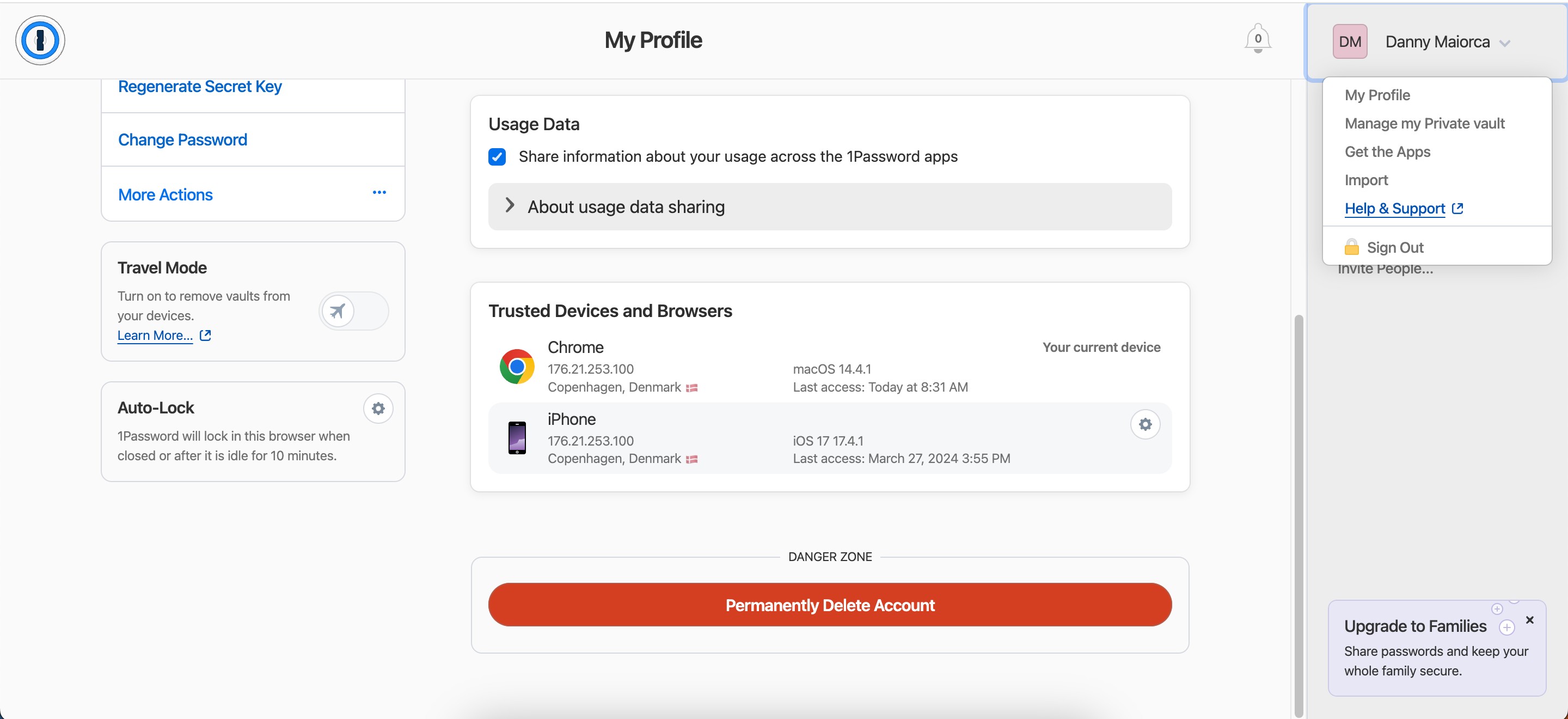
- Select Manage Two-Factor Authentication.
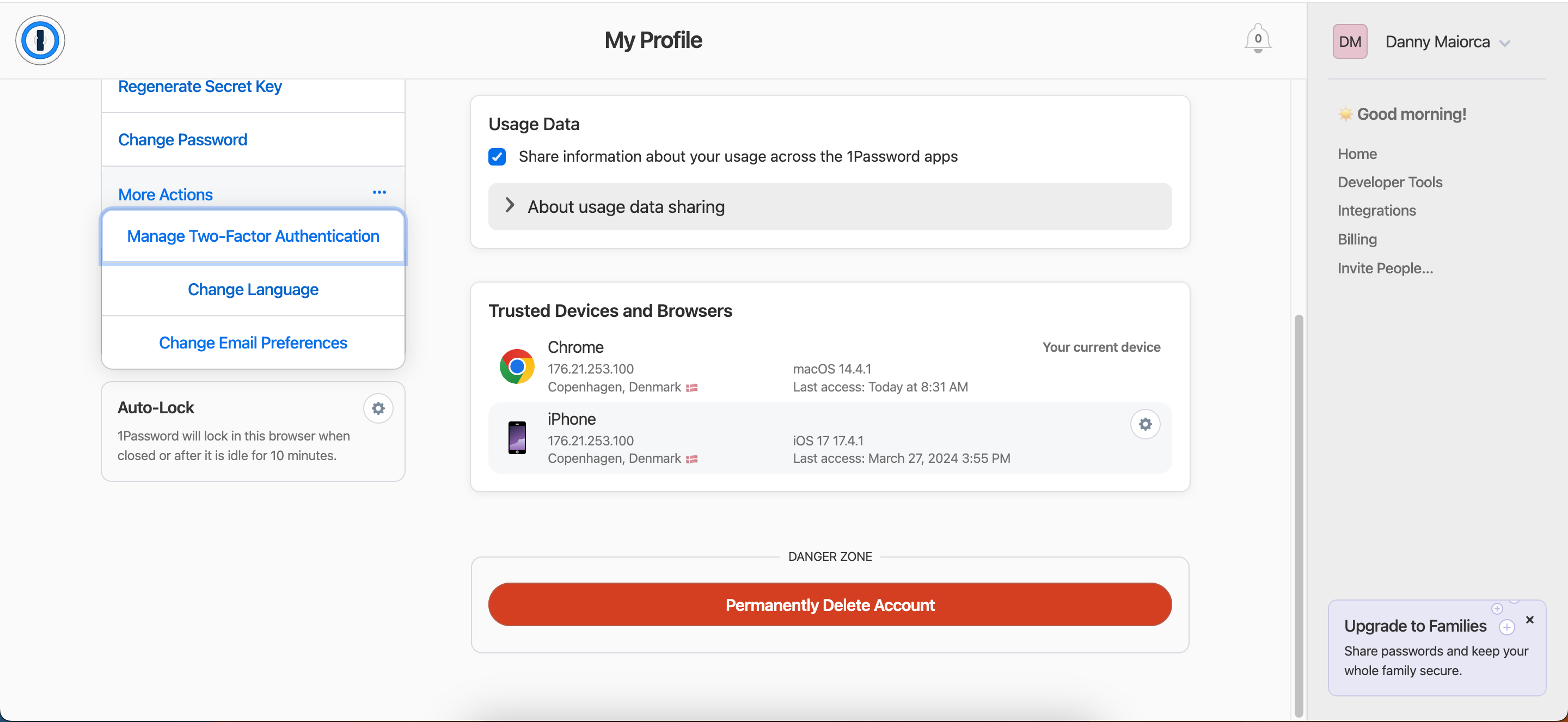
- Tap Add a Security Key and enter the code.
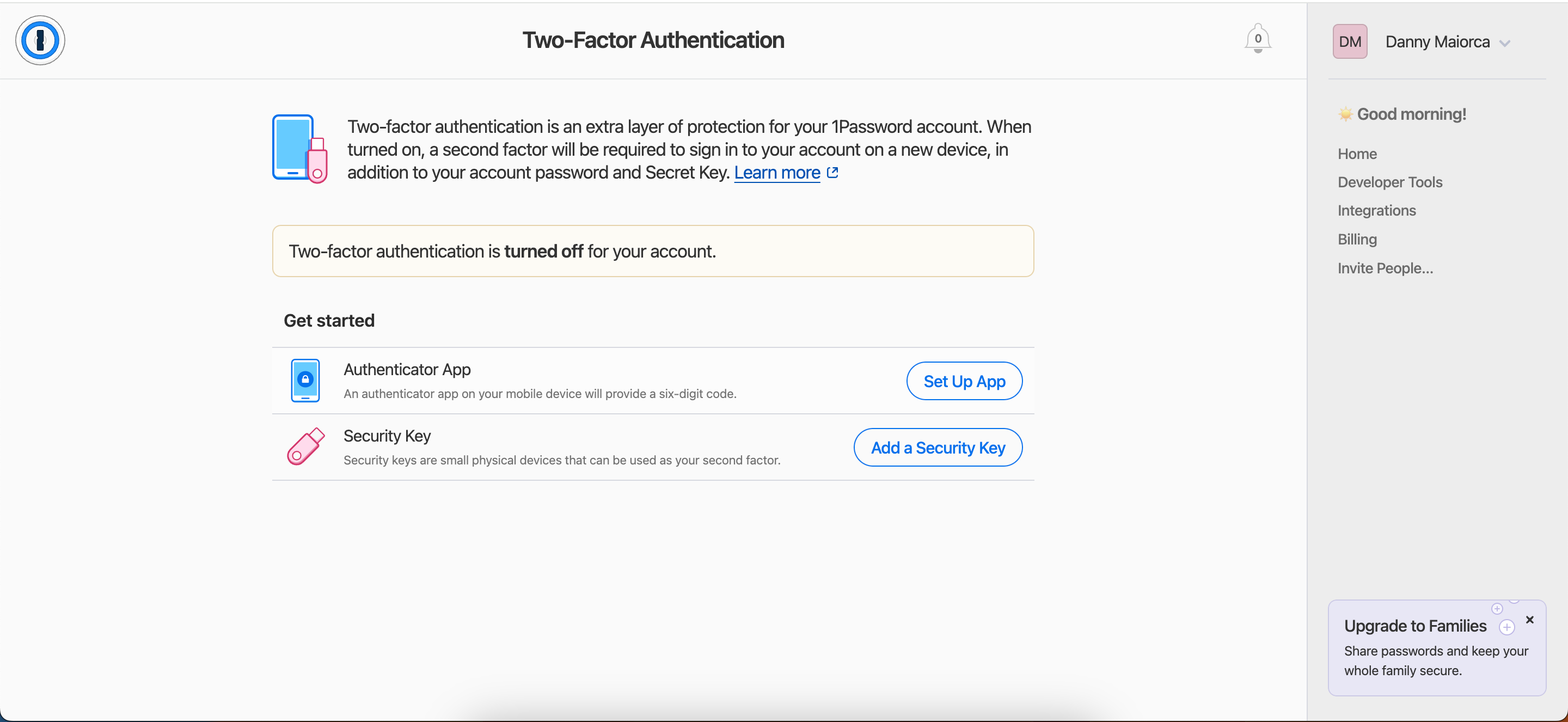


Another handy security feature that 1Password has is Travel Mode, which removes vaults not marked as safe from your devices when away from home. You can activate this via the My Profile section.
While Bitwarden has a strong base of security features, we’re giving the point to 1Password for its advanced tools like Travel Mode.
Winner: 1Password
Password Organization, Management, and Generation
You can keep your passwords safe in several ways, and 1Password and Bitwarden are great options. But how do these two password managers compare when it comes to organization, management, and password generation?
Bitwarden
Bitwarden has an easy-to-use password storage solution that lets you easily add or generate new login codes. You can also pick which folder your passwords are in, along with adding usernames and uniform resource identifiers (URIs).

If you need to add notes to each password you store in Bitwarden, you have a field to do that. Furthermore, you can use custom keys and, if you’re a Premium subscriber, authenticator keys. Once you’ve added new passwords, you’ll find them in the Vaults section. For frequently visited websites, you can add your login credentials as favorites.
If you use secure notes, you should read this guide on how to safely store sensitive information in Bitwarden.
1Password
1Password has a comprehensive password organization and generation tool. Select New Vault and customize your details before commencing.

Once you’ve tapped the + icon, you can choose Password and enter your login credentials and the web address. Like Bitwarden, you also have the option to add passwords as favorites if you’d like.

To organize your passwords better, 1Password lets you add labels and notes. You can store details for plenty of other things, too, like credit cards and your social security number.
While 1Password is better for organizing non-password-related amenities, we’re specifically comparing Bitwarden and 1Password as password managers. Since both are very similar in this area, we’re giving them a point each.
Winner: Tie
Browser and Device Support
1Password and Bitwarden aren’t just available on desktop devices. To ensure that you’re covered everywhere you want to log in, it’s time to compare browser and device support.
Bitwarden
Bitwarden is available on Windows, Linux, Mac, iOS, and Android. You can access your login details by signing into the Bitwarden website on your computer. iOS and Android apps are available from the App Store and Google Play. Bitwarden also has desktop apps for Mac, Linux, and Windows.
Download: Bitwarden for iOS | Android | Mac | Linux | Windows (Free, in-app purchases available)
Bitwarden also has web browser extensions for each of the following:
At the time of writing in March 2024, Bitwarden was also working on a DuckDuckGo extension for Mac. If you use Chrome and you’re struggling to remember your password, consider using these Chrome password extensions.
1Password
1Password has web and desktop apps for Windows, Mac, and Linux. You can also download the password manager and generator on your iOS or Android device. 1Password has a CLI tool.
Download: 1Password for Windows | Mac | Linux (.deb) | Linux (.rpm) | iOS | Android | CLI (Free, in-app purchases available)
While 1Password doesn’t have as many web browsers as Bitwarden, it does have a reasonable selection that’ll be more than enough for most users. You can use 1Password browsers on:
We’re giving Bitwarden the point here as it’s available in more browsers. However, the differences are marginal for the average user.
Winner: Bitwarden
Pricing
Bitwarden and 1Password have different pricing options, and we’ll break down your options in easily digestible formats below.
Bitwarden
Bitwarden has two pricing hierarchies: Personal and Business. If you choose a paid option, you’ll pay with annual billing. The free version has unlimited devices and password storage, but you can add file attachments and get security reports with Premium. Meanwhile, Families has unlimited sharing, six premium accounts, and other helpful features.
Below is a breakdown of Bitwarden’s Personal pricing plans:
| Free | Premium | Families |
|---|---|---|
| Free | $10 per year | $40 per year |
Bitwarden’s Business plans are Team and Enterprise, but you can also get a customized subscription if necessary. Below are the prices for Bitwarden Business (both are annual subscriptions):
| Teams | Enterprise |
|---|---|
| $48 per user per year | $72 per user per year |
1Password
1Password doesn’t have a free plan, but you can get a 14-day free trial before committing to a subscription. Families offers up to five members, Individuals gives unlimited devices and 1GB of storage for a single user, and Teams Starter Pack offers risk detection. Meanwhile, 1Password Business lets you integrate with Slack and other apps.
Below is a pricing breakdown for 1Password’s subscriptions:
| Individual | Families | Teams Starter Pack | Business |
|---|---|---|---|
| $2.99 per month | $4.99 per month | $19.95 per month | $7.99 per month |
For options, a free tier, and affordability, we’re giving Bitwarden another point here.
Winner:
Bitwarden
Bitwarden or 1Password: Which Password Manager Is Better?
When tallying up the points, Bitwarden won 3-2. For the average user in need of a user-friendly and secure password manager or password generator, Bitwarden is an excellent, affordable option. The free tier will be more than enough for most users, and you can use the software in several web browsers (and on multiple devices).As the close scoreline suggests, 1Password is still a good option for many people. Despite lacking a free pricing tier, you can access a decent range of features, and the monthly cost isn’t too high.