

How to Use This Free Tool to Catch Hackers When They Access Your Files
Key Takeaways
- Canary Tokens is a free cybersecurity tool that alerts you when a hacker opens your files.
- Embed a token in a file, like a folder, and receive an email notification when it’s opened.
- Canary Tokens can be used on numerous files and services, and it works on different devices and operating systems.
Are you worried about your personal files getting stolen by hackers? Canary Tokens is a free and easy-to-use tool you can quickly deploy to get notified when a hacker opens your files.
What Is Canary Tokens?
Canary Tokens is a cybersecurity tool by Thinkst Canary used to track hackers when they get access to your personal data. It works by embedding your file with a special tracking URL that alerts you through email when opened. Just like how honeypots work, the idea is to place a tracker disguised as a regular file on your device. When a hacker opens the file, a hidden link is opened, alerting you to the breach.
How to Use Canary Tokens to Protect Your Data
I’m going to show you how to embed a Canary Tokens tracking URL on a Windows folder. However, you can use Canary Tokens to protect all sorts of files and services, ranging from Word and Excel documents to specific URLs, to online services like Azure and Microsoft SQL server, and more.
Let’s begin by visiting Canary Tokens.
Upon visiting the site, you will be greeted by the Canary Token generator. The generator requires you to set up three fields:
- The first one is for selecting the proper token for your file type.
- The second is for your email address.
- The last is for anything you want to remind yourself of when the alert has been triggered.
Since we’re embedding the token into a folder, I’ve selected the Windows folder from the Select your token drop-down menu.

I’ve also provided an email for receiving an alert and a text note to remind me of what the token is for.
After you’ve filled out the form, click Create my Canarytoken and download the ZIP file embedded with a special token.
Now, unzip the ZIP file by right-clicking it and selecting Extract All, then inputting the directory where you want the file to be located. Ideally, it should be somewhere easily located for the hacker to find. For example, if you wanted the file on your Desktop, you would input C:UsersYourUserNameDesktop (swapping out YourUserName). You can then add files to the folder and rename it to something a potential hacker might be interested in opening.
Now that our trap has been set, try opening the folder and check if an alert has been triggered.
How to Check if a Hacker Accessed Your Files
Checking to see if your special file has been opened is as simple as opening your email account (the one that you linked to earlier) and checking for Canarytoken Mailer in your inbox.
Allowing email notifications on Chrome or your favorite web browser will help alert you immediately when the file has been opened. You may also want to check your spam folder in case Canarytoken Mailer was identified as spam.
Triggering the token should alert you with an email which will look something like this:

As you can see, it contains info such as date and time, the text note reminder, and the source IP, which can be used for a variety of things. You can use an IP tracker to find the general location of where your file was opened. Alternatively, select More info on this token here to view the incident map.

The specificity of the location that Canary Tokens provide will vary depending on how the ISP of the person opening your file operates and whether they’re using a VPN to protect their location data.
How to Troubleshoot Canary Tokens
If you’ve tried opening the folder but still get no alerts, try following the troubleshooting steps.
Canary Tokens Won’t Trigger on a Windows Folder
If you’re using Windows 11 and the Windows folder won’t trigger an alert, it is likely that remote pathing is disabled. To fix the problem:
- Input edit group policy in the Taskbar Search and select the Best Match.
- Navigate to > Computer Configuration > Administrative Templates > Windows Components > File Explorer.
- In File Explorer, double-click on Allow the use of remote paths in file shortcut icons and make sure it is enabled.

Lost Filesystem Attribute
This should solve the problem, but if it still doesn’t work, it may be due to the folder’s filesystem attribute being lost during extraction.
- Open the directory where your special folder is located
- Click on the File Explorer address bar near the top of the folder and enter cmd.exe. This will open a command line interface right at the folder’s location. You can then add the required attribute by entering, with the quotation marks:
attrib.exe +s "embedded folder name"
- Now, if you enter the command below, you should be able to see an S right beside your embedded folder, indicating that the attributes have been added.
attrib.exe "embedded folder name"

Canary Tokens Keeps Triggering
If you keep getting alerts from Canary Mailer, and you’re sure they are false positives from your embedded Windows folder, it is likely that your antivirus software has scanned the folder causing the alert.
To solve this problem, you’ll want to exclude the embedded folder from your regular antivirus scans. If you’re using Windows Defender, here is how to exclude a file or folder:
- Input Windows Security in your Start Menu search bar and select the Best Match.
- Now, head to Virus threat and protection. Under Virus and threat protection settings click on Manage settings.
- Scroll down to Exclusions and click on Add or remove exclusions.
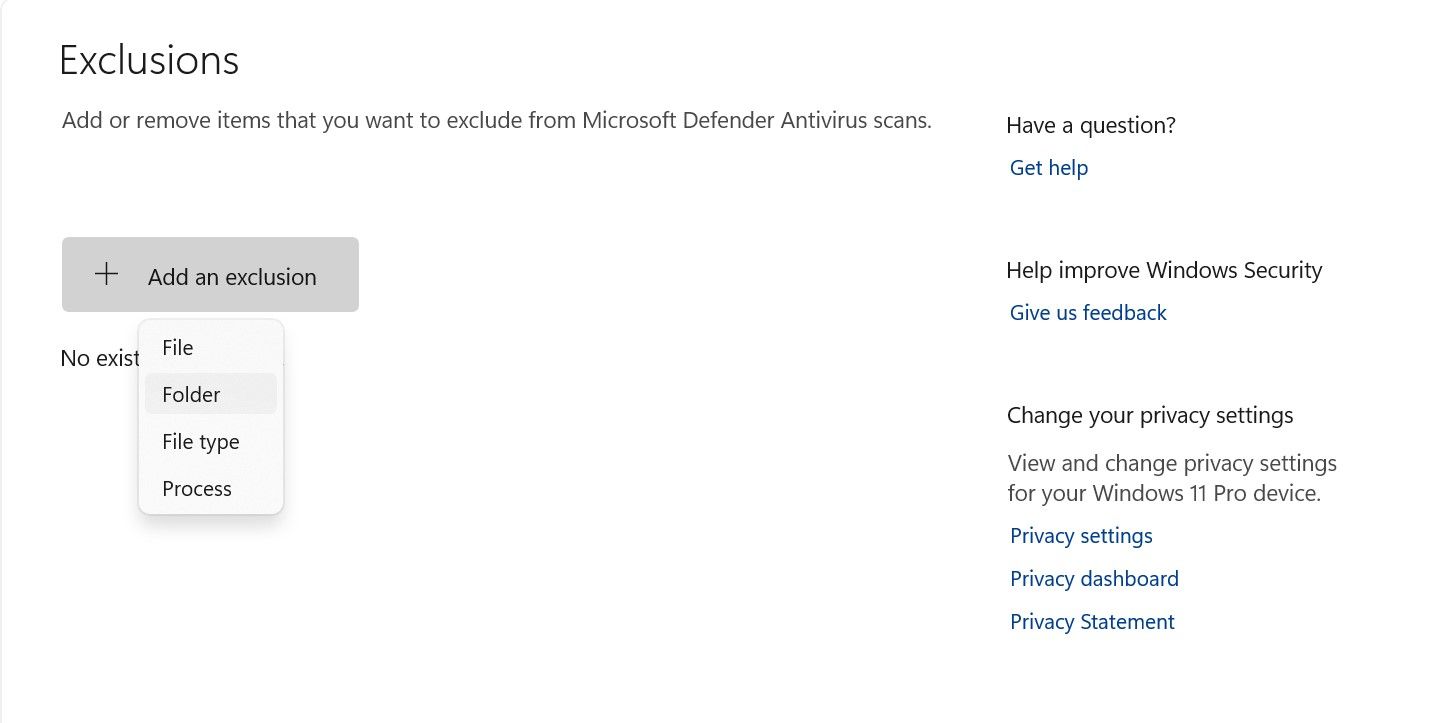
- Click on Add an exclusion, then select Folder. Now find your folder and click on Select Folder.
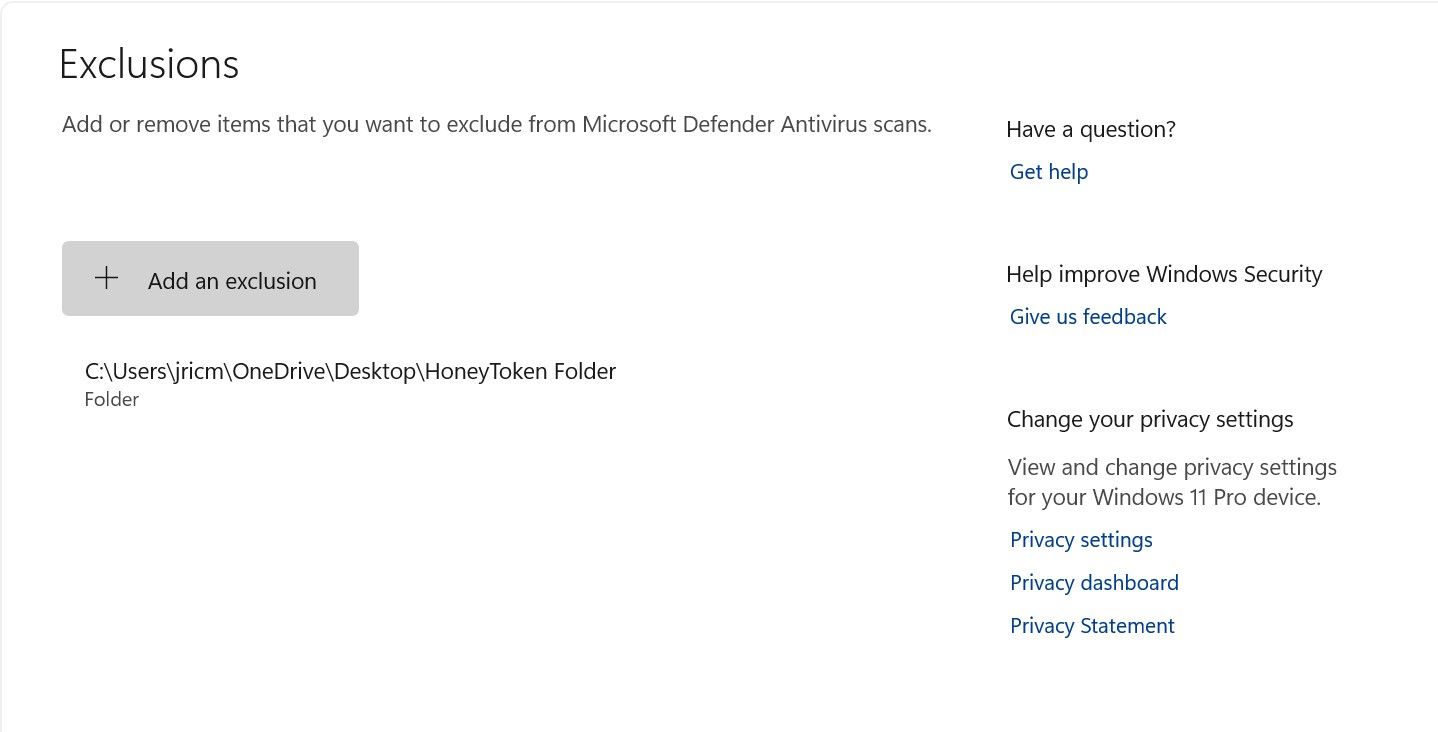


That should stop your file from getting scanned and prevent the false positives you keep getting from Canary Mailer.
Will Canary Tokens Work if the File Is Transferred to Another Device?
Yes, as long as the tracking URL was visited, you will be alerted about the incident. For the majority of the tokens provided, it shouldn’t matter whether the person opening the file is using Windows, Linux, macOS, iOS, or an Android device. As long as the device is capable of browsing the web, Canary Tokens should work.
Although this guide focused more on using honey tokens on Windows folders, Canary Tokens can do so much more! You can also embed honey tokens on other files (Word, Excel, PDF), online services (Azure, Microsoft SQL server, WireGuard, AWS), email, a specific URL, or even on credit cards. There is even a premium version of the service providing even more features that can help you secure entire networks.